


About the vendor
-
Customers
  • Academic
  • Large Enterprises (>10,000)
  • Non Profits
  • Public Administrations
  • Small/Medium Businesses
Use Cases
  • Blended Learning
  • Continuing Education
  • Employee Training
  • Extended Enterprise
Industries
  • eLearning
  • Engineering/Management Services
  • Financial Services
  • Government Administration
  • Higher Education
  • Manufacturing
  • Professional Training & Coaching
Deployment
  • Self-Hosted Cloud-based
  • Self-Hosted System
  • Software as a Service / Cloud
Platforms
  • Linux
  • Mac
  • Windows
Browsers
  • Apple Safari
  • Google Chrome
  • Mozilla Firefox
Training
  • Documentation
  • In Person
  • Live Online
  • Online Tutorials
  • Webinars
Support
  • Business Hours
  • Email
  • FAQ
  • Knowledge Base
  • Online Community
Supported Specifications
  • IMS LTI
Languages Supported
-
LinkedIn Page
@Linkedin
X
-

What is Constructor Assess?

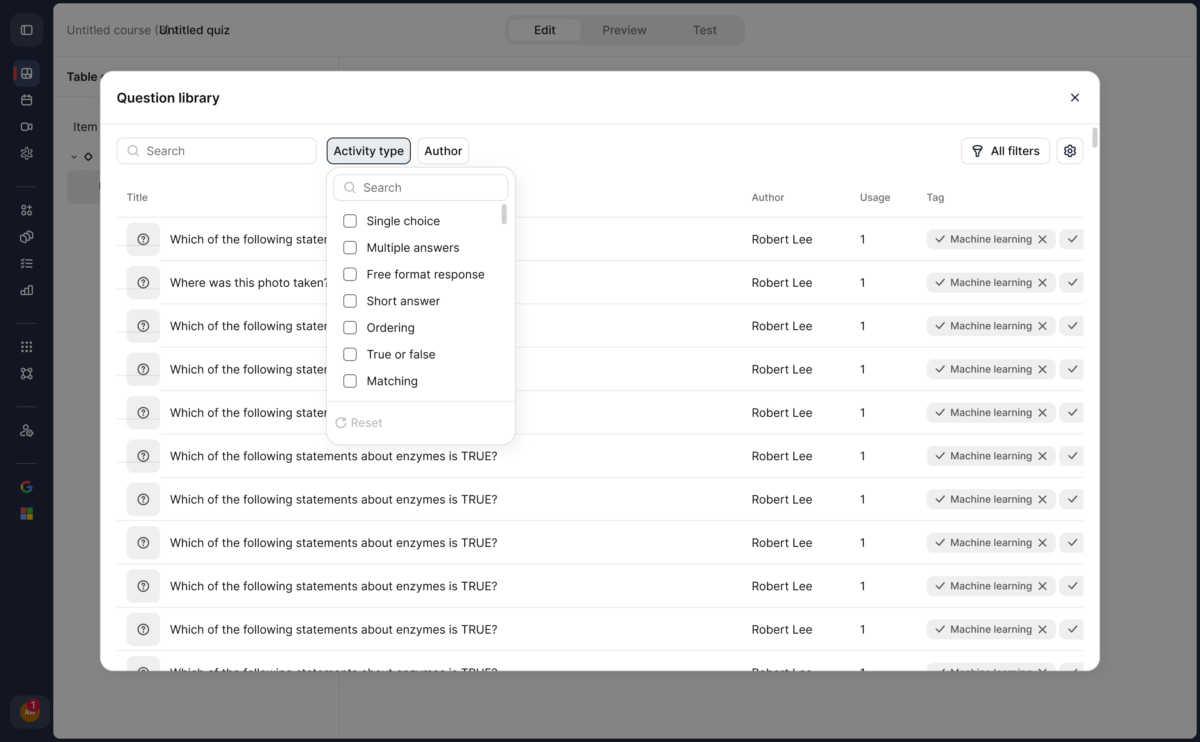
Constructor Assess helps schools, universities, certification bodies, and corporate learning teams create, deliver, and review digital assessments. Instructors manage reusable question banks, quizzes, assignments, rubrics, feedback, and learner results.

AI-assisted question generation drafts questions from supplied materials for instructors to review and edit. AI grading suggestions remain subject to instructor review and confirmation. Teams can configure delivery and feedback around their assessment requirements.

Assess works with Constructor Learn for connected course and assessment workflows and with Constructor Proctor when exam supervision is required. Deployment, integration, and AI availability depend on the agreed setup.

Constructor Tech welcomes reseller, implementation, referral, and technology partners.

Overview of Constructor Assess benefits

Create and reuse assessment content across teaching, certification, and workplace learning. Question banks, quizzes, assignments, and rubrics help teams organize assessment around their learning objectives.

AI assistance can draft questions from source materials and suggest grades against a rubric. Instructors review, edit, and confirm the results, retaining responsibility for final grades. Configurable feedback and results review support follow-up with learners.

Teams can reuse questions and organize assessment activities around their course structure. Instructors can review learner responses and decide how feedback is shared. Constructor Learn connects assessment to course delivery, and Constructor Proctor can provide supervision when required.

Schools, universities, certification bodies, and corporate learning teams can select workflows that suit their teaching or training process. Features, AI availability, licensing, deployment, and integrations depend on the agreed implementation.

Features

Learn more about Constructor Assess features that set it apart from the competition. Discover how its unique tools and capabilities enhance your processes.

Administration

Access Controls/Permissions
Role-Based Permissions
Single Sign On

Communication Management

Alerts/Notifications
Collaboration Tools
Commenting / Notes
Contact Management
Employee Portal
Multi-Language
Student Portal

Content Development

508 Compliant
Activity Dashboard
Brand integration
Data Import/Export
Drag & Drop
Gamification
Interactivity

Content Management

Cataloging/Categorization
Content Library
Media Library
Search/Filter
Template Library

Integrations

API
Mobile App
Third Party Integrations
Pricing

Learn more about Constructor Assess's pricing options, cost, and plans so you can make a well-informed, business-wise decision on the best software to use for organization.

Pricing Model
  • Subscription
License
  • Paid
Starting Price
  • Contact us for pricing
Free Trial
  • No

Constructor Assess logo
Have you used Constructor Assess before?
Answer a few questions and help the community to make the best decisions
Alternatives

Not a match? Find software alternatives that better suit your needs and compare them to discover the one that's right for you.

Constructor Assess

iSpring Suite

4.6/5
Compare

Compozer

5.0/5
Compare

Jericho Content Studio

Compare

Articulate 360

4.4/5
Compare

TalentLMS

4.7/5
Compare

Chameleon Creator

4.6/5
Compare
Resources

Explore a curated collection of resources that provide insights, guidance, and ideas to help you make informed decisions.