Customers
- Academic
- Large Enterprises (>10,000)
- Non Profits
- Public Administrations
- Small/Medium Businesses
Use Cases
- Academic Learning
- Association Learning
- Continuing Education
- Employee Training
- Workforce Development
Industries
- Civic & Social Organization
- Education Management
- eLearning
- Nonprofit Organization Management
- Professional Training & Coaching
Deployment
- Mobile Application
- Self-Hosted Cloud-based
- Self-Hosted System
- Software as a Service / Cloud
Browsers
- Apple Safari
- Google Chrome
- Internet Explorer
- Mozilla Firefox
Training
- Documentation
- In Person
- Live Online
- Online Tutorials
- Webinars
Support
- 24/7
- Business Hours
- Email
- FAQ
- Live Online
- Phone
Supported Specifications
- SCORM 1.2
- SCORM 2004
- SCORM 2004 3rd Edition
- SCORM 2004 4th Edition
- Section 508
- xAPI/Tin Can API
What is CoreAchieve?
What to expect from CoreAchieve
Organizations use CA LMS to facilitate access to learning materials that range from videos/audio materials and presentations to interactive lessons and assessments.
CoreAchieve includes:
· Provide learning experiences that are adaptable to learners
· Provide access to LMS from any device from any location with internet access
· Make it easy and intuitive for instructors to make changes
· Give an opportunity to instructors and learners to collaborate online
· Integrate with accounting and/or payment system
· Create custom branded UI solution for organizations
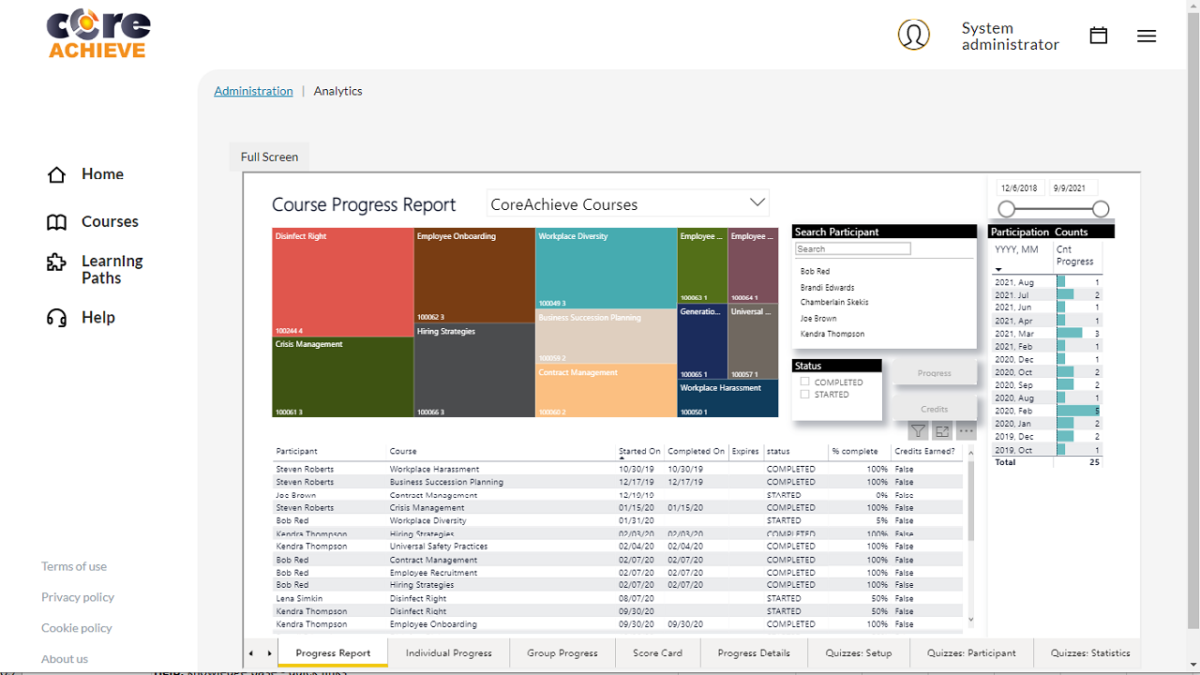
· Include easy access to learning progress data
· Be able to scale as organization grows
· Provide analytical insights to help with learning content improvement
What CA is used for
CA will manage, deploy, measure learning activities, and support a variety of features, including:
· Compliance training : CA is often used to make sure employees or members receive mandated training, and manage certification and accreditation programs.
· Member training : CA is also used to amplify membership value by creating new training content and facilitate engagement amongst members of non-profit organizations.
· Customer training : CA can be used for organizations to provide training to their customers. This is very common for technology companies who needs fast and effectively onboard new customers.
· Employee onboarding : One of the most common CA use case is support of new employees with their onboarding so that they can go through the process quickly.
· Employee development : This LMS use case is focused on supporting the talent management, training and development of current employees.
Overview of CoreAchieve benefits
CoreAchieve LMS operates through browser-based User Interface (UI) on your computer, tablet/iPad or other mobile devices with secure sign-on/single sign-on process. This gives all learners easy access to courses from any location while instructors and managers can monitor learning progress. CoreAchieve LMS applications include business intelligence to boost productivity, and promote continuous learning.
CoreAchieve LMS Features inludes:
· Painless Implementation that will enable any organization to launch training courses quickly
· Quick and easy deployment in cloud-based SaaS or PaaS models
· Customizable reporting that will support information access for all learners, administrators, and course authors
· Learner Profile which gives access to full history of purchases, courses, credits and certificates
· xAPI (Tin Can API)/SCORM compliant content management system (CMS) import features for learning objects and adding elements.
· LMS system that involves course management capabilities that direct learners through specific learning path.
· Certificates and achievements that learners can share in social media.
· Automated and semi-automated assessment scoring
· Instructor Led Training (ILT) in person or virtual capabilities
· Technical and course development support, including built-in tutorials.
· Transition from User Interface (UI) to User Experience (UX)
Analytical model and Business Intelligence tool
· ILT and async Class scheduling
Features
Learn more about CoreAchieve features that set it apart from the competition. Discover how its unique tools and capabilities enhance your processes.
Accounts
Add a new user
Allows administrators to add new users directly to their LMS for streamlined user management.
Archive users
Deactivate and store user accounts without deleting them.
Activity grading
Gradebook
AI Features
AI Powered
Chatbot
AI assistant for learner support.
Predictive analysis
Authentication
Manual Accounts
No login
Allow content access without authentication.
Categories
Priced Categories (Bundle)
Certificate management
Unique Certificate by Course
Course Creation
Assignments Engine
Content Library
A repository of pre-made templates, existing content, multimedia sets, and learning outlines.
LRS
Format
Gamification Format
Social Format
Weekly Format
Gamification
Badges
Award digital achievements.
Customize Gamification mechanics
Levels
Points
Award points for activity.
Rewards
Offer incentives for achievements.
Interface options
Block Management
Learning Accessibility
Mobile learning
Offline (disconnected Mobile app)
Reports
Learning Analytics Tools
System reports
Live Logs
Monitor system activity in real time.
Pricing
Learn more about CoreAchieve's pricing options, cost, and plans so you can make a well-informed, business-wise decision on the best software to use for organization.
Free for up to 5 users and unlimited courses. Starting at $175 per month for up to 50 ACTIVE* users with other tiers available. No contacts, no locked features, no implementation costs. For small organizations and/or large enterprise solution please call us to see our prices. Please visit our web site for price details for up to 500 ACTIVE* users. *Active users refers to users currently training
Integrations
Learn more about CoreAchieve's integration options.
Have you used CoreAchieve before?
Answer a few questions and help the community to make the best decisions
Reviews
Is CoreAchieve the right solution for you? Read verified CoreAchieve reviews from people in industries like yours to make a confident choice.
CoreAchieve offers a great solution for our organization
Overall Rating
100%
-
Usefulness
-
Usability
-
Customer Experience
-
Likelihood to Recommend
What do you like best?
CoreAchieve is a highly customizable Learning Management platform, although initial set up can be quite challenging.
What do you dislike?
We are pretty happy with our selection so far and find it hard to think of something we liked the least.
Flexible and stable platform provides a custom tailored solution that exceeds business expectations
Overall Rating
96%
-
Usefulness
-
Usability
-
Customer Experience
-
Likelihood to Recommend
What do you like best?
Scalable cloud based architecture provides options for small and large deployments that keeps hosting costs down and allows for multiple instances that can be individually custom tailored for each of your learning scenarios. This opens opportunity's to develop a learning solution which truly meets the needs and showcases the platforms potential. The platform is designed to be customized which keeps implementation costs reasonable. Service and support is excellent. Highly recommend!
What do you dislike?
Some may find the initial setup to be a tad challenging, but once completed, it rarely requires maintenance.
CoreAchieve is easy to use. Anything can be done using their platform. It can be highly customized!
Overall Rating
99%
-
Usefulness
-
Usability
-
Customer Experience
-
Likelihood to Recommend
What do you like best?
I like how versatile the system is. They really can do pretty much anything to customize the system to fit your needs. We have yet to have a request not being able to be accomplished. The CorePartners team is great to work with. Very reasonable pricing and you get such a great product from them every time. I've helped out with 3 different projects that put our online learning into CoreAchieve and they all exceed our expectations. You can't go wrong!
What do you dislike?
Nothing to dislike about CoreAchieve. I've worked on 3 different projects putting our online learning into CoreAchieve and I have nothing bad to say about it. We'll continue to use CoreAchieve for our online learning and will highly recommend it to anyone.
Alternatives
Not a match? Find software alternatives that better suit your needs and compare them to discover the one that's right for you.