Customers
- Academic
- Freelancers
- Large Enterprises (>10,000)
- Non Profits
- Public Administrations
- Small/Medium Businesses
Deployment
- Software as a Service / Cloud
Browsers
- Apple Safari
- Google Chrome
- Internet Explorer
- Mozilla Firefox
Training
- Documentation
- Live Online
- Training
Support
- 24/7
- Business Hours
- Email
- FAQ
- Knowledge Base
What is Hypersay Studio?
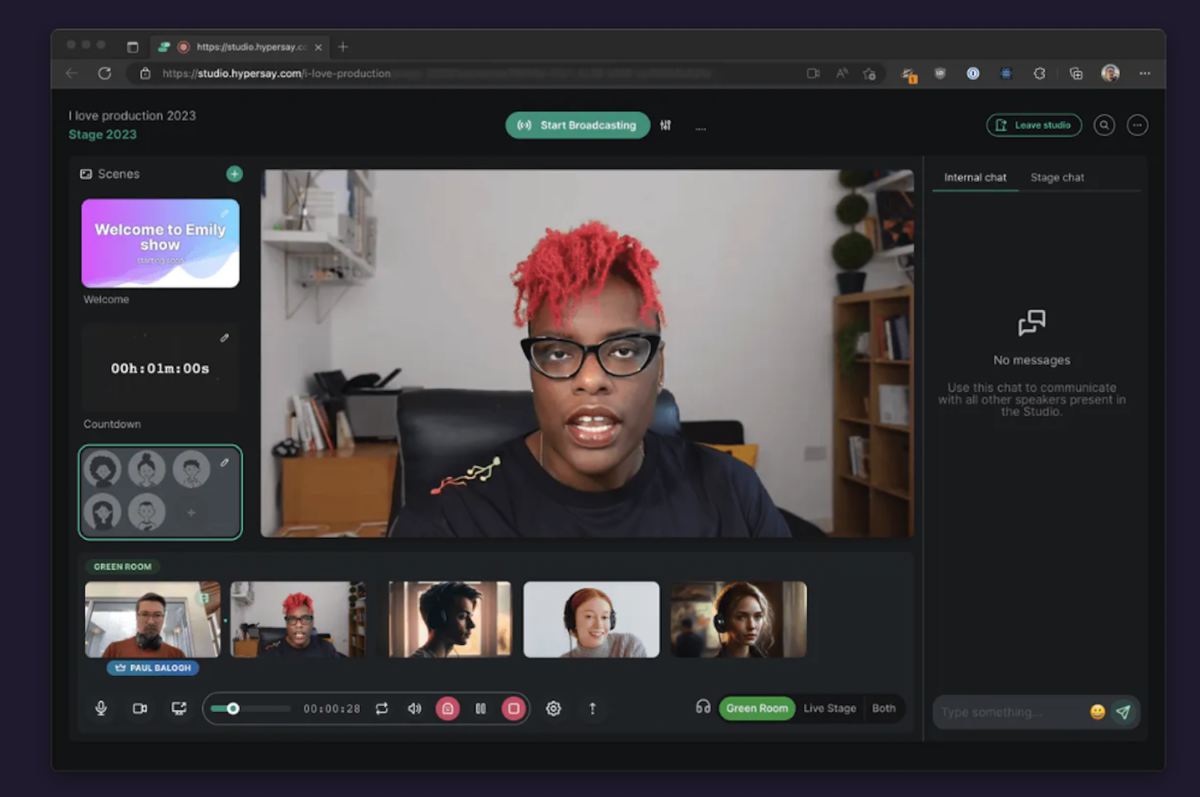
Modern live streaming to multiple endpoints. Ghost sharing, green-room, animated scenes.
Hypersay Studio lives in your browser. There’s no app to install, no admin permissions required. Just open a Hypersay Studio, share a link with your speakers and go live. Easy!
- Multi-cast
- Green room
- Ghost-sharing
- Dynamic scenes
- Auto-layout
- 1080p streaming
- Play a recorded video
- Stage chat and translations
When Hypersay Studio streams into Hypersay Events platform, you have access to the stage chat. Stay on top of the discussions in the chat, respond to them in real-time. Collect questions, answer concerns and even show a chat post as a layer inside the live stream itself. Written in another language? Translate it on the spot with our built-in translation service.
Overview of Hypersay Studio benefits
The Pandemic has changed the way we see live streaming, how we relate to it and our expectations. With its innovative features, such as ghost-sharing, live greenroom, animated scenes and omnichat, Hypersay Studio allows you to capture the audience’s attention on all platforms, your way.
- Stream from your browser
- Multi-cast
- Green room
- Ghost-sharing
- Dynamic scenes
- Auto-layout
- 1080p streaming
- Play a recorded video
- Stage chat and translations
Video streaming studio allowing multiple speakers to stream inside an event or to other RTMP endpoints. Special features: passwordless access, mix pre-recorded and live content, ghost sharing, multi-cast, animated scenes, translations. Nothing to install: just use your browser.
Features
Learn more about Hypersay Studio features that set it apart from the competition. Discover how its unique tools and capabilities enhance your processes.
Advanced Features
Multi-Language Support
On-Demand Webcasting
Recording & Playback
Simulations & Games
Third-Party Recording Tools
Two-Way Audio & Video
VOIP Functionality
VOIP Number
Basic Features
Audio & Video Recording
Audio Calls
Chat
Desk-to-Desk Calls
Follow-Up and Breakout Meetings
Muting
Screenshare
Video Conferencing
Video Streaming
Whiteboard
Conference Management
Agenda Management
Attendee Management
Contact Management
Content Management
Event Management
Materials Management
Meeting Initiation and Joining
Meeting Management
Project Management
Projections
Task Management
Conferencing Modes
Brainstorming
Internal Meetings
Public Conferences and Webinars
Video Call Full HD
Video Lecture
Virtual Meeting
Content
Annotation
Cooperative Writing
Data Import/Export
Discussion Boards
Document Management
File Transfer
Rich Media
Slideshow
Customization
CRM Integration
Custom Forms
Customizable Branding
Customizable Templates
Enterprise Scalability
Mobile Integration
Social Media Integration
Website Integration
Interactive Features
Electronic Hand Raising
Feedback Collection
Group Collaboration
Instant Messaging
Polling
Presentation Tools
Private Text Chat
Q&A
Quizzes
Survey Creation
Pre-meeting Tools
Email Invitations & Reminders
Event Calendar
Group Calendars
Invitation Management
Registration Management
Scheduling
Reports
Activity Dashboards
Real Time Analytics
Real Time Reporting
Pricing
Learn more about Hypersay Studio's pricing options, cost, and plans so you can make a well-informed, business-wise decision on the best software to use for organization.
Stand-alone Studio We have designed our Studio to work seamlessly with Hypersay Events. However, we recently decided to open the Studio to the general public use. So feel free to use the Studio as a stand-alone video streaming studio to reach other RTMP endpoints as well: events platforms, YouTube Live, Facebook Live, Twitch, etc.
Have you used Hypersay Studio before?
Answer a few questions and help the community to make the best decisions
Alternatives
Not a match? Find software alternatives that better suit your needs and compare them to discover the one that's right for you.