Customers
- Large Enterprises (>10,000)
- Non Profits
- Public Administrations
- Small/Medium Businesses
Use Cases
- Compliance Training
- Customer Training
- Employee Training
- Training Companies
- Workforce Development
Industries
- Financial Services
- Hospital & Health Care
- Information Technology and Services
- Retail
Deployment
- Desktop Application
- Mobile Application
- Self-Hosted Cloud-based
- Software as a Service / Cloud
Browsers
- Apple Safari
- Google Chrome
- Internet Explorer
- Mozilla Firefox
Training
- Live Online
- Online Tutorials
Support
- Business Hours
- Email
- Phone
What is KEA?
KEA is an AI-driven learning experience platform that brings enterprise learning to life not just by making the entire process very interactive and engaging but also making it very flexible. So, each individual can learn at their own pace and find the help they need when they need it. And, the AI component continues to improve the process, adapting to the needs and preferences of the learners.
KEA allows an employee to convert any document into ‘trackable’ training content. It uses AI and automation to create a smooth onboarding experience for your customers. KEA platform empowers sales and customer support teams and improves their online training experience.
KEA is an integrated, disruptive digital learning ecosystem that a business can customize and deploy very quickly, and in a cost-effective way. Consider this learning experience platform (LXP) “as a service,” which eases the creation and implementation of corporate training programs that pique the interest of employees and motivates learners.
Overview of KEA benefits
KEA is Much More Than a Corporate Training Solution
KEA is much more than employee training and onboarding software. When you choose KEA for all your corporate learning needs, you get:
Faster Content Creation
Integrate existing content, create new content, update information, add interactive elements and more, quickly and easily.
Enhanced Learner Engagement
Offer a completely customized learning experience with the AI and machine learning powered personal learning facilitator.
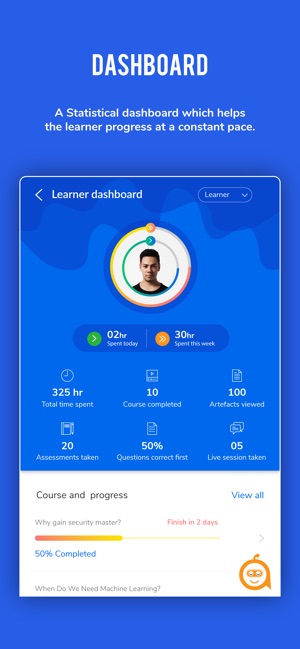
Analytics and Reports
Track and monitor content usage, learner progress and much more to gain maximum benefits from workplace training programs.
Onboarding - Employee and Customer
Need to quickly onboard a new hire or a new client? It’s easy with an interactive, engaging, intuitive AI-based solution.
Learning in the Flow of Work
This extremely flexible and adaptable platform, helps organizations use their existing content and experts to facilitate learning in the flow of work.
Overview of features- Customer on-boarding, Employee training, Course authoring, Course delivery, Mobile apps, SCORM Support, Assessments and Quizzes, Reporting and Analytics, Machine learning and NLP, Chatbot
Read more
Read less
Features
Learn more about KEA features that set it apart from the competition. Discover how its unique tools and capabilities enhance your processes.
Accounts
Add a new user
Allows administrators to add new users directly to their LMS for streamlined user management.
Archive users
Deactivate and store user accounts without deleting them.
Activity grading
Gradebook
Centralized view of all learner grades.
Gradebook audit trail
Gradebook comments
AI Features
Adaptive Learning
AI Powered
Chatbot
Content development
Content Translation
Intelligent recommendations
Natural Language Processing
Predictive analysis
Quiz generation
Text-to-speech
Authentication
Manual Accounts
No login
Categories
Priced Categories (Bundle)
Certificate management
Certification life-cycle
Manage certification templates
Predefined certification templates
Unique Certificate by Course
Unique Certification by Curriculum
Compliance management
Certificate expiration notifications
Certification Expiration Management
Course Creation
Content Library
Course backup Options
Drag & Drop Interactions
Hybrid Learning Courses
LRS
Survey Engine
Customization
Mobile Learning Support
Enrollment
Attendance Tracking
Automated Enrollment (based on User data)
Progress Tracking
Survey enrollment (based on a response)
Format
Gamification Format
LIVE Chat Option
Video Conferencing Integration
Weekly Format
Gamification
Badge customization
Badges
Leaderboards
Levels
Points
Award points for activity.
Rewards
Interface options
Calendar Settings
Learning Accessibility
Location Settings
Learning types
Synchronous Virtual Classroom
Reports
Automated Report Scheduling
Learning Analytics Tools
Shopping cart
Built-In Shopping Cart
Shopping Cart as Plug-In
System reports
Automatic email reports in predefined intervals
Live Logs
Pricing
Learn more about KEA's pricing options, cost, and plans so you can make a well-informed, business-wise decision on the best software to use for organization.
Contact Us at https://www.askkea.com/
Integrations
Learn more about KEA's integration options.
Have you used KEA before?
Answer a few questions and help the community to make the best decisions
Alternatives
Not a match? Find software alternatives that better suit your needs and compare them to discover the one that's right for you.