Customers
- Academic
- Large Enterprises (>10,000)
- Non Profits
- Public Administrations
- Small/Medium Businesses
Use Cases
- Channel Training
- Compliance Training
- Employee Onboarding
- Employee Training
- Franchise/Dealer Training
Industries
- Financial Services
- Hospital & Health Care
- Hospitality
- Information Technology and Services
- Retail
Deployment
- Software as a Service / Cloud
Browsers
- Apple Safari
- Google Chrome
- Internet Explorer
- Mozilla Firefox
Training
- Documentation
- Online Tutorials
What is LMS Portals?
LMS Portals provides our corporate users and partners with a cloud-based, multi-tenant Learning Management System (LMS). Our clients and partners are able to quickly and easily build and deploy custom-branded eLearning portals to support all aspects of corporate learning management. Each portal can be branded and customized to support a unique audience and you can manage all of your eLearning environments from one centralized console.
Our clients are currently utilizing the LMS Portals platform for such things as employee on-boarding, professional development, compliance training, diversity training and more.
Through our Partnership Program, our partners are able to build, deploy, and manage custom-branded portals for their clients. This enables them to re-purpose and further monetize new and existing corporate training materials in order to create new company revenue streams.
Overview of LMS Portals benefits
Saas-Based platform offering customized branding to our corporate clients and partners. Powerful tools for fast and easy course development with support for mutliple formats, including MP4, HTML5, YouTube, Vimeo, documents, images, and more.
Manage user access through the Invitation system and drive bi-direction communications between students and instructors using the in-platform messaging system.
Leverage SCORM integration to collect and analyze critical data regarding students usage and perfromance. And incorporate in-platform quizzes to support and confirm the student learning experience.
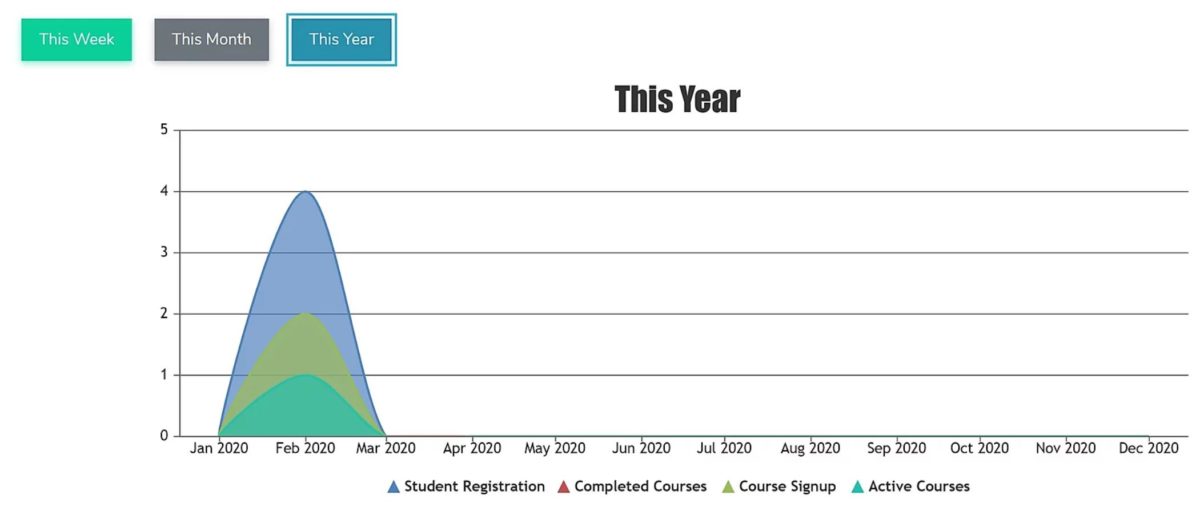
Powerful in-platform reporting to ensure student engagement, perfromance, and course completion.
Ideal for both corporate users and consulting/partner organizations looking to further monetize expertise through customized eLearning.
Features
Learn more about LMS Portals features that set it apart from the competition. Discover how its unique tools and capabilities enhance your processes.
Accounts
Add a new user
Allows administrators to add new users directly to their LMS for streamlined user management.
Archive users
Activity grading
Gradebook
Centralized view of all learner grades.
Gradebook audit trail
Manual Grading ("Marking")
AI Features
Adaptive Learning
AI Powered
Chatbot
Content development
Content Translation
Intelligent recommendations
Natural Language Processing
Predictive analysis
Quiz generation
Text-to-speech
Authentication
Active Directory/LDAP Integration
Manual Accounts
No login
SAML2/API Integration
Categories
Priced Categories (Bundle)
Certificate management
Certification life-cycle
Manage certification templates
Unique Certificate by Course
Unique Certification by Curriculum
Compliance management
Certificate expiration notifications
Certification Expiration Management
Course Creation
Assignments Engine
Built-In Authoring Tool
Changing Course default settings
Content Library
Course backup Options
Drag & Drop Interactions
Hybrid Learning Courses
Learning Paths (Curriculums)
LRS
Scheduling LIVE events
Survey Engine
Enrollment
Attendance Tracking
Guest Access Settings
Progress Tracking
Self-enrollment (with a PIN #)
Survey enrollment (based on a response)
Format
Gamification Format
Learner Upload
LIVE Chat Option
Video Conferencing Integration
Weekly Format
Gamification
Badge customization
Badges
Award digital achievements.
Customize Gamification mechanics
Leaderboards
Levels
Define progression stages.
Points
Award points for activity.
Rewards
Interface options
Additional external pages
Block Management
Calendar Settings
Language settings
Learning Accessibility
Location Settings
Multilanguage Support
Learning types
Asynchronous Instructor-led
Asynchronous Self-paced
Blended Learning
Synchronous Virtual Classroom
Mobile learning
Offline (disconnected Mobile app)
Reports
Automated Report Scheduling
Grading Report Settings
Learning Analytics Tools
Training Record Maintenance
Roles
System Permissions per role
Teams and Team Hierarchies
Security
IP Blocker
Restrict registration to specific domains
Shopping cart
Built-In Shopping Cart
Shopping Cart as Plug-In
Pricing
Learn more about LMS Portals's pricing options, cost, and plans so you can make a well-informed, business-wise decision on the best software to use for organization.
Pricing Model
-
Free
-
Free Trial
-
Freemium
-
Subscription
Free version for up to ten corporate users and one Administrator.
Integrations
Learn more about LMS Portals's integration options.
Have you used LMS Portals before?
Answer a few questions and help the community to make the best decisions
Reviews
Is LMS Portals the right solution for you? Read verified LMS Portals reviews from people in industries like yours to make a confident choice.
Alternatives
Not a match? Find software alternatives that better suit your needs and compare them to discover the one that's right for you.