


Branding Icon 1
Tech Solutions to HR Problems
Trending Employee Engagement Software
About the vendor
-
Customers
  • Large Enterprises (>10,000)
  • Public Administrations
  • Small/Medium Businesses
Industries
  • Computer & Network Security
  • Computer Networking
  • Computer Software
  • eLearning
  • Entertainment
Deployment
  • Software as a Service / Cloud
Platforms
  • Linux
  • Mac
  • Windows
Browsers
  • Apple Safari
  • Google Chrome
  • Internet Explorer
  • Mozilla Firefox
Training
Support
  • Live Online
Languages Supported
-
LinkedIn Page
-
X
-

What is Peoplebox?

Peoplebox platform is the one-stop solution for HR teams. It includes – performance reviews, OKRs (Goals), 1:1s, engagement surveys, KPIs, 9-box, competency framework and strategic meetings.

It allows you to conduct end-to-end performance reviews, leveraging auto-tracked goals from 50+ sources or tailored competencies. Our platform offers unparalleled configuration and customization to fit your specific needs. At Peoplebox, we’re partnering with companies like Ula, Talent 500, Razorpay, Disney, Postman, and Veriff to do just that.

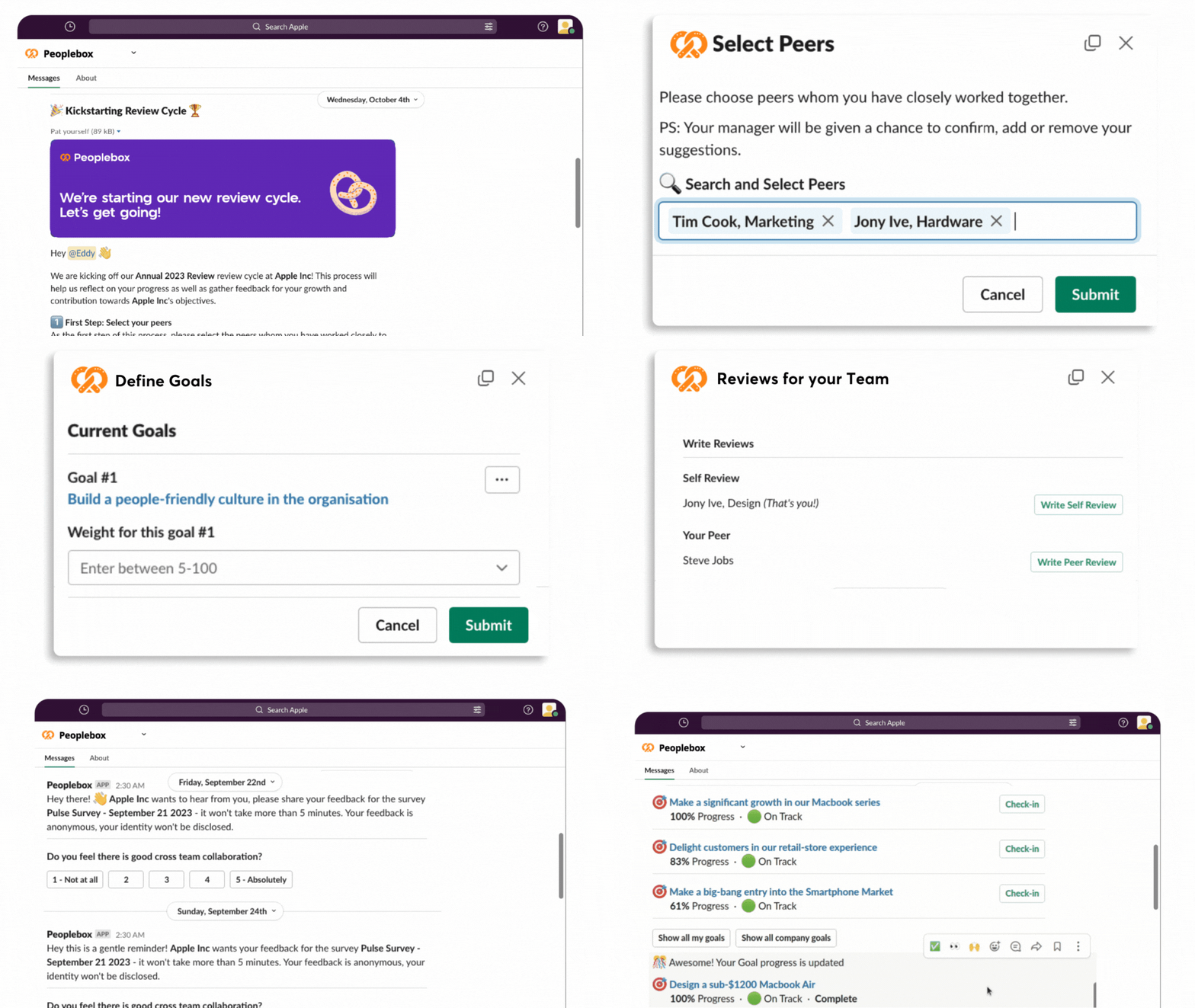
Peoplebox integrates with all work tools (Slack, MS Teams, Workday, SQL, Jira, Asana, Hubspot, etc) to drive greater adoption of all business and HR processes and build an engaged and high performing culture with 90% less admin.


 

Overview of Peoplebox benefits

  • Directly Impact Business Results

    Single platform to connect People and Business Strategy

    Run business reviews where OKRs are set and aligned

    Central hub to align & track goals, projects & KPIs and embed them in review boards

  • Deep Integration with Slack / Microsoft Team

    Integration with work tools to update goals automatically

    Integrate Projects and Tasks from anywhere

    Run Performance Reviews and Check-ins within Slack/ Teams

  • Very Easy-to-Use, Highly Customizable

    Customise and run your performance reviews as per your needs

    Add custom weightage for goals, competency, and values

    Advance formula and Calibration for final rating calculation

  • Retain top talent & build an elite culture

    Gain actionable Insights into your People & Culture

    Make employees feel heard by responding to their anonymous feedback

    Save time & effort in running surveys and preparing reports with complete automation

  • Track Goals in Magically Easy Way

    Integrate with work tools to auto-update progress on goals

    Sync projects and progress from project management toolsk

    Auto populate goals and projects for strategic meetings

Features

Learn more about Peoplebox features that set it apart from the competition. Discover how its unique tools and capabilities enhance your processes.

Accounts & Permissions

Access Control
Approval Process Control
Collaboration Tools
Employee Self Service
Permission Management
Role-Based Permissions
Self Service Portal
Single Sign On

Administration Features

Compliance Management
Content Library
Content Management
Email Templates
Forms Management
Knowledge Base Management
Receiving
SSL Security
Template Management

Communication Management

Automatic Notifications
Communication Management
Email Alerts
Email Invitations & Reminders
Email Notifications
Instant Messaging
Mobile Alerts
Multi-Language
Real Time Notifications
Real-Time Updates
Reminders

Customization & Personalization

Configurable Workflow
Custom Fields
Custom Forms
Customizable Branding
Customizable Templates
Dashboard Creation
Employee Profile
Personalized Profiles

Data Management Features

Data Filtering
Data Import
Data Import/Export
Data Visualization
Document Management
Document Storage
Employee Database
Real Time Data
Secure Data Storage

Feedback Features

360 Degree Feedback
Feedback Automation
Feedback Collection
Feedback Management
Performance Appraisal
Ratings & Reviews
Surveys & Feedback

HR Activities Management

Applicant Tracking
Assessment Management
Employee Management
Employee Onboarding
HR Management
Learning Management
Recruitment Management
Rewards Management
Skills Tracking
Training Management

Integration

API
Email Integration
Mobile Integration
Social Media Integration
Third Party Integration

Interaction Features & UX

Activity Dashboard
Chat
Collaborative Workspace
Commenting
Drag & Drop Interface
Employee Portal
Filtered Views
Gamification
Search Functionality

Reporting & Analytics

Ad hoc Reporting
Analytics
Customizable Reporting
Engagement Analytics
Performance Reports
Progress Reports
Real Time Analytics
Real Time Reporting
Reporting & Statistics
Summary Reports
Trend Analysis
Visual Analytics

Strategy & Planning

Activity Management
Activity Tracking
Benchmarking
Calendar Management
Event Calendar
Goal Setting / Tracking
Monitoring
Performance Management
Progress Tracking
Status Tracking
Task Management
Workflow Management
Pricing

Learn more about Peoplebox's pricing options, cost, and plans so you can make a well-informed, business-wise decision on the best software to use for organization.

Pricing Model
  • Subscription
License
Starting Price
  • $7
Free Trial
  • No

Trusted by 500+ Companies, Peoplebox powers growing companies around the world. Explore which plan is right for you.

Peoplebox logo
Have you used Peoplebox before?
Answer a few questions and help the community to make the best decisions
Reviews

Is Peoplebox the right solution for you? Read verified Peoplebox reviews from people in industries like yours to make a confident choice.

Performance Overview
Overall Rating 83%
  • Usefulness
  • Usability
  • Customer Experience
  • Likelihood to Recommend

Great Performance Management System But Customization And Flexibility Are Limited

Nov 26, 2024

Overall Rating 81%
  • Usefulness
  • Usability
  • Customer Experience
  • Likelihood to Recommend
What do you like best? Peoplebox has enabled us to standardize performance reviews, feedback cycles, and goal setting, which is efficient and repeatable. The tool supports OKRs, 1:1s, peer reviews, and quarterly check-ins, all under one roof, ensuring a consistent format across teams. It made setting and tracking goals easier and allowed managers to track progress relative to company priorities.
What do you dislike? With that said, the platform could improve by being less rigid and more flexible in supporting diverse workflows. For instance, there isn't much in the way of career-path planning or PDP (personal development plan) resources. Other than that, not being able to customize review templates meaningfully or adjust workflows across different departments is one of the reasons it’s not ideal for teams with anything but prototypical roles.
Reviewer photo

Mason M.

Industry : Capital Markets | Company size : 201-500 | Level : Manager | Focus : Administrative | Experience using the software : 6-12 months as Administrator, User

Easy Goal Tracking And Analytics Are Helpful But Review Workflow Is Confusing

Nov 16, 2024

Overall Rating 83%
  • Usefulness
  • Usability
  • Customer Experience
  • Likelihood to Recommend
What do you like best? Setting goals in Peoplebox is simple and intuitive. I use it to track my tasks, monitor progress, and get clarity on what I should focus on next. The analytics for one-on-ones, progress graphs, and breakdown dashboards help me and my team stay aligned.
What do you dislike? As a manager, I find the review and feedback workflow somewhat confusing. It is not always obvious whether I should prioritize approving goals, collecting check-ins, or giving feedback first. The UI for one-on-ones and “talent assessment” feels clunky, especially on larger screens.
Reviewer photo

Isaiah H.

Industry : Consumer Services | Company size : 501-1,000 | Level : Manager | Focus : Administrative | Experience using the software : More than 1 year as Administrator, User

Useful For Goal Alignment And Feedback But Integrations Are Cumbersome To Configure

Oct 5, 2024

Overall Rating 81%
  • Usefulness
  • Usability
  • Customer Experience
  • Likelihood to Recommend
What do you like best? We found Peoplebox to be a helpful central platform for aligning our organizational objectives and tracking progress over time. It brings together OKR management, performance reviews, and continuous feedback in one place, making it easier for managers to provide feedback and for employees to update their progress.
What do you dislike? That said, there are a couple of pain points. Integrations can be cumbersome to configure and are sometimes somewhat limited, which limits adaptability for teams employing other collaboration or tracking software. Again, it is not automated: many updates and feedback entries still need to be input manually.
Reviewer photo

Isabella R.

Industry : Consumer Services | Company size : 501-1,000 | Level : Director | Focus : Operations | Experience using the software : More than 1 year as Administrator, User

Great For Small To Mid Sized Teams But Reporting Module Feels Basic And Limited

Sep 22, 2024

Overall Rating 82%
  • Usefulness
  • Usability
  • Customer Experience
  • Likelihood to Recommend
What do you like best? Peoplebox has been a significant win for us as a mid-sized team. The onboarding process was fast and easy, and it wasn't long before we were tracking goals, reviews, and feedback with minimal issues. The OKR module really enabled everyone to stay aligned and kept the focus on what matters.
What do you dislike? However, Peoplebox could use even further customization. Functional though this reporting module is, it feels somewhat basic, especially for teams seeking extensively tailored analytics or intricate breakdowns. Additionally, when multiple OKRs and tasks are active simultaneously, the interface tends to feel cluttered, which reduces visibility and makes tracking more challenging.
Reviewer photo

Lucas D.

Industry : Executive Office | Company size : 501-1,000 | Level : Senior | Focus : Finance | Experience using the software : 6-12 months as Administrator, User

All In One Platform For Goals And Reviews But No Major Issues Have Been Encountered

Sep 19, 2024

Overall Rating 83%
  • Usefulness
  • Usability
  • Customer Experience
  • Likelihood to Recommend
What do you like best? Peoplebox works very well as a single platform for goal setting, performance reviews, and development planning. I can set individual and team objectives, monitor progress, and manage performance feedback all in one place. That has simplified performance management a lot for me.
What do you dislike? I don’t have major issues to call out. The tool handles what I need (goal management, review cycles, and tracking), and so far I have felt positive about the experience.
Reviewer photo

Nathan R.

Industry : Capital Markets | Company size : 201-500 | Level : Manager | Focus : Operations | Experience using the software : 6-12 months as Administrator, User

Smooth Performance Reviews And Simple To Use But Nested Goals Can Be Confusing

Sep 15, 2024

Overall Rating 83%
  • Usefulness
  • Usability
  • Customer Experience
  • Likelihood to Recommend
What do you like best? Using Peoplebox has made our quarterly reviews and goal tracking feel effortless. The interface is clean and user-friendly. Progress tracking, goal alignment, and team collaboration feel structured and streamlined. For me as a user, filling in one-on-ones, tracking my goals, and getting feedback is straightforward.
What do you dislike? I feel it could improve if there was a mobile app; right now I need my laptop for check-ins or updates. Also, when it comes to goal settings, nested goals and targets can get a little confusing. Some simplification on how goals are created and organized would make things smoother.
Reviewer photo

Connor P.

Industry : Elearning | Company size : 201-500 | Level : Director | Focus : Operations | Experience using the software : More than 1 year as Administrator, User

Intuitive Platform Improved Team Alignment But Goal Dependencies Are Hard To Handle

Aug 1, 2024

Overall Rating 81%
  • Usefulness
  • Usability
  • Customer Experience
  • Likelihood to Recommend
What do you like best? Peoplebox was easy for us to adopt, even from day one. It is very intuitive and clean, so managers or team members could jump on it without going through a lengthy training process. Updates and tracking of OKRs suddenly became a breeze, and seeing both individual and team progress in one single view was just the way to align everyone around common objectives.
What do you dislike? On the other hand, when we attempted to interlink goals between teams or collaborate on common objectives, Peoplebox seemed somewhat restrictive. Inter-user goal dependencies are challenging to handle and visualize. And some tasks, such as editing goals or progress entries, require multiple steps; the interface is not as effortless as one might wish.
Reviewer photo

Sophia M.

Industry : Entertainment | Company size : 201-500 | Level : Senior | Focus : Administrative | Experience using the software : More than 1 year as Administrator, User

Clarity And Structure For OKRs And Feedback But Review Templates Feel Quite Rigid

Jul 28, 2024

Overall Rating 84%
  • Usefulness
  • Usability
  • Customer Experience
  • Likelihood to Recommend
What do you like best? By adopting Peoplebox, we added a lot of transparency in how we set goals and what is being monitored across the company. Its OKR and key-result templates are straightforward to use, allowing teams to align objectives with minimal confusion. The system collects all performance reviews, 1:1 notes, and feedback, so we never miss any progress or past conversations.
What do you dislike? With that said, the performance-review templates are also quite rigid, which can make it challenging to tailor reviews (or review cycles) to individual roles or changing job descriptions. This is particularly frustrating for more complex organizations or teams with specialized workflows. The mobile experience is also weaker than the desktop experience.
Reviewer photo

Elijah G.

Industry : Elearning | Company size : 501-1,000 | Level : Manager | Focus : Finance | Experience using the software : More than 1 year as Administrator, User

A powerful tool for aligning employee performance with business strategy

Jul 12, 2024

Overall Rating 77%
  • Usefulness
  • Usability
  • Customer Experience
  • Likelihood to Recommend
What do you like best? Peoplebox is a comprehensive tool for HR teams seeking to align business outcomes with individual performance. By automating performance tracking from more than 50 sources it also makes evaluation precise and less time-intensive. Managers can track KPIs and competencies using dashboarding, as well as meeting management capabilities, to ensure that meetings occur strategically.
What do you dislike? The vast range of things you need to adjust can be overwhelming at first. Users will have to spend time figuring out all the features. A brief training is required for some advanced analytics, while occasional integration issues are found with less frequently used third-party tools.
Reviewer photo

Lisa J.

Industry : Banking | Company size : 201-500 | Level : VP | Focus : Human Resources | Experience using the software : More than 1 year as Member of the procurement team

Solid Tool For Remote Work And Transparency But Inconsistent Adoption Diminishes Value

May 25, 2024

Overall Rating 83%
  • Usefulness
  • Usability
  • Customer Experience
  • Likelihood to Recommend
What do you like best? Since I work remotely, Peoplebox has helped me stay visible to my manager; my tasks, goals, and progress are all tracked and transparent. I regularly schedule one-on-one meetings through the platform, which helps align my individual career goals with team expectations.
What do you dislike? I’m not sure the tool is being used consistently across the whole organization. Even if I use it properly, if others don’t, it diminishes the value. I think organization-wide adoption would make Peoplebox far more effective for tracking goals and team performance.
Reviewer photo

Hunter A.

Industry : Executive Office | Company size : 501-1,000 | Level : Senior | Focus : Finance | Experience using the software : 6-12 months as Administrator, User

You've viewed 10 out of 15

Alternatives

Not a match? Find software alternatives that better suit your needs and compare them to discover the one that's right for you.

Peoplebox

4.2/5

Workleap

4.0/5
Compare