About the vendor
Founded In 1997
Customers
- Large Enterprises (>10,000)
- Non Profits
- Public Administrations
- Small/Medium Businesses
Use Cases
- Channel Training
- Compliance Training
- Customer Training
- Employee Training
- Extended Enterprise
Deployment
- Mobile Application
- Software as a Service / Cloud
Browsers
- Apple Safari
- Google Chrome
- Internet Explorer
- Mozilla Firefox
Training
- Documentation
- Live Online
- Online Tutorials
- Webinars
Support
- 24/7
- Email
- Knowledge Base
- Phone
Supported Specifications
- AICC
- SCORM 1.2
- SCORM 2004
- Section 508
- xAPI/Tin Can API
What is WestNetLMS?
FAQs
- Is it customizable?
Customize the system colors, logos, navigation, text and and more. You have full access to many customization options.
- Does WestNet’s name appear on my version of the LMS site?
No, it is your site. WestNet is not seen as we are your background partner.
- What sign-in options will I have for user authentication?
There are two (2) basic forms of authentication available.
--Standard Log-in using username and password.
--Single sign-on: this is auto-authentication linking across from your website where the user has already signed in.
- Can I load 3rd party content?
Absolutely -- you can license any of the 2500 off-the-shelf eCourses from WestNet’s catalog OR
you can license eCourses from ANY supplier you wish – no restrictions.
- Are there additional charges for bandwidth and storage?
NO, all fees for bandwidth and storage are included in the LMS fee.
- What happens to the user’s history when I deactivate that user?
All learning history is secure and saved. Users are deactivated but NOT deleted. So you may
reactivate a user at any time and their history is preserved.
- Can I sync with our HRIS system, i.e. PeopleSoft, Sales Force?
Absolutely -- this process is accomplished with scheduled sync to keep your systems up-to-date.
You set the schedule.
Overview of WestNetLMS benefits
"Start Today, It Only Takes a Couple Minutes"
Experience all the benefits of WestNet LMS with Freemium
(No Credit Card Necessary)
People Centered – Technology Driven – AI Enhanced
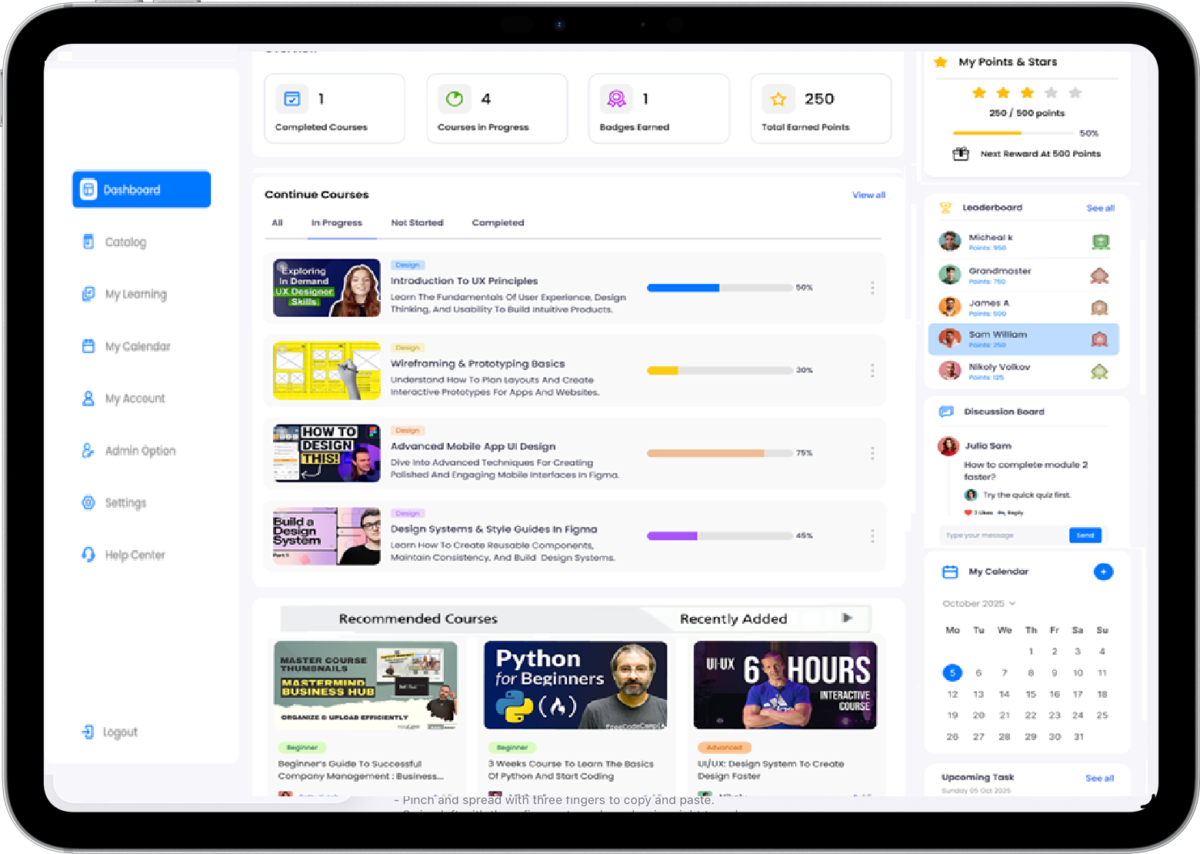
- AI-powered eCourse Creation:
Build interactive eCourses, effortlessly convert your training documents into interactive e-learning modules, develop custom courses in minutes with Intuitive drag-and-drop interface.
- Intelligent Course Recommendations:
Leverage AI to provide personalized course suggestions for learners, facilitating targeted skill development and promoting continuous growth.
- Mobile Accessibility:
Ensure a seamless learning experience across devices, allowing employees to engage with training materials anytime, anywhere.
- Team Analytics:
Equip managers with real-time insights into their teams’ training statuses.
- Comprehensive Reporting:
Utilize pre-built reports for quick insights. Additionally, create custom reports on demand and schedule automated updates to stay informed.
- Engagement and Recognition:
Motivate learners by recognizing milestones with badges and designations. Incorporate gamification, social discussions, and announcements and create a vibrant learning community.
- Personalized Learning Experiences:
Develop tailored training paths for different learner types and departments.
- Compliance and Certification Management:
Track compliance training status and manage certifications effectively with automated reminders for renewals, reducing organizational risk.
- Custom Site Branding:
Align the learning platform with your corporate identity, allowing for co-branding options across different departments and locations. Support for over 60 languages ensures accessibility for diverse workforce.
- Tailored Training Catalogs:
Organize training offerings by department or job role and engage with relevant content.
- Flexible User Role Customization:
Set distinct permissions for management and staff, enabling effective tracking and management of team progress.
Features
Learn more about WestNetLMS features that set it apart from the competition. Discover how its unique tools and capabilities enhance your processes.
Accounts
Add a new user
Allows administrators to add new users directly to their LMS for streamlined user management.
Archive users
Deactivate and store user accounts without deleting them.
Activity grading
Gradebook
Centralized view of all learner grades.
Gradebook comments
Multiple grading scales
AI Features
AI Powered
Chatbot
AI assistant for learner support.
Text-to-speech
Authentication
Manual Accounts
No login
Allow content access without authentication.
Certificate management
Unique Certificate by Course
Course Creation
Content Library
A repository of pre-made templates, existing content, multimedia sets, and learning outlines.
LRS
Learning Record Store for xAPI data.
Enrollment
Guest Access Settings
Gamification
Badges
Award digital achievements.
Levels
Define progression stages.
Points
Award points for activity.
Rewards
Offer incentives for achievements.
Mobile learning
Offline (disconnected Mobile app)
Offline
Support for offline access to content
System reports
Live Logs
Monitor system activity in real time.
Pricing
Learn more about WestNetLMS's pricing options, cost, and plans so you can make a well-informed, business-wise decision on the best software to use for organization.
Starting Price
-
Start for Free! "No Credit Card Necessary"
https://www.westnetlearning.com/get-started
Integrations
Learn more about WestNetLMS's integration options.
Have you used WestNetLMS before?
Answer a few questions and help the community to make the best decisions
Reviews
Is WestNetLMS the right solution for you? Read verified WestNetLMS reviews from people in industries like yours to make a confident choice.
It is a no frills LMS and allows learners to achieve their goals.
Overall Rating
83%
-
Usefulness
-
Usability
-
Customer Experience
-
Likelihood to Recommend
What do you like best?
It creates a self-service platform for users and managers and is easy to navigate.
What do you dislike?
Some of the admin tasks are a labor of love, such as reporting, to get one created.
WestNetLMS
—
Jun 29, 2024
Reaching out to see if we can have a call and I will help out with any reports. Would also want to know your thoughts on what can be done to make it easier for your.
Simple, Agile LMS that was easy to implement with great support.
Overall Rating
95%
-
Usefulness
-
Usability
-
Customer Experience
-
Likelihood to Recommend
What do you like best?
Easily configurable for our needs and the support was timely and effective.
What do you dislike?
Keep the things that customers request so that new customers have the functionality instead of starting from scratch.
Great platform for training - home office and in the field.
Overall Rating
100%
-
Usefulness
-
Usability
-
Customer Experience
-
Likelihood to Recommend
What do you like best?
Customer service is terrific. Westnet Learning partners with you to improve your business. Easy for employees to use and easy for administrators to manage. Have used Westnet at several companies from 90 employees to 90,000 employees. With a resource like this available, I struggle to understand why there are still companies (large or small) that still have paper-based training systems.
What do you dislike?
I was satisfied with most if not all of the platforms features. As is with many many Learning Management Systems, a more intuitive UI would help learners explore and become engaged.
Great platform for training my team! Sleek and modern look.
Overall Rating
100%
-
Usefulness
-
Usability
-
Customer Experience
-
Likelihood to Recommend
What do you like best?
Customer service is terrific. Westnet Learning partners with you to improve your business. Easy for employees to use and easy for administrators to manage. Have used Westnet at several companies from 90 employees to 90,000 employees. With a resource like this available, I struggle to understand why there are still companies (large or small) that still have paper-based training systems.
What do you dislike?
The feature I like the least is the custom report builder because I do not use it. The Westnet team has helped me build out my own reports.
WestNET support is great --when I need assistance, they respond quickly.
Overall Rating
72%
-
Usefulness
-
Usability
-
Customer Experience
-
Likelihood to Recommend
What do you like best?
Simple delivery of SCORM packages. Ability to customize the interface (including graphics and test) based on the audience.
What do you dislike?
WestNET needs a "simple" mode, where you can load and deploy simple SCORM modules for those of us who offer small microlearning. Too many boxes to check and things to select to get something deployed quickly. Maybe build a wizard.
WestNetLMS
—
Jan 16, 2021
Thanks Lewis, really appreciate your review. There are 3 options you should set to load your courses. Title/ID, course type and catalog placement. The other options provide the ability for a customized catalog display for users by department/job titles. Since you assign content to your users and they don’t access a catalog, you can skip those settings. Hope that helps!
Alternatives
Not a match? Find software alternatives that better suit your needs and compare them to discover the one that's right for you.