

Trending Learning Management Systems (LMS)
About the vendor
Founded In 2008
Customers
  • Academic
  • Large Enterprises (>10,000)
  • Non Profits
  • Public Administrations
  • Small/Medium Businesses
Use Cases
  • Association Learning
  • Compliance Training
  • Customer Training
  • Employee Onboarding
  • Employee Training
  • Extended Enterprise
  • Workforce Development
Industries
  • Construction
  • Financial Services
  • Food & Beverages
  • Higher Education
  • Hospital & Health Care
  • Hospitality
  • Nonprofit Organization Management
Deployment
  • Desktop Application
  • Mobile Application
  • Software as a Service / Cloud
Platforms
  • Linux
  • Mac
  • Windows
Browsers
  • Apple Safari
  • Google Chrome
  • Internet Explorer
  • Mozilla Firefox
Training
  • Documentation
  • In Person
  • Live Online
  • Online Tutorials
  • Webinars
Support
  • 24/7
  • Business Hours
  • Email
  • FAQ
  • Knowledge Base
  • Live Online
  • Online Community
  • Phone
Supported Specifications
  • AICC
  • PENS
  • SCORM 1.1
  • SCORM 1.2
  • SCORM 2004
  • SCORM 2004 3rd Edition
  • SCORM 2004 4th Edition
  • xAPI/Tin Can API
Languages Supported
-
LinkedIn Page
@Linkedin
X
-
Change your privacy settings to see the content.
In order to watch this video you need to have advertising cookies enabled.
You can adjust your cookie preferences here.

What is Bridge?

Bridge is a learning management system (LMS) with built-in skills and performance management. It's designed for mid-market organizations with lean L&D and HR teams that need results without a lot of overhead. Getting started is easy, with a dedicated onboarding manager, a proven five-phase implementation process, and 24/7 support after launch.

Bridge is ideal for onboarding new hires, delivering compliance training, and building manager capability. But it doesn't stop at training. It connects daily learning to skill-building and performance, bridging the gap between training and organizational goals.

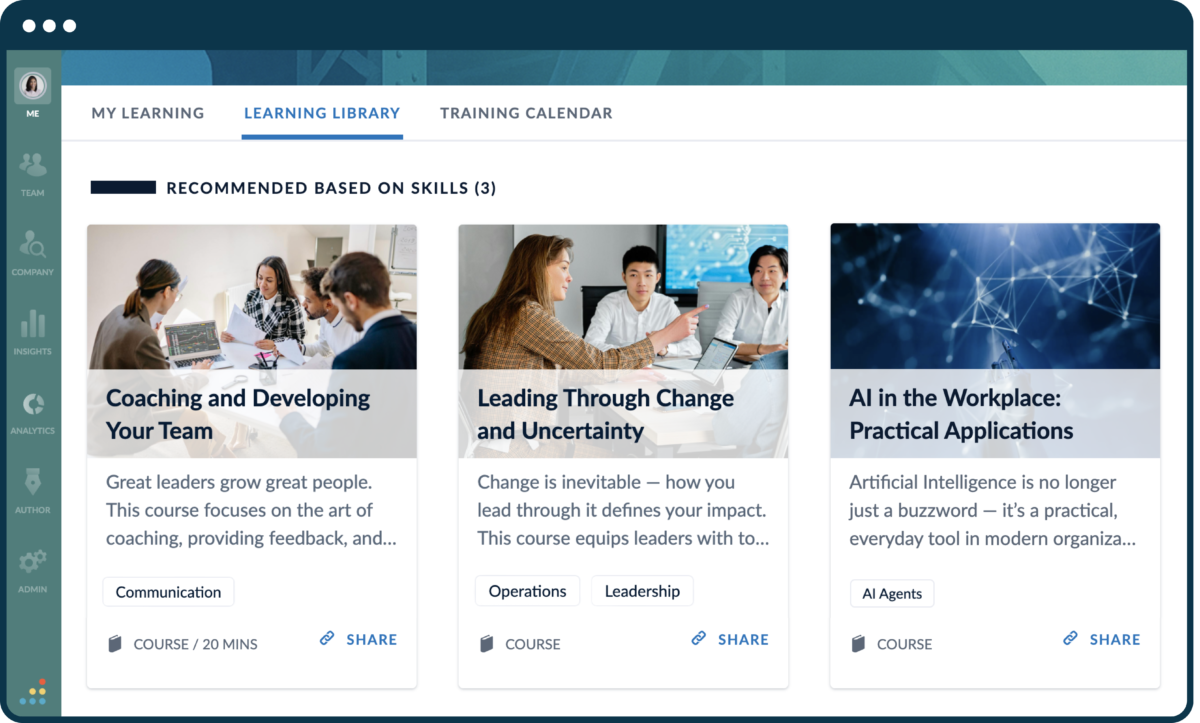
Learners get a personalized library with AI-powered course recommendations, reminders when training is due, and the freedom to search and build new skills on their own. They can also connect with peers and mentors, building a community that inspires them to take charge of their careers.

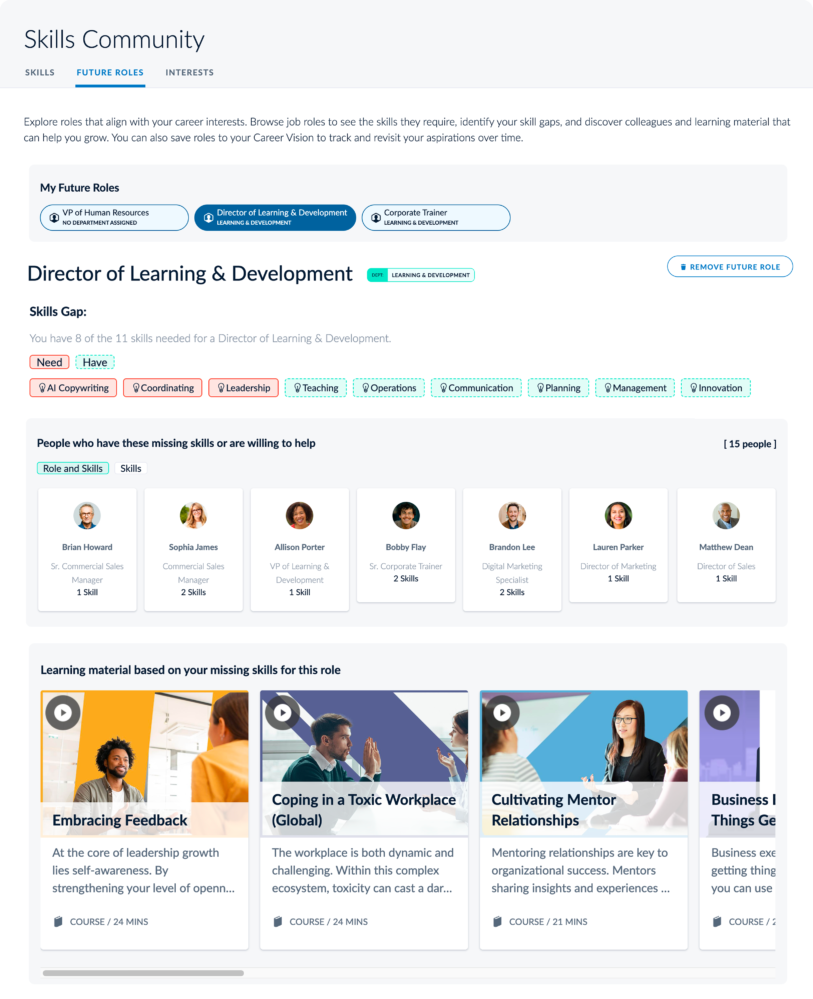
Bridge's AI engine automatically tags course content against more than 30,000 skills, powered by Lightcast's real-time labor-market data. Leaders can see exactly where the organization is strong and where gaps remain, then connect that view to career pathing and internal mobility. Employees get clear pathways into future roles, so they know what to work on and can see a future at their organization.

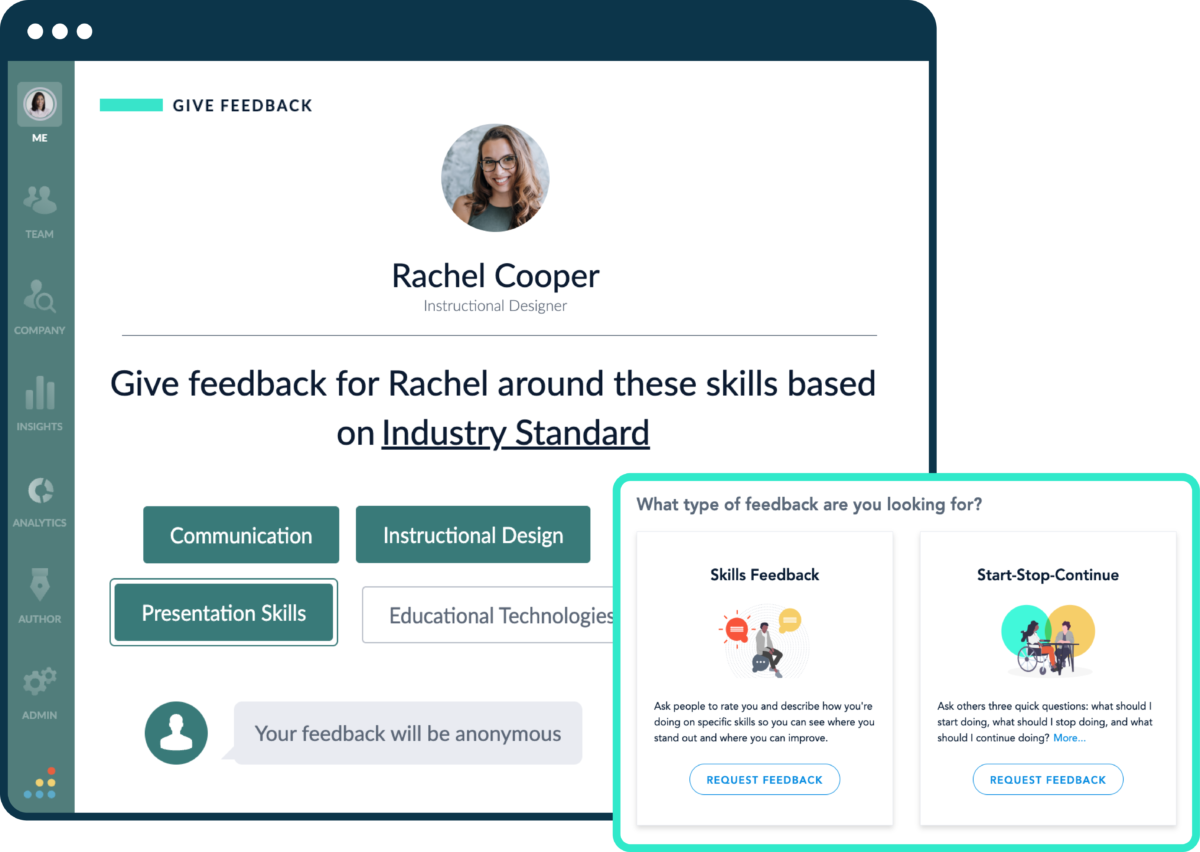
Managers get structured support with templated 1-on-1 agendas, feedback tools, skills validation, and goal tracking, helping them become better coaches.

Admins get clear reporting on overdue learners and enrollments, plus set-it-and-forget-it Learning Journeys that deliver content in stages. And with a mobile app that works offline, training reaches deskless workers wherever they are.

Overview of Bridge benefits

AI That Fits How Your Team Already Works
Bridge brings powerful AI into your learning system in two ways. The Bridge AI Assistant is built directly into the platform, helping surface insights, support admin work, and answer questions about your learning and skills data. And with Bridge's MCP Connector you'll securely connect the AI your company already uses (Claude, Copilot, ChatGPT, etc.), so it can interpret your learning data, and reason across your org to help your L&D programs truly move the needle for your business.

Build Real Career Paths, Backed by Skills Data
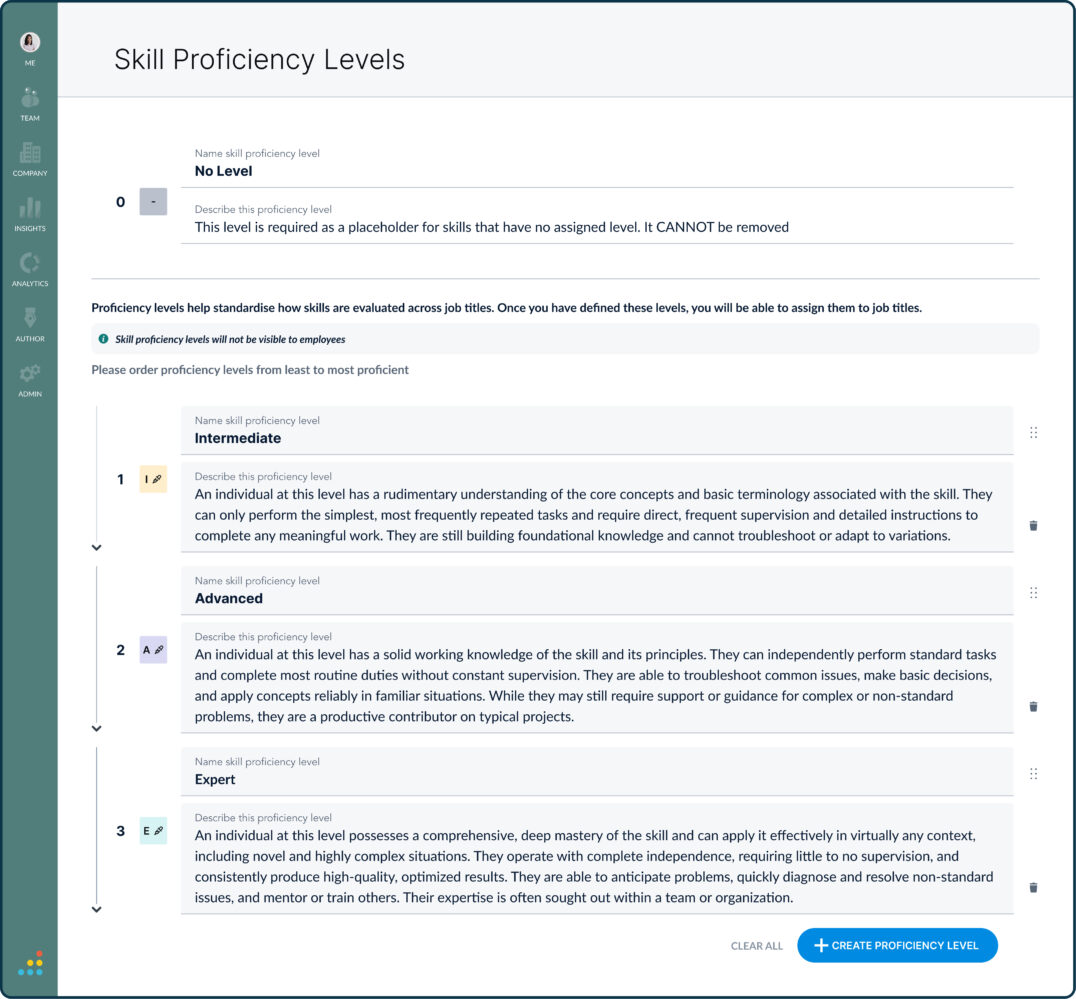
Bridge turns job roles, required skills, and proficiency levels into a working model of your workforce, then connects skill gaps to learning recommendations. Employees see the roles ahead and what to develop next, while managers validate skill levels instead of relying on self-reported data. AI keeps your skills taxonomy current with real-time labor market data.

Get New Hires Onboarded Faster
Automate onboarding journeys that deliver courses, live training, and checkpoints without overwhelming new employees.

Headache-Free Compliance Training
Track certifications and compliance status, and send automated deadline reminders.

Easy for Admins
Built-in authoring and simple reporting help admins stay on top of training.

Personalized Development
Tailor development paths to each employee to boost engagement and retention.

Integration Capabilities
Bridge integrates with many HRIS platforms, and our professional services team supports custom integrations.

Bridge Adapts to Your Organization's Needs
Bridge scales to more internal and external users and makes it simple to track training modalities across regions.

Features

Learn more about Bridge features that set it apart from the competition. Discover how its unique tools and capabilities enhance your processes.

Accounts

Add a new user Allows administrators to add new users directly to their LMS for streamlined user management.
Archive users Deactivate and store user accounts without deleting them.
Browse list of users View all registered users in the system.
Bulk User Actions Manage multiple user accounts at once.
Custom/Mandatory User profile fields Define required or optional fields for user profiles.
Upload users Import users via spreadsheet.

Activity grading

Course History
Gradebook
Gradebook audit trail
Gradebook comments
Manual Grading ("Marking")
Multiple grading scales

AI Features

Adaptive Learning
AI Powered Use AI-driven automation and insights.
Chatbot
Content development Generate or enhance educational content.
Content Translation Translate learning materials automatically.
Intelligent recommendations Suggest courses based on learner activity.
Natural Language Processing
Predictive analysis
Quiz generation Automatically creates AI-generated quizzes.
Text-to-speech

Authentication

Active Directory/LDAP Integration
Custom User login page Personalized login interface.
Manual Accounts
No login
SAML2/API Integration Single sign-on and external authentication.
Self-Registration Users create their own accounts.
Self-Registration w. Admin Confirmation User signup requires admin approval.

Categories

Assign Courses to categories Organize courses under specific categories.
Create new Categories Add new organizational groups for courses.
Manage Categories Edit, delete, or update categories.
Priced Categories (Bundle)

Certificate management

Certification life-cycle Track generation, renewal, and expiration.
Manage certification templates Customize certificate formats.
Predefined certification templates Use ready-made certificate designs.
Unique Certificate by Course
Unique Certification by Curriculum Different certificate per learning path.

Compliance management

Certificate expiration notifications
Certification Expiration Management
Due Date notifications Notify learners of upcoming deadlines.
Soft/Hard Stop Due Dates

Course Creation

Assignments Engine Create and manage learner assignments.
Built-In Authoring Tool Create content directly inside the platform.
Can reuse PPTs, PDFs, Videos Upload and repurpose existing material.
Changing Course default settings Modify core course configuration.
Consume online video content Embed or stream video lessons.
Content Library A repository of pre-made templates, existing content, multimedia sets, and learning outlines.
Course backup Options
Drag & Drop Interactions Interactive content creation.
Hybrid Learning Courses Blend online and in‑person lessons.
Learning Paths (Curriculums) Sequence courses into structured programs.
LRS
Scheduling LIVE events Plan webinars or virtual classes.
Survey Engine
Tests Engine
Upload courses Import courses into the platform.

Customization

Mobile Learning Support
Personalized views

Enrollment

Attendance Tracking Track presence in sessions.
Automated Enrollment (based on User data) Enroll users automatically by rules.
Guest Access Settings
Manual Enrollment Manually assign users to courses.
Progress Tracking Monitor learner progress in real time.
Self-enrollment Allow learners to join courses freely.
Self-enrollment (with a PIN #)
Survey enrollment (based on a response)

Format

Course Discussions
Gamification Format
Learner Upload
LIVE Chat Option
Social Format
Topics Format
Video Conferencing Integration
Weekly Format

Gamification

Badge customization
Badges
Customize Gamification mechanics
Leaderboards
Levels
Points
Rewards

Interface options

Additional external pages Add custom pages to the platform.
Block Management
Calendar Settings Configure system calendar.
Language settings Set default or custom system language.
Learning Accessibility Tools for users with disabilities.
Location Settings
Media embedding settings Control embedding permissions.
Multilanguage Support Provide support in multiple languages.
Ready-made Themes Prebuilt platform designs.

Learning types

Asynchronous Instructor-led Instructor-led but not in real time.
Asynchronous Self-paced Learners progress independently.
Blended Learning Mix online and face‑to‑face training.
Synchronous Virtual Classroom

Mobile learning

Offline (disconnected Mobile app) Access mobile content without internet.
Online (Internet connected) Access content with full connectivity.

Offline

Support for offline access to content Downloadable materials for offline study.

Reports

Automated Report Scheduling
Canned Reports
Dashboards and Graphic Reports Visual analytics dashboards.
Email delivery of Reports Send reports via email.
Exporting Reports in variety of formats Export data as PDF, Excel, etc.
Grading Report Settings
Learning Analytics Tools Analyze learner behavior.
Training Record Maintenance

Roles

Define roles Create custom permission roles.
Role Assignment Assign roles to users.
System Permissions per role Control access rights.
Teams and Team Hierarchies Organize users into teams.

Security

Anti-spam
Anti-virus
IP Blocker
Restrict registration to specific domains
Strong Passwords

Shopping cart

Built-In Shopping Cart
Shopping Cart as Plug-In Add commerce via plugin.

System reports

Automatic email reports in predefined intervals Send periodic system reports.
Custom reports generator Create custom report layouts.
Email notification settings Control notification rules.
Live Logs Monitor system activity in real time.
Who uses Bridge ?

Based on eLearning Industry reviews from the past 4 years

Company Size

Areas of Focus

Top Industries

Elearning
11%
Financial Services
11%
Information Technology and Services
8%
Insurance
6%
Information Services
6%
Other
58%
Pricing

Learn more about Bridge's pricing options, cost, and plans so you can make a well-informed, business-wise decision on the best software to use for organization.

Learn (LMS)

Contact us for pricing

Everything a lean L&D team needs to create, catalog, deliver and measure training for employees, customers and partners, without the manual grind of chasing completions. A mobile app, staged onboarding, unlimited subaccounts, and a training calendar are all included.

Talent Suite (Skills Management)

Contact us for pricing

Everything in Learn, plus AI-powered skills mapping connected to real-time labor market data from Lightcast. Skills insights dashboards help leaders understand where skills exists across the org, and shows levels of skill mastery, taking the guess work out of workforce readiness and succession planning 

Career development tools—including intuitive career pathing, built-in mentorship and peer-to-peer learning, feedback collection tools and personalized development—connects daily learning to long-term growth.

Full Suite (Performance Management)

Contact us for pricing

Everything a mid-market company needs to train its teams, build a skills strategy and run performance cycles—all in one connected platform.

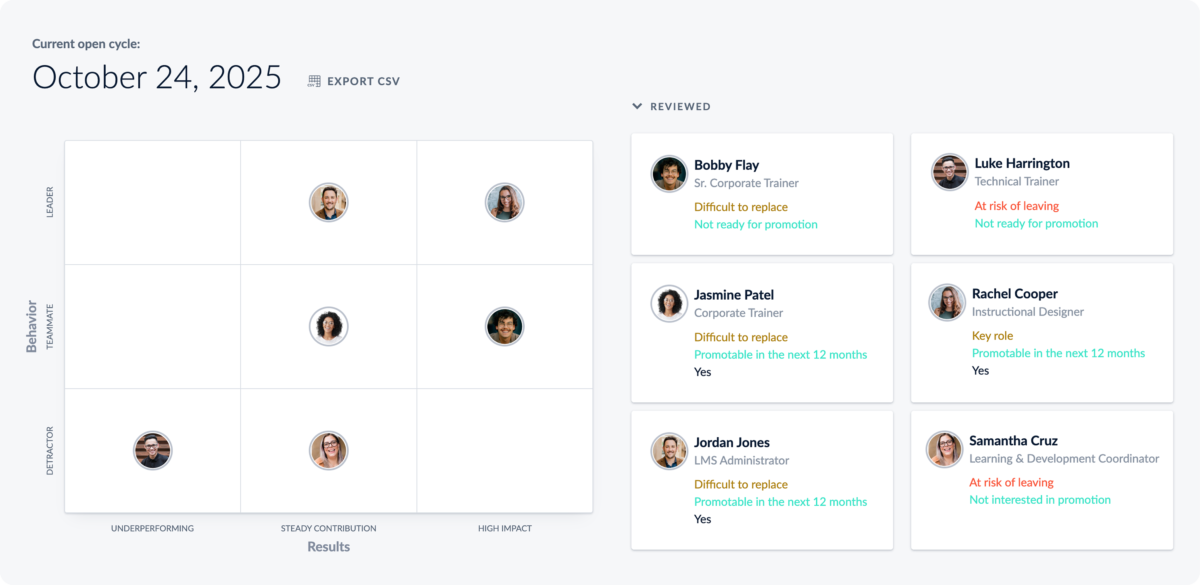
Everything in Learn and Talent Suite, plus a range of performance management features, including: structured 1on1 agendas, integrated performance reviews (combining manager-, self- and peer-evaluations), cascading goals and OKRs, and a talent review nine-box matrix.

Integrations

Learn more about Bridge's integration options.

ADP

ADP

API

API

BambooHR

BambooHR

Dropbox

Dropbox

Okta

Okta

Oracle Sales Cloud CRM

Oracle Sales Cloud CRM

Outlook Calendar

Outlook Calendar

Salesforce CRM

Salesforce CRM

SAP CRM

SAP CRM

Shopify

Shopify

Slack

Slack

Zapier

Zapier

Bridge logo
Have you used Bridge before?
Answer a few questions and help the community to make the best decisions
Reviews

Is Bridge the right solution for you? Read verified Bridge reviews from people in industries like yours to make a confident choice.

Pros
  • Ease of Use & Navigation The platform is highly regarded for its clean, clutter-free user interface and straightforward navigation. Reviewers noted that it dramatically "reduces the learning curve for new users" and is intuitive enough that even administrators without previous experience can "hit the ground running."
  • Feature Set & Functionality Reviewers appreciated the flexible options for structuring training. The system effectively supports diverse formats (such as microlearning paths, programs, and journeys), automates learner engagement through reminders, and serves as an excellent tool for compliance tracking, auditing, and certificate generation.
  • Implementation & Onboarding Transitioning to the system is described as a smooth and worry-free process. An enterprise reviewer highlighted a "frictionless pre-sales experience and implementation" that allowed them to easily improve user adoption rates over time compared to other alternative systems.
  • Customer Support & Service The support network is consistently highlighted as dependable and quick to act. Administrators remarked that customer support teams are "responsive and effective" whenever technical questions arise, working closely with the user community to implement requested features.
  • Customization & Flexibility Reviewers valued the platform's architectural versatility. Administrators noted that it is "great at both" simplicity and customization, allowing teams to seamlessly integrate their own custom or off-the-shelf SCORM courses, build role-specific training pathways, and embed custom internal tools or reference links directly onto the platform.  
Cons
  • Reporting & Analytics Issues The data extraction utilities lack deep complexity. Multiple administrators mentioned that the native "reporting features are somewhat basic" and lack advanced custom options, with one user specifically noting that the system was unable to run reports on which employees had not completed specific training.
  • Limited Features / Missing Tools Users flagged minor structural gaps in administrative tools and content control. Omissions include a very basic module builder that lacks advanced interactivity, an inability to batch-download certificates for audit preparation, and a lack of native video hosting (requiring users to rely on external video embeds).
  • Customization Limitations Certain administrative controls feel overly restrictive for enterprise teams. Reviewers noted that "customization options for the dashboard are somewhat limited," the portal's branding capabilities are not robust enough to support distinct external organizations, and user permissions lack the granularity needed for large administrative teams.
  • Performance or Reliability Issues Data processing lags under heavy administrative stress. A regular user managing high-volume compliance paths noted that "the system slows down when processing large datasets or multiple user groups," revealing room for technical enhancement in overall processing speed.
  • Integration & Technical Challenges Ineffective system discovery processes create manual overhead. Administrators pointed out that "the search feature lacks accuracy and ease of use, making it difficult for employees to independently locate courses," which ultimately forces administrators to spend time sending direct links or manually enrolling staff.
Performance Overview
Overall Rating 92%
  • Usefulness
  • Usability
  • Customer Experience
  • Likelihood to Recommend

Learning Journeys have vastly improved our onboarding

Aug 9, 2026

Overall Rating 89%
  • Usefulness
  • Usability
  • Customer Experience
  • Likelihood to Recommend
What do you like best? We use Learning Journeys heavily during onboarding. Instead of giving new hires a huge collection of courses on their first day, we can spread training across different stages and include tasks along the way. It feels much more manageable for the learner.
What do you dislike? Creating a really good journey takes some work upfront. We've changed ours several times based on feedback from new employees.
Reviewer photo

Reviewer verified by LinkedIn

Industry : Consumer Services | Company size : 201-500 | Level : Director | Focus : Human Resources | Experience using the software : More than 1 year as Administrator

Works well for training customers and partners too

May 29, 2026

Overall Rating 87%
  • Usefulness
  • Usability
  • Customer Experience
  • Likelihood to Recommend
What do you like best? We use Bridge for employees as well as external audiences. Separate subaccounts allow us to keep customer and partner training organized without having to maintain completely different learning platforms.
What do you dislike? Once you're managing several subaccounts, you need to be disciplined about naming, pemissions and content organization or things can become confusing.
Reviewer photo

Reviewer verified by LinkedIn

Industry : Insurance | Company size : 201-500 | Level : Manager | Focus : Education | Experience using the software : More than 1 year as User, Administrator

An extremely good fit for a lean learning and dev team

May 12, 2026

Overall Rating 89%
  • Usefulness
  • Usability
  • Customer Experience
  • Likelihood to Recommend
What do you like best? We have a relatively small team managing training for a much larger employee population, so ease of administration matters a lot. Bridge lets us automate many of the repetitive tasks while managers can take more responsibility for their employees' development.
What do you dislike? The platform has grown beyond being just an LMS, which is useful but also means there's more to learn. New admins need some time to understand how learning, skills and performance all fit together.
Reviewer photo

Reviewer verified by LinkedIn

Industry : Information Technology and Services | Company size : 501-1,000 | Level : Manager | Focus : Human Resources | Experience using the software : 6-12 months as Administrator

Much better visibility into staff training completion

Apr 13, 2026

Overall Rating 92%
  • Usefulness
  • Usability
  • Customer Experience
  • Likelihood to Recommend
What do you like best? The dashboards make it easy to see who has completed training and where people are falling behind. We also schedule reports for managers, which means our L&D team isn't constantly being asked to pull the same information.
What do you dislike? I'd like a little more freedom when creating very specific reports. The standard reporting covers most of what we need, but occasionally we still work with exported data.
Reviewer photo

Emily E. — Instructional Design and E-Learning Specialist

Industry : Elearning | Company size : 201-500 | Level : VP | Focus : Product Management | Experience using the software : More than 1 year as User, Administrator

Skills functionality is becoming one of our favorite features

Apr 13, 2026

Overall Rating 90%
  • Usefulness
  • Usability
  • Customer Experience
  • Likelihood to Recommend
What do you like best? We've started using Bridge for more than just mandatory training. Being able to identify skills, connect them with learning content and give employees a clearer idea of what they should develop next makes the LMS feel much more useful for career development.
What do you dislike? Building a good skills strategy takes time. The technology helps, but you still need to decide how you want skills and development to work within your organization.
Reviewer photo

Reviewer verified by LinkedIn

Industry : Information Services | Company size : 201-500 | Level : Director | Focus : Education | Experience using the software : More than 1 year as User, Administrator

Bridge is a great LMS for all our frontline employees

Apr 12, 2026

Overall Rating 87%
  • Usefulness
  • Usability
  • Customer Experience
  • Likelihood to Recommend
What do you like best? A large percentage of our workforce isn't sitting behind a computer all day, so the mobile experience was important to us. Employees can access their training from their phones and the offline option is particularly useful at locations where connectivity isn't reliable.
What do you dislike? I still find some administrative tasks easier on desktop. For learners, however, the mobile experience works very well.
Reviewer photo

Reviewer verified by LinkedIn

Industry : Human Resources | Company size : 501-1,000 | Level : Senior | Focus : Human Resources | Experience using the software : More than 1 year as Administrator

Automation saves our Learning and Development team hours every month

Apr 12, 2026

Overall Rating 92%
  • Usefulness
  • Usability
  • Customer Experience
  • Likelihood to Recommend
What do you like best? Automated enrollments have probably saved us the most time. New employees can be assigned the appropriate training based on their role without someone from our team having to manually enroll them every time.
What do you dislike? More complicated enrollment rules require some planning. I usually test them with a small group before rolling them out to everyone.
Reviewer photo

Reviewer verified by LinkedIn

Industry : Information Technology and Services | Company size : 501-1,000 | Level : Manager | Focus : Administrative | Experience using the software : Less than 6 months as Administrator, Member of the deployment/customization team

Learning and performance finally feel connected...

Apr 12, 2026

Overall Rating 91%
  • Usefulness
  • Usability
  • Customer Experience
  • Likelihood to Recommend
What do you like best? What makes Bridge different for us is that learning doesn't sit completely separately from performance and development. Managers can have conversations about skills and then actually connect employees with learning that helps address those gaps.
What do you dislike? There is quite a lot available across the platform, so getting managers to use everything consistently has taken some effort on our side.
Reviewer photo

Reviewer verified by LinkedIn

Industry : Facilities Services | Company size : 501-1,000 | Level : Manager | Focus : Education | Experience using the software : More than 1 year as Administrator

One of the easiest LMS platforms we've used over the years.

Apr 12, 2026

Overall Rating 90%
  • Usefulness
  • Usability
  • Customer Experience
  • Likelihood to Recommend
What do you like best? Bridge is very straightforward for both learners and administrators. Our employees didn't need much guidance when we launched it, and creating courses, assigning training and checking completions doesn't take a lot of time.
What do you dislike? Some of the more advanced admin settings take a little while to find. Once you know where everything is, it's not really an issue.
Reviewer photo

Reviewer verified by LinkedIn

Industry : Financial Services | Company size : 201-500 | Level : Senior | Focus : Human Resources | Experience using the software : 6-12 months as Administrator

The AI skills features are genuinely useful for our employees

Feb 22, 2026

Overall Rating 92%
  • Usefulness
  • Usability
  • Customer Experience
  • Likelihood to Recommend
What do you like best? I like that the AI functionality is tied to something practical rather than just being added for the sake of having AI. Automatically tagging learning content with relevant skills saves us manual work, and recommendations can help employees find training that's actually related to their development needs.
What do you dislike? We still review the skills and recommendations rather than treating everything generated automatically as perfect. Our internal terminology doesn't always match what the system initially suggests.
Reviewer photo

Reviewer verified by LinkedIn

Industry : Financial Services | Company size : 201-500 | Level : Manager | Focus : Education | Experience using the software : More than 1 year as User, Administrator

You've viewed 10 out of 36

Alternatives

Not a match? Find software alternatives that better suit your needs and compare them to discover the one that's right for you.

Bridge

4.6/5

TalentLMS

4.8/5
Compare

Connecteam - Mobile Teams LMS

4.0/5
Compare

iSpring LMS

4.7/5
Compare

SkyPrep LMS

4.4/5
Compare

360Learning

4.7/5
Compare

Acorn

4.6/5
Compare

Absorb

4.8/5
Compare
FAQs

Learn more about Bridge.

Bridge pricing depends on your number of users and the capabilities you need. Plans start from $15,000. You can start with Bridge LMS for learning and training, or add skills and performance capabilities for a more connected approach to employee development.

Most organizations can get up and running with Bridge within 90 days. You’ll have an implementation partner to help with setup, data migration, integrations, configuration, and launch, so your team isn’t left to figure everything out on its own.

Yes. Bridge connects with HRIS platforms, SSO providers, content libraries, CRMs, calendars, and other business systems through pre-built integrations, APIs, webhooks, and other integration methods. HRIS options include ADP, UKG, Workday, Paylocity, Paycom, BambooHR, and Oracle.

Bridge is built for lean HR and L&D teams that don’t have time to become LMS experts. Admins can create courses, assign training, automate enrollments and reminders, manage recurring training, and pull reports without needing deep technical experience. Smart Groups can also use employee data to automatically organize learners and assign the right training based on attributes such as role, department, location, or hire date.

Yes. Bridge helps automate required training from assignment through completion. Teams can set due dates and passing requirements, automatically enroll the right employees, send reminders, schedule recurring training, and maintain completion records for reporting and audits.

Bridge gives admins and managers visibility into enrollments, progress, completions, compliance, and learning activity. Teams can also connect learning with skills and performance data to better understand how employee development supports workforce needs and business priorities.

Yes. Bridge supports a mix of internally created and third-party learning. Teams can build courses in Bridge, use assessments and multimedia, bring in existing learning content, and connect with content providers including Skillsoft, OpenSesame, LinkedIn Learning, Udemy, and iAM Learning.

Bridge maintains SOC 2 and ISO 27001 credentials and supports enterprise security requirements including SSO and controlled access.

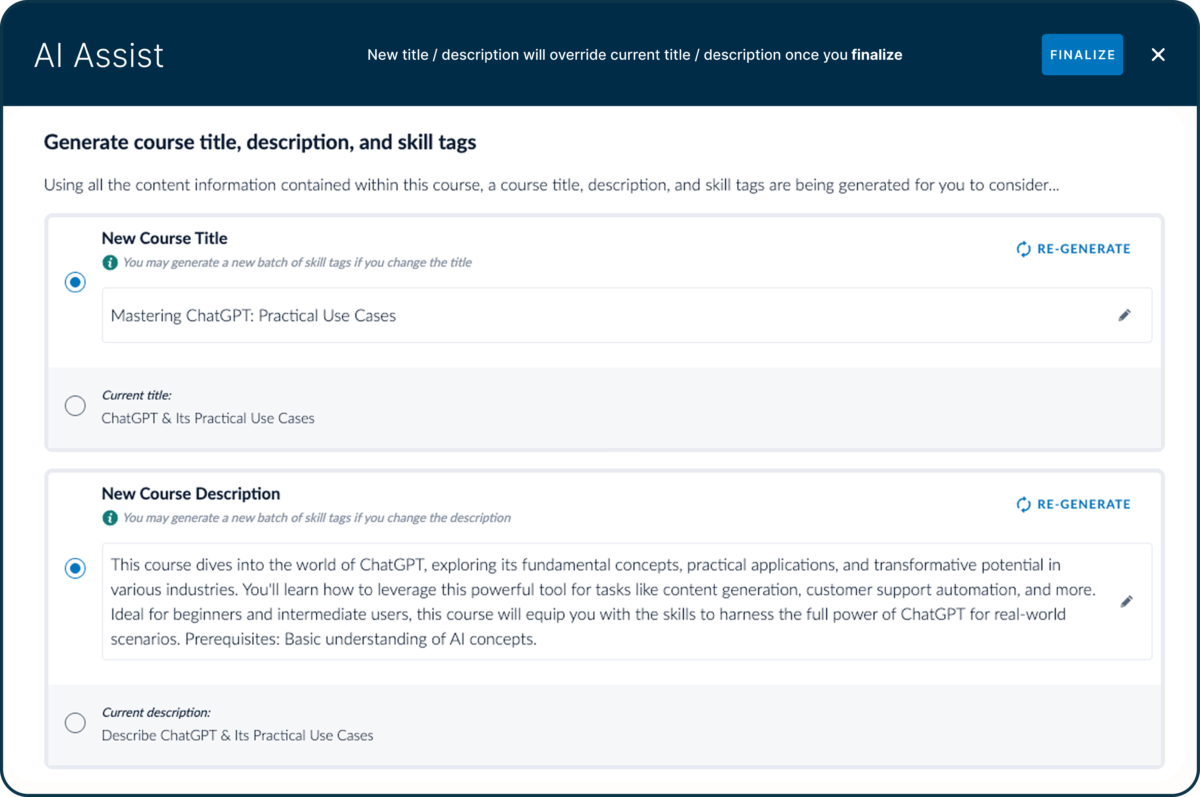
Bridge uses AI to take repetitive work off your plate. Create and translate courses faster, automatically map skills to roles and learning, and recommend training based on skill gaps. Bridge also connects your existing AI tools to your learning and skills data through its MCP Connector, helping teams get answers and insights without manually pulling reports.

Resources

Explore a curated collection of resources that provide insights, guidance, and ideas to help you make informed decisions.

Articles