Trending Learning Management Systems (LMS)
About the vendor
Located In Toronto, CA
Founded In 2005
Customers
  • Large Enterprises (>10,000)
  • Small/Medium Businesses
Use Cases
  • Compliance Training
  • Customer Training
  • Employee Onboarding
  • Employee Training
  • Extended Enterprise
  • Franchise/Dealer Training
  • Sales Training
Industries
  • Computer Software
  • Financial Services
  • Government: State/Local
  • Information Technology and Services
  • Manufacturing
  • Retail
  • Telecommunications
Deployment
  • Desktop Application
  • Mobile Application
  • Software as a Service / Cloud
Platforms
  • Linux
  • Mac
  • Windows
Browsers
  • Apple Safari
  • Google Chrome
  • Internet Explorer
  • Mozilla Firefox
Training
  • Documentation
  • In Person
  • Online Tutorials
  • Webinars
Support
  • 24/7
  • Email
  • FAQ
  • Knowledge Base
  • Phone
Supported Specifications
  • AICC
  • SCORM 1.2
  • SCORM 2004
  • xAPI/Tin Can API
Languages Supported
  • Arabic
  • German
  • English
  • Spanish
  • French
  • Italian
  • Japanese
  • Korean
  • Dutch
  • Portuguese
  • Russian
  • Chinese
LinkedIn Page
-
X
-
Change your privacy settings to see the content.
In order to watch this video you need to have advertising cookies enabled.
You can adjust your cookie preferences here.

What is Docebo?

Docebo is an AI-powered learning platform that helps organizations make learning continuous, measurable, and scalable.

Designed for mid-sized to large organizations, Docebo supports employees, partners, and customers from a single platform, enabling use cases such as onboarding, enablement, compliance, and customer education. This unified approach allows 3,900+ organizations to manage multiple audiences without relying on disconnected systems.

AI is built into the platform to personalize learning experiences, improve content discovery, and automate routine tasks like assignments, enrollments, and workflows. This reduces administrative effort while helping 30 million learners access relevant knowledge as their roles and responsibilities evolve.

Docebo supports both structured learning paths and self-directed learning, making it easier for people to never stop learning over time rather than relying on one-time training events. Skills-based capabilities and embedded analytics give leaders visibility beyond completions, helping them understand readiness, identify gaps, and connect learning activity to business outcomes.

Built for enterprise scale, Docebo supports global organizations with complex structures, multiple languages, and extended enterprise programs, enabling learning that keeps pace with change instead of falling behind it.

Overview of Docebo benefits

Engage any audience
Engage your learners and get results. Drive performance, productivity, and growth with experiences that automatically identify and fill skills gaps for each individual learner.

Deliver hyperpersonalized learning
Deliver a tailored, personalized, and fully-branded experience to customers, managers, new hires, partners, and any other audience you can think of - all from a single platform.

Prove learning's impact with data
Measure adoption, progress, and impact with built-in analytics that connect learning to real business outcomes.

Save time and scale quickly with automations
Automate entire workflows and repetitive tasks like enrollments and skills tagging. Seamlessly scale your program to more learners and new audiences and use cases.

Conquer the content challenge
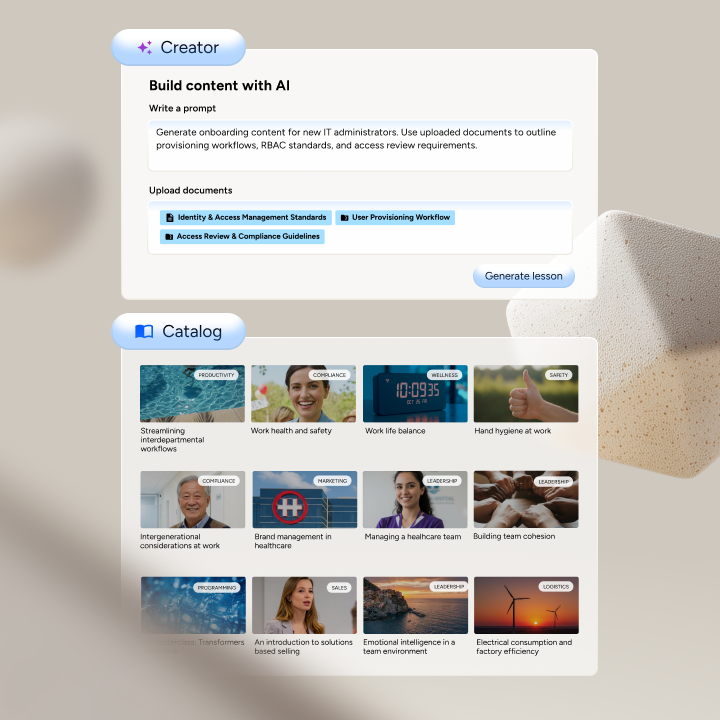
Simplify content creation, management, translation, and distribution. License over 20,000 high-quality courses or build your own in 15+ languages with Docebo's generative AI.

Optimize your learning tech stack
Docebo integrates with your existing tech stac to support global audiences, and scale learning programs without added complexity.

Learn in the flow of work
Embed learning directly into systems like Salesforce and Microsoft Teams and hundreds more. Use Docebo's fully customizable mobile learning app to deliver engaging learning on the go.


Features

Learn more about Docebo features that set it apart from the competition. Discover how its unique tools and capabilities enhance your processes.

Accounts

Add a new user Allows administrators to add new users directly to their LMS for streamlined user management.
Archive users Deactivate and store user accounts without deleting them.
Browse list of users View all registered users in the system.
Bulk User Actions Manage multiple user accounts at once.
Custom/Mandatory User profile fields Define required or optional fields for user profiles.
Upload users Import users via spreadsheet.

Activity grading

Course History View completed and ongoing courses for each user.
Gradebook Centralized view of all learner grades.
Gradebook audit trail Track all grade changes over time.
Gradebook comments Add comments to learner grades.
Manual Grading ("Marking") Manually review and grade submissions.
Multiple grading scales Support for different grading systems.

AI Features

Adaptive Learning Adjust learning paths based on learner behavior.
AI Powered Use AI-driven automation and insights.
Chatbot AI assistant for learner support.
Content development Generate or enhance educational content.
Content Translation Translate learning materials automatically.
Intelligent recommendations Suggest courses based on learner activity.
Natural Language Processing Interprets and responds to text inputs.
Predictive analysis Forecasts learner performance and trends.
Quiz generation Automatically creates AI-generated quizzes.
Text-to-speech Converts written content to audio.

Authentication

Active Directory/LDAP Integration Authenticate users via corporate directories.
Custom User login page Personalized login interface.
Manual Accounts
No login
SAML2/API Integration Single sign-on and external authentication.
Self-Registration Users create their own accounts.
Self-Registration w. Admin Confirmation User signup requires admin approval.

Categories

Assign Courses to categories Organize courses under specific categories.
Create new Categories Add new organizational groups for courses.
Manage Categories Edit, delete, or update categories.
Priced Categories (Bundle) Sell course bundles grouped by category.

Certificate management

Certification life-cycle Track generation, renewal, and expiration.
Manage certification templates Customize certificate formats.
Predefined certification templates Use ready-made certificate designs.
Unique Certificate by Course
Unique Certification by Curriculum Different certificate per learning path.

Compliance management

Certificate expiration notifications Alerts when certificates are near expiry.
Certification Expiration Management Manage timelines and renewal rules.
Due Date notifications Notify learners of upcoming deadlines.
Soft/Hard Stop Due Dates Allow or block access after due dates.

Course Creation

Assignments Engine Create and manage learner assignments.
Built-In Authoring Tool Create content directly inside the platform.
Can reuse PPTs, PDFs, Videos Upload and repurpose existing material.
Changing Course default settings Modify core course configuration.
Consume online video content Embed or stream video lessons.
Content Library A repository of pre-made templates, existing content, multimedia sets, and learning outlines.
Course backup Options Backup and restore course data.
Drag & Drop Interactions Interactive content creation.
Hybrid Learning Courses
Learning Paths (Curriculums) Sequence courses into structured programs.
LRS Learning Record Store for xAPI data.
Scheduling LIVE events Plan webinars or virtual classes.
Survey Engine Create learner surveys.
Tests Engine Build quizzes and exams.
Upload courses Import courses into the platform.

Customization

Mobile Learning Support Optimize learning for mobile devices.
Personalized views Customize interface per user.

Enrollment

Attendance Tracking Track presence in sessions.
Automated Enrollment (based on User data) Enroll users automatically by rules.
Guest Access Settings Allow non‑registered users limited access.
Manual Enrollment Manually assign users to courses.
Progress Tracking Monitor learner progress in real time.
Self-enrollment Allow learners to join courses freely.
Self-enrollment (with a PIN #) Require a PIN for enrollment.
Survey enrollment (based on a response) Enroll based on survey answers.

Format

Course Discussions Forum-style communication.
Gamification Format Add game elements to courses.
Learner Upload Allow learners to upload content.
LIVE Chat Option Real-time messaging inside courses.
Social Format Social interaction‑focused layout.
Topics Format Organize course by topics.
Video Conferencing Integration Connect with tools like Zoom/Teams.
Weekly Format Course structured week by week.

Gamification

Badge customization Design custom achievement badges.
Badges Award digital achievements.
Customize Gamification mechanics Modify points, levels, and rewards.
Leaderboards Rank learners based on achievements.
Levels Define progression stages.
Points Award points for activity.
Rewards Offer incentives for achievements.

Interface options

Additional external pages Add custom pages to the platform.
Block Management Control layout blocks/widgets.
Calendar Settings Configure system calendar.
Language settings Set default or custom system language.
Learning Accessibility
Location Settings Configure regional settings.
Media embedding settings Control embedding permissions.
Multilanguage Support Provide support in multiple languages.
Ready-made Themes Prebuilt platform designs.

Learning types

Asynchronous Instructor-led Instructor-led but not in real time.
Asynchronous Self-paced Learners progress independently.
Blended Learning Mix online and face‑to‑face training.
Synchronous Virtual Classroom Live real-time classes.

Mobile learning

Offline (disconnected Mobile app) Access mobile content without internet.
Online (Internet connected) Access content with full connectivity.

Offline

Support for offline access to content Downloadable materials for offline study.

Reports

Automated Report Scheduling Send reports automatically.
Canned Reports Prebuilt report templates.
Dashboards and Graphic Reports Visual analytics dashboards.
Email delivery of Reports Send reports via email.
Exporting Reports in variety of formats Export data as PDF, Excel, etc.
Grading Report Settings Customize grade reporting.
Learning Analytics Tools Analyze learner behavior.
Training Record Maintenance Maintain full training logs.

Roles

Define roles Create custom permission roles.
Role Assignment Assign roles to users.
System Permissions per role Control access rights.
Teams and Team Hierarchies Organize users into teams.

Security

Anti-spam Protect forms and communication.
Anti-virus Scan uploaded files for threats.
IP Blocker Block specific IP ranges.
Restrict registration to specific domains Limit signups by email domain.
Strong Passwords Enforce secure password rules.

Shopping cart

Built-In Shopping Cart Sell courses directly.
Shopping Cart as Plug-In Add commerce via plugin.

System reports

Automatic email reports in predefined intervals Send periodic system reports.
Custom reports generator Create custom report layouts.
Email notification settings Control notification rules.
Live Logs Monitor system activity in real time.
Who uses Docebo ?

Based on eLearning Industry reviews from the past 4 years

Company Size

Areas of Focus

Top Industries

Information Technology and Services
10%
Computer Software
8%
Financial Services
7%
Elearning
4%
Nonprofit Organization Management
4%
Other
67%
Pricing

Learn more about Docebo's pricing options, cost, and plans so you can make a well-informed, business-wise decision on the best software to use for organization.

Elevate

Contact us for pricing
  • Personalization and multi-audience support
  • White-labeled, customizable design
  • Certification and compliance tracking
  • AI-powered content creation
  • Multilingual training and instant translations
  • Admin and workflow automation
  • Harmony AI copilot & search
  • Learning insights and reporting
  • Live, on-demand, mobile, and social learning
  • Hundreds of integration options with your tech stack

Enterprise

Contact us for pricing

Everything in Elevate, plus:

  • Advanced analytics and insights
  • Integration of up to 6 tools
  • Extended enterprise (up to 10 domains)
  • 2x Sandbox environments
  • Branded mobile app
  • Upgraded API access — 100 calls/min
  • Dedicated database
  • Elite support with priority assistance
Integrations

Learn more about Docebo's integration options.

Adobe Connect

Adobe Connect

API

API

BambooHR

BambooHR

G Suite

G Suite

Gmail

Gmail

Google Analytics

Google Analytics

Google Calendar

Google Calendar

GoToMeeting

GoToMeeting

GoToTraining

GoToTraining

GoToWebinar

GoToWebinar

Okta

Okta

Paypal

Paypal

Salesforce CRM

Salesforce CRM

Shopify

Shopify

Slack

Slack

Stripe

Stripe

WebEx

WebEx

WooCommerce

WooCommerce

Wordpress

Wordpress

Zapier

Zapier

Zendesk

Zendesk

Zoom

Zoom

Docebo logo
Have you used Docebo before?
Answer a few questions and help the community to make the best decisions
Reviews

Is Docebo the right solution for you? Read verified Docebo reviews from people in industries like yours to make a confident choice.

Pros
  • Ease of Use & Navigation

    Many reviewers emphasize that Docebo is intuitive and easy to learn for both admins and learners, with clear navigation and a user-friendly design that doesn’t require deep technical expertise.

  • Customization & Flexibility

    Users repeatedly note the strong ability to customize the platform, including branding, page layouts, and user experiences, helping organizations tailor the LMS to their needs.

  • Feature Set & Functionality

    Reviews highlight robust functionality such as diverse content catalogs, learning plans, automation, scalable structure, and powerful learning tools that support varied training needs.

  • Customer Support & Community

    Several users appreciate Docebo’s support, including community resources, Docebo University training, and responsiveness to feedback and feature requests.

  • Scalability & Continuous Updates

    Reviewers mention that the platform scales well with organizational growth and benefits from regular updates that keep Docebo aligned with evolving learning needs.

Cons
  • Complexity & Learning Curve

    Some administrators find parts of the platform (especially power user features or configuration options) complex or non-intuitive, requiring time to master.

  • Reporting & Analytics Issues

    Several reviewers would like more advanced or streamlined reporting capabilities, especially for specific use cases like course surveys or detailed analytics.

  • Integration & Feature Gaps

    Users note gaps such as less robust out-of-the-box integrations (e.g., calendars, Zoom/GCal), and some expected features (like duplicating learning plans) are missing or frustrating.

  • Performance / Technical Quirks

    Some feedback points to older legacy interface components and quirks in certain functionalities, which can feel inconsistent or confusing.

  • Cost & Support Experience Variability

    A few reviewers mention issues with support organization (changing account managers) and pain points with extra costs for certain tools or add-ons.

Performance Overview
Overall Rating 90%
  • Usefulness
  • Usability
  • Customer Experience
  • Likelihood to Recommend

Much better learner experience than our older LMS.

Sep 9, 2026

Overall Rating 89%
  • Usefulness
  • Usability
  • Customer Experience
  • Likelihood to Recommend
What do you like best? The biggest improvement for us has been the learner experience. We can organize content in a way that feels much less like a traditional training portal and more like a proper learning destination. Adoption has been noticeably better since we moved over.
What do you dislike? There are so many customization options that it can be easy to overcomplicate things. We learned pretty quickly that simpler is usually better.
Reviewer photo

Danielle D.

Industry : Financial Services | Company size : 10,000+ | Level : Manager | Focus : Education | Experience using the software : More than 1 year as Administrator

AI features are becoming more useful in our daily work

Aug 19, 2026

Overall Rating 88%
  • Usefulness
  • Usability
  • Customer Experience
  • Likelihood to Recommend
What do you like best? I've been impressed with how AI is being incorporated into the platform. Anything that helps us organize content, speed up repetitive tasks or make it easier for learners to find relevant training is valuable when you're managing a large catalog.
What do you dislike? We're still working out which AI features provide the most value for our particular use case. I wouldn't say they replace the work of our learning team, but they can make parts of it faster.
Reviewer photo

Samantha D.

Industry : Elearning | Company size : 1,001-5,000 | Level : Manager | Focus : Education | Experience using the software : More than 1 year as Administrator

Great flexibility, but expect an implementation project

Jun 23, 2026

Overall Rating 72%
  • Usefulness
  • Usability
  • Customer Experience
  • Likelihood to Recommend
What do you like best? Docebo can be configured around the way our organization actually works rather than forcing us into a very rigid structure. That flexibility was one of the main reasons we selected it.
What do you dislike? Implementation wasn't something we could complete in a couple of afternoons. There are plenty of decisions to make around structure, permissions and the learner experience, so you need to dedicate time to getting it right.
Reviewer photo

Diana Z.

Industry : Professional Training & Coaching | Company size : 1,001-5,000 | Level : Director | Focus : Purchasing | Experience using the software : More than 1 year as User, Administrator

Automation has reduced a lot of manual admin work.

May 29, 2026

Overall Rating 86%
  • Usefulness
  • Usability
  • Customer Experience
  • Likelihood to Recommend
What do you like best? We have automated quite a few processes that previously required someone from our L&D team to handle manually. Enrollments, notifications and recurring training are much easier to manage now, especially as our learner numbers have grown.
What do you dislike? Setting up more complex rules isn't always intuitive. Once they're configured correctly they work well, but getting there can require some testing.
Reviewer photo

Lisa J.

Industry : Insurance | Company size : 1,001-5,000 | Level : Director | Focus : Education | Experience using the software : More than 1 year as Administrator

Docebo is a powerful LMS once you get comfortable with it

May 29, 2026

Overall Rating 85%
  • Usefulness
  • Usability
  • Customer Experience
  • Likelihood to Recommend
What do you like best? Docebo gives us a lot of flexibility in how we organize and deliver training. We have different audiences with different requirements, and we can create experiences that make sense for each group rather than forcing everyone through the same catalog.
What do you dislike? There is definitely a learning curve for administrators. There are a lot of settings and options, so it took me some time to feel confident using everything.
Reviewer photo

Elizabeth M.

Industry : Financial Services | Company size : 1,001-5,000 | Level : Manager | Focus : Human Resources | Experience using the software : More than 1 year as Administrator

Docebo's reporting gives us so much better visibility

May 27, 2026

Overall Rating 84%
  • Usefulness
  • Usability
  • Customer Experience
  • Likelihood to Recommend
What do you like best? We finally have a much clearer view of course completions, learner activity and overall training performance. Managers can access the information they need without constantly asking our L&D team to pull numbers for them.
What do you dislike? Creating exactly the report you want can take a little experimentation. I'd like some reporting tasks to be more straightforward.
Reviewer photo

Marie D.

Industry : Information Services | Company size : 1,001-5,000 | Level : Director | Focus : Human Resources | Experience using the software : More than 1 year as Administrator

Docebo is a good platform for training multiple audiences

May 27, 2026

Overall Rating 82%
  • Usefulness
  • Usability
  • Customer Experience
  • Likelihood to Recommend
What do you like best? We use Docebo for employees as well as external learners, and being able to manage both from one LMS is a huge advantage. We can keep the experiences separate while our team still manages everything centrally.
What do you dislike? The more audiences and configurations you add, the more complicated administration becomes. Good organization is important if you have a large setup.
Reviewer photo

Reviewer verified by LinkedIn

Industry : Elearning | Company size : 1,001-5,000 | Level : Manager | Focus : Education | Experience using the software : More than 1 year as Administrator

Docebo handles a large training operation very well

Apr 11, 2026

Overall Rating 82%
  • Usefulness
  • Usability
  • Customer Experience
  • Likelihood to Recommend
What do you like best? Our learning program has grown considerably and Docebo has been able to grow with us. We have a large number of users, courses and different training requirements, and the platform handles the complexity without forcing us to manage several separate systems.
What do you dislike? I probably wouldn't choose it for a very simple training program. There is a lot of functionality here and smaller teams may not need all of it.
Reviewer photo

Reviewer verified by LinkedIn

Industry : Financial Services | Company size : 501-1,000 | Level : Manager | Focus : Education | Experience using the software : More than 1 year as Administrator

Integrations were an important selling point for us

Mar 12, 2026

Overall Rating 79%
  • Usefulness
  • Usability
  • Customer Experience
  • Likelihood to Recommend
What do you like best? Our LMS needs to communicate with several other systems and Docebo gives us much more flexibility in that area than our previous solution. It has helped us reduce duplicate work and keep learner information more consistent.
What do you dislike? Some integrations require technical knowledge to configure properly. Our L&D team could handle the everyday administration, but we needed IT involved for parts of the initial setup.
Reviewer photo

Reviewer verified by LinkedIn

Industry : Financial Services | Company size : 1,001-5,000 | Level : Manager | Focus : Education | Experience using the software : More than 1 year as Administrator

Feature-rich LMS with room to simplify the admin experience

Mar 11, 2026

Overall Rating 84%
  • Usefulness
  • Usability
  • Customer Experience
  • Likelihood to Recommend
What do you like best? There isn't much we've wanted to do with our learning programs that Docebo couldn't accommodate. Between learning plans, different audiences, reporting, automation and customization, it gives our team plenty of options as our needs change.
What do you dislike? That flexibility comes with complexity. Some everyday admin tasks could involve fewer clicks, and new administrators need time to understand where everything lives.
Reviewer photo

Shannon H. — Learning Strategist

Industry : Information Technology and Services | Company size : 5,001-10,000 | Level : Director | Focus : Education | Experience using the software : More than 1 year as Administrator, Member of the procurement team

You've viewed 10 out of 167

Our take

Get an in-depth, unbiased expert analysis of Docebo. Our team breaks down its features, pricing, and real-world performance to help you make an informed decision.

Christopher Pappas profile image
Christopher Pappas
View Profile

Docebo Overview

Founded in 2005, Docebo is a cloud-based enterprise learning service that ranks among the world’s top 10 SaaS eLearning solutions. Trusted by more than 1,600 companies worldwide, including Thomson Reuters, Starbucks, Uber and Denny's, the Docebo Learning Platform brings together the enterprise LMS you need, the social learning experience your learners want, and the power of Artificial Intelligence to satisfy multiple use cases for both internal and external enterprise learning.

What Is The Docebo Learning Platform?

The Docebo Learning Platform automates learning management, facilitates informal learning applied in the flow-of-work, and personalizes the learner experience to produce deeper learning outcomes tied to business objectives.

Docebo is a highly secure online-only eLearning solution, which is also rich in features. As a trusted eLearning tool (1,600+ companies use it), Docebo can help deliver top-notch eLearning training programs and facilitate social learning to create a culture of continuous learning that drives, in both desktop and mobile learning environments.

AI-powered technology augments the Learner Experience by delivering the highest level of personalization with content curation and aggregation tools while automating menial, time-consuming tasks for L&D administrators.

With Docebo’s platform, you can deliver courses in different formats like formal (Docebo Learn LMS), external training for partners, customers, and members (Docebo Extended Enterprise), plus social and experiential learning activities (Docebo Coach & Share). Be it gamified Instructor-Led Training (ILT), Web-Based Training (WBT), or blended learning activities, it is fully scalable to track and deliver.

Courses And Types Of Learning Scenarios

Docebo is a software as a service learning platform that can be used as a complete training tool. From courses and exams to groups, chat, and forums you can create and manage all you need.

Docebo’s functionality and the way it helps navigate the learning experience will make your training excel. Your courses will be more engaging, making it easier to train and develop top talents.

All these can be accomplished through a blend of learning modalities. Such steps may include online courses, live and virtual Instructor-Led training classes, social learning, and experiential learning.

Seize the opportunity to benefit from Docebo’s tracking and reporting tools. You can assess your learning programs’ data easily and effectively to determine the ROI of your eLearning efforts. You can also create and run advanced custom reports by tracking various metrics, including course completion and User Engagement.

Docebo allows you to publish eLearning content in any format. Most importantly, it offers lightning-fast delivery and is able to handle nearly all types of learning objects. If your courses are packaged in SCORM, AICC, xAPI/Tin Can or unpackaged slides, you’ll have no issues.

Docebo makes it easy to simplify the way you manage content no matter its format. Uploading any file from any standard is easier than ever. You can create stunning courses effortlessly by taking advantage of Elucidat and Lectora integrations, while Docebo Pages gives administrators the power to completely design their learners’ UI and Learner Experience, end to end in minutes, by creating pages using drag-and-drop widgets as building blocks, without any coding skills required.

By using Docebo you can easily embed video content, but also unlock massive knowledge libraries. What’s more, you can do this at no cost with embedded Youtube, Vimeo and Wistia content. Docebo also allows you to combine multiple courses and learning objects to build sophisticated learning paths.

You can make training more exciting and fun with Docebo’s gamification functionality. What better way to engage users by using leaderboards and contests and then rewarding them with badges and awards?

Through Docebo you can support multiple portals and administration. It is a great tool to capture and uncover otherwise hidden value in User-Generated knowledge capital, but also identify your company’s skills and competency gaps.

Your L&D team can provide unlimited courses, without having to worry about storage and bandwidth.

Targeted Businesses

For anyone looking for a scalable and flexible solution, Docebo is one of the best ways to go. This cloud-based eLearning solution is designed to address the needs of businesses of any size, be it SMBs or Large Companies/Enterprises, everyone can benefit from this easy to use learning platform.

You can use Docebo to design and create courses for every department in your organization, segmenting those departments as audiences for role-specific learning activities, configuring the experience for each learner audiences using Docebo Pages, such as sales, marketing, HR (employee onboarding), customer training, etc.

What’s cool about Docebo is the fact that it is designed for eCommerce. Actually, it has a smooth integration with Stripe and Shopify. This awesome feature allows you to earn revenue by selling custom eLearning courses to external audiences. The latter functionality is widely appreciated by several entrepreneurs in the eLearning industry.

Setup And System Configuration

As a cloud-based eLearning solution, Docebo does not need an installation. This makes the implementation easier and faster. Docebo is easy to set up and maintain, this being one of the most significant benefits. You will not have to install any software, as everything lives online. Docebo handles updates to the system automatically, including new features integrations. Another thing to note is that Docebo is multi-browser friendly.

You can use this cloud-based functionality to grow your company’s ever-evolving training needs. Being a SaaS Learning Platform allows seamless collaboration and distribution to your workforce, no matter where they are. Offering mobile training to on-the-go employees is what Docebo does best.

Cloud-based eLearning platforms are dependable since no internal IT support is required. You can rely on their online customer support. After all, everything is installed on Docebo’s server.

License Model/Pricing

Docebo employs a flexible pricing model based on the number of monthly active users. To be considered active, a learner must consume training content OR a Discover, Coach & Share asset (as of 4/2/19) for the respective month. If they log in, check their calendar, and search for something, they are not considered an active user for that month.

Docebo customers also have the flexibility of choosing their AWS hosting location across 6 locations (England, Canada, the US, Ireland, Germany, Australia).

Since their pricing model is scalable, they offer custom quotes depending on the size of the company and how many users are going to log in.

Integrations

You can activate several integrations within Docebo. Third-party LMS Integrations can help you extend your Docebo capabilities by using additional features, SSO and third-party applications. Salesforce.com, Shopify, LinkedIn Learning, and other new third-party app integrations will come in handy.

You can connect your Docebo eLearning platform with your Drupal, Joomla, or WordPress installation. There is another app that allows you to combine Docebo with Elucidat. You can also use the Google Analytics app. In addition, you can integrate your Google Drive or even create material for your eLearning courses in Lectora and then publish them to Docebo.

You can find substantial out-of-the-box capabilities for coaching, sharing, and mentoring. Support for User-Generated Content is handled via the Docebo Coach & Share modules, providing learners the opportunity to contribute learning content of their own, have it vetted by internal Subject Matter Experts, and share that content among peers of their choosing. Meanwhile, Docebo’s Artificial Intelligence engine automatically tags new content to improve categorization and search, making content easier to find within the platform, while also generating a list of learners who may find a particular piece of content most useful, making it easier to uncover value in User-Generated Content by making sure it is shared with the people who will value it most.

Feature Highlights 

Docebo offers plenty of features that are used in most online training platforms.

For example, they offer course creation, you have the ability to create assessments, you are able to track and analyze course data, plus an eCommerce functionality.

The built-in eCommerce capabilities might come in handy, especially for entrepreneurs who want to sell their custom courses and learning content.

Additionally, Docebo offers a number of features that go beyond the standard expectations. Such features are gamification (a strong asset to boost employee engagement), a free 14-day trial, custom (and multiple) domains via Docebo’s multidomain app, a stellar mobile learning experience (plus the ability to create your own mobile learning app with the Docebo Mobile App Publisher).

Another noteworthy product feature is that Docebo has added more language ”localization” opportunities. Now, you have the ability to add or modify existing translations.

Pros/Cons Of Docebo 

As a modern learning platform, Docebo offers a neat User Experience. Having easy integration with business systems (such as CRM) makes it a go-to tool. The free trial is really useful by allowing you to get a feel for the platform and to test out various features that will work for you. The trial will also walk you through the basics of setting up the platform for your needs to give you a better idea of what’s ahead once it’s time to implement the system. This platform is highly customizable and offers great multiple-language support. You can benefit immensely if you have an international audience. Docebo, being a flexible eLearning tool, will assist you in achieving just about everything.

Its flexible pricing model, automated learning management capabilities, social learning potential, and eCommerce features make it ideal.

What I admire most is being able to conduct training sessions anytime, anywhere. Docebo is an agile eLearning platform that makes tracking training performance seem effortless.

I really like the way Docebo looks and works. It offers great UX, which is important to keep motivation and engagement among learners high. Additionally, creating pages is an easy and enjoyable process. I found the ready-made widgets extremely useful, which is great for those who don’t have coding experience.

The Docebo platform has a clean and up-to-date feel. Its environment is very easy to use and navigate, for both internal and external users. Its off-the-shelf features and customization variety are two of its greatest assets.

One of the best selling points of Docebo is its ability to meet the learning needs of any company, no matter the size.

The 14-day trial period is ok for someone who wants to check the basic features, however, some users might need a bit longer to test everything. On the other hand, if you do find that most features and functionalities meet your needs, you can start with a small plan.

User Satisfaction 

You should opt for Docebo especially if you need an enterprise learning tool that will help your employees learn quickly and efficiently. This full-featured, cloud-based learning platform has all the necessary features to do just that. Docebo can help you implement convenient, engaging and effective learning in no time.

Docebo’s functionality allows users to organize courses with the appropriate customization. It is a great platform to create material that needs desktop and mobile distribution. Another awesome feature our L&D team enjoyed was the ability to drag-and-drop widgets when setting up learning dashboards.

Docebo is the ideal learning platform for employees, partners, and customers. Its flexibility and easy to use UI are what make it stand out from the crowd. With Docebo you can create courses in just a few clicks even if your users are not tech-savvy.

There might occasionally be some bugs with new releases, but all in all the experience is superb.

Customer Support

First of all, as a SaaS learning platform, Docebo offers online support 24/7, so there is always someone from the customer support department available to address any of your concerns. The implementation of the live chat to troubleshoot issues is an interesting touch as well. In any case, Docebo’s customer support is professional and deals with issues promptly. Don’t worry, they’ll keep your data safe from harm!

Also, it would be great to review Docebo’s Knowledge Base. This award-winning resource is full of easy-to-find how-to guides and other information about Docebo and its multitude of functionalities.

Benefitting From Docebo

Docebo’s interface is pretty easy to navigate, making onboarding new hires very easy, keeping them from feeling lost within the platform and able to complete onboarding activities efficiently and effectively.

Since it is extremely difficult to find such a platform, Docebo can solve any restraints and make sure that new employees complete their onboarding successfully. There is a variety of solutions out there and, unfortunately, most are too confusing. This is not the case with Docebo. Your employees will be ready to start working on assigned projects from the very beginning. This makes it easier for your L&D team to benefit because they can understand how their programs are being received, the effectiveness of them, and they can identify areas in order to further optimize.

By using modules and editing tools you can build the environment you want. In this way, you can create courses and content that drives engagement. Docebo is great for those who would like to transition to self-guided learning. It makes the creation of microlearning a piece of cake. Even if your employees are not that into technology, they’ll need minimal training to share their own content.

With Docebo, you’ll find it easy to add eLearning/SCORM content. Actually you have a lot of options regarding the content you can add (ie. Tin Can/video/SCORM). You can also take advantage of learner progress reporting either via Docebo’s platform or via export to XLS/CSV spreadsheets.


Alternatives

Not a match? Find software alternatives that better suit your needs and compare them to discover the one that's right for you.

Docebo

4.5/5

LatitudeLearning

4.4/5
Compare

iSpring LMS

4.7/5
Compare

Synergy Learning LMS

Compare

Bridge

4.6/5
Compare

Absorb

4.8/5
Compare

TalentLMS

4.8/5
Compare
Resources

Explore a curated collection of resources that provide insights, guidance, and ideas to help you make informed decisions.