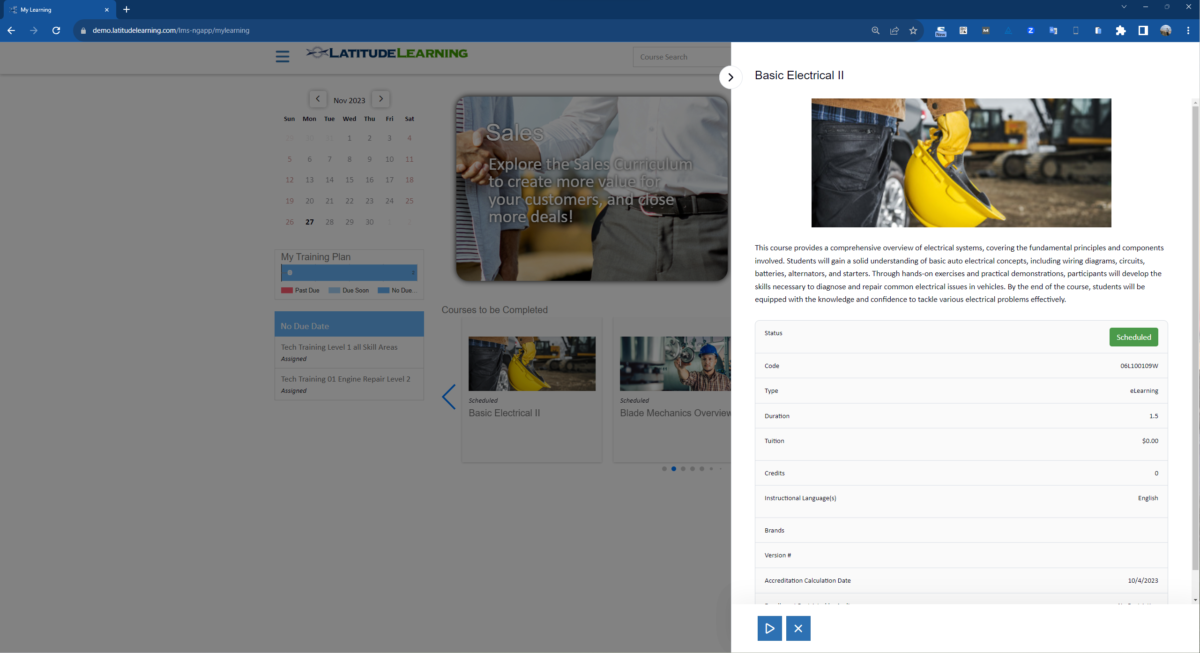
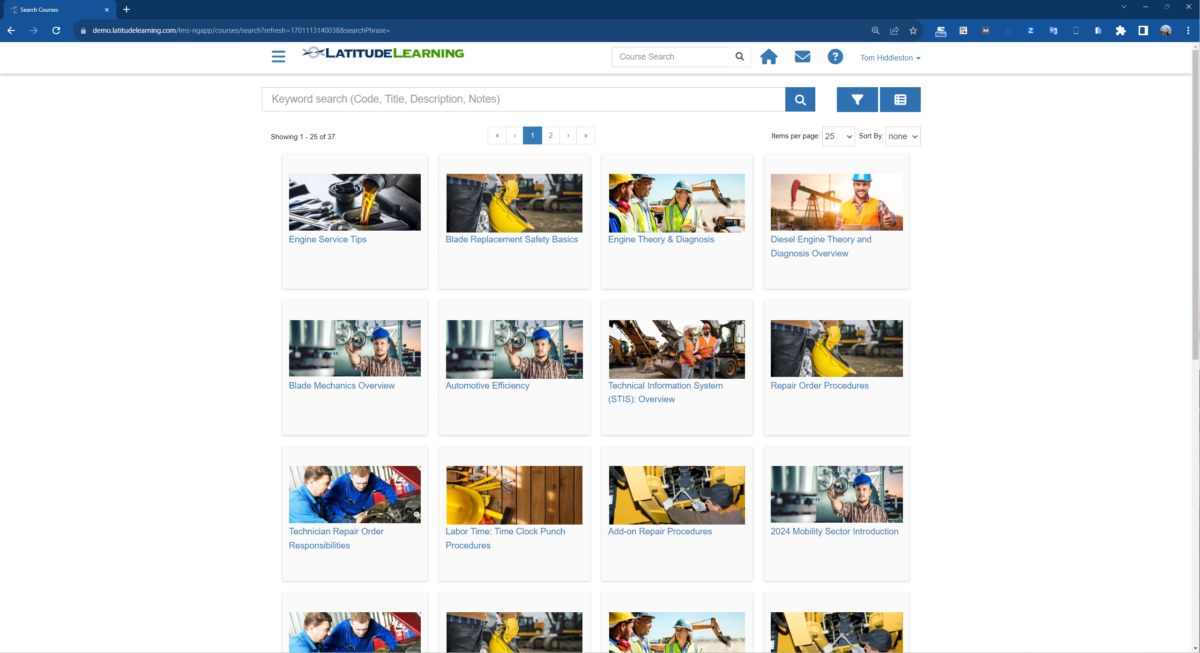
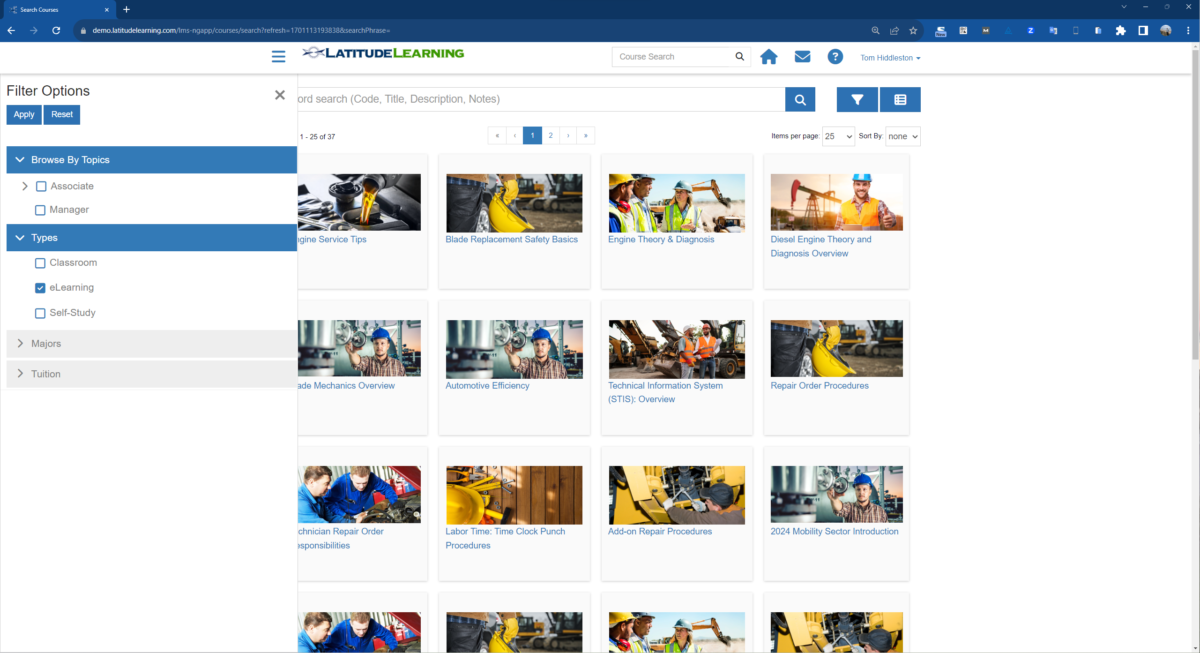
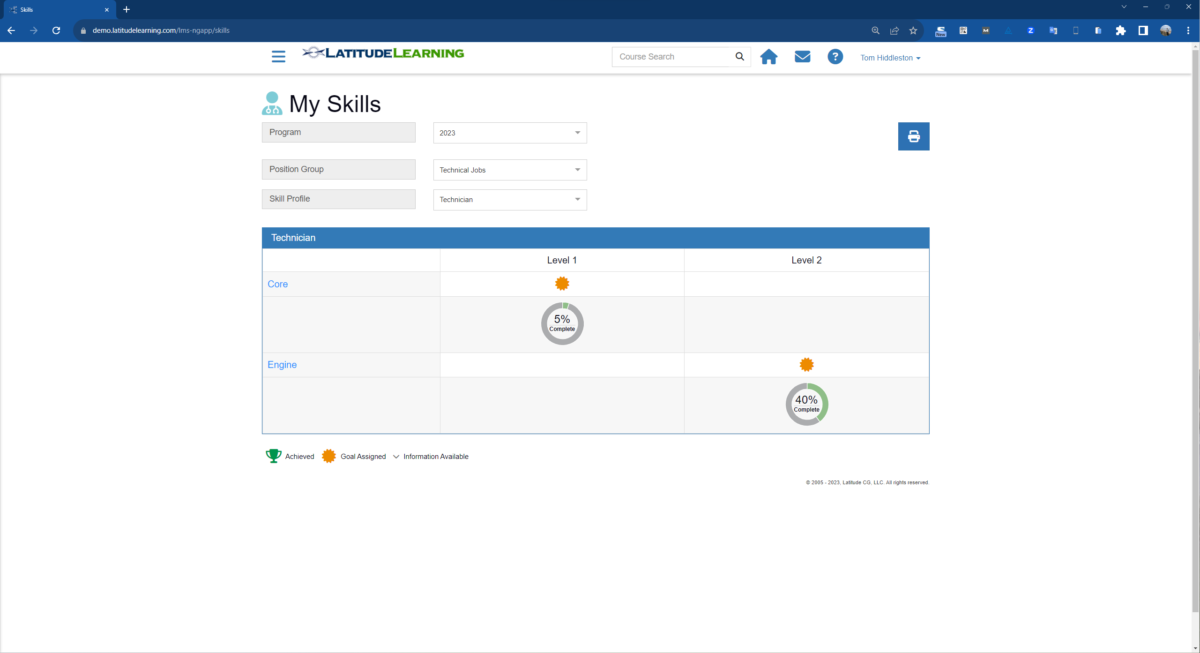
The LatitudeLearning LMS helps you manage partner training programs and ensure that your partners have the skills necessary to positively impact your business. Elegantly deliver training to your extended enterprise.
Training executives that want to improve the effectiveness of their partner training programs. Unlike traditional LMSes that focus on employee training, LatitudeLearning focuses on the challenges of training partners - resellers, services providers, franchisees, and customers.
LatitudeLearning is a partner learning platform that enables you to manage effective partner training programs. It addresses the unique challenges of partner training programs:
Large Partner Networks
Partner networks often span hundreds or thousands of global locations, organized into unique subnetworks. LatitudeLearning supports multiple partner networks, enabling efficient management of partner learning.
Brands and Product Lines
Not all partners handle every brand. LatitudeLearning associates brands with courses, certifications, skills, and partners, ensuring partners receive necessary brand-specific training.
Complex Certifications
Partner certifications needs to include course requirements, training objectives, and performance data. LatitudeLearning offers six certification rule types, allowing the creation of complex, performance-enhancing certifications.
Sophisticated Skill Profiles
Developing skilled partners requires role-based skill profiles and optimal skill mixes for partners. LatitudeLearning supports multiple skill profiles per role and optimal skills mixes per location.
Performance Metrics
LatitudeLearning supports the incorporation of performance metrics in certifications, skill profiles, training assignments and reporting
Multiple Field Support Networks
Partners receive support from various independently organized field networks. LatitudeLearning includes multiple field networks within the partner training solution.
Multi-Role Learners
Learners often have multiple roles and work for multiple partners. LatitudeLearning provides multiple profiles and roles, offering a unified training view for learners and segregated management views.
Internal & External Learners
Both partner and support employees require training. LatitudeLearning configures employees as a learner audience with unique and shared training content.
Audience-Specific Workflows
Training programs must cater to diverse learner audiences. LatitudeLearning offers tools to define and manage these audiences, tailoring learner workflows for each group.
LatitudeLearning gives you the tools you need to efficiently manage a high-impact partner training program and ensure that your partners have the skills necessary to positively impact your business.
But you need more than a great product, you need a great partner.
Our Delivery team has a 100% successful implementation record. Our Surefire Delivery method ensures that we implement your program On Time, On Budget and As Promised.
Our ClientCare team is there to answer your questions, resolve issues, and help you with program administration. In fact, over 99.95% of client reported bugs are resolved within 30 days!
Our high level of success is due to our partnership approach with every client and our knowledge of how to structure, execute and manage extended enterprise training programs.
Our award winning LatitudeLearning LMS combine with our world-class service is the reason we have a 95% client retention rate.
Expect more from you LMS partner. Experience LatitudeLearning.
Learn more about LatitudeLearning features that set it apart from the competition. Discover how its unique tools and capabilities enhance your processes.
Accounts
Add a new userAllows administrators to add new users directly to their LMS for streamlined user management.
Archive usersDeactivate and store user accounts without deleting them.
Based on eLearning Industry reviews from the past 4 years
Company Size
Areas of Focus
Top Industries
Elearning
23%
Financial Services
14%
Information Technology and Services
9%
Facilities Services
5%
Consumer Services
5%
Other
44%
Pricing
Learn more about LatitudeLearning's pricing options, cost, and plans so you can make a well-informed, business-wise decision on the best software to use for organization.
Franchisee Readiness & Launch Path
Contact us for pricing
Designed for new owners from agreement signing through grand opening and early stabilization.
Onboarding & Brand Alignment
Brand standards
Financial model & KPIs
Operating philosophy
Systems overview
Technology setup
Instructor-Led Training (Headquarters)
Core operating systems
Leadership expectations
Compliance standards
Customer/guest experience model
Performance metrics
Training Location On-the-Job Experience
Real-world execution
Shift management
Standards enforcement
Team oversight
Launch preparation
Launch Readiness Validation
Required course completion
Assessments passed
Operational readiness checklist
Manager staffing readiness
Go-live authorization
Outcome: Franchisees open aligned, confident, and operationally prepared.
Manager Leadership & Verification Path
Contact us for pricing
Managers are the multiplier in your system.
They do not just run shifts. They protect standards. They verify competence. They coach performance.
This path ensures managers can execute and enforce your system consistently across locations.
Operational Leadership
Opening and closing standards
Scheduling and labor management
Inventory control
Quality assurance
Compliance oversight
People Leadership
Coaching conversations
Performance management
Conflict resolution
Hiring and onboarding support
Culture reinforcement
Training & Skill Verification Authority
Conducting Observed Skill Verification
Documenting competency inside the LMS
Remediation workflows
Certification renewal tracking
Accountability enforcement
Outcome: Managers become certified standard-bearers who ensure consistency location to location.
Employee Skill-Based Certification Path
Contact us for pricing
Every employee role is built as a structured certification track.
No more tribal knowledge. No more “watch and learn.” No more inconsistent training by shift.
Is LatitudeLearning the right solution for you? Read verified LatitudeLearning reviews from people in industries like yours to make a confident choice.
Pros
Ease of Use & Navigation
Reviewers consistently mention how approachable the system is for all users. They noted it has a "clean layout and logical menus," making it "intuitive and easy to use both from an administrator as well as from a user perspective," even for individuals who are not very technical.
Feature Set & Functionality
The platform offers strong capabilities tailored for external and corporate networks. Users highlighted the usefulness of the bulk upload tool, mobile learning access, multi-tenant environmental setups for different regions, and reliable tracking for OSHA and compliance training.
Implementation & Onboarding
Organizations found deploying the platform to be efficient and smooth. Reviewers noted that it "made onboarding our partner network much easier than our previous LMS" and appreciated that the implementation team truly understood corporate training needs.
Customer Support & Service
The help desk is highly regarded by administrators for its responsiveness. Reviews highlight a "standout support team" and an attentive help desk that walks users through detailed setup questions and resolves backend errors quickly.
Value for Money / Pricing & ROI
The system is recognized as an economical choice for smaller operations. A director noted that "the biggest advantage for us is the affordability," providing a highly cost-effective way to launch partner training without breaking the budget.
Cons
Customization Limitations
Reviewers frequently complained about structural rigidity. Users found that "layouts and workflows are fairly rigid" and that it is challenging to tailor the platform to specific branding, wishing for ready-made page templates or integrated webpage builders so they wouldn't need HTML skills.
Reporting & Analytics Issues
The metrics tools are a prominent pain point for administrators. Multiple reviews explicitly stated that "the analytics and reporting tools are quite limited, and would greatly benefit from an optimization," noting that they occasionally struggle to generate reports with the exact information they need.
Integration & Technical Challenges
Admins encountered disruptive software glitches during routine management. Omissions and errors include courses prompting a legacy "requires Adobe Flash" error, courseware libraries failing to display properly, and the system generating duplicate accounts when self-registered users overlap with predesigned admin accounts.
Performance or Reliability Issues
System latency and display restrictions frustrated some users. Reviewers indicated that "searching for courses isn’t as fast or intuitive" and that, on occasion, courses take longer than expected to load and fail to display in full-screen mode.
Limited Features / Missing Tools
Users noted gaps in learner engagement and advanced capabilities. Reviews pointed out that the platform "lacks engagement features that could make training more interactive and motivating," while other senior reviewers noted the absence of advanced features necessary for complex, multi-functional LMS requirements.
Performance Overview
Overall Rating
88%
Usefulness
Usability
Customer Experience
Likelihood to Recommend
Great learning platform for our company training needs
Jul 2, 2025
Overall Rating
100%
Usefulness
Usability
Customer Experience
Likelihood to Recommend
What do you like best?
Using Latitude Learning has been a good experience because the platform is easy to log into and navigate even for people who are not very technical. I like that courses are clearly organized and it only takes a few clicks to get started.
What do you dislike?
No major hiccups or glitches. Overall it feels like the system was built to keep learning stress free and efficient.
Great for Partner Training, Though Some Workflows Could Be Smoother
Jun 2, 2025
Overall Rating
83%
Usefulness
Usability
Customer Experience
Likelihood to Recommend
What do you like best?
LatitudeLearning made onboarding our partner network much easier than our previous LMS. The bulk upload tool and mobile learning access have been particularly helpful for our dispersed teams. The interface feels intuitive for most daily tasks, and our partners were able to start self-training without much guidance.
What do you dislike?
ome processes require too many clicks to accomplish what should be a single step. Customization is also more limited than we’d like, making it difficult to match the platform to our branding and workflow needs.
Very intuitive and easy to use. Great fit for our company
May 8, 2025
Overall Rating
80%
Usefulness
Usability
Customer Experience
Likelihood to Recommend
What do you like best?
We started using Latitude almost 2 years ago. It is extremely intuitive and easy to use both from an administrator as well as from a user perspective.
What do you dislike?
There is nothing really to add to this section. Only thing that comes to mind is the plethora of existing and upcoming features, which means that we need to time to explore all of them and see whether we can apply them on our day to day routine.
Surprisingly robust LMS for partner training with standout support team
May 8, 2025
Overall Rating
83%
Usefulness
Usability
Customer Experience
Likelihood to Recommend
What do you like best?
I’ve found LatitudeLearning really helpful for managing training across partner networks. The platform supports multi-tenant setups, letting me spin up separate environments for different departments or regions, which saves us so much hassle.
What do you dislike?
Nothing much comes to mind, although navigating the dashboard can feel a bit overwhelming at first.
Easy to Llearn LMS, with occasional hiccups in enrollment processes
May 2, 2025
Overall Rating
85%
Usefulness
Usability
Customer Experience
Likelihood to Recommend
What do you like best?
Our team adapted to LatitudeLearning quickly thanks to its clean layout and logical menus. Uploading content and assigning courses is straightforward, and the system works well for managing our extended enterprise learners. The help desk has been very attentive, walking us through setup questions in detail.
What do you dislike?
On the admin side, deleting or updating courses sometimes leads to errors. While support helps fix these, it can slow down our timelines.
Latidue is an easy to use LMS with solid core features
Apr 30, 2025
Overall Rating
96%
Usefulness
Usability
Customer Experience
Likelihood to Recommend
What do you like best?
LatitudeLearning stands out for being user friendly and quick to pick up even for new admins. Uploading content launching courses and tracking progress feels smooth and dependable which is exactly what you need when launching partner or compliance training.
What do you dislike?
If pushed I might say that course enrollment can be quite confusing for learners at times. Nothing more to add to this section.
Solid LMS for small businesses, but limited llexibility in design
Apr 23, 2025
Overall Rating
87%
Usefulness
Usability
Customer Experience
Likelihood to Recommend
What do you like best?
The biggest advantage for us is the affordability. For a smaller business like ours, LatitudeLearning offered a cost-effective way to launch partner training without breaking the budget. The learning curve was minimal, and the ability to manage both in-house and partner training from one place is a huge plus.
What do you dislike?
Layouts and workflows are fairly rigid, which sometimes means working around the system instead of with it. Searching for courses isn’t as fast or intuitive as we’d prefer, and on occasion, courses take longer than expected to load.
Great for partner training but lacks customization options
Apr 11, 2025
Overall Rating
88%
Usefulness
Usability
Customer Experience
Likelihood to Recommend
What do you like best?
Latitude Learning is excellent for managing partner training programs.It's user-friendly and supports various content types, enhancing the learning experience.
What do you dislike?
The customization options are limited. We find it challenging to tailor the platform to our specific branding and training needs.
Latitude Learning is a great platform, but reporting tools need an update.
Mar 24, 2025
Overall Rating
88%
Usefulness
Usability
Customer Experience
Likelihood to Recommend
What do you like best?
The interface is intuitive, making it easy for both administrators and learners to navigate. The platform supports a big variety of content types.
What do you dislike?
The analytics and reporting tools are quite limited, and would greatly benefit from an optimization.
Effective for compliance training but lacks engagement features
Jan 16, 2025
Overall Rating
81%
Usefulness
Usability
Customer Experience
Likelihood to Recommend
What do you like best?
Latitude Learning is effective for delivering compliance training programs. The platform ensures that all necessary training is completed and tracked efficiently.
What do you dislike?
The platform lacks engagement features that could make training more interactive and motivating for learners. I think that additional elements are required to keep training interesting on more or less a boring topic for most.
You've viewed 10 out of 22
Alternatives
Not a match? Find software alternatives that better suit your needs and compare them to discover the one that's right for you.