


Trending Learning Management Systems (LMS)
About the vendor
Located In Perth, AU
Founded In 2002
Customers
  • Academic
  • Freelancers
  • Large Enterprises (>10,000)
  • Non Profits
  • Public Administrations
  • Small/Medium Businesses
Use Cases
  • Academic Learning
  • Compliance Training
  • Continuing Education
  • Customer Training
  • Employee Training
  • Microlearning
  • Workforce Development
Industries
  • Education Management
  • Education: K-12
  • Higher Education
  • Primary/Secondary Education
  • Professional Training & Coaching
Deployment
  • Mobile Application
  • Self-Hosted Cloud-based
  • Self-Hosted System
  • Software as a Service / Cloud
Platforms
  • Linux
  • Mac
  • Windows
Browsers
  • Apple Safari
  • Google Chrome
  • Internet Explorer
  • Mozilla Firefox
Training
  • Documentation
  • In Person
  • Live Online
  • Online Tutorials
  • Webinars
Support
  • FAQ
  • Knowledge Base
  • Online Community
Supported Specifications
  • AICC
  • IMS LTI
  • IMS QTI
  • SCORM 2004
  • xAPI/Tin Can API
Languages Supported
  • Arabic
  • German
  • English
  • Spanish
  • French
  • Italian
  • Japanese
  • Korean
  • Dutch
  • Portuguese
  • Russian
  • Chinese
LinkedIn Page
@Linkedin
X
@X
Change your privacy settings to see the content.
In order to watch this video you need to have advertising cookies enabled.
You can adjust your cookie preferences here.

What is Moodle?

With 20+ years of expertise in education technology, Moodle is an open-source, secure and scalable learning management system (LMS) that integrates seamlessly with other platforms and can be customised for any teaching or training purposes in over 160 languages. As a B-Corp certified solution, it is suitable for K-12, higher education, vocational training, corporates, and all types of enterprise learning. From improving education and learning outcomes to streamlining training, onboarding, and compliance management, Moodle helps institutions and organisations build more active and engaging online learning spaces.

Designed for flexibility, Moodle can be customised to any organisation's size, structure, and needs while integrating with the organisation’s existing software ecosystem. Moodle's world-leading privacy and security features help protect learner privacy, achieve compliance, and control their infrastructure and data. When organisations choose Moodle, they become part of a global community of people who love Moodle's online learning platform and its values. Organisations can get support from Moodle's active community forums, access Moodle's certified integrations, and explore over 2000 open-source plugins. For expert advice and end-to-end support and service, they can contact one of the Moodle Certified Partners and Service Providers within Moodle's global network. At Moodle, we celebrate the hundreds of millions of learners worldwide and the educators and trainers who encourage their lifelong learning. Collectively, we empower educators to improve our world with open-source LMS software.


Overview of Moodle benefits

Support all types of learning
Whether you're delivering fully online courses, a blended learning experience, self-paced modules, or collaborative learning, Moodle adapts to your needs. Designed by a global community representing diverse educational and corporate sectors, Moodle supports a wide range of learning approaches and perspectives.

Learn anywhere, anytime
With the Moodle App, learners can access course content, submit assignments, and complete activities directly from their mobile devices. Push notifications ensure they stay informed and engaged.

Commitment to accessibility
Accessibility is at the heart of Moodle. We conduct accessibility audits and align development with recognized standards like WCAG 2.1. Built-in accessibility tools help you create courses and content that support all learners.

Safeguard your system and data
Security is a top priority. As an open-source platform, Moodle benefits from a global network of contributors who continuously review and enhance security. Updates and fixes are applied across past releases to safeguard as many sites as possible.

Protect your privacy
Moodle’s advanced privacy features allow you to configure your site to comply with local regulations, including industry-leading GDPR compliance for education platforms.

Features

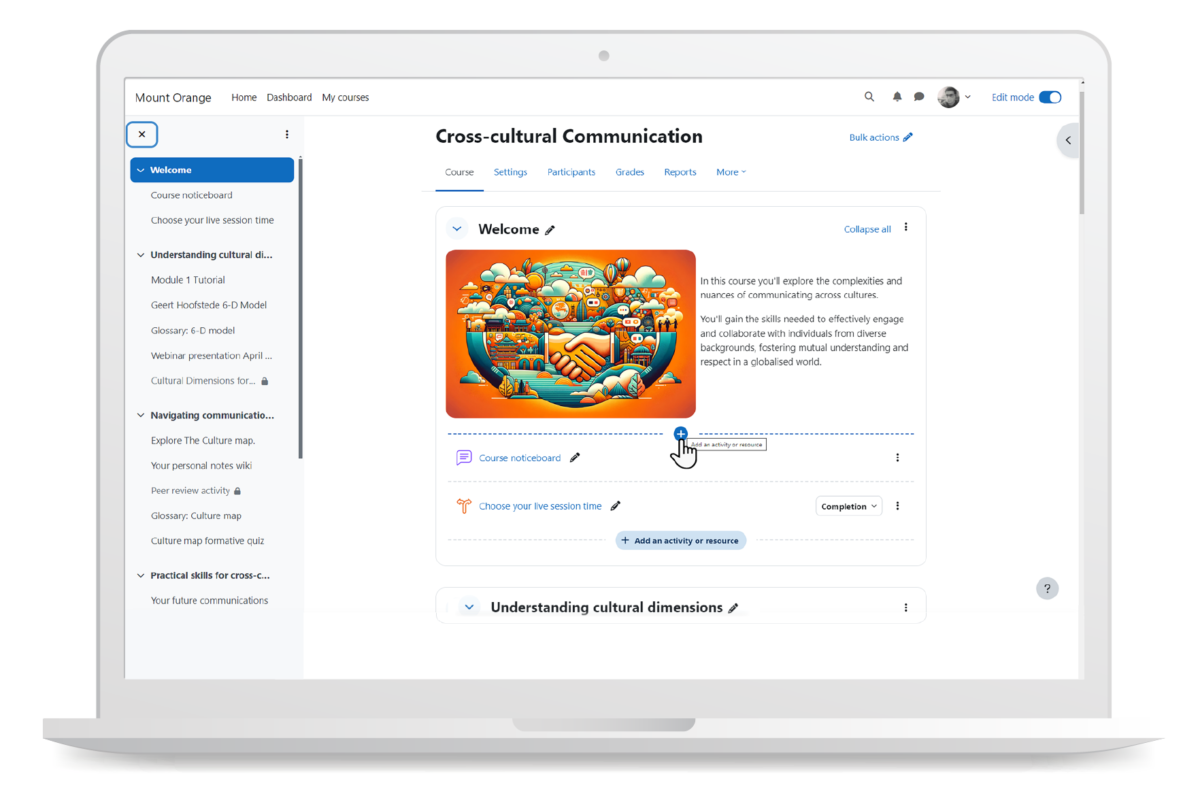
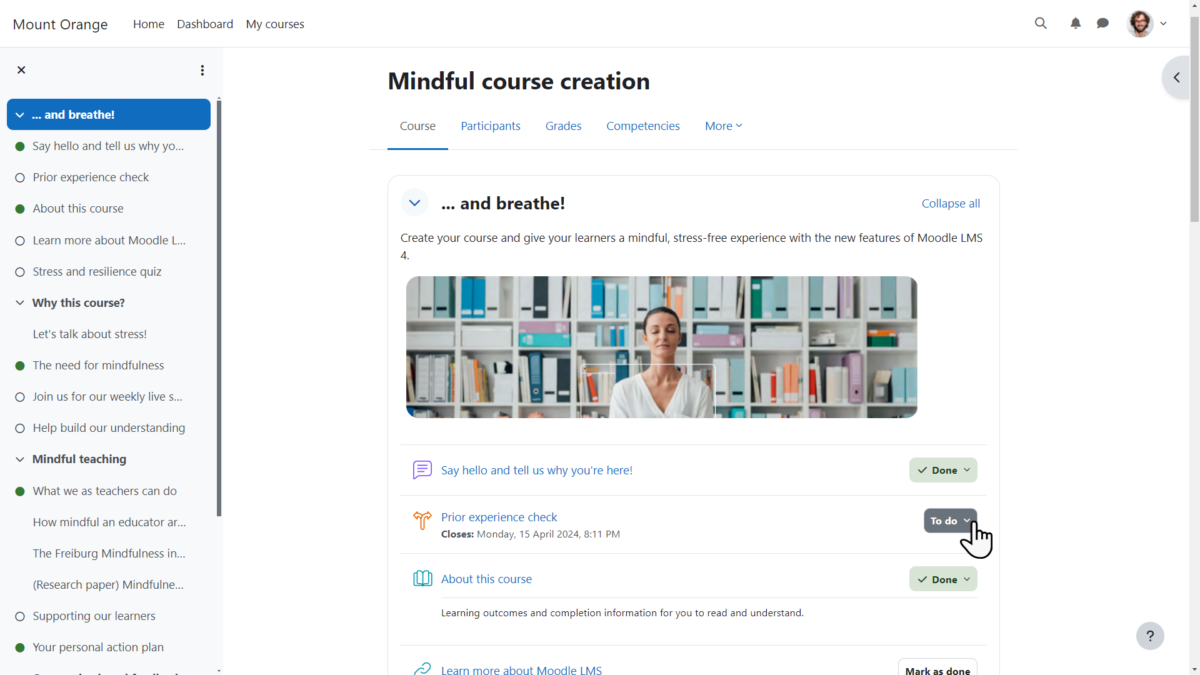
Learn more about Moodle features that set it apart from the competition. Discover how its unique tools and capabilities enhance your processes.

Accounts

Add a new user Allows administrators to add new users directly to their LMS for streamlined user management.
Archive users Deactivate and store user accounts without deleting them.
Browse list of users View all registered users in the system.
Bulk User Actions Manage multiple user accounts at once.
Custom/Mandatory User profile fields Define required or optional fields for user profiles.
Upload users Import users via spreadsheet.

Activity grading

Course History View completed and ongoing courses for each user.
Gradebook Centralized view of all learner grades.
Gradebook audit trail Track all grade changes over time.
Gradebook comments Add comments to learner grades.
Manual Grading ("Marking") Manually review and grade submissions.
Multiple grading scales Support for different grading systems.

AI Features

Adaptive Learning
AI Powered
Chatbot
Content development Generate or enhance educational content.
Content Translation
Intelligent recommendations
Natural Language Processing
Predictive analysis
Quiz generation
Text-to-speech Converts written content to audio.

Authentication

Active Directory/LDAP Integration Authenticate users via corporate directories.
Custom User login page Personalized login interface.
Manual Accounts
No login Allow content access without authentication.
SAML2/API Integration
Self-Registration Users create their own accounts.
Self-Registration w. Admin Confirmation User signup requires admin approval.

Categories

Assign Courses to categories Organize courses under specific categories.
Create new Categories Add new organizational groups for courses.
Manage Categories Edit, delete, or update categories.
Priced Categories (Bundle)

Certificate management

Certification life-cycle Track generation, renewal, and expiration.
Manage certification templates Customize certificate formats.
Predefined certification templates Use ready-made certificate designs.
Unique Certificate by Course
Unique Certification by Curriculum Different certificate per learning path.

Compliance management

Certificate expiration notifications Alerts when certificates are near expiry.
Certification Expiration Management Manage timelines and renewal rules.
Due Date notifications Notify learners of upcoming deadlines.
Soft/Hard Stop Due Dates Allow or block access after due dates.

Course Creation

Assignments Engine Create and manage learner assignments.
Built-In Authoring Tool Create content directly inside the platform.
Can reuse PPTs, PDFs, Videos Upload and repurpose existing material.
Changing Course default settings Modify core course configuration.
Consume online video content Embed or stream video lessons.
Content Library
Course backup Options Backup and restore course data.
Drag & Drop Interactions Interactive content creation.
Hybrid Learning Courses
Learning Paths (Curriculums) Sequence courses into structured programs.
LRS
Scheduling LIVE events Plan webinars or virtual classes.
Survey Engine Create learner surveys.
Tests Engine Build quizzes and exams.
Upload courses Import courses into the platform.

Customization

Mobile Learning Support Optimize learning for mobile devices.
Personalized views Customize interface per user.

Enrollment

Attendance Tracking Track presence in sessions.
Automated Enrollment (based on User data) Enroll users automatically by rules.
Guest Access Settings Allow non‑registered users limited access.
Manual Enrollment Manually assign users to courses.
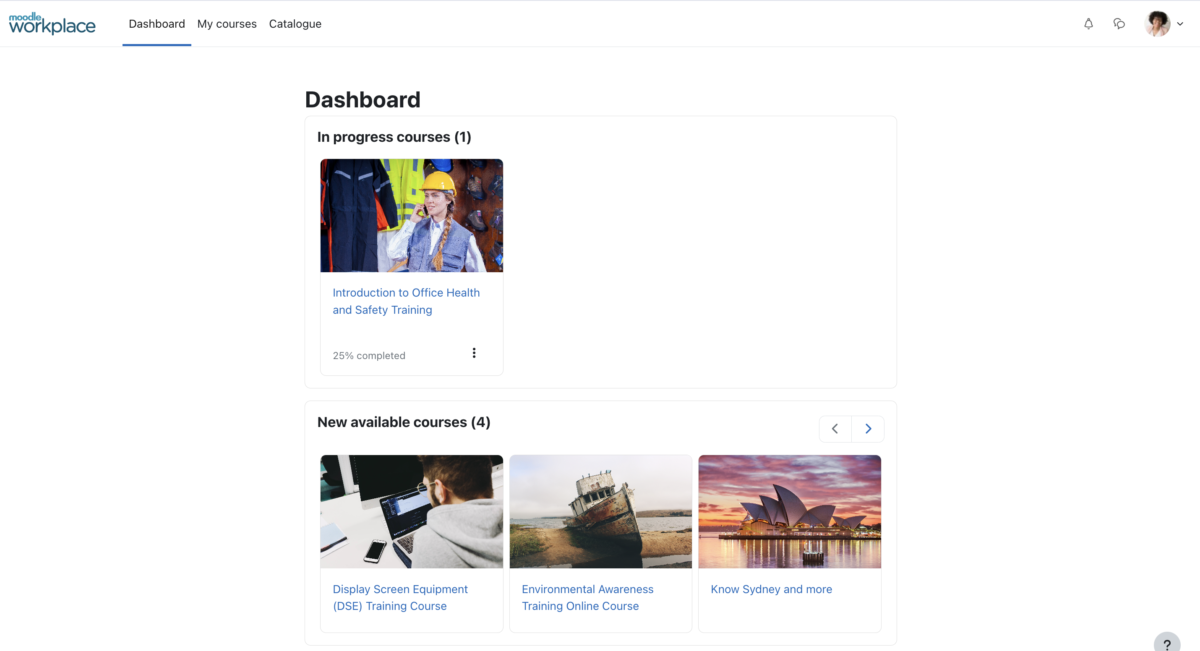
Progress Tracking Monitor learner progress in real time.
Self-enrollment Allow learners to join courses freely.
Self-enrollment (with a PIN #) Require a PIN for enrollment.
Survey enrollment (based on a response) Enroll based on survey answers.

Format

Course Discussions Forum-style communication.
Gamification Format Add game elements to courses.
Learner Upload Allow learners to upload content.
LIVE Chat Option Real-time messaging inside courses.
Social Format Social interaction‑focused layout.
Topics Format Organize course by topics.
Video Conferencing Integration Connect with tools like Zoom/Teams.
Weekly Format Course structured week by week.

Gamification

Badge customization Design custom achievement badges.
Badges Award digital achievements.
Customize Gamification mechanics Modify points, levels, and rewards.
Leaderboards Rank learners based on achievements.
Levels Define progression stages.
Points Award points for activity.
Rewards Offer incentives for achievements.

Interface options

Additional external pages Add custom pages to the platform.
Block Management Control layout blocks/widgets.
Calendar Settings Configure system calendar.
Language settings Set default or custom system language.
Learning Accessibility
Location Settings Configure regional settings.
Media embedding settings Control embedding permissions.
Multilanguage Support Provide support in multiple languages.
Ready-made Themes Prebuilt platform designs.

Learning types

Asynchronous Instructor-led Instructor-led but not in real time.
Asynchronous Self-paced Learners progress independently.
Blended Learning Mix online and face‑to‑face training.
Synchronous Virtual Classroom

Mobile learning

Offline (disconnected Mobile app) Access mobile content without internet.
Online (Internet connected) Access content with full connectivity.

Offline

Support for offline access to content Downloadable materials for offline study.

Reports

Automated Report Scheduling Send reports automatically.
Canned Reports Prebuilt report templates.
Dashboards and Graphic Reports
Email delivery of Reports Send reports via email.
Exporting Reports in variety of formats Export data as PDF, Excel, etc.
Grading Report Settings Customize grade reporting.
Learning Analytics Tools
Training Record Maintenance

Roles

Define roles Create custom permission roles.
Role Assignment Assign roles to users.
System Permissions per role Control access rights.
Teams and Team Hierarchies Organize users into teams.

Security

Anti-spam Protect forms and communication.
Anti-virus Scan uploaded files for threats.
IP Blocker Block specific IP ranges.
Restrict registration to specific domains Limit signups by email domain.
Strong Passwords Enforce secure password rules.

Shopping cart

Built-In Shopping Cart
Shopping Cart as Plug-In Add commerce via plugin.

System reports

Automatic email reports in predefined intervals Send periodic system reports.
Custom reports generator Create custom report layouts.
Email notification settings Control notification rules.
Live Logs Monitor system activity in real time.
Who uses Moodle ?

Based on eLearning Industry reviews from the past 4 years

Company Size

Areas of Focus

Top Industries

Education - Higher
37%
Elearning
20%
Education - Secondary
7%
Higher Education
4%
Information Technology and Services
3%
Other
29%
Pricing

Learn more about Moodle's pricing options, cost, and plans so you can make a well-informed, business-wise decision on the best software to use for organization.

Pricing Model
  • Free
  • Free Trial
  • Subscription
License
  • Free
  • Open Source
  • Paid
Starting Price
  • Contact Moodle for pricing
Free Trial
  • Yes

Moodle is provided freely as Open Source software, under the GNU General Public License. Anyone can adapt, extend or modify Moodle for both commercial and non-commercial projects without any licensing fees and benefit from the cost-efficiencies, flexibility and other advantages of using Moodle. Direct download can be done here: https://download.moodle.org/ However, Moodle Certified Partners and Service Providers can partner with you to adapt Moodle for your needs and provide expertise in customisations, hosting, support and training.

Integrations

Learn more about Moodle's integration options.

API

API

BigBlueButton

BigBlueButton

Dropbox

Dropbox

G Suite

G Suite

Google Calendar

Google Calendar

Office 365

Office 365

OneDrive

OneDrive

Outlook Calendar

Outlook Calendar

Paypal

Paypal

Zapier

Zapier

Zoom

Zoom

Moodle logo
Have you used Moodle before?
Answer a few questions and help the community to make the best decisions
Reviews

Is Moodle the right solution for you? Read verified Moodle reviews from people in industries like yours to make a confident choice.

Pros
  • Customization & Flexibility Moodle’s open-source nature allows tailoring courses, roles, and settings to diverse educational needs. Reviewers praise its adaptability and extensive configuration options.
  • Feature Set & Functionality Users appreciate the robust learning tools, such as quizzes, assignments, forums, grading, content management, and integrations.
  • Community & Support Many mention Moodle’s active community, documentation, and resources as helpful. Some also highlight responsive support.
  • Value for Money Being open-source, many see it as cost-effective and a great alternative to proprietary LMSs.
  • Ease of Use (once familiar)  A smaller segment of users finds Moodle manageable and straightforward after initial learning, especially for organizing courses and assignments.
Cons
  • Complexity & Learning Curve The most frequent complaint: Moodle has a steep learning curve, especially for new users. Navigating the interface and using advanced features is challenging.
  • User Interface / UX Issues Many reviewers describe the interface as outdated, cluttered, or visually unappealing. Course creation and grading tools can feel cumbersome.
  • Performance / Workflow Challenges Users report that tasks like uploading content, setting quizzes, or grading require multiple steps and can be frustrating.
  • Technical Customization Barriers While customizable, some users struggle to achieve a polished look or specific workflows without technical skills.
  • Initial Setup / Onboarding Some reviewers note that initial configuration or setup is difficult for non-technical users.
Performance Overview
Overall Rating 77%
  • Usefulness
  • Usability
  • Customer Experience
  • Likelihood to Recommend

Moodle is a flexible and widely used open-source LMS

Jun 9, 2026

Overall Rating 83%
  • Usefulness
  • Usability
  • Customer Experience
  • Likelihood to Recommend
What do you like best? What I like most about Moodle is its flexibility and customization. It provides a wide range of features for managing courses, tracking learning progress, and supporting both learners and administrators, while remaining open-source and cost-effective
What do you dislike? What I like the least about Moodle is that its user interface can feel less modern and intuitive compared to some newer LMS platforms. Customization and advanced features may also require additional technical knowledge and administration effort
Reviewer photo

Reviewer verified by LinkedIn

Industry : Mining & Metals | Company size : 51-200 | Level : Senior | Focus : Information Technology | Experience using the software : Less than 6 months as User, Administrator, Member of the deployment/customization team, Member of the procurement team

Moodle is a versatile and user-friendly learning management system that facilitates online education

Apr 16, 2024

Overall Rating 75%
  • Usefulness
  • Usability
  • Customer Experience
  • Likelihood to Recommend
What do you like best? What stands out about Moodle is its versatility and adaptability, catering to diverse educational needs with customizable features, robust learning management tools, and extensive community support. Its open-source nature fosters innovation and collaboration, empowering educators worldwide to create engaging and effective learning experiences for their students.
What do you dislike? One aspect I find challenging with Moodle is its initial learning curve, particularly for new users. Navigating the interface and understanding its various features can be overwhelming. Additionally, customizing the platform to specific educational needs may require technical expertise, which can pose a barrier for some educators.
Reviewer photo

KMS IT B.

Industry : Apparel & Fashion | Company size : 1-10 | Level : Manager | Focus : Business Development | Experience using the software : Less than 6 months as User

Terrible and outdated not user friendly and made me tear up.

Oct 21, 2023

Overall Rating 40%
  • Usefulness
  • Usability
  • Customer Experience
  • Likelihood to Recommend
What do you like best? Nothing. It’s was shockingly outdated. This is my 4th trial platform in 30 days. This one made me cry. It made the other 3 look like gold. They were terrible and this was the worst experience of them all.
What do you dislike? I honestly cannot decide what I like the least. Every aspect of the experience was bad. It’s hard to believe this was created by people with IT experience. I am learning IT at 52 years and my designs are better than this and I’m learning from YouTube videos.
Reviewer photo

Reviewer verified by LinkedIn

Industry : Elearning | Company size : 1-10 | Level : Owner | Focus : Administrative | Experience using the software : Free Trial as Administrator

User unfriendly, sloppy, outdated, looks terrible.

Oct 18, 2023

Overall Rating 37%
  • Usefulness
  • Usability
  • Customer Experience
  • Likelihood to Recommend
What do you like best? It gives a lot of testing options, and some customization is available... And really I don't have much more good things to say about it
What do you dislike? Grading system settings are too complicated, and it is hard to make the course look nice. It has an inconvenient navigation system. Too many windows need to be passed before I can upload anything. Uploading pre-made tests is a nightmare as well as making them from scratch in Moodle. Picture uploading is poorly done too. The user interface is garbage.
Reviewer photo

Reviewer verified by LinkedIn

Industry : Education - Higher | Company size : 1,001-5,000 | Level : Manager | Focus : Education | Experience using the software : More than 1 year as User, Administrator

The user interface looks awful and is difficult to use. It is extremely disorganized.

Oct 3, 2023

Overall Rating 47%
  • Usefulness
  • Usability
  • Customer Experience
  • Likelihood to Recommend
What do you like best? It serves its purpose as a platform to access course documents and assignments. Calendar is functional.
What do you dislike? The user interface is horrible to use, everything is disorganized and it is extremely hard to find things. There are a lot of unnecessary steps to certain things, and trying to find information can be a hassle.
Reviewer photo

Reviewer verified by LinkedIn

Industry : Education - Higher | Company size : 1,001-5,000 | Level : Partner | Focus : Education | Experience using the software : Less than 6 months as User

it is customizable, requires some practice to set up the way you want

Jun 12, 2023

Overall Rating 88%
  • Usefulness
  • Usability
  • Customer Experience
  • Likelihood to Recommend
What do you like best? Support is very responsive They offer lots of webinars and Q&A opportunities It is customizable I can set up various roles and permissions
What do you dislike? not always intuitive, though we are moving to a new version next week - 4.1 - from what I have seen so far, I think I will like the improvements
Reviewer photo

Paula C.

Industry : Education - Higher | Company size : 51-200 | Level : Manager | Focus : Education | Experience using the software : More than 1 year as User, Administrator, Member of the deployment/customization team

Is a open source, with a good support and very flexible and a lot of resources for the e-learning.

May 16, 2023

Overall Rating 89%
  • Usefulness
  • Usability
  • Customer Experience
  • Likelihood to Recommend
What do you like best? flexibility, the support team, the easy documentation a lot of resources and activities and also is easy to use.
What do you dislike? I still can't say there's anything I don't like, what I lack is time to explore all the features it provides and take full advantage of the facilities it offers.
Reviewer photo

Reviewer verified by LinkedIn

Industry : Education - Higher | Company size : 51-200 | Level : Manager | Focus : Education | Experience using the software : More than 1 year as User, Administrator

It has it all from a pedagogical perspective, but the UX is NOT desirable

Jun 13, 2022

Overall Rating 62%
  • Usefulness
  • Usability
  • Customer Experience
  • Likelihood to Recommend
What do you like best? The endless pedagogical possibilities regarding both knowledge, skills and competencies. It is truly designed with learning/teaching affordances in mind!
What do you dislike? Try making a new user, both designer and learner, navigate in Moodle. It is NOT intuitive as we all expect today and for the future.
Reviewer photo

Reviewer verified by LinkedIn

Industry : Elearning | Company size : 11-50 | Level : Consultant | Focus : Information Technology | Experience using the software : More than 1 year as User, Administrator

Moodle logo
Moodle — Jun 27, 2022

Thank you for your review. We appreciate your feedback. At Moodle, we are constantly working on new ways to improve our solutions to deliver the best learning outcomes. Discover Moodle 4.0's fresh and intuitive user experience. https://bit.ly/3bgVsDC Regards.

Moodle is not as intuitive or clear as it could be

Jun 11, 2022

Overall Rating 37%
  • Usefulness
  • Usability
  • Customer Experience
  • Likelihood to Recommend
What do you like best? I do like some of the 'activities' tools that you can implement, although it could be much easier to implement them if it were more straightforward.
What do you dislike? The number of steps it takes to complete almost any task. Some are not readily evident. Testing is very difficult, and the Gradebook is hard to get through, organize, and/or view.
Reviewer photo

Reviewer verified by LinkedIn

Industry : Higher Education | Company size : 51-200 | Level : Director | Focus : Education | Experience using the software : 6-12 months as User, Administrator

Moodle logo
Moodle — Jun 27, 2022

Thank you for your review. We appreciate your feedback. At Moodle, we are constantly working on new ways to improve our solutions to deliver the best learning outcomes. Discover Moodle 4.0's fresh and intuitive user experience. https://bit.ly/3bgVsDC Regards.

Moderately useful LMS that is pretty outdated in the current environment

Jun 10, 2022

Overall Rating 50%
  • Usefulness
  • Usability
  • Customer Experience
  • Likelihood to Recommend
What do you like best? The option for multitenancy is great to have. The ability to customise colour and apply different themes is a nice feature.
What do you dislike? The amount of plug-ins to give you the functionality yuou need is a pain. Just been looking at multi-factor authentication. It looks as though some of the functionality is buggy. Why do I want to bother with this when I can buy a platform that already has it all?
Reviewer photo

Reviewer verified by LinkedIn

Industry : Information Technology and Services | Company size : 51-200 | Level : Manager | Focus : Education | Experience using the software : More than 1 year as Administrator

Moodle logo
Moodle — Jun 27, 2022

Thank you for your review. We appreciate your feedback. At Moodle, we are constantly working on new ways to improve our solutions to deliver the best learning outcomes. Discover Moodle 4.0's fresh and intuitive user experience. https://bit.ly/3bgVsDC Regards.

You've viewed 10 out of 106

Alternatives

Not a match? Find software alternatives that better suit your needs and compare them to discover the one that's right for you.

Moodle

3.9/5

360Learning

4.7/5
Compare

Absorb

4.8/5
Compare

SkyPrep LMS

4.4/5
Compare

Connecteam - Mobile Teams LMS

4.0/5
Compare

TalentLMS

4.8/5
Compare

Acorn

4.6/5
Compare

GoSkills

4.4/5
Compare
FAQs

Learn more about Moodle.

Moodle is an open-source Learning Management System (LMS) used by organizations, universities, and training providers to create, manage, and deliver online learning experiences.  

Moodle is ideal for educational institutions, corporate training teams, NGOs, and organizations that need a highly customizable and scalable LMS.

Yes, Moodle is open-source and free to download. However, costs may apply for hosting, customization, plugins, support, or working with a Moodle Certified Service Provider. Â