Trending Learning Management Systems (LMS)
About the vendor
-
Customers
  • Academic
  • Freelancers
  • Small/Medium Businesses
Use Cases
  • Academic Learning
  • Customer Training
  • Employee Training
  • Microlearning
  • Social Learning
  • Training Companies
Industries
  • Arts and Crafts
  • Education Management
  • Entertainment
  • Financial Services
  • Higher Education
  • Management Consulting
Deployment
  • Software as a Service / Cloud
Platforms
  • Linux
  • Mac
  • Windows
Browsers
  • Apple Safari
  • Google Chrome
  • Internet Explorer
  • Mozilla Firefox
Training
  • Documentation
  • Live Online
  • Online Tutorials
Support
  • Business Hours
  • Email
Supported Specifications
Languages Supported
-
LinkedIn Page
-
X
-
Change your privacy settings to see the content.
In order to watch this video you need to have advertising cookies enabled.
You can adjust your cookie preferences here.

What is Seturon LMS?

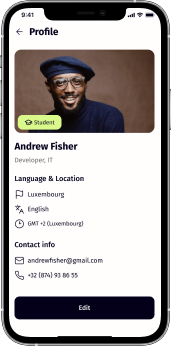
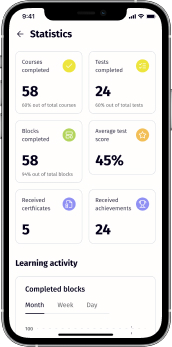
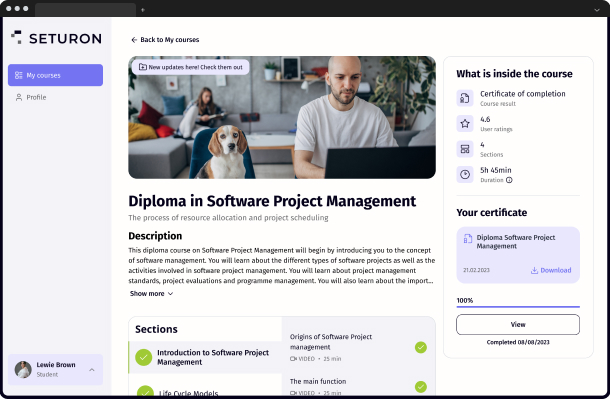
Seturon is a new-generation adaptive cloud-based educational platform that is comfortable for students and course administrators to use. It works great on mobile and desktop, offering a flawless learning experience.


Adaptive learning paths. We developed tools and a user-friendly interface that provide deep personalisation of all student activities.

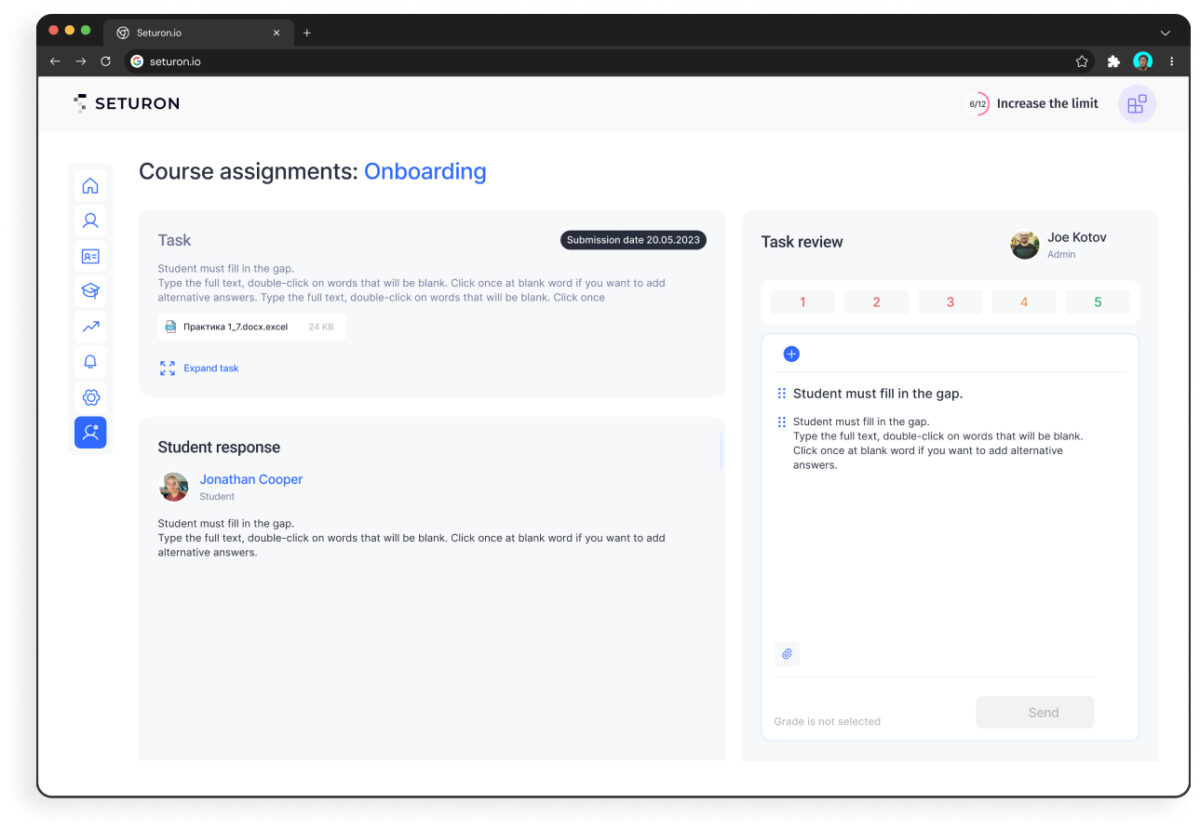
Various tasks. Numerous test and assignment types on our platform enable students to learn by doing, which is more engaging and effective

Microlearning. Our courses are divided into sections and smaller blocks
for easier memorization

Social learning. Get feedback from students on the course overall or
on individual course blocks with our reaction feature.

Overview of Seturon LMS benefits

Course editor

  • 10 types of blocks, including longreads, assignments, team tasks, payments and certificates.
  • 5 types of self-assessment questions.
  • 31 interactive block options.
  • 1-to-1 or group live sessions.


Adaptive learning

  • Design pre-assessments which will lead students to different lessons or modules, depending on the result.
  • Create learning tracks to create a personalised experience.
  • Add choices to let your students create their own learning tracks.


Payments

  • Add a paywall anywhere in the course so you can showcase a portion of its content for free if you like.
  • Add a block with a registration option to share a module or two for any user on the internet.
Features

Learn more about Seturon LMS features that set it apart from the competition. Discover how its unique tools and capabilities enhance your processes.

Accounts

Add a new user Allows administrators to add new users directly to their LMS for streamlined user management.
Archive users Deactivate and store user accounts without deleting them.
Browse list of users View all registered users in the system.
Bulk User Actions Manage multiple user accounts at once.
Custom/Mandatory User profile fields Define required or optional fields for user profiles.
Upload users Import users via spreadsheet.

Activity grading

Course History View completed and ongoing courses for each user.
Gradebook Centralized view of all learner grades.
Gradebook audit trail Track all grade changes over time.
Gradebook comments Add comments to learner grades.
Manual Grading ("Marking") Manually review and grade submissions.
Multiple grading scales Support for different grading systems.

AI Features

Adaptive Learning Adjust learning paths based on learner behavior.
AI Powered
Chatbot
Content development
Content Translation
Intelligent recommendations
Natural Language Processing
Predictive analysis
Quiz generation
Text-to-speech

Authentication

Active Directory/LDAP Integration
Custom User login page
Manual Accounts
No login Allow content access without authentication.
SAML2/API Integration
Self-Registration Users create their own accounts.
Self-Registration w. Admin Confirmation

Categories

Assign Courses to categories Organize courses under specific categories.
Create new Categories Add new organizational groups for courses.
Manage Categories Edit, delete, or update categories.
Priced Categories (Bundle) Sell course bundles grouped by category.

Certificate management

Certification life-cycle Track generation, renewal, and expiration.
Manage certification templates
Predefined certification templates Use ready-made certificate designs.
Unique Certificate by Course
Unique Certification by Curriculum

Compliance management

Certificate expiration notifications Alerts when certificates are near expiry.
Certification Expiration Management Manage timelines and renewal rules.
Due Date notifications Notify learners of upcoming deadlines.
Soft/Hard Stop Due Dates Allow or block access after due dates.

Course Creation

Assignments Engine Create and manage learner assignments.
Built-In Authoring Tool Create content directly inside the platform.
Can reuse PPTs, PDFs, Videos Upload and repurpose existing material.
Changing Course default settings Modify core course configuration.
Consume online video content Embed or stream video lessons.
Content Library A repository of pre-made templates, existing content, multimedia sets, and learning outlines.
Course backup Options Backup and restore course data.
Drag & Drop Interactions Interactive content creation.
Hybrid Learning Courses Blend online and in‑person lessons.
Learning Paths (Curriculums) Sequence courses into structured programs.
LRS Learning Record Store for xAPI data.
Scheduling LIVE events Plan webinars or virtual classes.
Survey Engine Create learner surveys.
Tests Engine Build quizzes and exams.
Upload courses

Customization

Mobile Learning Support Optimize learning for mobile devices.
Personalized views Customize interface per user.

Enrollment

Attendance Tracking Track presence in sessions.
Automated Enrollment (based on User data) Enroll users automatically by rules.
Guest Access Settings Allow non‑registered users limited access.
Manual Enrollment Manually assign users to courses.
Progress Tracking Monitor learner progress in real time.
Self-enrollment Allow learners to join courses freely.
Self-enrollment (with a PIN #) Require a PIN for enrollment.
Survey enrollment (based on a response) Enroll based on survey answers.

Format

Course Discussions Forum-style communication.
Gamification Format Add game elements to courses.
Learner Upload Allow learners to upload content.
LIVE Chat Option
Social Format Social interaction‑focused layout.
Topics Format Organize course by topics.
Video Conferencing Integration
Weekly Format

Gamification

Badge customization
Badges
Customize Gamification mechanics
Leaderboards
Levels
Points Award points for activity.
Rewards Offer incentives for achievements.

Interface options

Additional external pages Add custom pages to the platform.
Block Management Control layout blocks/widgets.
Calendar Settings
Language settings
Learning Accessibility Tools for users with disabilities.
Location Settings Configure regional settings.
Media embedding settings Control embedding permissions.
Multilanguage Support
Ready-made Themes Prebuilt platform designs.

Learning types

Asynchronous Instructor-led Instructor-led but not in real time.
Asynchronous Self-paced Learners progress independently.
Blended Learning Mix online and face‑to‑face training.
Synchronous Virtual Classroom

Mobile learning

Offline (disconnected Mobile app)
Online (Internet connected) Access content with full connectivity.

Offline

Support for offline access to content

Reports

Automated Report Scheduling Send reports automatically.
Canned Reports Prebuilt report templates.
Dashboards and Graphic Reports Visual analytics dashboards.
Email delivery of Reports Send reports via email.
Exporting Reports in variety of formats Export data as PDF, Excel, etc.
Grading Report Settings Customize grade reporting.
Learning Analytics Tools Analyze learner behavior.
Training Record Maintenance Maintain full training logs.

Roles

Define roles Create custom permission roles.
Role Assignment Assign roles to users.
System Permissions per role
Teams and Team Hierarchies Organize users into teams.

Security

Anti-spam Protect forms and communication.
Anti-virus Scan uploaded files for threats.
IP Blocker
Restrict registration to specific domains
Strong Passwords Enforce secure password rules.

Shopping cart

Built-In Shopping Cart Sell courses directly.
Shopping Cart as Plug-In

System reports

Automatic email reports in predefined intervals Send periodic system reports.
Custom reports generator
Email notification settings Control notification rules.
Live Logs
Pricing

Learn more about Seturon LMS's pricing options, cost, and plans so you can make a well-informed, business-wise decision on the best software to use for organization.

Pricing Model
  • Free Trial
  • Subscription
License
  • Paid
Starting Price
  • $5 per student per month
Free Trial
  • Yes

Integrations

Learn more about Seturon LMS's integration options.

API

API

HubSpot

HubSpot

Stripe

Stripe

Seturon LMS logo
Have you used Seturon LMS before?
Answer a few questions and help the community to make the best decisions
Reviews

Is Seturon LMS the right solution for you? Read verified Seturon LMS reviews from people in industries like yours to make a confident choice.

Performance Overview
Overall Rating 88%
  • Usefulness
  • Usability
  • Customer Experience
  • Likelihood to Recommend

I created my own course easily. Will continue to use it more.

Feb 5, 2025

Overall Rating 93%
  • Usefulness
  • Usability
  • Customer Experience
  • Likelihood to Recommend
What do you like best? The microlearning structure keeps my students engaged and coming back. The flow is well organized for users.
What do you dislike? It could use more customization options for branding. Like custom UI elements or labels or other details.
Reviewer photo

Alex N.

Industry : Information Technology and Services | Company size : 1-10 | Level : CXO | Focus : Operations | Experience using the software : Less than 6 months as Administrator

Seturon is a game-changer for creating professional, engaging courses with ease and efficiency.

Feb 4, 2025

Overall Rating 78%
  • Usefulness
  • Usability
  • Customer Experience
  • Likelihood to Recommend
What do you like best? I love the intuitive course builder, which makes structuring content seamless. The ability to personalize learning paths ensures students get a customized experience, improving engagement and retention. The platform’s clean interface and rich features, like interactive quizzes and multimedia support, make it ideal for educators and businesses alike.
What do you dislike? I wish it had a dedicated mobile app for better accessibility. While the web version is mobile-friendly, a standalone app would make it easier to access courses on the go, improve push notifications, and enhance the overall user experience for both instructors and learners. Adding offline access would also be a great improvement.
Reviewer photo

Владислав �.

Industry : Computer Software | Company size : 11-50 | Level : Senior | Focus : Marketing | Experience using the software : Less than 6 months as User

Seturon makes online tutoring far more interactive and enjoyable

Feb 3, 2025

Overall Rating 86%
  • Usefulness
  • Usability
  • Customer Experience
  • Likelihood to Recommend
What do you like best? The live session options and payment integration are a huge plus, making the platform both interactive and convenient
What do you dislike? There are occasional bugs, but they don’t impact the overall functionality too much, so it doesn't disrupt my experience significantly
Reviewer photo

Mariia S.

Industry : Marketing and Advertising | Company size : 1-10 | Level : Manager | Focus : Program and Project Management | Experience using the software : Less than 6 months as User

Seturon is perfect for breaking content into easy-to-learn sections.

Jan 31, 2025

Overall Rating 93%
  • Usefulness
  • Usability
  • Customer Experience
  • Likelihood to Recommend
What do you like best? I'm really enjoying the platform overall. The microlearning tools are great for my audience, who prefer smaller lessons.
What do you dislike? I’d love more advanced customization for certificates. I hope they can implement this soon. It would be a very interesting "plus".
Reviewer photo

Wenddy D.

Industry : Internet | Company size : 11-50 | Level : Manager | Focus : Marketing | Experience using the software : Less than 6 months as Member of the deployment/customization team

Made it easy if we need something done in contents

Jan 31, 2025

Overall Rating 79%
  • Usefulness
  • Usability
  • Customer Experience
  • Likelihood to Recommend
What do you like best? Payment facility integrated within it allowing users to have a flexibility when using it.
What do you dislike? Probably lack of an app for the platform - this would help in so many ways.
Reviewer photo

Reviewer verified by LinkedIn

Industry : Computer Software | Company size : 51-200 | Level : Senior | Focus : Business Development | Experience using the software : 6-12 months as User, Administrator

Seturon is a game-changer for creating professional, engaging courses.

Jan 31, 2025

Overall Rating 96%
  • Usefulness
  • Usability
  • Customer Experience
  • Likelihood to Recommend
What do you like best? I love the intuitive course builder and the ability to personalize learning paths for my specific needs
What do you dislike? I wish it had a dedicated mobile app for both Android and IOS to use on the go and have access where ever I am.
Reviewer photo

Arthur G.

Industry : Program Development | Company size : 11-50 | Level : Manager | Focus : Business Development | Experience using the software : 6-12 months as Member of the deployment/customization team

Seturon makes delivering employee training efficient and easy to create.

Jan 29, 2025

Overall Rating 94%
  • Usefulness
  • Usability
  • Customer Experience
  • Likelihood to Recommend
What do you like best? The detailed analytics and adaptive learning features are incredibly helpful in achieving our goals.
What do you dislike? Some minor bugs need fixing, but nothing critical. Overall experience of using this product is great.
Reviewer photo

Reviewer verified by LinkedIn

Industry : Computer Software | Company size : 51-200 | Level : Manager | Focus : Business Development | Experience using the software : More than 1 year as Administrator

Seturon is a versatile platform that’s simple to use for course creation.

Jan 28, 2025

Overall Rating 99%
  • Usefulness
  • Usability
  • Customer Experience
  • Likelihood to Recommend
What do you like best? Social learning features help me interact more effectively with my audience. I would also like to mention the adaptive pre-assessments they are great for personalizing the learning process.
What do you dislike? I need a mobile app (Seturon doesn't have one), and think there could be more integrations. I also encountered minor bugs, but they were fixed.
Reviewer photo

Sergei S.

Industry : Marketing and Advertising | Company size : 11-50 | Level : Manager | Focus : Marketing | Experience using the software : 6-12 months as Member of the procurement team

Good LMS with a user-friendly interface and good functionality for managing education

Nov 26, 2024

Overall Rating 74%
  • Usefulness
  • Usability
  • Customer Experience
  • Likelihood to Recommend
What do you like best? The course structure tree/flow is designed in a very interactive and understandable way
What do you dislike? There are minor bugs and shortcomings on the platform that would be good to fix
Reviewer photo

Reviewer verified by LinkedIn

Industry : Computer Games | Company size : 1,001-5,000 | Level : Manager | Focus : Product Management | Experience using the software : Free Trial as Administrator

Quick and UX-friendly solution that may help in e-learning

Nov 20, 2024

Overall Rating 99%
  • Usefulness
  • Usability
  • Customer Experience
  • Likelihood to Recommend
What do you like best? Pages load quickly, transitions are smooth, detailed analytics on the learning process and completion within the blocks, interesting and convenient course builder.
What do you dislike? No mobile app, no big deal at the moment, but hopefully they fix it later. It would be great to use app.
Reviewer photo

Reviewer verified by LinkedIn

Industry : Computer Games | Company size : 11-50 | Level : Senior | Focus : Product Management | Experience using the software : Free Trial as User, Administrator

You've viewed 10 out of 11

Alternatives

Not a match? Find software alternatives that better suit your needs and compare them to discover the one that's right for you.


Seturon LMS

4.4/5

LatitudeLearning

4.4/5
Compare

Acorn

4.6/5
Compare

Absorb

4.8/5
Compare

Connecteam - Mobile Teams LMS

4.0/5
Compare

TalentLMS

4.8/5
Compare

360Learning

4.7/5
Compare

iSpring LMS

4.7/5
Compare