Trending Learning Management Systems (LMS)
About the vendor
Founded In 1982
Customers
  • Large Enterprises (>10,000)
  • Public Administrations
  • Small/Medium Businesses
Use Cases
  • Channel Training
  • Compliance Training
  • Customer Training
  • Employee Training
  • Extended Enterprise
  • Franchise/Dealer Training
  • Sales Training
Industries
  • Computer Software
  • Consumer Goods
  • Electrical/Electronic Manufacturing
  • Financial Services
  • Hospitality
  • Information Technology and Services
  • Retail
Deployment
  • Software as a Service / Cloud
Platforms
  • Mac
  • Windows
Browsers
  • Apple Safari
  • Google Chrome
  • Internet Explorer
  • Mozilla Firefox
Training
  • Documentation
  • In Person
  • Live Online
  • Online Tutorials
  • Webinars
Support
  • Business Hours
  • Email
  • FAQ
  • Knowledge Base
  • Online Community
  • Phone
Supported Specifications
  • AICC
  • SCORM 1.1
  • SCORM 1.2
  • SCORM 2004
  • SCORM 2004 3rd Edition
  • SCORM 2004 4th Edition
  • Section 508
  • xAPI/Tin Can API
Languages Supported
  • Arabic
  • German
  • English
  • Spanish
  • French
  • Italian
  • Japanese
  • Korean
  • Dutch
  • Portuguese
  • Russian
  • Chinese
LinkedIn Page
-
X
-
Change your privacy settings to see the content.
In order to watch this video you need to have advertising cookies enabled.
You can adjust your cookie preferences here.

What is Adobe Learning Manager?

A cloud-based Learning Platform to train your employees, customers and partners alike. Develop employee skills, increase sales, enable partners, and engage customers with the next-gen Learning Management System. Integrate the award-winning LMS into your brand’s website or customize it out of the box. Deliver personalized engaging experiences at scale, reduce skill gaps, and track organization wide learning to manage a learner ecosystem that is engaged, compliant and updated.

Enable a future ready workforce:

Empower HR and L&D teams to nurture talent & upskill employees by delivering an AI based personalized and gamified learning experience.

Drive business with learning:

Help CX, Marketing and Sales leaders to increase customer retention and maximize sales performance by delivering a consistent, brand-aware, personalized, and engaging learning experience.

Experience a world-class enterprise LMS from Adobe that is:

  • Recognized by leading analysts and industry bodies
  • Awarded for excellence across multiple categories
  • Adopted by leading corporations around the world

Key Highlights

Learning Support for Hybrid Workplace
Embrace the future of work by giving your teams the flexibility to learn, virtually and in classrooms. Give learners a complete view of the upcoming in-person and virtual sessions through an interactive calendar on their homepage.

Gamified Learning
Give your teams a more rewarding, engaging way to learn through points, badges, and certifications that foster a culture of continuous improvement.

AI-based Social Learning
Encourage peer-to-peer learning with automated content curation. Allow learners to share their expertise with peers in the form of web-based or user-generated content posted on topic-based discussion boards.

Overview of Adobe Learning Manager benefits

Adobe Advantage
Be a part of best in class innovations in the fields of technology and artificial intelligence. Seamlessly integrate with enterprise apps and get access to advanced safety, security and streaming technology.

Best-in-class Safety &Security
Adobe Learning Manager is SOC 2 TYPE 2, FedRAMP Certified, 508 compliant and follows some of the most stringent applications, data and cloud infrastructure security guidelines including GDPR compliance.

Seamless platform experience
Out if the box integration of your LMS with Adobe Experience Manager Sites, Marketo Engage, and Adobe Commerce.

Integration with enterprise apps
Take advantage of out-of-the-box component-based integration in Learning Manager for apps such as SFDC, Microsoft Teams, LinkedIn Learning, Talent Management Suites, Workday, Power BI, Adobe Connect, Adobe Captivate and many more. Also enjoy API based connectors with other enterprise apps.

World-class Content Streaming
Adobe Learning Manager draws on Brightcove® adaptive video streaming, scalable Amazon cloud infrastructure and fast content delivery using Akamai edge servers – ensuring a lag- free learning experience.

Top-notch Enterprise Support
Benefit from step-by-step onboarding assistance, and on-going troubleshooting in the form of an online help center, and 24x7 support. All enterprise customers get their own Customer Success Manager.

Let's talk about what Adobe Learning Manager can do for your business.

Features

Learn more about Adobe Learning Manager features that set it apart from the competition. Discover how its unique tools and capabilities enhance your processes.

Accounts

Add a new user Allows administrators to add new users directly to their LMS for streamlined user management.
Archive users
Browse list of users View all registered users in the system.
Bulk User Actions Manage multiple user accounts at once.
Custom/Mandatory User profile fields Define required or optional fields for user profiles.
Upload users Import users via spreadsheet.

Activity grading

Course History View completed and ongoing courses for each user.
Gradebook Centralized view of all learner grades.
Gradebook audit trail
Gradebook comments
Manual Grading ("Marking")
Multiple grading scales

AI Features

Adaptive Learning
AI Powered
Chatbot
Content development
Content Translation
Intelligent recommendations
Natural Language Processing
Predictive analysis
Quiz generation
Text-to-speech

Authentication

Active Directory/LDAP Integration Authenticate users via corporate directories.
Custom User login page Personalized login interface.
Manual Accounts
No login
SAML2/API Integration Single sign-on and external authentication.
Self-Registration
Self-Registration w. Admin Confirmation User signup requires admin approval.

Categories

Assign Courses to categories Organize courses under specific categories.
Create new Categories Add new organizational groups for courses.
Manage Categories Edit, delete, or update categories.
Priced Categories (Bundle)

Certificate management

Certification life-cycle Track generation, renewal, and expiration.
Manage certification templates Customize certificate formats.
Predefined certification templates Use ready-made certificate designs.
Unique Certificate by Course
Unique Certification by Curriculum Different certificate per learning path.

Compliance management

Certificate expiration notifications Alerts when certificates are near expiry.
Certification Expiration Management Manage timelines and renewal rules.
Due Date notifications Notify learners of upcoming deadlines.
Soft/Hard Stop Due Dates Allow or block access after due dates.

Course Creation

Assignments Engine Create and manage learner assignments.
Built-In Authoring Tool
Can reuse PPTs, PDFs, Videos Upload and repurpose existing material.
Changing Course default settings Modify core course configuration.
Consume online video content Embed or stream video lessons.
Content Library
Course backup Options
Drag & Drop Interactions
Hybrid Learning Courses
Learning Paths (Curriculums) Sequence courses into structured programs.
LRS
Scheduling LIVE events Plan webinars or virtual classes.
Survey Engine
Tests Engine Build quizzes and exams.
Upload courses Import courses into the platform.

Customization

Mobile Learning Support
Personalized views Customize interface per user.

Enrollment

Attendance Tracking Track presence in sessions.
Automated Enrollment (based on User data) Enroll users automatically by rules.
Guest Access Settings
Manual Enrollment Manually assign users to courses.
Progress Tracking
Self-enrollment Allow learners to join courses freely.
Self-enrollment (with a PIN #)
Survey enrollment (based on a response)

Format

Course Discussions
Gamification Format
Learner Upload
LIVE Chat Option
Social Format
Topics Format Organize course by topics.
Video Conferencing Integration
Weekly Format

Gamification

Badge customization
Badges Award digital achievements.
Customize Gamification mechanics Modify points, levels, and rewards.
Leaderboards Rank learners based on achievements.
Levels
Points Award points for activity.
Rewards Offer incentives for achievements.

Interface options

Additional external pages
Block Management
Calendar Settings
Language settings
Learning Accessibility
Location Settings Configure regional settings.
Media embedding settings
Multilanguage Support
Ready-made Themes Prebuilt platform designs.

Learning types

Asynchronous Instructor-led Instructor-led but not in real time.
Asynchronous Self-paced Learners progress independently.
Blended Learning Mix online and face‑to‑face training.
Synchronous Virtual Classroom Live real-time classes.

Mobile learning

Offline (disconnected Mobile app) Access mobile content without internet.
Online (Internet connected) Access content with full connectivity.

Offline

Support for offline access to content Downloadable materials for offline study.

Reports

Automated Report Scheduling Send reports automatically.
Canned Reports Prebuilt report templates.
Dashboards and Graphic Reports Visual analytics dashboards.
Email delivery of Reports Send reports via email.
Exporting Reports in variety of formats Export data as PDF, Excel, etc.
Grading Report Settings
Learning Analytics Tools
Training Record Maintenance

Roles

Define roles Create custom permission roles.
Role Assignment Assign roles to users.
System Permissions per role Control access rights.
Teams and Team Hierarchies

Security

Anti-spam Protect forms and communication.
Anti-virus Scan uploaded files for threats.
IP Blocker Block specific IP ranges.
Restrict registration to specific domains
Strong Passwords Enforce secure password rules.

Shopping cart

Built-In Shopping Cart
Shopping Cart as Plug-In Add commerce via plugin.

System reports

Automatic email reports in predefined intervals Send periodic system reports.
Custom reports generator Create custom report layouts.
Email notification settings Control notification rules.
Live Logs
Who uses Adobe Learning Manager ?

Based on eLearning Industry reviews from the past 4 years

Company Size

Areas of Focus

Top Industries

Elearning
28%
Information Technology and Services
11%
Financial Services
7%
Education - Higher
5%
Information Services
3%
Other
46%
Pricing

Learn more about Adobe Learning Manager's pricing options, cost, and plans so you can make a well-informed, business-wise decision on the best software to use for organization.

Registered users

Contact us for pricing

The registered user model lets you assign individual licenses to a fixed number of learners within your account who will have continuous access to courses.


  • A fixed number of learners.

  • Employee reskilling

  • Compliance training

  • Sales training


Monthly active users

Contact us for pricing

The monthly active user model is for organizations whose users do not need continuous access to courses. Rather than assigning licenses to individuals, this model gives users on-demand access.


  • A mix of floating learners.

  • Customer education

  • Partner training

  • Franchisee and store training


Integrations

Learn more about Adobe Learning Manager's integration options.

Adobe Connect

Adobe Connect

API

API

Magento

Magento

Microsoft Dynamics CRM

Microsoft Dynamics CRM

Office 365

Office 365

Okta

Okta

Outlook Calendar

Outlook Calendar

Salesforce CRM

Salesforce CRM

ServiceNow

ServiceNow

Zendesk

Zendesk

Zoom

Zoom

Adobe Learning Manager logo
Have you used Adobe Learning Manager before?
Answer a few questions and help the community to make the best decisions
Reviews

Is Adobe Learning Manager the right solution for you? Read verified Adobe Learning Manager reviews from people in industries like yours to make a confident choice.

Pros
  • Ease of Use & Navigation

    Multiple users praised the platform's simple and intuitive UI. One user noted the navigation is "straightforward, making it easy to find any course," while another mentioned the updated UI makes the system "smoother and more intuitive for customers" without unnecessary complexity.

  • Customer Support & Service

    Reviewers highly rated Adobe's support team. One customer highlighted that the "Help desk support is excellent, fast responses and persistent follow-up until issues are solved," and another mentioned the support teams are always there to help smooth out the learning curve.

  • Customization & Flexibility

    Users appreciate the ability to tailor the platform. Reviews cited "powerful customization capabilities, allowing for personalized learning paths and a branded user experience," as well as flexibility in managing different user types and assigning training.

  • Feature Set & Functionality

    The breadth of tools and integrations was a major plus. Reviewers loved the seamless integration with Adobe Captivate and Premiere Pro, as well as the ability to use multiple content formats (PDFs, slides, videos, audio, live training) and external course catalogs.

  • User Experience & Engagement

    The platform successfully drives learner engagement. One user specifically compared the personalized experience to Netflix, praising the "curated course suggestions, gamification, multilingual support, and LinkedIn badge sharing."

Cons
  • Limited Features / Missing Tools

    Some users found specific tools lacking for their business needs. For example, one reviewer noted the platform "does not seem to have any ecommerce ability to resell courses," and another mentioned that marking a course complete requires manual clicks rather than being automated.

  • Customization Limitations

    Certain areas of the platform feel rigid to users. One review pointed out that "managers on self-registered users can’t be edited, which limits flexibility," while another mentioned that "email templates could offer more editing options."

  • Reporting & Analytics Issues

    Data visibility is a pain point for some administrators. Multiple reviews (from different users/dates) specifically stated that "Finding the exact report can be challenging," suggesting the reporting interface could be more intuitive.

  • Complexity & Learning Curve

    While usable once set up, the initial phase can be daunting. Reviewers noted "there's a learning curve for new users" and that "the initial setup and configuration can be extremely lengthy."

  • Integration & Technical Challenges

    Users experienced a few technical and system-handling glitches. Examples include "migrating third-party content is tedious," retired classes still appearing to learners, and password reset issues occurring when multiple employees share the same name. Switching between sandbox and live environments also requires clunky workarounds, such as using incognito mode.

Performance Overview
Overall Rating 92%
  • Usefulness
  • Usability
  • Customer Experience
  • Likelihood to Recommend

Reporting is powerful once you understand how it works

Sep 11, 2026

Overall Rating 90%
  • Usefulness
  • Usability
  • Customer Experience
  • Likelihood to Recommend
What do you like best? We have much better visibility into completions, learner activity and compliance than we did with our previous system. There are plenty of reporting options and our managers can get a much clearer picture of what's happening across their teams.
What do you dislike? Reporting isn't always intuitive at first. There are a lot of options and it took some trial and error before I could consistently get exactly the data I wanted.
Reviewer photo

Christi B. — Professional Female Voice-Warm & Bright Like a Ray of Sunshine

Industry : Elearning | Company size : 1,001-5,000 | Level : Director | Focus : Education | Experience using the software : More than 1 year as Administrator

Personalized learning is getting better and better

Jul 13, 2026

Overall Rating 94%
  • Usefulness
  • Usability
  • Customer Experience
  • Likelihood to Recommend
What do you like best? I like that we're moving away from giving every employee the exact same catalog. Recommendations and personalized learning paths make it easier for people to find training based on their role and interests instead of expecting them to search through hundreds of courses.
What do you dislike? Recommendations aren't always perfect, particularly when someone's interests or role aren't properly configured. The quality depends a lot on having good learner and content data.
Reviewer photo

Lisa H.

Industry : Consumer Services | Company size : 201-500 | Level : Manager | Focus : Human Resources | Experience using the software : More than 1 year as Administrator, Member of the deployment/customization team

it is easy to implement and accessible, assign courses and track progression.

Jun 7, 2026

Overall Rating 78%
  • Usefulness
  • Usability
  • Customer Experience
  • Likelihood to Recommend
What do you like best? A great LMS lets you allow to drag, drop, and arrange content into place, making it easy to create courses. you need to be able to use multiple content formats; PDFs, slides, videos, audio, and even live training sessions. Easy to track student's progress report
What do you dislike? A great LMS lets you allow to drag, drop, and arrange content into place, making it easy to create courses. you need to be able to use multiple content formats; PDFs, slides, videos, audio, and even live training sessions. Using Adobe Captivate, you can distribute a course or tutorial on an LMS, which learners from different parts of the globe can access. it can help you standardize and formalize your training programs. overall it's a great LMS to manage onboarding, induction etc.
Reviewer photo

Reviewer verified by LinkedIn

Industry : Information Technology and Services | Company size : 201-500 | Level : Manager | Focus : Human Resources | Experience using the software : 6-12 months as User

Adobe Learning Manager is an intuitive, enterprise-ready LMS that delivers highly personalized train

May 22, 2026

Overall Rating 78%
  • Usefulness
  • Usability
  • Customer Experience
  • Likelihood to Recommend
What do you like best? Seamless Integrations: ALM connects effortlessly with enterprise tools like Salesforce, Workday, Microsoft Teams, and Microsoft Power BI.Actionable Reporting: Admins get access to over 300 out-of-the-box customizable reports to effectively track compliance and overall learner progress
What do you dislike? "I really enjoy strategy and big-picture planning. If I had to pick a least favorite part of my job, it would be manual data entry. However, I know it's a necessary part of the process, so I block out a specific, distraction-free hour in the morning to knock it out efficiently.
Reviewer photo

Lameck B. S.

Industry : Hospitality | Company size : 501-1,000 | Level : Manager | Focus : Human Resources | Experience using the software : Free Trial as Administrator

Gamification actually helped with learner engagement

May 8, 2026

Overall Rating 86%
  • Usefulness
  • Usability
  • Customer Experience
  • Likelihood to Recommend
What do you like best? I wasn't sure our employees would care about points and badges, but we've had a surprisingly good response. The leaderboard has created some friendly competition and gives learners another little incentive to keep progressing.
What do you dislike? Gamification won't motivate everyone. Some employees love it while others completely ignore it, so it needs to be part of a broader engagement strategy.
Reviewer photo

Cindy P.

Industry : Commercial Real Estate | Company size : 1,001-5,000 | Level : Manager | Focus : Media and Communication | Experience using the software : 6-12 months as User, Administrator

Powerful LMS, especially for a large organization.

Apr 12, 2026

Overall Rating 79%
  • Usefulness
  • Usability
  • Customer Experience
  • Likelihood to Recommend
What do you like best? Adobe Learning Manager gives us a lot of control over how training is organized and delivered across different teams. We manage onboarding, compliance and professional development in the same platform, and learning paths make it easy to structure longer programs.
What do you dislike? There is definitely a learning curve for administrators. It has a lot of functionality, but that also means new admins need some time before they feel comfortable with everything.
Reviewer photo

Lynn H.

Industry : Capital Markets | Company size : 1,001-5,000 | Level : Director | Focus : Education | Experience using the software : More than 1 year as Administrator

An extremely good fit for blended learning programs

Mar 22, 2026

Overall Rating 92%
  • Usefulness
  • Usability
  • Customer Experience
  • Likelihood to Recommend
What do you like best? We don't only deliver online courses, so being able to manage self-paced content alongside instructor-led and virtual sessions is important to us. Learners can see everything in one place instead of having different systems for different types of training.
What do you dislike? Managing a large number of sessions and learning programs can get complicated. You need a clear structure from the beginning or administration can become messy.
Reviewer photo

Lori K.

Industry : Information Services | Company size : 1,001-5,000 | Level : Director | Focus : Operations | Experience using the software : More than 1 year as User, Administrator

The AI assistant is a really interesting addition to ALM

Mar 12, 2026

Overall Rating 93%
  • Usefulness
  • Usability
  • Customer Experience
  • Likelihood to Recommend
What do you like best? I've been impressed with the direction Adobe is taking with AI. Being able to ask questions about learning content and get an answer without searching through an entire course is genuinely useful. The summaries are also handy when deciding whether a course is relevant before starting it.
What do you dislike? The AI functionality is still relatively new, so I wouldn't rely on it for everything yet. I'm interested to see how much further Adobe develops it over the next year.
Reviewer photo

Layla R.

Industry : Events Services | Company size : 501-1,000 | Level : Manager | Focus : Human Resources | Experience using the software : More than 1 year as Administrator

Integrates nicely with the rest of our learning ecosystem

Mar 11, 2026

Overall Rating 91%
  • Usefulness
  • Usability
  • Customer Experience
  • Likelihood to Recommend
What do you like best? Adobe Learning Manager doesn't have to operate as an isolated LMS. We've been able to connect it with other systems and external content providers, which makes the learner experience much more centralized.
What do you dislike? Some integrations are fairly straightforward while others require technical help. We needed IT involved during parts of our implementation.
Reviewer photo

Beau S.

Industry : Financial Services | Company size : 501-1,000 | Level : Director | Focus : Human Resources | Experience using the software : More than 1 year as Administrator, Member of the procurement team

A User-Friendly Tool That Keeps Employees Informed

Feb 23, 2026

Overall Rating 100%
  • Usefulness
  • Usability
  • Customer Experience
  • Likelihood to Recommend
What do you like best? ALM is intuitive and makes it easy to share updates across the organization, ensuring employees stay informed about their work. It streamlines communication and helps keep everyone aligned on important information.
What do you dislike? No major issues, but retrieving usernames can be tricky when multiple employees share the same name. Aside from that, the platform runs smoothly and meets our needs well.
Reviewer photo

Reviewer verified by LinkedIn

Industry : Financial Services | Company size : 1,001-5,000 | Level : Manager | Focus : Administrative | Experience using the software : More than 1 year as User, Administrator

You've viewed 10 out of 88

Our take

Get an in-depth, unbiased expert analysis of Adobe Learning Manager. Our team breaks down its features, pricing, and real-world performance to help you make an informed decision.

Christopher Pappas profile image
Christopher Pappas
View Profile

Adobe Overview

Founded in December 1982, Adobe is one of the top vendors when it comes to digital media and publishing solutions. You can find several creative cloud services in Adobe’s Digital Media segment that will assist in satisfying your business’s needs.

Although most users are familiar with Adobe’s flagship product—Adobe Photoshop—there is an abundance of tools that can take your Learning and Development to the next level.

As a multinational software company, acknowledged worldwide, Adobe offers solutions that you can use from creating complex graphic design projects to delivering top-notch training programs.

Adobe’s eLearning products are popular among eLearning professionals. Such software can help your L&D team harness the power of technology. Use them wisely to create successful employee training and more.

Fun Fact: 

Do you know what the name Adobe actually means? For those having the same curiosity, I’d like to share my discovery! The founders of Adobe, John Warnock and Charles Geschke, both used to live right next to Adobe Creek, in California, U.S. 

So, it is more than a name. It is a brand name that has a history with a strong connection to its foundation. It is admirable how such a trivial local creek was the reason to name one of the most recognized computer software companies in the world! 

What Is Adobe Learning Manager?

Adobe Learning Manager is a cloud-based LMS that focuses on the learner’s experience. By opting for this LMS you can create engaging corporate training experiences for your learners.

From the very beginning, Adobe’s main focus is to satisfy the needs of each learner, in addition to offering solutions to the demands of Adobe Learning Manager's administrators. In the first stages of Adobe Learning Manager's development, a lot of Learning and Development work was done. This hasn’t stopped. Adobe offers LMS feature updates on a regular basis, always trying to better the experience for the L&D managers and learners alike.

Adobe Learning Manager is one of the most versatile and intuitive Learning Management Systems. Boasting a single web page architecture User Interface, Adobe makes it easy for any L&D manager to create online training courses fast and easy.

The inbuilt LMS function feature is going to be really useful in keeping your modules organized. The chaotic days for your L&D team are over by creating structure within your online training programs.

Adobe Learning Manager is an ideal LMS solution in case your organization has an abundance of learning material or certifications. This LMS will also be of great value for those who need to stay organized and up-to-date.

Courses And Types Of Learning Scenarios

Adobe Learning Manager is considered a next-gen LMS. With this learning management system, you can deliver a personalized learning experience across multiple devices. It is a good solution if you want to align all online and offline initiatives, especially for your extended enterprise. The above allows you to use Adobe Learning Manager to boost your employees’ skill development non-stop.

This LMS is ideal for small-to-medium businesses that need to create basic employee training. The best-case scenario would be for compliance training and skills training. You can definitely address your employee training program to global audiences with this LMS.

Localization is key for extended enterprise companies. Adobe Learning Manager is a good option if you want to serve a global learning audience since your courses’ presentation can reach up to 10 languages.

Another cool feature is that you can have access to these courses on mobile devices, simply by installing Adobe Learning Manager's iPad or Android app. Taking courses offline is a lifesaver when WiFi is not available.

If you need an effective tool for your organization, Adobe Learning Manager is your go-to eLearning solution for creating and delivering content to multiple channels. Whether it be mixed reality or mobile, using advanced features like gesture recognition, Adobe Learning Manager can easily do the trick.

In case you are interested in a virtual classroom, you can combine Adobe Learning Manager with Adobe Connect. Also, Adobe Captivate (authoring tool) might be a nice addition to your eLearning solutions if you want to take your training strategy a step further.

With Adobe Learning Manager you can create courses (if you are an Author), start your training program by taking up courses (if you are a Learner), or track learners’ performance (if you are an Administrator).

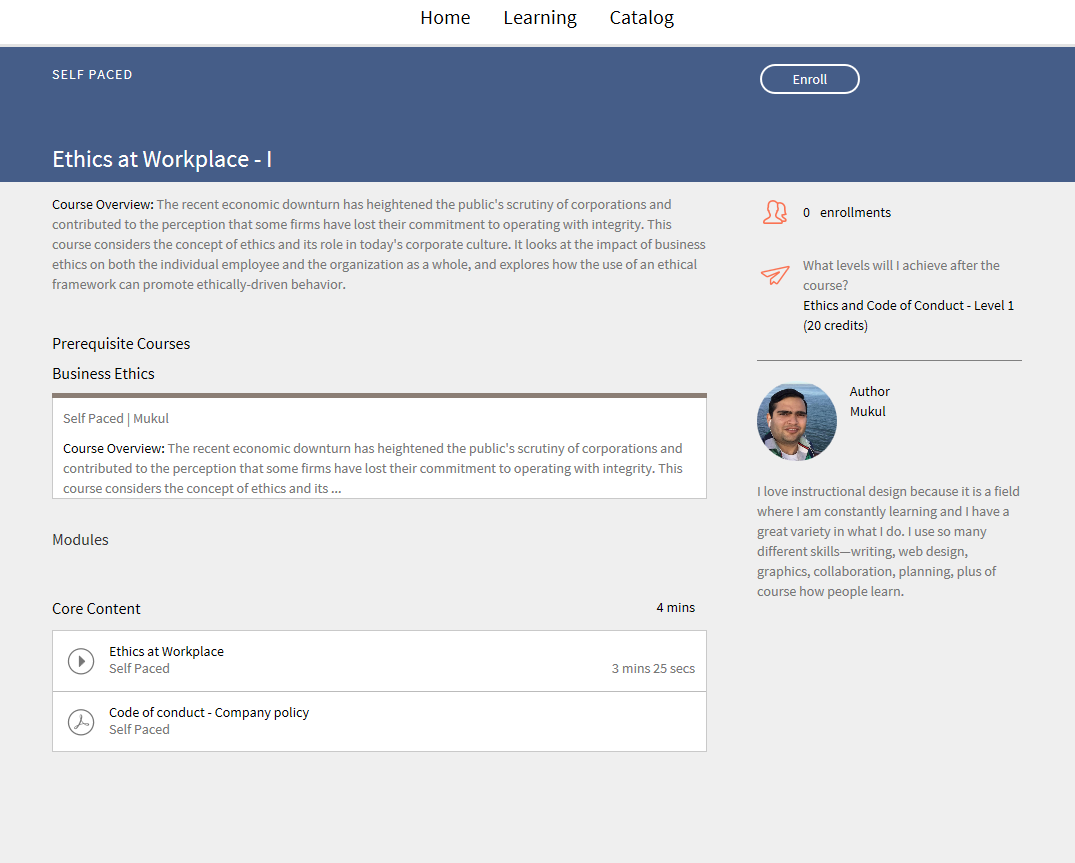
There is a variety of available courses for each learner. You can either use a catalog or enroll in a course that would best fit your agenda.

Targeted Businesses

Adobe Learning Manager is one of the best Learning Management Systems you’ll come across, especially if you are looking for responsive and personalized eLearning.

Any enterprise environment can make use of this LMS, as it will bring new life into your training processes’ optimization. Adobe Learning Manager is a great tool for Instructional Designers who are not afraid to use their imagination. This LMS can assist in taking training design above and beyond. With this tool, your L&D team will have the opportunity to create interactive training courses.

I would recommend giving a shot at Adobe Learning Manager's free trial in case you want to opt for a platform that will assist in designing your eLearning course development.

Setup And System Configuration

Adobe Learning Manager has a stellar look and feel. I was very impressed with its functionality. It boasts a modern design and is relatively easy to navigate from the moment you start learning your way around it.

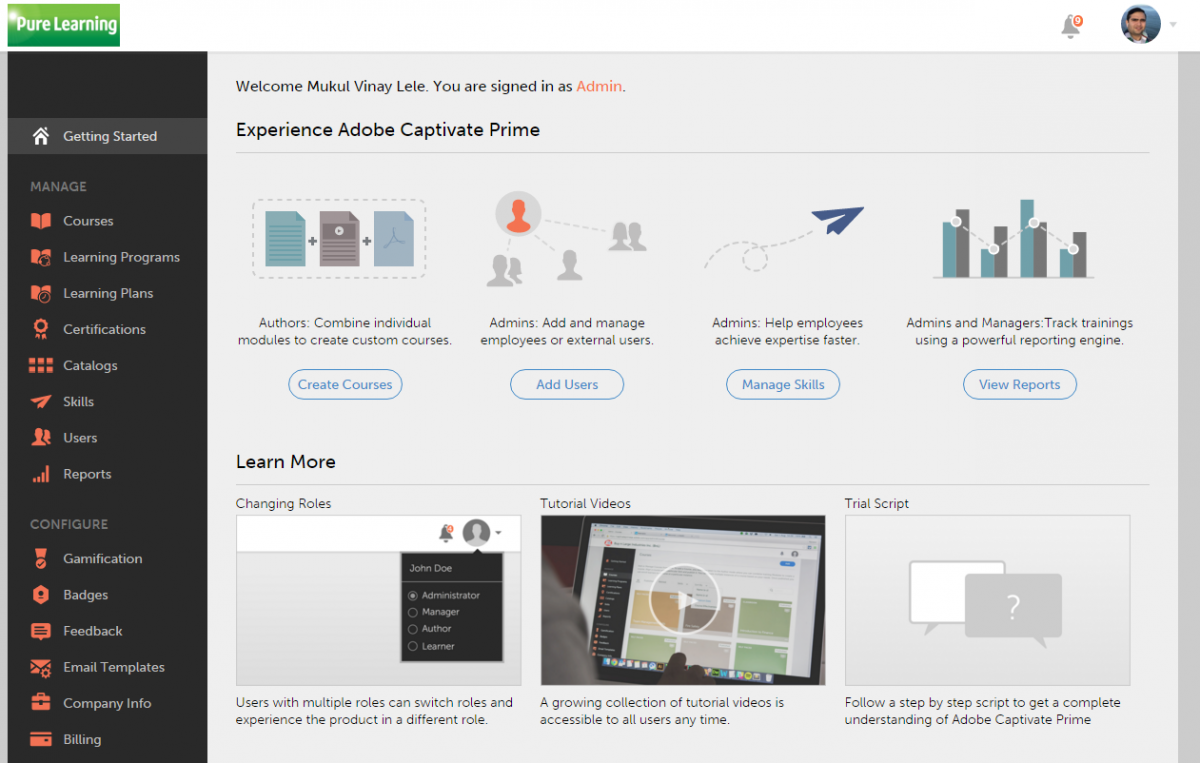
The product is evolving and has a good interface for learners. The friendly “getting started” video tutorials will make learning about Adobe Learning Manager's key concepts and features an easy process for the first-time user. You may choose one of the several roles in this application. During your sessions, you can toggle between roles (Administrator, Integration Administrator, Author, and Learner), depending on the appropriate permissions set for each user.

Although Adobe Learning Manager's design is more effective for small-to-medium-sized organizations, still it remains powerful. This employee-centered learning solution will surely assist you on multiple levels be it compliance training or employee skills development.

Adobe Learning Manager is a go-to tool if you want to truly take advantage of all of its features. You can lean on Adobe Learning Manager for reporting, administration, compliance, and social learning. Its vast reporting features, which are a part of Adobe Learning Manager/SCORM, along with Adobe Learning Manager's customization, might be really useful for your L&D.

License Model/Pricing

Adobe offers a 30-day trial period, which is more than enough time for you to decide if you want to proceed with making a purchase. The above-mentioned tutorial guides are essential to get the hang of it.

Apart from that, Adobe Learning Manager model pricing involves a $4/month fee per registered user. A “registered user” can be defined as one of your organization’s employees. Or could also be defined as a temporary worker or even a third-party contractor authorized by your company, to use an Adobe Learning Manager account. Organizations that have 500+ registered users can benefit from a special discount.

When considering if it is ideal for your company to get Adobe Learning Manager, my recommendation differs depending on the size of the organization. Some smaller organizations, which require less training, might find it costly.

Bigger organizations that have a large number of employees, especially spreading outside their headquarters, will make better use of Adobe Learning Manager. To use Adobe Learning Manager affordably you essentially need 100+ learners.

Integrations

Adobe Learning Manager has great integration capabilities as a learning platform. Integrating with external content providers is key to delivering a variety of content to your learners. Such integrations include LinkedIn and Lynda.

From intranet to using advanced APIs, Adobe Learning Manager's integrations will be of value to you. You can integrate Adobe Learning Manager with Adobe Connect in order to schedule, access, and track meetings—or even virtual classroom sessions. What’s more, you can take advantage of Adobe Learning Manager's integration with Salesforce.

This platform offers different ways to manage users both internally and externally. Giving you the ability to add users by uploading from a spreadsheet is helpful. You can categorize your learners in different groups (based on location or business unit).

It is also great that Adobe Learning Manager allows you to use regular content like videos and PDFs. Furthermore, you can also use PPTs, Word and Excel files. Extra points for supporting interactive content like Scorm, AICC, Tin Can.

Hosting certifications by a third party or internally is another thing you can do with Adobe Learning Manager. Automatic tracking of learning activities like assessments, learning status, and skill-level attainment will help your Learning and Development managers.

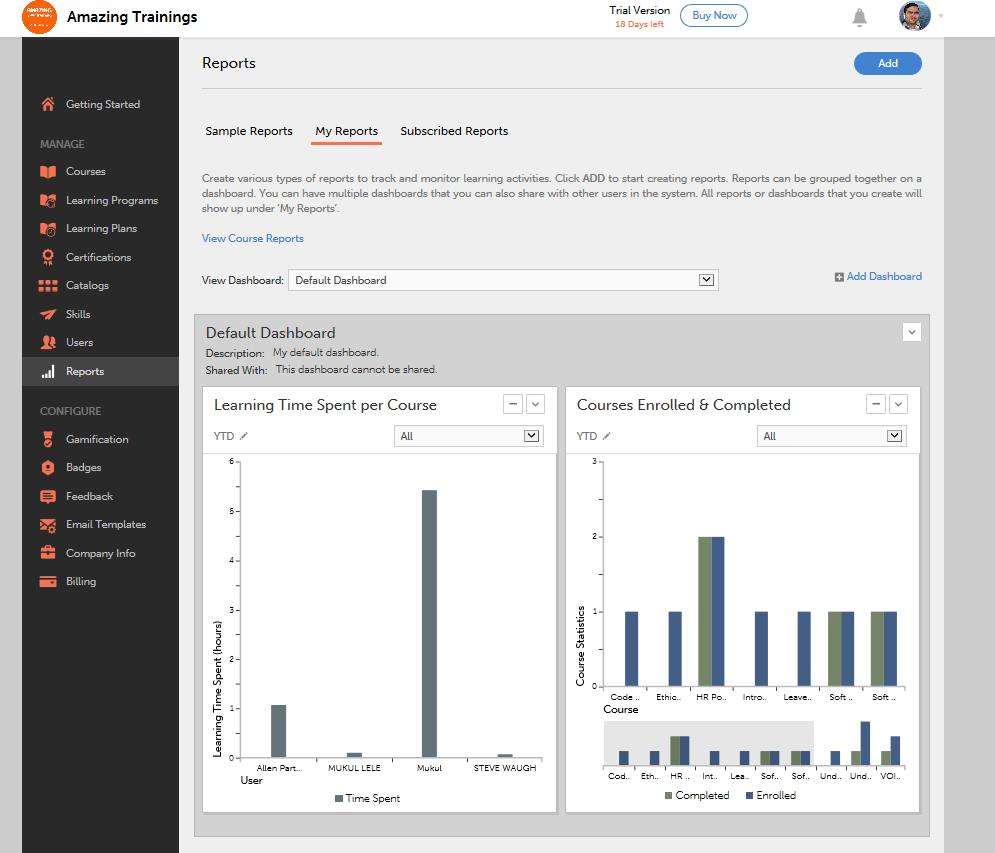
Generating reports is made easy, also allowing managers to subscribe to get them automatically in their inbox. They can also get notifications regarding participants' activities like certifications, enrollments, unmet deadlines, etc.

The dashboard is going to boost your learners’ engagement since it will be even more convenient for them to check courses, have their eye on deadlines, get learning recommendations, keep a calendar, and have their achievements organized.

It is also interesting that learners have the chance to discover courses that will help them develop certain skills for a specific position. Gamification rewards (like badges) are certain to keep engagement high and assist in boosting achievement based on desired behaviors.

You can create catalogs while giving access to custom-made learning material. Adobe Learning Manager is ideal for managers who need to create learning courses or programs destined to achieve a larger training goal.

Feature Highlights

One of Adobe Learning Manager's highlights is that it focuses on the skills approach. A great way to go, since any manager, has to keep track and evaluate his/her employee training programs.

I enjoyed the possibility of different language functionality regarding the content. The unlimited storage space and offline access have to be noted. In times when WiFi is not accessible the ability to download course content is a superior feature for me.

Adobe Learning Manager's gamification feature helps solve one of the biggest challenges faced by organizations: how to generate consistent engagement for trainees. Implementing gamification within Adobe Learning Manager makes creating courses an enjoyable process. You have the chance to enhance completion rates among your training participants both for standard and compliance training.

The deployment of gamification, including badge implementation and establishing a point system for achievements, adds motivation. Leaderboards make things more interesting. A great way to start being more competitive. Those who love to excel are going to love this! Our L&D team liked this feature a lot.

Adobe Learning Manager is pretty easy to understand and use, as I mentioned multiple times. It makes it possible to share content with other platforms and is also compatible with the Android and iOS apps. In case you use Adobe’s authoring tool (Captivate) you can create eLearning content there as well. Later on, you can publish your SCORM-compliant training packages on Adobe Learning Manager with ease. A real time-saver!

Pros/Cons Of Adobe Learning Manager

I had an exceptional experience with Adobe Learning Manager, overall. Developing and publishing courses is a smooth error-free process. A go-to LMS solution, for sure, to effectively increase employee engagement.

There are plenty of reasons why making Adobe Learning Manager is an ideal LMS solution for any Learning and Development department. First off, its many features allow eLearning managers to deliver an effective learner administration. When it comes to developing, publishing and managing courses, with Adobe Learning Manager you get an outstanding comprehensive experience.

The more you use this all-inclusive platform, the more you understand how it can assist you in providing adult learners with an immersive learning approach. Adobe Learning Manager's robust features, like implementing Virtual Reality, will bring you one step closer to EdTech implementation. This platform is effective when it comes to increasing engagement by creating attention-grabbing eLearning courses.

Even by opting for the 30-day free trial you’ll find that Adobe Learning Manager is a practical platform. Using Adobe Learning Manager makes publishing your L&D team’s work a piece of cake. You can support external audiences through this LMS, however, it is not ideal for organizations or individuals that need eCommerce-driven learning.

From the clearly identified tabs to a variety of functions, this LMS is fairly easy to use. The prompts and tutorials available give more insight into this, making it a learn-as-you-go procedure.

User Satisfaction

One of the major benefits of Adobe Learning Manager is its wealth of functionality and features. You can rely on this LMS for the most demanding L&D tasks; be it recording training presentations, screen capturing, notifications scheduling or even reporting.

What’s more, creating learning plans or adding incentives to your learning modules has never been easier. The UI is intelligent, making it simple to tangle languages and formats.

Enabling enhanced User Engagement is what has made the biggest impact on me. This can be accomplished with gamification, badges, offline learning, bookmarks, playback methods, and revision notes.

Opt for Adobe Learning Manager especially if you need to combine the above with tracking and reporting without needing to have your own host server. Adobe Captivate is king to creating and delivering enjoyable eLearning experiences. Of course, being available to stream learning content offline is just one more feature that results in user satisfaction.

Adobe Learning Manager delivers solutions to major problems. Finding out how to deploy eLearning modules, or simply how to create presentations and learning plans is made easy. Yet, depending on your L&D managers’ backgrounds and what they want to accomplish, some might argue that its tools are very basic. No worries though, since its integration with Adobe’s authoring tool (Captivate) will add even more extra features to your toolkit.

Customer Support

As mentioned above, Adobe Learning Manager has a vast set of tutorials that can guide you through every step of the training process while learning to get around Adobe Learning Manager's UI. These support resources are helpful user guides, FAQs, and other Adobe Learning Manager support tools designed specifically for each user role.

In addition, when you make your first system purchase, a representative from Adobe will walk you through the basics. So, from the initial set up you are going to have full basic details. Beyond that, you can seek out more information on your own for advanced actions.

Adobe Learning Manager is easy to navigate, even for a first-time user. You’ll have no issues setting it up, at least we didn’t in contradiction to other LMSs that we’ve tried. Customer support has been very responsive, especially when we contacted them to get more info on how to use Salesforce’s integration.

In case something out of the ordinary comes up and you aren’t able to solve it through the step-by-step guides, you can always contact Adobe Customer Care. They’ll be more than willing to help you out.

Benefitting From Adobe

The way it encourages stimulating eLearning experiences is what sets Adobe Learning Manager apart from other LMSs. The Fluidic Player will be useful in uploading and using countless formats of eLearning content seamlessly. This player also helps improve retention since it allows learners to make notes.

Consuming content whether it be online or offline is the best you can get out of this LMS, while at the same time you can keep track of your learners’ progress using personalized dashboards.

The customizable UI makes things even more interesting, as you can choose one of the attractive themes or even focus on your brand color palette. With Adobe Learning Manager you can set up and manage your training needs with ease while maximizing your eLearning impact.

Use Adobe Learning Manager to track your learners’ learning history while generating learner transcripts. There is no better way to foster a flourishing eLearning culture that encourages users to embrace learning.

By utilizing Adobe Learning Manager's features like gamification, badges, and leaderboards you can improve your learners’ interest. This can be done even on the go, all they have to do is use their mobile devices.


Alternatives

Not a match? Find software alternatives that better suit your needs and compare them to discover the one that's right for you.

Adobe Learning Manager

4.6/5

SkyPrep LMS

4.4/5
Compare

Bridge

4.6/5
Compare

Connecteam - Mobile Teams LMS

4.0/5
Compare

Absorb

4.8/5
Compare

iSpring LMS

4.7/5
Compare

TalentLMS

4.8/5
Compare

LatitudeLearning

4.4/5
Compare