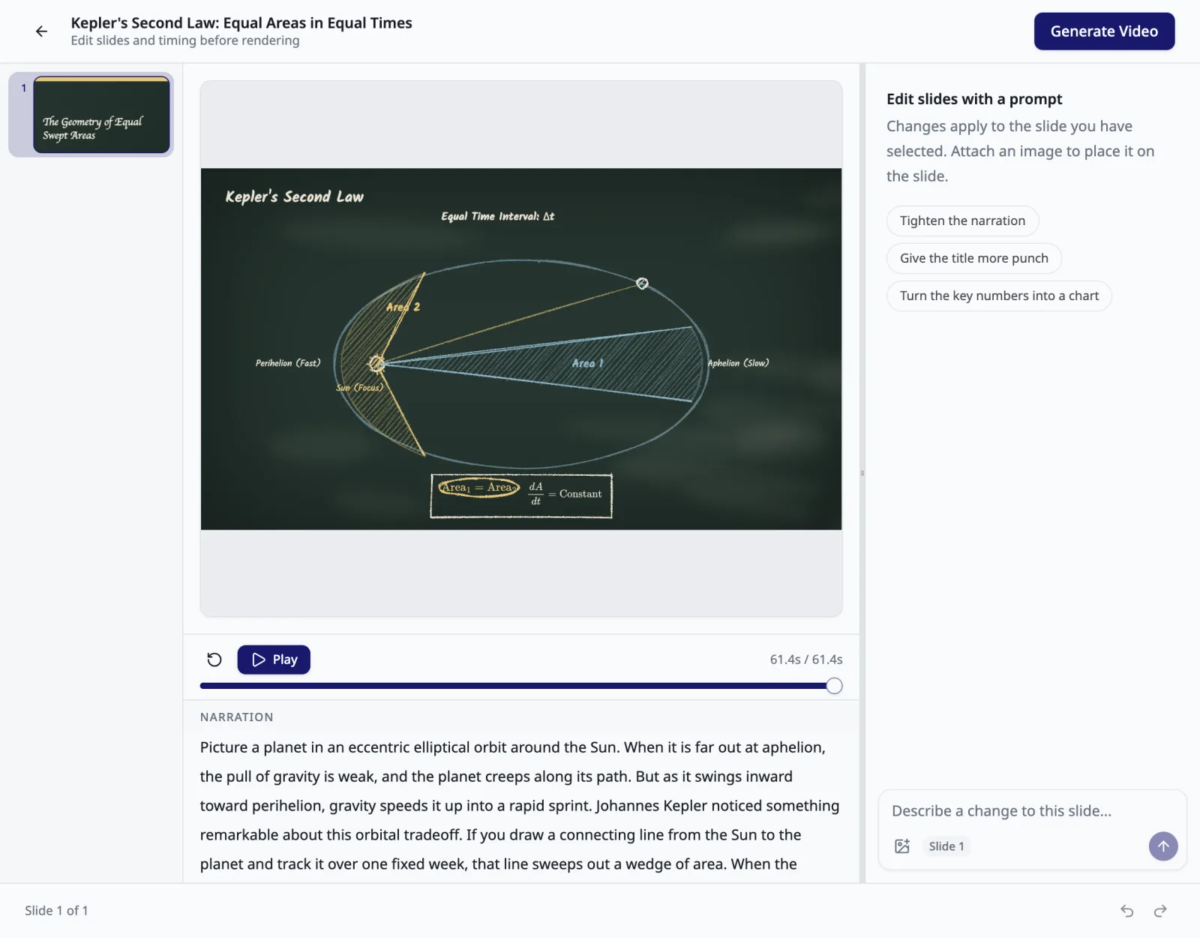
Kinoslide turns PDFs and prompts into narrated learning videos. Create animated presentations, whiteboard lessons, and visual explainers, with storyboard review and scene editing on Pro and Scale plans.
Course providers, instructional designers, L&D teams, educators, and independent creators use Kinoslide to turn course manuals, lecture notes, onboarding guides, and training material into narrated video lessons.
Kinoslide is an AI video creation tool for educators, course providers, and training teams. Start with a PDF or a prompt to create a lesson with a script, visuals, and narration.
Choose animated presentations, hand-drawn whiteboard lessons, or visual explainers. Explainer styles include Dry Erase, Blackboard, and Paper Trail. Presentations can also be exported as slide decks.
On Pro and Scale plans, review the storyboard before rendering, revise narration, and regenerate individual scenes. These plans also support videos in English, French, and Spanish. Scale includes a shared workspace with five seats.
Download finished videos as MP4 files for use in your LMS, course platform, or video channel. Kinoslide runs in the browser and offers a free plan, with paid plans for higher production volumes.
Overview of Kinoslide benefits
Reuse your teaching material. Turn course manuals, lecture notes, policies, and onboarding guides into narrated videos from a single source document.
Choose a visual format for the lesson. Use animated slides for course modules, whiteboard scenes for explanations, or Paper Trail for case studies.
Review before publishing. Pro and Scale users can inspect the storyboard, refine the script, and update individual scenes before rendering.
Create multilingual lessons. Pro and Scale support English, French from France or Canada, and Spanish across narration and on-screen content.
Publish where you already teach. Export MP4 videos for your existing learning platform. Export presentation decks when learners also need slides.
Features
Learn more about Kinoslide features that set it apart from the competition. Discover how its unique tools and capabilities enhance your processes.
Learn more about Kinoslide's pricing options, cost, and plans so you can make a well-informed, business-wise decision on the best software to use for organization.
Pricing Model
Freemium
Subscription
License
Free
Paid
Starting Price
$30
Free Trial
No
Free plan: 5 credits to start, with videos up to 2 minutes. No credit card required. Paid monthly plans: Basic $30 for 50 credits, Pro $150 for 150 credits, and Scale $600 for 500 credits. Annual billing is 20% less: Basic $24/month ($288/year), Pro $120/month ($1,440/year), and Scale $480/month ($5,760/year). Prices are in USD; CAD is available at checkout. One credit equals one minute of requested video duration. Unused credits roll over. Pro and Scale include storyboard review, scene edits, and multilingual videos. Scale includes five workspace seats. Full details: https://kinoslide.ai/pricing
Have you used Kinoslide before?
Answer a few questions and help the community to make the best decisions
Is Kinoslide the right solution for you? Read verified Kinoslide reviews from people in industries like yours to make a confident choice.
Performance Overview
Overall Rating
97%
Usefulness
Usability
Customer Experience
Likelihood to Recommend
Innovative tool to simplify tasks for you so you can focus on other areas of your work.
Oct 11, 2026
Overall Rating
93%
Usefulness
Usability
Customer Experience
Likelihood to Recommend
What do you like best?
The different layouts that it can use for creating slideshow videos. Kinoslide also uses a voiceover feature so it’s almost like watching an interactive learning video rather than just reading.
What do you dislike?
I’ve not come across anything yet to say I like it the least. With longer use there may be areas to identify for improvement.
Best tool in my workflow! Super easy to create high-quality videos in different styles and voices.
Oct 6, 2026
Overall Rating
100%
Usefulness
Usability
Customer Experience
Likelihood to Recommend
What do you like best?
I love how quickly Kinoslide turns an idea into a polished, high-quality video. The variety of styles and voices makes it very flexible, and the final videos require far less editing than other tools I’ve tried. It saves a huge amount of time.
What do you dislike?
There is very little I dislike about Kinoslide. It has customization options which are great and the minimal editing required is one of its biggest strengths compared with other video tools. You are actually left with a really high quality video in the end which you can use and publish right away.
You've viewed 2 out of 2
Alternatives
Not a match? Find software alternatives that better suit your needs and compare them to discover the one that's right for you.
Upload a PDF, such as lecture notes, a course manual, a slide export, or an onboarding guide. You can also start from a text prompt. Choose the source pages, video length, and format before generating.
Create narrated presentations, hand-drawn whiteboard videos, and visual explainers. Explainer styles include Dry Erase, Blackboard, and Paper Trail. Presentation videos can also be exported as PDF or PowerPoint slide decks.
Yes. Pro and Scale include storyboard review and scene editing. You can revise narration and regenerate individual visuals before rendering the finished video.
Pro and Scale support English, French (France), French (Canada), and Spanish for scripts, on-screen text, and narration.
Yes. Download the finished video as an MP4, then upload it to your LMS, course platform, or video channel according to that platform's upload requirements.
Yes. The Free plan includes 5 credits to start, with a maximum of 2 minutes per video. No credit card is required. Paid plans provide more credits and additional features.
One credit covers one minute of requested video duration. A 5-minute request uses 5 credits. Credits are deducted when you submit the request, and the final video length can vary slightly. Unused credits carry over. On Pro and Scale, an image or transcript edit costs 0.25 credits.