Trending Learning Management Systems (LMS)
About the vendor
-
Customers
  • Non Profits
  • Public Administrations
  • Small/Medium Businesses
Use Cases
  • Employee Onboarding
  • Employee Training
  • Workforce Development
Industries
  • Consumer Goods
  • Consumer Services
  • Professional Training & Coaching
  • Retail
Deployment
  • Desktop Application
  • Mobile Application
  • Software as a Service / Cloud
Platforms
  • Linux
  • Mac
  • Windows
Browsers
  • Apple Safari
  • Google Chrome
  • Internet Explorer
  • Mozilla Firefox
Training
  • Documentation
  • In Person
  • Online Tutorials
Support
  • Business Hours
  • Email
  • FAQ
  • Knowledge Base
  • Live Online
  • Phone
Supported Specifications
  • SCORM 2004 4th Edition
  • xAPI/Tin Can API
Languages Supported
-
LinkedIn Page
-
X
-
Change your privacy settings to see the content.
In order to watch this video you need to have advertising cookies enabled.
You can adjust your cookie preferences here.

What is Lessonly?

Lessonly is powerfully simple training software that helps teams learn, practice, and do better work. We are used by over 3 million learners at nearly 900 leading companies, including Trunk Club, Ibotta, U.S. Cellular, and Zendesk, to share knowledge, develop skills, and reinforce best practices. The result is faster onboarding, higher NPS scores, more closed deals, and a superior customer experience.

Many of our competitors have been around for a lot longer than we have. That means they are loaded down with clunky technology and outdated feature sets that often slow progress to a sluggish, grinding halt. Lessonly is a breath of fresh, time-saving air. In 2021, we joined forces with Seismic, a global leader in sales enablement, and became Seismic Learning. This change means that the platform is now more powerful than ever. We pride ourselves on our simplicity and ease of use. We're not trying to be yet another traditional LMS; we're trying to help solve the training problem in a new way, and our customers love us for it.


Overview of Lessonly benefits

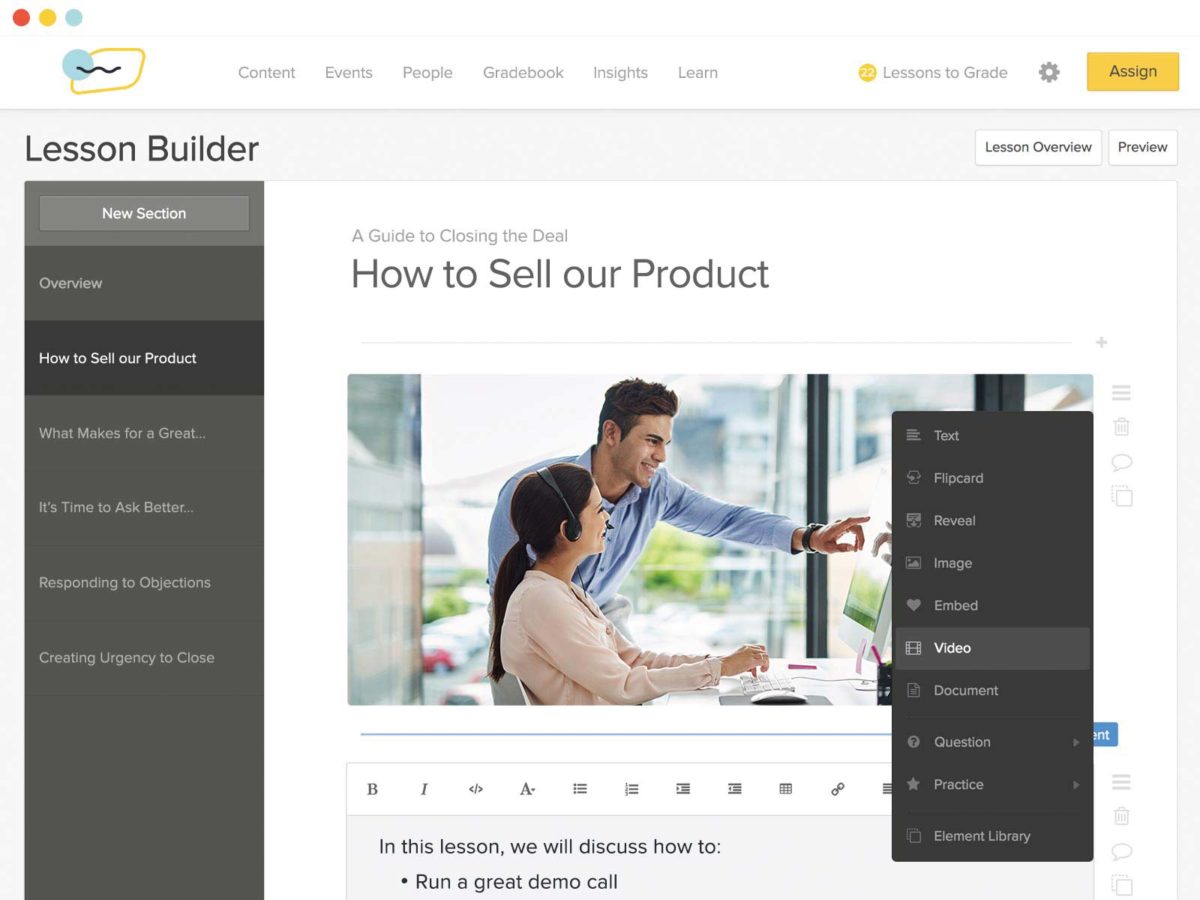
Lessonly truly makes training easy. In fact, we say if you can write an email, you can build a lesson in Lessonly. With Lessonly you can:

  • Create quickly with our drag-and-drop functionality.
  • Include text, images, videos, documents, quiz questions, SCORM and more.
  • Put learners first with a simple, mobile-friendly experience.
  • Target training and assign lessons and training paths to individuals, specific teams, or your entire company.
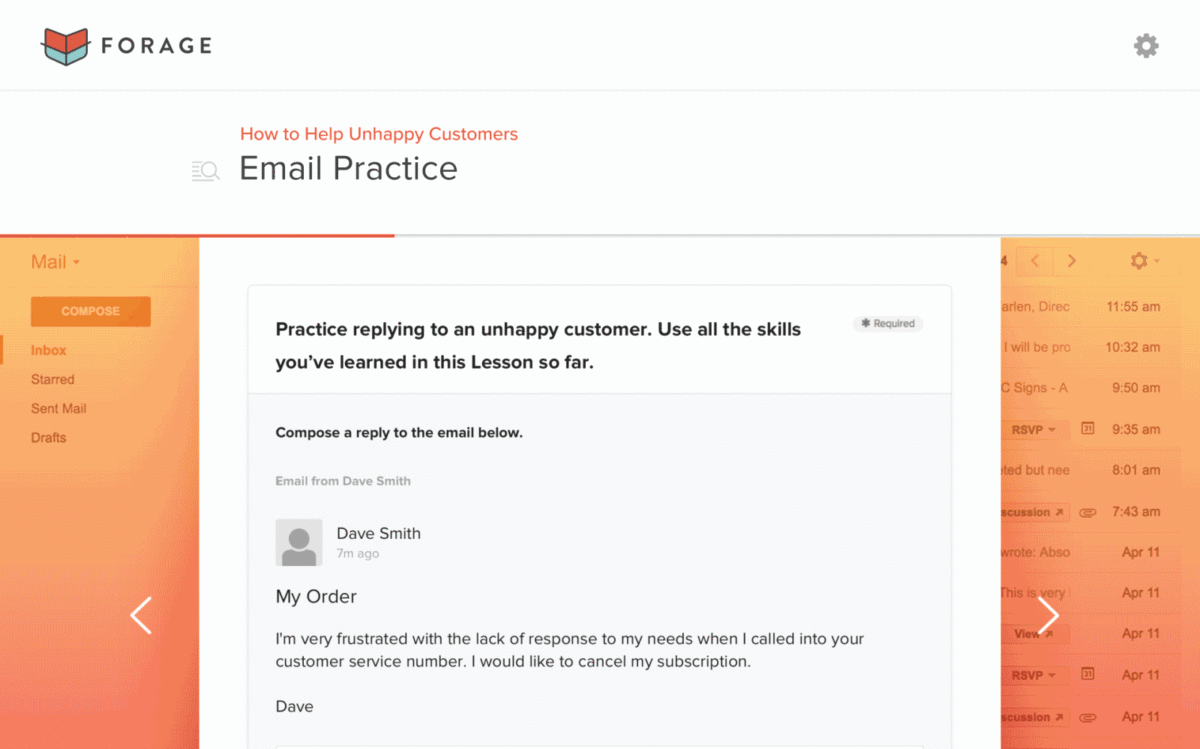
  • Empower your team to hone skills with Practice.
  • Create feedback loops with frontline teammates to highlight what's working and deliver effective coaching.
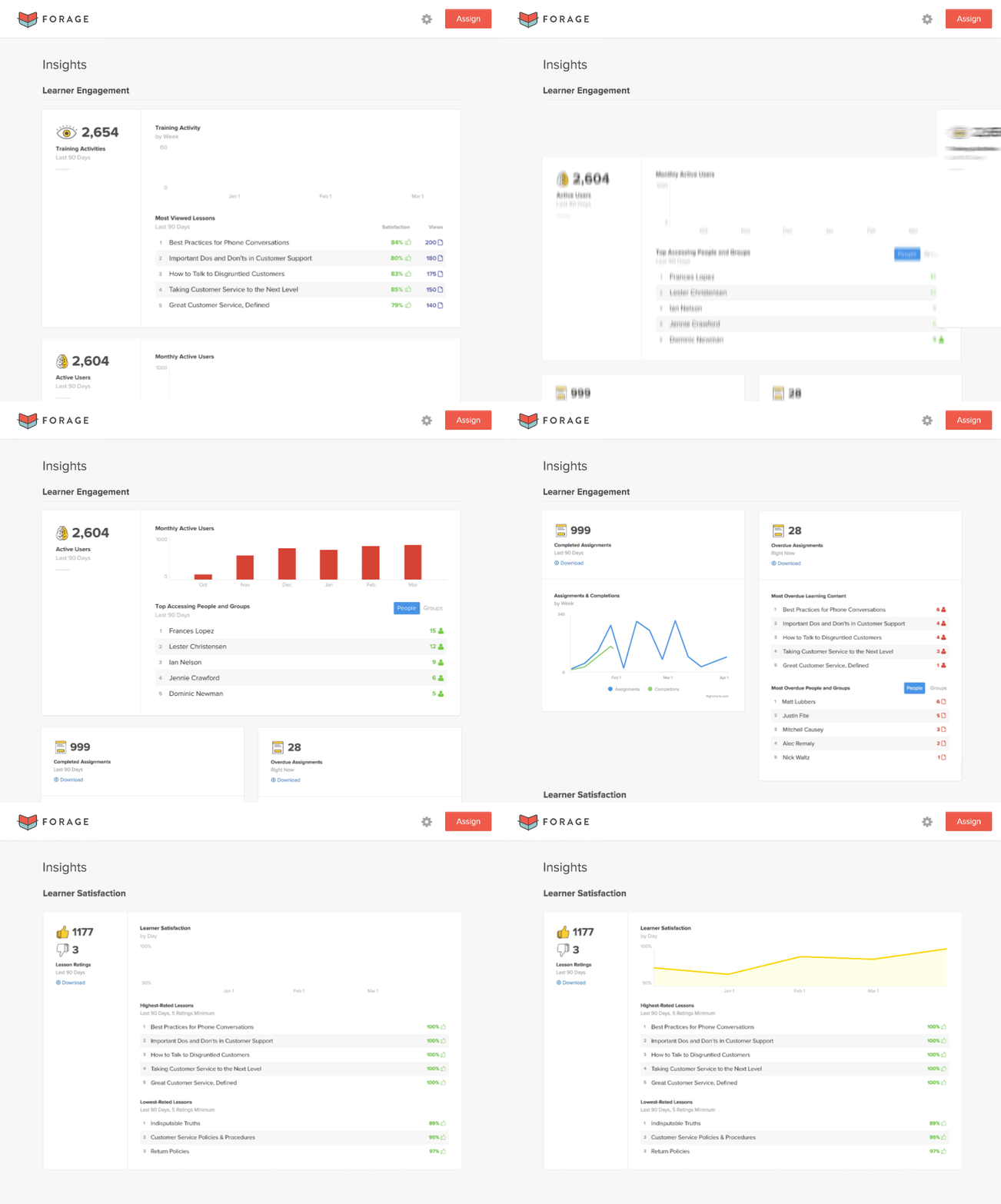
  • Measure and continuously imporve team training with our complete reporting solution.
  • Integrate training into your tech stack to simplify learning.

Our customers love how easy we are to use, the quality of support they receive from our team, and how quick it is to get set up. Learn more at lessonly.com!

What Is Lessonly Used For?

Lessonly (now Seismic Learning) is an advanced Learning Management System (LMS) designed to make training easier and more effective for organizations. Its user-friendly interface and versatile features make it a go-to solution for businesses looking to enhance team performance, promote skill growth, and ensure compliance.

Learning Management System

Lessonly is an advanced and versatile LMS that is also less complex. It helps businesses create, manage, and track employee training and development programs. The design is very user-friendly, and its powerful features make it an ideal LMS for companies of all sizes.

Training

It provides a flexible training platform that helps companies create effective training strategies for both technical and soft skills. Lessonly keeps employees engaged while helping them gain the skills they need, and it truly shines as a tool for businesses looking to boost performance and growth.

Onboarding

Onboarding new employees can be a time-consuming process. Lessonly simplifies the process by offering organized training programs that help new hires get up to speed quickly so they feel confident and ready to contribute right from the start.

Course Authoring

Lessonly's convenient authoring tools make creating custom lessons and courses easy. The drag-and-drop functionality makes it simple to create professional-grade lessons.

Sales Enablement

Sales teams can use Lessonly to improve product knowledge and refine sales pitches. When combined with consistent training, this will enhance overall sales performance. Lessonly helps sales teams close deals faster.

Sales Coaching

Lessonly provides coaching tools for feedback on practice scenarios. Sales teams can practice their sales techniques with practice scenarios and then use real-time feedback and performance tracking to work on their weak areas.

Who Uses Lessonly?

Lessonly has grown to be trustworthy software for optimizing training and development processes among organizations across diverse industries. Leading companies use it, including Trunk Club, Ibotta, U.S. Cellular, and Jostens. Its versatility makes it so popular; it is scalable across teams, supports multiple learning styles, and provides real-time feedback.

Customer Services And Support

Customer service teams use Lessonly to prepare their teams. It provides easy access to product knowledge, troubleshooting steps, and company protocols so they can offer great service and solve customer issues with ease.

Education & Learning

Schools and universities use Lessonly to help staff and teachers keep learning and growing professionally. The platform’s flexibility allows institutions to create personalized training programs and courses and also ensure compliance.

Health & Medical

In the healthcare sector, it is important to stay up to date. Lessonly helps doctors, nurses, and other staff stay on top of new procedures, regulations, and safety practices. This ensures they provide the best care while sticking to the necessary rules.

Human Resources

HR teams use Lessonly to optimize onboarding and training programs for new hires. It makes it easier to train employees on company policies and ensure everyone is on the same page.

Legal

Law firms and corporate legal teams rely on Lessonly to stay current with changing laws, regulations, and internal procedures. It ensures they stay informed and compliant through continuous learning and also prepares them to handle new challenges successfully.

Lessonly Integrations

One of the standout features of Lessonly is its ability to integrate smoothly with the tools your team already uses. Its integration capabilities are particularly strong, and they really enhance workflow without adding extra complexity. It works effectively with major platforms like Salesforce, Zendesk, Workday, Google Analytics, and API Access. Lessonly also makes team communication easier by working with tools like Slack and Microsoft Teams. It sends training reminders and updates straight into the chats your team already uses, so no one misses a thing.


Features

Learn more about Lessonly features that set it apart from the competition. Discover how its unique tools and capabilities enhance your processes.

Accounts

Add a new user Allows administrators to add new users directly to their LMS for streamlined user management.
Archive users Deactivate and store user accounts without deleting them.
Browse list of users View all registered users in the system.
Bulk User Actions Manage multiple user accounts at once.
Custom/Mandatory User profile fields Define required or optional fields for user profiles.
Upload users Import users via spreadsheet.

Activity grading

Course History View completed and ongoing courses for each user.
Gradebook Centralized view of all learner grades.
Gradebook audit trail Track all grade changes over time.
Gradebook comments Add comments to learner grades.
Manual Grading ("Marking")
Multiple grading scales Support for different grading systems.

AI Features

Adaptive Learning
AI Powered
Chatbot
Content development
Content Translation
Intelligent recommendations
Natural Language Processing
Predictive analysis
Quiz generation
Text-to-speech

Authentication

Active Directory/LDAP Integration Authenticate users via corporate directories.
Custom User login page Personalized login interface.
Manual Accounts
No login Allow content access without authentication.
SAML2/API Integration Single sign-on and external authentication.
Self-Registration
Self-Registration w. Admin Confirmation

Categories

Assign Courses to categories Organize courses under specific categories.
Create new Categories Add new organizational groups for courses.
Manage Categories Edit, delete, or update categories.
Priced Categories (Bundle) Sell course bundles grouped by category.

Certificate management

Certification life-cycle
Manage certification templates
Predefined certification templates
Unique Certificate by Course
Unique Certification by Curriculum

Compliance management

Certificate expiration notifications
Certification Expiration Management
Due Date notifications Notify learners of upcoming deadlines.
Soft/Hard Stop Due Dates Allow or block access after due dates.

Course Creation

Assignments Engine
Built-In Authoring Tool Create content directly inside the platform.
Can reuse PPTs, PDFs, Videos Upload and repurpose existing material.
Changing Course default settings Modify core course configuration.
Consume online video content Embed or stream video lessons.
Content Library
Course backup Options Backup and restore course data.
Drag & Drop Interactions
Hybrid Learning Courses
Learning Paths (Curriculums) Sequence courses into structured programs.
LRS
Scheduling LIVE events Plan webinars or virtual classes.
Survey Engine Create learner surveys.
Tests Engine Build quizzes and exams.
Upload courses

Customization

Mobile Learning Support Optimize learning for mobile devices.
Personalized views Customize interface per user.

Enrollment

Attendance Tracking Track presence in sessions.
Automated Enrollment (based on User data) Enroll users automatically by rules.
Guest Access Settings
Manual Enrollment
Progress Tracking
Self-enrollment
Self-enrollment (with a PIN #)
Survey enrollment (based on a response)

Format

Course Discussions Forum-style communication.
Gamification Format
Learner Upload
LIVE Chat Option
Social Format Social interaction‑focused layout.
Topics Format Organize course by topics.
Video Conferencing Integration
Weekly Format Course structured week by week.

Gamification

Badge customization
Badges
Customize Gamification mechanics
Leaderboards
Levels
Points
Rewards

Interface options

Additional external pages
Block Management
Calendar Settings
Language settings Set default or custom system language.
Learning Accessibility
Location Settings Configure regional settings.
Media embedding settings Control embedding permissions.
Multilanguage Support Provide support in multiple languages.
Ready-made Themes Prebuilt platform designs.

Learning types

Asynchronous Instructor-led Instructor-led but not in real time.
Asynchronous Self-paced Learners progress independently.
Blended Learning Mix online and face‑to‑face training.
Synchronous Virtual Classroom

Mobile learning

Offline (disconnected Mobile app)
Online (Internet connected) Access content with full connectivity.

Offline

Support for offline access to content

Reports

Automated Report Scheduling Send reports automatically.
Canned Reports Prebuilt report templates.
Dashboards and Graphic Reports Visual analytics dashboards.
Email delivery of Reports Send reports via email.
Exporting Reports in variety of formats Export data as PDF, Excel, etc.
Grading Report Settings Customize grade reporting.
Learning Analytics Tools
Training Record Maintenance Maintain full training logs.

Roles

Define roles Create custom permission roles.
Role Assignment Assign roles to users.
System Permissions per role Control access rights.
Teams and Team Hierarchies Organize users into teams.

Security

Anti-spam Protect forms and communication.
Anti-virus Scan uploaded files for threats.
IP Blocker Block specific IP ranges.
Restrict registration to specific domains Limit signups by email domain.
Strong Passwords Enforce secure password rules.

Shopping cart

Built-In Shopping Cart
Shopping Cart as Plug-In

System reports

Automatic email reports in predefined intervals Send periodic system reports.
Custom reports generator Create custom report layouts.
Email notification settings Control notification rules.
Live Logs Monitor system activity in real time.
Pricing

Learn more about Lessonly's pricing options, cost, and plans so you can make a well-informed, business-wise decision on the best software to use for organization.

Pricing Model
  • Free Trial
  • Subscription
License
  • Paid
Starting Price
  • N/A
Free Trial
  • Yes

Your annual investment is based on three pillars. The functionality you need to solve your problems, the number of users who will access Lessonly, and the services and integrations you need to customize Lessonly to meet your needs. Learn more about our package options at lessonly.com/pricing.

Integrations

Learn more about Lessonly's integration options.

BambooHR

BambooHR

Namely

Namely

Okta

Okta

Slack

Slack

Zapier

Zapier

Zendesk

Zendesk

Lessonly logo
Have you used Lessonly before?
Answer a few questions and help the community to make the best decisions
Reviews

Is Lessonly the right solution for you? Read verified Lessonly reviews from people in industries like yours to make a confident choice.

Performance Overview
Overall Rating 88%
  • Usefulness
  • Usability
  • Customer Experience
  • Likelihood to Recommend

Nice tool to train teams, but the UI could use some improvement.

Sep 5, 2022

Overall Rating 71%
  • Usefulness
  • Usability
  • Customer Experience
  • Likelihood to Recommend
What do you like best? Companies that hire on a frequent basis can leverage this software to help their workforce have quick access to all the required information. If you don't have in-house trainers, Lessonly is a good tool to help your new hires (or customers) to get a better understanding of your company and products. Going through specific modules gets people to be onboarded faster, and you have the opportunity to help current team members improve as well.
What do you dislike? I still think there's room for improvement regarding the UI/UX. The interface didn't give me that "a-ha" moment. Also, there are times when the training won't load at all. Plus, the timer seems to be a little problematic. Finally, I couldn't quite figure out how many modules were assigned to me. You see, until you finish one, the system doesn't allow you to see the new module path. If they improve this, it would be much easier for newcomers to organize their time, etc.
Reviewer photo

Reviewer verified by LinkedIn

Industry : Program Development | Company size : 11-50 | Level : Director | Focus : Consulting | Experience using the software : Less than 6 months as User, Administrator, Member of the deployment/customization team

From a trainee perspective, I like how easy Lessonly made my first few days in my new job.

Jul 26, 2022

Overall Rating 78%
  • Usefulness
  • Usability
  • Customer Experience
  • Likelihood to Recommend
What do you like best? Lessonly is extremely useful if you want to assist new employees in their positions. At first, I was unsure if I would reach the expectations for my new position. Everything was completely new to me, so I didn't know how and where to start. I still remember how anxious I felt since they hired me and I hadn't even started working at the office. To my surprise, the company has an awesome culture, and employee onboarding was one of its top priorities. So, they introduced me to Lessonly!
What do you dislike? A comment bar would be a great addition to the tool; also, a kind of knowledge base is missing. Maybe they could add a place where users would be able to ask questions or confirm some information regarding the content. Also, I'd love to see an app so that I can continue studying over my smartphone. I did face some minor difficulties with the video-making tool; there were times I had to re-record my answers because the recording didn't always start at the right moment.
Reviewer photo

Reviewer verified by LinkedIn

Industry : Marketing and Advertising | Company size : 51-200 | Level : Manager | Focus : Administrative | Experience using the software : Less than 6 months as User, Administrator

If you're looking for a simple LMS, this gets the job done.

Jul 26, 2022

Overall Rating 78%
  • Usefulness
  • Usability
  • Customer Experience
  • Likelihood to Recommend
What do you like best? My team needed a simple and easy way to scale learning for our quickly growing organization. We found that solution in Lessonly. It has a clean interface and makes it relatively easy to create lessons within the LMS. Its minimalistic design made things easier for sure. With a bit of extra work, we made it even nicer and more enticing for our team members.
What do you dislike? At first, we had to rely solely on Lessonly's built-in editor, but they've begun to add support for SCORM - so that's a plus. They have good support (responsive when it comes to troubleshooting), but I've noticed that they make very few updates/changes based on user feedback. I hope they pay more attention to what their customers need...
Reviewer photo

Reviewer verified by LinkedIn

Industry : Marketing and Advertising | Company size : 51-200 | Level : Manager | Focus : Administrative | Experience using the software : Less than 6 months as Administrator

An easy-to-use tool that works well; very useful if you're creating lessons for the first time.

Jul 19, 2022

Overall Rating 97%
  • Usefulness
  • Usability
  • Customer Experience
  • Likelihood to Recommend
What do you like best? To be honest, I didn't have to spend a lot of time learning how to use it. Plus, every time I want to try something new, there are many lessons/guides for admins. These also include tips like how much content you should use, best practices regarding content, when to put information into a video, and much more. I've been adding images, quizzes, and videos to my lessons; everything works really well. I also like how easy it is to create lesson paths.
What do you dislike? The only disadvantage I can think of is that I can only add an editor one lesson at a time. So, if you have lots of lessons having to do that for every single one isn't very convenient. It would be great if the user could select all the lessons where a new admin for auditing is needed and make it happen with one click.
Reviewer photo

Patrick M.

Industry : Leisure, Travel & Tourism | Company size : 11-50 | Level : Senior | Focus : Education | Experience using the software : More than 1 year as Administrator

In terms of price and features, its perfect as a middle-ground solution.

Jun 22, 2022

Overall Rating 93%
  • Usefulness
  • Usability
  • Customer Experience
  • Likelihood to Recommend
What do you like best? Before choosing Lessonly, I tested quite a few LMS solutions. I can surely say I've become a fan! Our company is middle range, under 50 employees, so I recommend it to similar businesses. However, they do have plans for larger businesses as well. It's got all the features we needed (and at a reasonable price), but what I love most is how responsive their support is. I couldn't be happier!
What do you dislike? I'd like to see some more customization. Also, having more formatting variations would be a plus. I wish I could host videos through Lessonly. We can only embed them now, so this should be a priority in future improvements. Also, as an admin, I'd love it if the system allowed me to create a grading key.
Reviewer photo

Reviewer verified by LinkedIn

Industry : Elearning | Company size : 11-50 | Level : Manager | Focus : Program and Project Management | Experience using the software : More than 1 year as Administrator

Thumbs up! If you have remotely-based team members, this is a must.

Aug 2, 2021

Overall Rating 100%
  • Usefulness
  • Usability
  • Customer Experience
  • Likelihood to Recommend
What do you like best? Our company has gone hybrid for the last two years, so Lessonly was a godsend. We needed a tool to help train remote teams and keep everyone engaged (especially new hires), and I'm so relieved that we've gone with this choice. For the past year, the tool has constantly been improving. They've been releasing new features and extra enhancements, which is awesome. Keep it up, guys!
What do you dislike? I wish they improve the way that tags are created and managed as it doesn't seem to be very intuitive in comparison to other parts of the platform. All in all, the tool is great, don't get me wrong. If there was any other enhancement they could do, maybe add an easier way to manage lessons... Having something more visual like a flowchart or a tree would help to understand faster what lessons exist under what paths/teams.
Reviewer photo

Reviewer verified by LinkedIn

Industry : Information Technology and Services | Company size : 51-200 | Level : Director | Focus : Education | Experience using the software : More than 1 year as Administrator

Our employees rave about how simple and user-friendly it is!

Jun 5, 2021

Overall Rating 88%
  • Usefulness
  • Usability
  • Customer Experience
  • Likelihood to Recommend
What do you like best? Lessonly is simple and super easy to use. Its biggest advantage is that we can delegate lessons to experts. SMEs can build their own content, and we can even review it before publication. The focal point of all training is becoming better at our jobs. We've surely seen more engagement throughout our company. All members are set on increasing their skills.
What do you dislike? The system has been having plenty of updates lately, so I would appreciate seeing a calendar view of any new upcoming changes. Also, the reporting needs some enhancement. For example, I'd like to see a report with just comments. By doing that for all Lessons, we could help our leadership to review training results. Sure, numbers are great, but we find it would be even more useful to be able to have comments AND numbers.
Reviewer photo

James M.

Industry : Professional Training & Coaching | Company size : 51-200 | Level : Director | Focus : Education | Experience using the software : More than 1 year as Administrator

I'm very impressed! Everyone is more involved - Such an inspiration for the whole team.

Mar 31, 2021

Overall Rating 94%
  • Usefulness
  • Usability
  • Customer Experience
  • Likelihood to Recommend
What do you like best? If you want to give your employees easy access to your institutional knowledge, it's a great tool to start with. We mainly use Lessonly for onboarding, skills training, and safety training. In the next few months, we plan to set up internal certifications as well. What I love most about it is that it can be tied up to in-person events and online training. Our company culture is all about focusing on employee development, so we're after training that is aligned with our core values.
What do you dislike? The whole experience was a bit overwhelming at first since it was our first time using an LMS. Before Lessonly, we used to spend staff time that we now allocate to other growth opportunities. I'd like to see more formatting options and the ability to resize photos. The latter is a must to have good results both on mobile and computer users. Maybe they should consider adding some options for viewing online as a mobile user. It would definitely help speed up the process.
Reviewer photo

Reviewer verified by LinkedIn

Industry : Online Media | Company size : 51-200 | Level : Director | Focus : Human Resources | Experience using the software : More than 1 year as Administrator

It helped us a lot with the shift to remote training. Great for onboarding remote employees

Feb 26, 2021

Overall Rating 99%
  • Usefulness
  • Usability
  • Customer Experience
  • Likelihood to Recommend
What do you like best? If you're still managing your onboarding plan with Excel spreadsheets, you're going to love Lessonly... It has saved us so much time when onboarding remote teams!! How much? We now spend 60% less time to onboard our new hires. This is significant time and money we can allocate to other important projects. All the members of our management love the new system and appreciate how much time we've saved.
What do you dislike? Some of our trainers experienced issues in the formatting. Most times, it was related to complex training material creation.
Reviewer photo

Reviewer verified by LinkedIn

Industry : Human Resources | Company size : 51-200 | Level : Manager | Focus : Human Resources | Experience using the software : More than 1 year as User, Administrator

Amazing product for training new hires. We use it to test product knowledge quite often.

Jul 12, 2020

Overall Rating 82%
  • Usefulness
  • Usability
  • Customer Experience
  • Likelihood to Recommend
What do you like best? This is one of my favorite tools for onboarding new hires. It helps new employees have a fantastic experience right from the start. What I like most is that I can build lessons within different paths. Its UI is very comprehensive and intuitive. I'm very happy with it because it's perfect for staying organized. Plus, I can track my employee's progress within each path too! I love that I can create many different trainings for my team - great if you're into continuous improvement.
What do you dislike? Technically, moving lessons from one path to the next takes a bit longer than it should. I'd love to see it improve in future updates. Don't you think it would be much easier with the addition of a couple of shortcuts? Making the process quicker would save trainers loads of time.
Reviewer photo

Reviewer verified by LinkedIn

Industry : Computer & Network Security | Company size : 201-500 | Level : Director | Focus : Education | Experience using the software : More than 1 year as Administrator

You've viewed 10 out of 15

Alternatives

Not a match? Find software alternatives that better suit your needs and compare them to discover the one that's right for you.

Lessonly

4.4/5

iSpring LMS

4.7/5
Compare

SkyPrep LMS

4.4/5
Compare

Connecteam - Mobile Teams LMS

4.0/5
Compare

TalentLMS

4.8/5
Compare

Absorb

4.8/5
Compare

360Learning

4.7/5
Compare

Acorn

4.6/5
Compare
Buyer's Guide

Complete guide for Lessonly.

Buyer's guide table of contents

FAQs

Table of contents
FAQs

Learn more about Lessonly.

Lessonly has users that include customer service teams, sales departments, HR professionals, educational institutions, healthcare providers, and legal firms.​

Lessonly primarily operates in English but does support content in multiple languages, which is helpful for global teams. The user interface is mainly in English, but you can create and assign lessons in various languages, such as Spanish, French, and German. In terms of system navigation, it’s not a fully multilingual LMS yet.

Yes, Lessonly supports mobile devices, including Android, iPad, and iPhone. The mobile-friendly platform allows learners to access training materials anytime, anywhere. This makes it perfect for remote or on-the-go teams.

Yes, Lessonly offers a solid API that can be smoothly integrated into your existing systems. 

Lessonly integrates with several popular apps, including Salesforce, Slack, Microsoft Teams, Zendesk, Workday, and Google Analytics. It is easy to incorporate training into your existing workflows through Lessonly.

Lessonly is praised for its responsive and helpful customer support. Many appreciate the 24/5 live chat and email support, noting that the team is knowledgeable, attentive, and quick to assist. However, a few users have reported occasional technical issues, such as video playback problems and course reboots.