Zensai, the leading Human Success Platform, integrates seamlessly with Microsoft 365 and Teams to unlock human potential. With AI-driven solutions and millions of global users, we redefine modern learning, engagement, and performance.
Built natively for Microsoft 365, Teams, and Azure, Zensai is the perfect fit for all types of organizations across different industries using the Microsoft 365 digital environment.
Zensai’s Human Success Platform transforms the workplace by combining advanced AI-powered tools with seamless Microsoft 365 integration to support learning, engagement, and performance. It offers three key products:
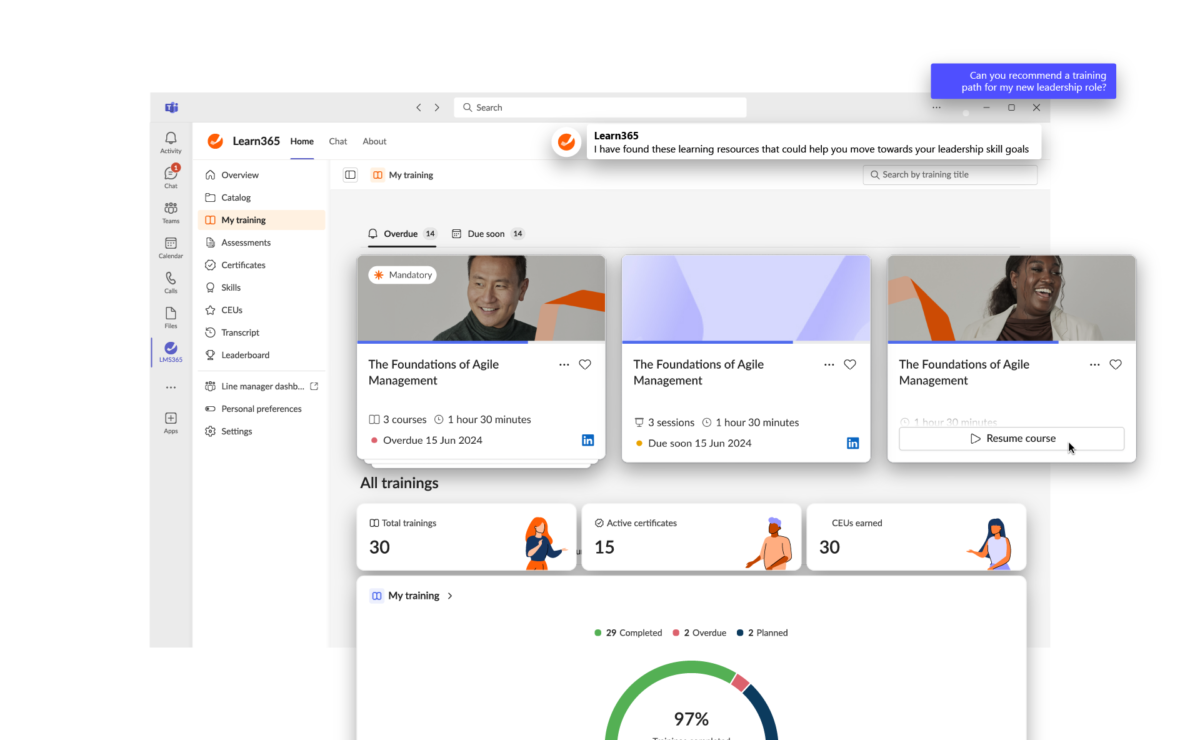
Learn365: A robust learning management system tailored for Microsoft 365, designed to enhance onboarding, skill-building, and compliance through personalized learning paths, gamification, and advanced analytics.
Engage365: A tool that drives employee engagement by fostering daily performance conversations, delivering feedback, and creating a culture where employees feel valued, all integrated within the Microsoft 365 ecosystem.
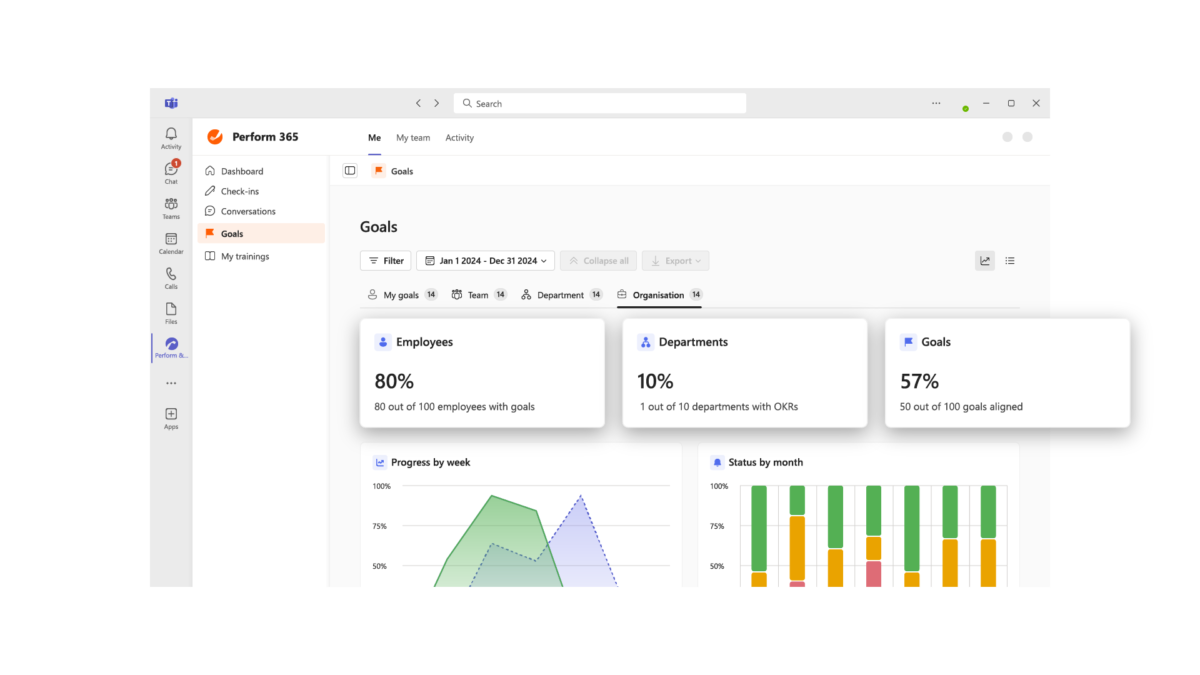
Perform365: A solution for optimizing performance with tools like OKRs, 360° feedback, and real-time performance insights, helping teams set, track, and achieve meaningful goals.
Together, these applications empower organizations to build future-ready, motivated teams while aligning business outcomes with individual success—all within the flow of everyday work.
Features
Learn more about Zensai features that set it apart from the competition. Discover how its unique tools and capabilities enhance your processes.
Accounts
Add a new userAllows administrators to add new users directly to their LMS for streamlined user management.
Archive usersDeactivate and store user accounts without deleting them.
Learn more about Zensai's pricing options, cost, and plans so you can make a well-informed, business-wise decision on the best software to use for organization.
Pricing Model
Free Trial
Freemium
One-time purchased license
Subscription
License
Free
Paid
Starting Price
N/A
Free Trial
Yes
https://lms365.com/subscription-plans/
Integrations
Learn more about Zensai's integration options.
Office 365
SharePoint
Have you used Zensai before?
Answer a few questions and help the community to make the best decisions
Is Zensai the right solution for you? Read verified Zensai reviews from people in industries like yours to make a confident choice.
Performance Overview
Overall Rating
83%
Usefulness
Usability
Customer Experience
Likelihood to Recommend
If you are committed to SharePoint as a company, willing then this is your tool.
Jun 12, 2023
Overall Rating
53%
Usefulness
Usability
Customer Experience
Likelihood to Recommend
What do you like best?
If you can customize SharePoint or have the IT team that can, you'll be able to combine data from business activities outside of the LMS to create well rounded learning content and assessments. Evaluations are possible at levels 1-3.
What do you dislike?
It was very hard to adapt to the terminology in the system and many of the SCORM settings inside the LMS to created issues with the authoring tool we used.
My experience as a training administrator using LMS365 has been good so far.
Jul 27, 2022
Overall Rating
78%
Usefulness
Usability
Customer Experience
Likelihood to Recommend
What do you like best?
LMS365 has helped us create our own "virtual university" in a relatively simple and standard way. Now, everyone at our organization has access to knowledge and continuous learning! We had everything we needed to t to configure the system, structure it and follow up.
What do you dislike?
In particular, we had many problems with the reporting, some updates, and data synchronization. These negatively impacted the system and delayed our processes. But, that may have been associated with our on-premise version, which requires many configuration elements and a high command of the internal functionalities of the tool. Also, this version is not very friendly if you want to copy courses and internal resources.
LMS365 fits basic needs with O365. If you're an advanced customer, you'll need Microsoft licensing.
Jul 21, 2022
Overall Rating
78%
Usefulness
Usability
Customer Experience
Likelihood to Recommend
What do you like best?
The initial cost is low. Thankfully the integration with Office 365 makes implementation reasonably effortless. Surely a good fit for organizations that have basic needs. In addition, Customer Support is one of its brightest spots. They have a global team that can solve any issues quickly and thoroughly. However, there is only the most basic supporting documentation for using Power Platform with LMS365.
What do you dislike?
The interface is incredibly clean; however, there are times to a fault. For example, options hide. If your organization has basic AAD and Office 365 implementations, but you need features of a complete LMS, then LMS365 might not be an ideal choice. I must also note here that group assignments rely on AAD entirely. Also, bug fixes and feature requests have delayed delivery.
You can easily onboard users and leverage existing materials for new training
Jul 18, 2022
Overall Rating
99%
Usefulness
Usability
Customer Experience
Likelihood to Recommend
What do you like best?
I love its seemless Office 365 integration. Also, onboarding users and adoption is extremely fast and simple. The platform offers many, many possibilities if you undestand how it works. And once you connect it with Microsoft Flow, you get even more options. LMS365 allows you to keep things simple. All you have to do is throw in your materials in (ppt, pdf, videos, ...) and you're set. Or, you can take it a step further and use your authoring tool to create highly visual learning stories.
What do you dislike?
Can’t really find any cons. If you’re using Microsoft365 you’ll love it. It has all the basic features you’ll need.
Powerful and easy to use both for learners and admins - if you have Office 365, go for it
May 6, 2022
Overall Rating
85%
Usefulness
Usability
Customer Experience
Likelihood to Recommend
What do you like best?
This tool is amazing, especially now that it integrates with MS Teams. If you're using Office 365, it makes for a great solution. I really enjoy the integration with SharePoint, Streams, OneDrive, Sway, Forms, and other Microsoft applications. Plus, now, with Power BI, I can get what I need from my reporting. The tool literally installs in just a few minutes, and you are good to go. Also, if you're not IT savvy, you can have the LMS365 Team help you with its installation.
What do you dislike?
I've found the Learner and Course reports to be somewhat simple. Meaning that the info I get from them is kind of basic. The good thing is that the tool now has a Power BI Connector (for free) and a Power BI Add-on (this is not free, but it gives you a lot of options). It's a great combination if you want to analyze all sorts of data from Leaner and Course interactions.
LMS365 is a powerful platform for learning management - fully integrated into Microsoft 365
Apr 16, 2022
Overall Rating
100%
Usefulness
Usability
Customer Experience
Likelihood to Recommend
What do you like best?
Since day one, we have been using the platform for all our training activities. Some of these include classroom training, eLearning as well as blended learning. When we have additional requirements that cannot be solved within the core product, we rely on Power Apps or Power Automate Flows.
What do you dislike?
Reporting surely needs some tiny improvements. If you don't mind putting your mind to it, you can use the Power BI Connector. It will help you create reports and dashboards for your company on your own.
Integrations and its price were our main reasons for Choosing LMS365.
Mar 23, 2022
Overall Rating
97%
Usefulness
Usability
Customer Experience
Likelihood to Recommend
What do you like best?
I like working with this platform because of its native integration into our existing platforms. So, this means that our user base can use a familiar login and navigation through their corporate credentials (Azure AD) and SharePoint. The integration with tools such as Forms and Stream was great for our platforms administrators. Plus, technology team integration into existing security capabilities worked well (thanks to Azure AD roles and groups).
What do you dislike?
There are some feature tweaks we would like to see in the future. For example, the dynamic starting and ending dates are connected to our employees' hire dates. Other than that, we enjoy using and expanding LMS 365 with existing tools such as Microsoft Flow.
A great tool to manage all training in your company - very useful for compliance
Mar 5, 2022
Overall Rating
100%
Usefulness
Usability
Customer Experience
Likelihood to Recommend
What do you like best?
This is a great tool. It helps you to stay organized as you have all the info for your workforce skills in one place. Plus, it allows you to manage all the company training, not only online but also in classrooms. We've used it extensively for compliance training (e.g., GDPR). I love that it can trace if people have read and acknowledged documents that include company rules and policies. If compliance is a priority for your business, this tool really works!
What do you dislike?
In terms of performance and speed, I can say that sometimes the system seems to be a little bit slow. However, that doesn't have a real impact on its effectiveness.
Lightning speed implementation but a few convenience-features are missing
Feb 15, 2022
Overall Rating
91%
Usefulness
Usability
Customer Experience
Likelihood to Recommend
What do you like best?
Our organization is all in for continuous learning. Hence, we provide lots of training opportunities for new and existing employees. Also, we offer training to some of our customers as well. Since we don't have the budget for an authoring tool or buying SCORM packages, LMS365 allows us to use our existing materials to create courses, which is super convenient!
What do you dislike?
Because of its simplicity, it clearly misses some features. Other than that, the team updates the software regularly, so any issues are fixed. Copying/duplicating courses is one thing that needs more attention. And, I'd like to be able to see more diverse roles. For example, distinguishing administrative and content responsibility would be more helpful. I'm trust that their dev team will fix pretty soon.
Convenience of SharePoint, more features than I would expect any user to need or use.
Jan 18, 2022
Overall Rating
91%
Usefulness
Usability
Customer Experience
Likelihood to Recommend
What do you like best?
Support is outstanding, the platform features and functions have steadily evolved and improved since 2013. I would add that in some releases there have been many new features and hence reorganization of configuration settings and controls which also means that yes sometimes the admin actually needs to go read about the new updates and changes. If that is a problem then good luck finding a powerful system that meets the breadth of classroom content online delivery needs.
What do you dislike?
I have 100 characters min (review requirement) to say there is nothing I dislike about the platform.
You've viewed 10 out of 11
Alternatives
Not a match? Find software alternatives that better suit your needs and compare them to discover the one that's right for you.