

 ChatGPT
 Perplexity
 Claude
 Grok
Grok
A 6-Step Plan To Clean Content Before Migrating
Key Takeaways
- A platform or tool-related migration effort is the rare moment when content cleanup has a budget, a deadline and executive attention behind it, and that window closes at go-live for another five to seven years.
- Review and validate all your content before you migrate to a new LMS, not after. Usage data only covers what the LMS tracks, and in most organizations the PDFs, videos, decks and documents outside the LMS are at least half the library.
- Every asset and digital resource needs one of four decisions before the move, and "review later" is not one of them, because in practice it is lift and shift with extra overhead.
The Digital MRI For Learning Content: See What's Really Inside
Migration Is The Rare Moment When Everyone Is Focused On Legacy Content Health
Almost every Learning and Development (L&D) team I talk to has a content cleanup project somewhere on their list. The priority has been there for years, but it does not move to the top because there is rarely a business case urgent enough to fund the effort it will take, and nobody gets promoted for retiring four hundred outdated courses, videos, PDF files, etc.
The situation changes markedly when an LMS migration gets approved and the team faces a real choice between knowing and fixing their entire content corpus or moving it all en masse and sorting it out later. In either case, there is now a budget, a deadline, and a legitimate reason to ask hard questions about every asset and resource sitting across your content libraries and cloud repositories.
The window usually stays open for three to six months and closes shortly after go-live, and it does not reopen until you replace the system you are about to install, which for most organizations is another five to seven years out. If you are going to clean up the catalog at all, this is when it happens.
"Lift And Shift" Feels Easier But It Is The Expensive Option
The default plan is almost always to move everything and sort it out later, and we understand why. The timeline is tight and a migration has no shortage of competing demands, from vendor selection and contracting to configuration, integration, security, governance and support. Moving everything feels low risk because the risk it avoids is immediate and visible, while the risk it creates is spread quietly across the next several years.
The expense of a migrated asset is not really the cost to move it, it is everything related to keeping it afterward. Every course you migrate is a course somebody may have to re-test in the new player, retag against the new metadata scheme, and include in the annual review cycle, and it is one more item to account for the next time compliance asks what is current. If your new LMS contract or your systems integrator prices by resource count or storage tier, you are paying for it directly as well.
The learner cost is the one that gets underestimated. Someone searches the new system for "harassment prevention" and gets nine results with nearly identical titles, three of them regional variants ported over from a platform an acquired business unit retired six years ago. Learners cannot evaluate those options, so they pick one at random, ask a colleague, or give up and type the question into a public chatbot instead, which is exactly the behavior the new platform was purchased to prevent.
What The Cleanup Is Actually Worth
The savings are easy to describe because they are mostly subtraction. Take a library of five thousand items where twelve hundred turn out to be superfluous, outdated or redundant. You do not spend migration services or internal hours on those items, you are not re-testing, retagging or fitting them into the new taxonomy, and if your new agreement prices on volume, your baseline is lower going into the negotiation, which is a number procurement can actually use.
The larger return is recurring, because those twelve hundred items disappear from every future review cycle, compliance question and platform upgrade, which is staff time returned every year rather than once.
On the learner side, the return is search results that make sense and a catalog where the current version of something is the only version anyone can find. There is also a downstream benefit that matters more every quarter: if you are planning to feed learning content into an enterprise Large Language Model (LLM) for agentic access, you want to move clean, vetted material into it. Models trained or grounded on expired policies and superseded procedures will confidently repeat them.
None of that happens by intention alone, and it does not happen in parallel with the technical migration either. It happens because somebody ran an end-to-end process, in order, starting early enough to matter. Here is the sequence we would recommend.
Step 1: Build A Real Inventory, Not A Course List
Start this during vendor evaluation if you possibly can, rather than after the contract is signed, since an accurate asset count gives your team leverage in a licensing negotiation and these numbers take weeks to assemble by hand.
Most teams begin with an export of course titles from a standard LMS report. That is a reasonable starting point, but it is a table of contents, not an inventory. Pull everything your system can give you, starting with the basics of package type and version, owner, last modified date and last launch date, then add the usage picture: launch and completion counts across at least twenty-four months, whether enrollment is assigned or self-selected, and which curricula each course belongs to. That last field matters more than people expect, because an item with almost no direct traffic may be embedded in an onboarding path that runs every week.
Then go find everything that is not in the LMS at all, because there is always more of it than the project plan assumes. Shared drives, team sites, vendor libraries with separate logins, recorded webinars nobody has watched since the live session, PowerPoint decks that became the de facto reference for a process, policy documents, job aids in a folder somebody set up in 2019. In most organizations we work with, the material outside the LMS is at least as large as the material inside it, and may often be the source learners actually use day to day.
One step almost everyone skips is checking whether you still have editable source files. If the authoring project file is gone, or it was built in a tool version nobody has a license for anymore, then "update it and move it" is not really an option, and your choices narrow to rebuild or retire. Finding that out now beats finding it out three weeks before go-live.
What Changes When You Can See Inside With An Intelligent Extraction Tool?
Our team originally envisioned creating a tool that could alleviate the manual, spreadsheet-centric content inventory exercise. This vision broadened significantly to a sophisticated toolkit solution called MetaLark.ai that connects directly to cloud repositories and LMS libraries and parses what is there, resulting in a single catalog of everything you own, with generated titles, descriptions and metadata attached, in days rather than the six to eight weeks a manual inventory usually takes. More to the point, it covers the shared-drive material that manual inventories quietly leave out because nobody has time to open four thousand files.
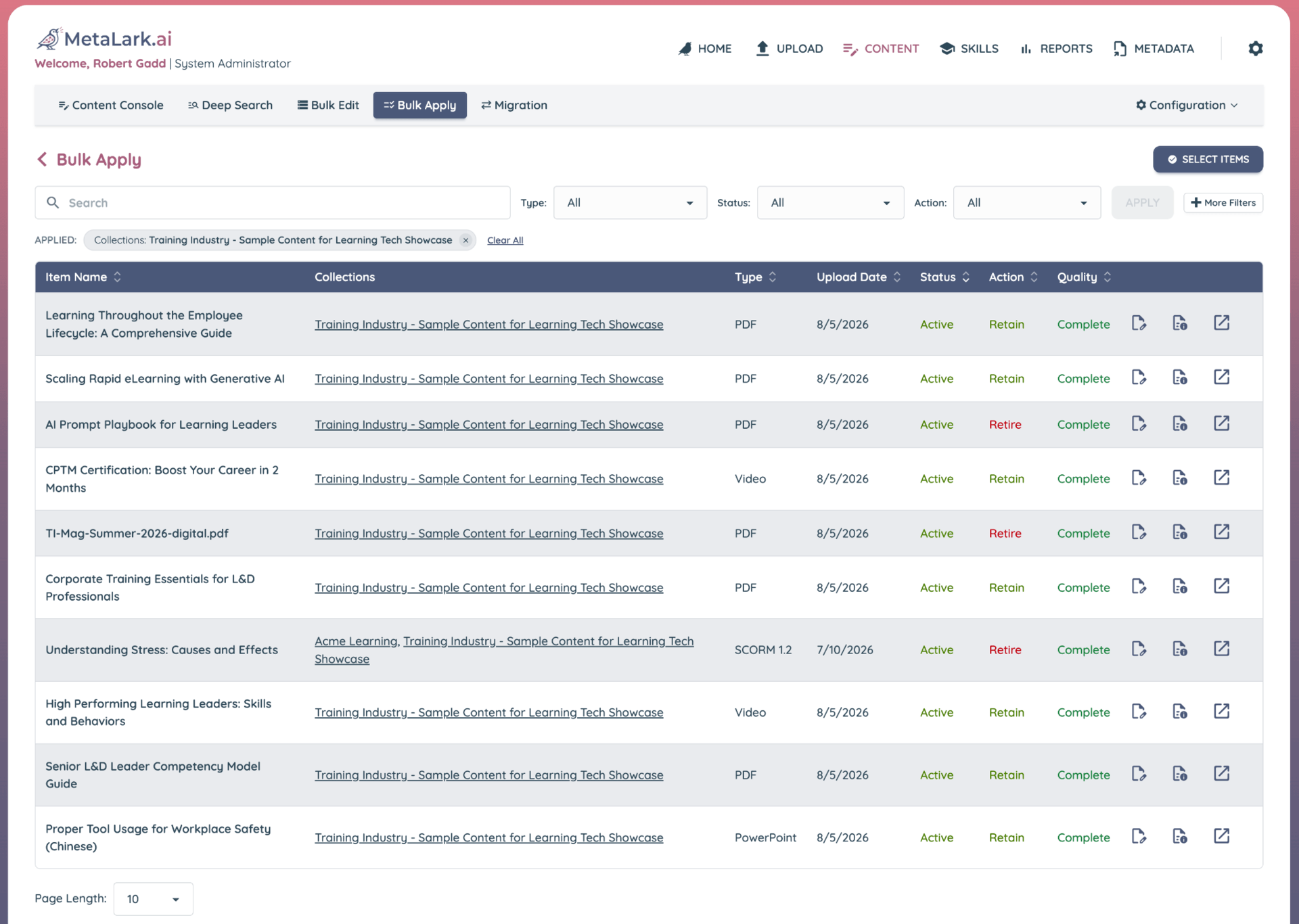
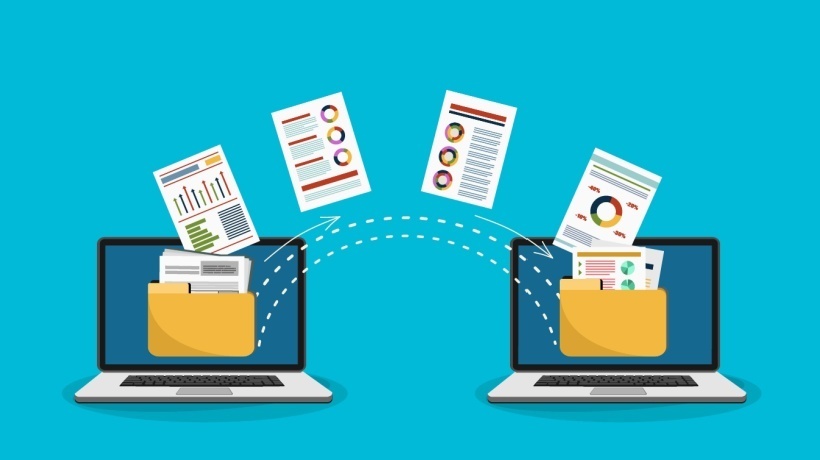
Figure 1: A real inventory includes everything, not just what the LMS tracks. Parsing content directly from cloud drives and LMS libraries produces one searchable catalog of every asset you own, regardless of format or where it was stored.
Step 2: Read The Content Before You Judge It
This is the step that traditionally comes last, and putting it last is the reason most content audits stall. In a manual process, opening files is the expensive part, so teams filter first on usage data and titles, then review whatever survives. The problem is that you are making the first cut using the least reliable information you have, and by the time anyone opens a file, scores of decisions may have already been made.
A module called "Data Privacy Essentials v3" tells you nothing about whether the regulatory references inside it are current, whether it overlaps eighty percent with a security awareness course from another team, or whether the scenarios still reflect how the business operates. A PDF called "Field Service Guide" tells you even less, because it does not carry a version number or a modified date you can trust.
I wrote about that visibility gap in an earlier article on what you do not know about your learning content, and migration is where the gap gets expensive, because you are making keep-or-kill decisions on hundreds of assets at once.
There are two ways to close it. You can assign people to open files and review them, which works, and which realistically limits you to a fraction of the library. Or you can automatically scan the content itself, which is the problem we built MetaLark.ai to address, going inside Sharable Content Object Reference Model (SCORM) packages, documents, presentations, PDFs, audio and video to generate summaries, skills and topic mappings, and to flag where two assets cover the same ground under different names. Processing any complex SCORM course takes less than a minute, PDFs get scanned in ten to twenty seconds, 20-minute audio and video clips reviewed and transcribed in under a minute, images and infographics in a few seconds each—the process is as accurate as it is amazing. Scanning and analyzing an entire enterprise library becomes a scheduling question rather than a staffing one occurring in hours instead of weeks.
Think of it as a diagnostic pass across the whole library rather than a review of individual items. You are not trying to grade each course or content item, you are now seeing the shape of everything you own at once, and most teams have never had that view of their own library at this molecular level in the past.
The finding that changes your mindset usually works like this. Consider it's now possible to compare a vendor course called "Managing Difficult Conversations" with an internally built module called "Performance Feedback Basics"; both have different owners, were purchased/commissioned and deployed two years apart, and teach the same six concepts against the same underlying model. You also find out there's a recorded leadership webinar covering most of the same territory in a third incarnation as well. Nobody was fully aware of the others, and all three had steady traffic because different managers or teams assigned them. This reality is difficult (or near impossible) to catch in a typical spreadsheet or standard LMS report containing just titles, descriptions and dates.
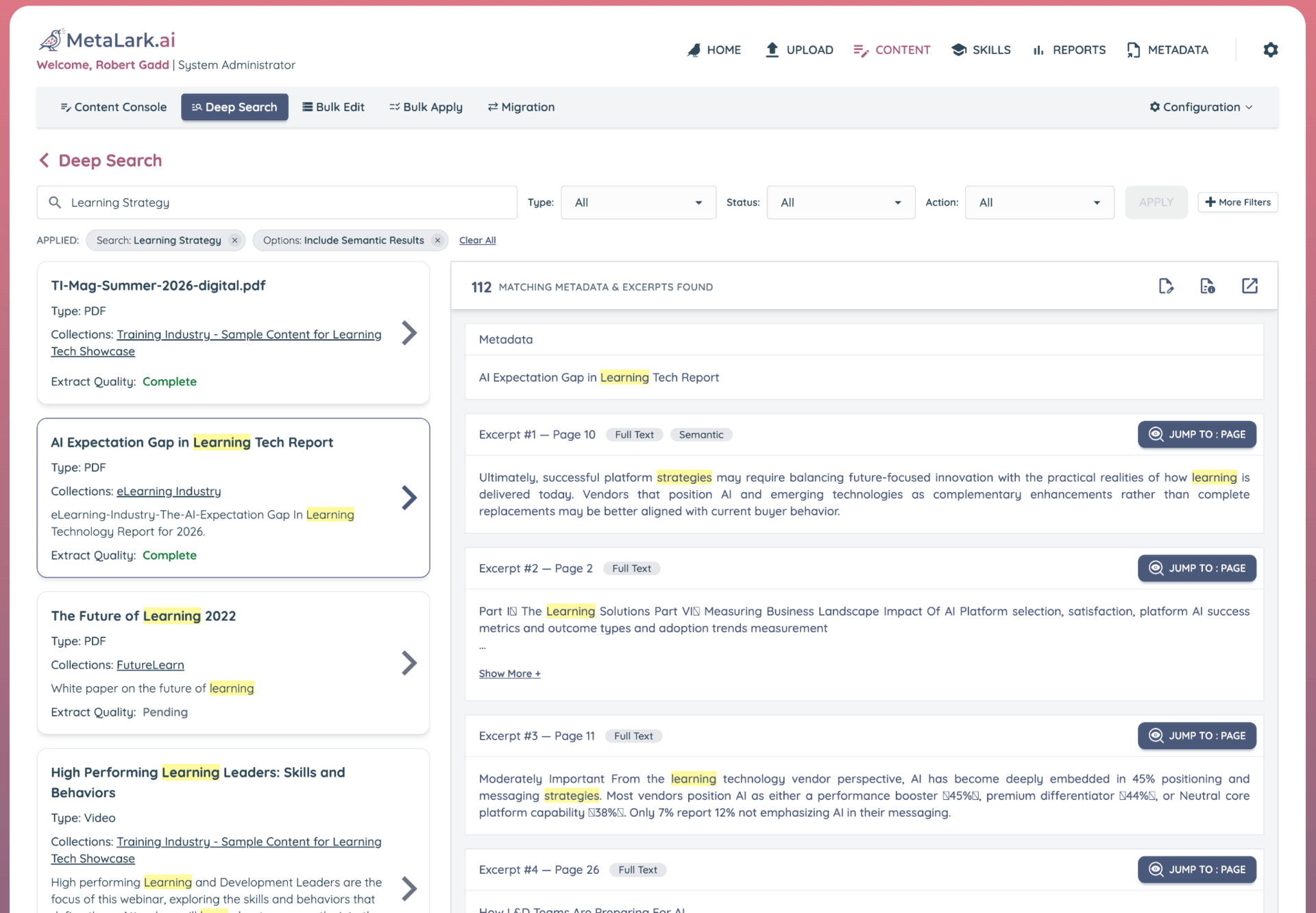
Figure 2: Duplication rarely announces itself in a title. Semantic analysis across the full library surfaces assets that teach the same material under different names, built by different teams, in different formats, which is where most consolidation savings actually come from.
Step 3: Let The Usage Data Make The Easy Calls
Now that you can see what the content actually is, layer the usage data on top of it. In most libraries I have seen, somewhere between a quarter and half of the tracked historical catalog has close to zero access activity, and a surprising number of items have never been launched by anyone, so a large portion of the decisions make themselves (especially when teams license huge third-party libraries in an uncurated fashion).
Set a simple, published rule and apply it consistently. Something like: if an asset has no launches in twenty-four months and no named owner is willing to claim it, it should be considered for retirement. Share the rule before you start and give people a defined window to appeal, because the rule is what keeps this from turning into a series of individual negotiations, which is how audits often stall. You do need a few honest exceptions, since seasonal content, onboarding for roles you rarely hire, and regulatory refresh cycles longer than two years might appear to be outdated from a usage perspective but that may not be the case.
Another challenge is that usage data may only exist for content tracked via your LMS or LXP tracks. For example, those PDFs and infographics stored in Microsoft SharePoint, recorded webinars warehoused in Google Drive, slide decks pulled off a facilitator's laptop every month used to marshall an onboarding event—none of these generate a launch record, and for most organizations that may represent a large share of an aggregated enterprise library. This is exactly why the chronology of these steps matters. If usage data were your first filter, everything outside the LMS/LXP either gets waved through untouched or gets cut without anyone knowing what it was.
Once you have read through and analyzed your content—either manually but hopefully using automation and AI—you have a substitute signal for all your digital content no matter the origin or source because you know what each item covers, whether something newer says the same thing, and whether the material across all the collections still aligns with how the organization operates.
Step 4: Apply One Of Four Decisions To Every Asset
With the content understood and the usage data applied, classify every digital resource/asset into one of four primary conditions as follows:
- Retain. Content matching this condition is "ready to go" as is because it is deemed to be active and owned. Retained content can immediately be launched and used in any new system without missing a beat.
- Refresh. Content matching this condition is generally current but can stand to be updated for content or clarity before it is migrated. This suggests someone is assigned and scheduled to do that work before the wave it belongs to.
- Retire. This reflects out-of-date or legacy content that's not been touched nor needed for a few years (or more!). Whenever large, uncurated third-party libraries are licensed, this may represent a very large collection of unused, superfluous items that are just clutter.
- Reuse. This distinction is likely new for many teams as it represents a shift in how content has traditionally been used or applied. It helps teams contemplate how extracted content from legacy packaged digital resources—think old SCORM packages or PDFs or PPT files—can be ported over and transformed into a new context either in a new authoring tool or LCMS or imported directly into an enterprise Large Language Model (LLM) as text or markdown artifacts.
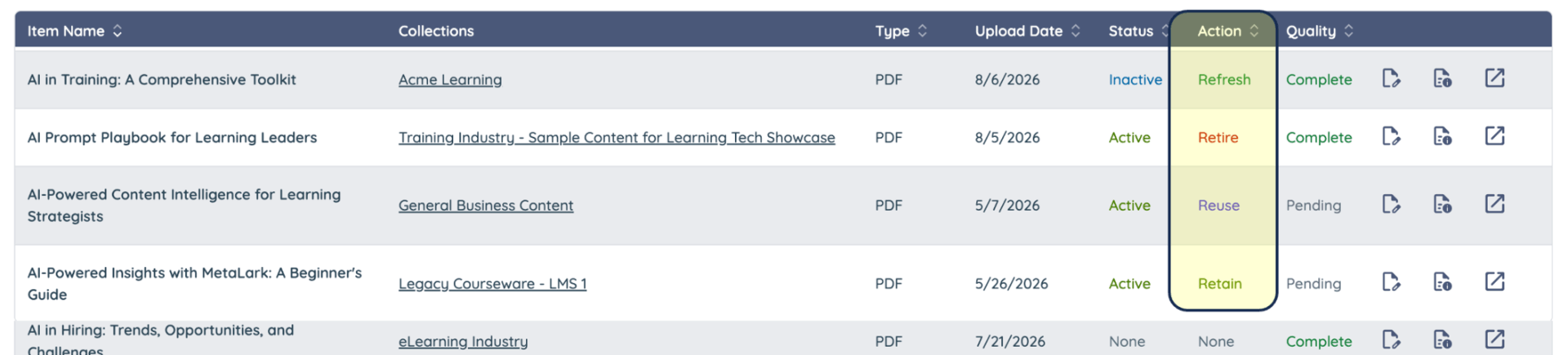
Figure 3: Action fields reflecting applied decisions and disposition for each content item; admins can filter on these conditions when they evaluate content or perform tasks like bulk exports or migrations.
One additional classification "bucket" you have but should try to avoid using is "Review" which is intended only as an interim step/condition for teams working through an inventory or audit to call attention to an item that needs a "second opinion." Always clear items marked as "Review" before any full scale migration activities commence. If a decision genuinely cannot be made before cutover, put the asset in a holding archive outside the new platform rather than migrating it into the live catalog.
What Changes When You Can See Inside With An Intelligent Extraction Tool?
The disposition schedule stops being something you build from scratch and becomes something you review and approve. Assets arrive at this step already grouped by subject, already flagged for overlap, and already summarized well enough that a business owner can make a call without opening the file—but there's a player one tap away in case you want to review any content item, even from outside of the originating LMS or repository. Your team ends up investing their time and efforts deciding what's good/bad, or needed/effective, instead of manually culling through unstructured, disorganized or outdated materials.
Step 5: Put Names Next To The Hard Calls
It is important to note that L&D should own the content migration process for their learning-related resources, but not necessarily be responsible for all of the content decisions, and this is where many audit efforts get stuck. Regulated content should be signed off by the compliance or risk owner accountable for the requirement, not by an instructional designer guessing whether a regulation changed, and functional content gets signed off by the business owner whose team it serves. If no one is willing to associate their name with a content asset, your team has their answer, and it is a legitimate one to document and share.
One thing worth clarifying before you initiate these actions, because it freezes more migrations than anything else: "retiring" a legacy course or content asset is not the same as losing its completion history. Those are separate decisions, and completion records can be archived and transcripts exported without carrying the content itself into the new platform. Get the compliance team to confirm what actually has to be retained and evidence of historical alignment in what form, and you will usually find the requirement is far narrower than everyone assumed.
Step 6: Migrate In Waves And Test Each One
Structure your migration strategy and timing so the highest-stakes content gets the most attention. The first wave should be regulated content plus the onboarding paths that run continuously, because these are where a broken package or a lost completion record causes real problems and you want time left to fix what breaks. The second wave is the rest of the active catalog, and the third is the long tail, which by then you may decide does not need to move at all.
Test each wave rather than confirming the files uploaded. Launch the content the way a learner would, on the devices your workforce actually uses, and confirm that tracking, bookmarking, scoring and completion all report back correctly, since older packages have a way of rendering fine while quietly failing to report anything. Keep the old system available read-only for a defined period, with an actual end date on it so it does not become a permanent second library.
Now, if your team has taken the leap to streamline and automate your migration process using a tool like MetaLark.ai, these waves can be either sequential and executed simultaneously after testing and validating each phase and class of content being migrated. Organizations planning to move from one (or several) legacy LMS platforms to a new, successor LMS platform (or LLM) can often take advantage of API-level integrations that can fully automate the migration process end-to-end to not only move their vetted and staged content but also create the object-level records inside the target LMS/LXP platform as needed. Audit-level controls allow teams to monitor the end-to-end migration process, simplifying the overall level of effort and reducing much of the time and related expense of these sorts of migration efforts.

Figure 4: Migration Services are organized and executed by administrators using predefined target endpoints and even API connectors where supported. Content can be selected and pre-staged for migration prior to initiating a staged exercise or bulk migration campaign as preferred.
The Bottom Line
A migration is not really a content project, but it is the funded, deadline-driven opportunity most organizations never otherwise get. Teams that come out of it well treat the transition as a decision point for every learning resource, not just a transfer exercise, and they leave a meaningful portion of the old library behind.
What has changed is the order in which this work can happen. Reading the full library used to come last because it was too expensive to do first. Scanning it with modern tools now takes hours or days instead of weeks or months, so teams can start with a complete picture instead of assembling one as they go, and spend their time deciding what to keep instead of manually sorting through it.
Once the waves are migrated, set governance for the new platform while you still have everyone's attention: naming conventions, metadata standards, a required owner field, and a retirement date at publication. These cost almost nothing to put in place on day one, and skipping them means repeating this whole process at the next migration, merger, or system replacement.