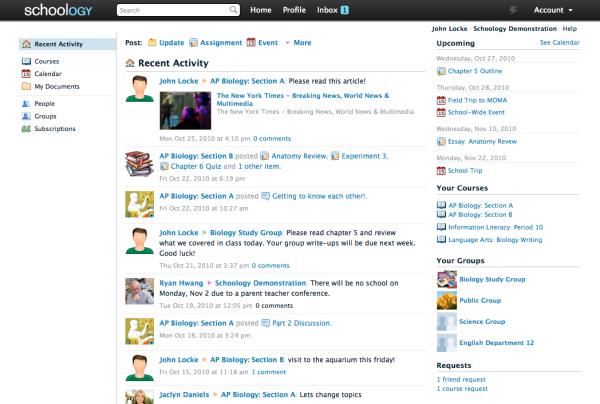
Connects people, content and systems that fuel education. Brings eLearning through collective effort. Easy to use and time-saving. Personalized education for 20+ millions administrators and users from K-12 schools and universities.
Learn more about Schoology's pricing options, cost, and plans so you can make a well-informed, business-wise decision on the best software to use for organization.
Pricing Model
Freemium
One-time purchased license
License
Free
Paid
Starting Price
N/A
Free Trial
No
There's the free and the enterprise version, in which pricing varies per implementation, the cost per student being $10, and it is a one-time fee. Schoology is free to educators in K-12 public and private schools, colleges and universities worldwide.
Integrations
Learn more about Schoology's integration options.
-
Have you used Schoology before?
Answer a few questions and help the community to make the best decisions
Is Schoology the right solution for you? Read verified Schoology reviews from people in industries like yours to make a confident choice.
Performance Overview
Overall Rating
75%
Usefulness
Usability
Customer Experience
Likelihood to Recommend
I really hate this lms. Pick something they aids students rather than hinders them.
Sep 24, 2025
Overall Rating
20%
Usefulness
Usability
Customer Experience
Likelihood to Recommend
What do you like best?
Nothing, this is a mess of a software that should be avoided at all costs. Just look at the Google play reviews.
What do you dislike?
Notifications, the power of the tool creates a mess for students other than the few teachers who put too much time in to try to control it.
K-12 collaborators get live support and friendly UI
Aug 5, 2025
Overall Rating
76%
Usefulness
Usability
Customer Experience
Likelihood to Recommend
What do you like best?
One of the most prominent things that Schoology gave us is the feeling of live support and community. The platform is simple enough for our teachers to adopt and use, plus the powerful user community makes it easier to integrate new features. It has proven to be a dependable ally in the classroom, allowing us to spend less time troubleshooting and more time teaching.
What do you dislike?
This platform requires too much manual work on the admin side. Organizing and/or onboarding classes can seem time-consuming. We also find it sparse on enterprise-grade features, which makes it less appealing for larger, more complex organizations.
Great for teachers, fun to use, but not always connected
Jun 27, 2025
Overall Rating
78%
Usefulness
Usability
Customer Experience
Likelihood to Recommend
What do you like best?
Schoology has allowed us to customize our vision for our desired learning space. Our teachers love having access to a community of peers sharing tips and best practices, and the UI is so intuitive that most of our staff required no training. It has helped us create a livelier classroom while allowing us to customize the experience.
What do you dislike?
We’ve had some challenges with integrations. The HTML editor strips some code, iframe embeds run into HTTPS issues, and LTI integrations can feel half-baked or demand a lot of labor from an external developer. This creates a higher level of complexity than we would like for connecting Schoology with some of our other tools.
A Comprehensive Platform for Teaching with Robust, for Engaging Learning Experiences
May 9, 2025
Overall Rating
78%
Usefulness
Usability
Customer Experience
Likelihood to Recommend
What do you like best?
Schoology quizzing and test tools are especially valuable to our teachers. They enable real-time student success monitoring and assessment management without needing external add-ons. These tools give us nearly everything we need to run practical coursework and have been a big help for our teaching staff.
What do you dislike?
The basics are good, but we cannot create more interactive and creativity-driven modules with this tool. The platform does not always allow for more dynamic training design or robust content development, as we would like with some of our corporate or higher ed programs.
Comprehensive LMS solution designed for K-12 environments
Apr 11, 2025
Overall Rating
76%
Usefulness
Usability
Customer Experience
Likelihood to Recommend
What do you like best?
We’ve found Schoology to unify a large community of instructors and students with an intuitive interface that helps decrease the learning curve for our new teachers. With built-in interactive teaching tools, resource management, and tracking grades, it has made it easier for our K–12 administrators and teachers to create a smooth learning experience.
What do you dislike?
We have an issue when marking an assignment where we have to annotate. The setup is stiff, and if students enter their solutions incorrectly, it gets tedious for us to grade. Embedding content is also tricky because of HTTPS restrictions, and we wish for better editor capabilities like Java code support.
Great LMS system for schools and secondary learners
Feb 18, 2025
Overall Rating
78%
Usefulness
Usability
Customer Experience
Likelihood to Recommend
What do you like best?
Schoology has provided us with an extensive resource library, dependable grade tracking, and interactive lesson delivery within our secondary and upper primary classrooms. It has established itself as a platform that resonates with our teachers, is needed for day-to-day learning, and is the most familiar K-12 platform.
What do you dislike?
We see limits for higher education use. The platform should be better able to deal with sophisticated LTI integration or high-end learning tool responsiveness. That makes it a poor fit for university and corporate training, but effective in K–12.
Helpful Features Support Classroom Routines But Grading Settings Are Hard To Adjust
Nov 27, 2024
Overall Rating
84%
Usefulness
Usability
Customer Experience
Likelihood to Recommend
What do you like best?
Schoology has been helpful for keeping classroom routines steady. Teachers are able to post announcements, track assignments, and monitor student progress in one place. Our teams like the ability to reuse past materials, which saves valuable time.
What do you dislike?
We have run into problems with outdated materials remaining visible, which confuses new students. Some grading settings are buried and hard to adjust. The platform can feel rigid for teachers trying to build creative modules. Importing or exporting materials between years sometimes takes longer than planned.
Useful LMS For Growing Schools And Active Staff But Integration Options Fall Short
Oct 26, 2024
Overall Rating
81%
Usefulness
Usability
Customer Experience
Likelihood to Recommend
What do you like best?
Our staff has appreciated how simple it is to post materials and keep classes active in Schoology. The gradebook is clear enough for most teachers and works well for day to day use. We rely on course folders to structure units, which has helped reduce confusion for students.
What do you dislike?
Some features feel dated, and long term storage of materials can get messy without careful upkeep. The integration options work for basic needs but fall short with more advanced learning tools. We have seen occasional sync issues with external grade systems.
Simple Setup With Reliable Tools For Daily Lessons But Multimedia Tools Are Weak
Sep 19, 2024
Overall Rating
84%
Usefulness
Usability
Customer Experience
Likelihood to Recommend
What do you like best?
We like how Schoology helps us run quizzes, collect files, and organize units without extra plugins. Teachers appreciate that they can move quickly between classes and find what they need. Sharing materials with coworkers has been smooth for most teams.
What do you dislike?
The platform could use stronger tools for multimedia lessons. Uploading large items takes longer than expected. Our staff often requests smoother links with outside systems. Mobile navigation can feel cramped for some families. Admin settings are spread out and require time to master.
Helps Teachers Build Digital Classes And Stay Organized But Editor Limits Creativity
Sep 15, 2024
Overall Rating
81%
Usefulness
Usability
Customer Experience
Likelihood to Recommend
What do you like best?
Schoology has given our teachers a dependable place to manage lessons, assignments, and basic communication. We find it easy to guide new staff through the layout because most tools feel familiar.
What do you dislike?
We face slowdowns when many students open assignments at once. The editor removes some embedded items that we rely on for enrichment activities, which limits creativity. Admin tasks can require extra clicks and feel repetitive for larger teams. Some teachers would like deeper analytics for tracking learning patterns.
You've viewed 10 out of 18
Alternatives
Not a match? Find software alternatives that better suit your needs and compare them to discover the one that's right for you.