



What Counts As "Instructional Design Tools" Today?
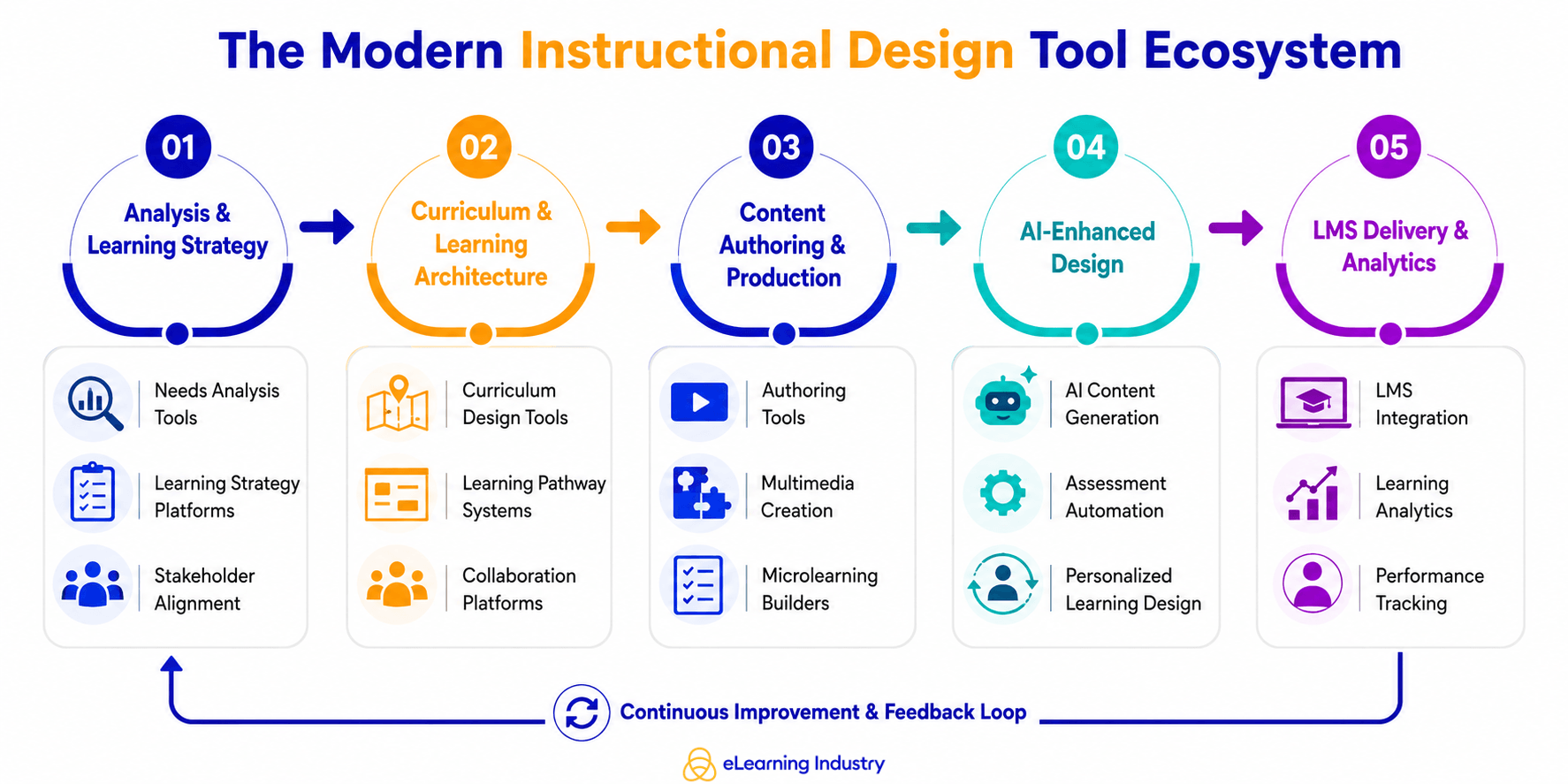
Instructional Design tools have evolved far beyond simple course creation software. Today, they include a broad ecosystem of platforms that support every stage of Instructional Design for eLearning, from strategy and curriculum planning to content development, collaboration, delivery, and analytics. As digital learning becomes more complex, organizations are increasingly investing in Instructional Design software tools that improve scalability, learner engagement, and workflow efficiency.
Modern Instructional Design technology tools now fall into several categories.
- Instructional Design authoring tools help teams create interactive courses, simulations, assessments, and multimedia learning experiences.
- Curriculum design tools support learning pathway planning, competency mapping, and structured program development.
- At the same time, AI tools for Instructional Design are reshaping how learning content is developed by helping Instructional Designers generate outlines, assessments, summaries, and adaptive learning experiences more efficiently.
- Many organizations also rely on LMS Instructional Design systems that connect learning content directly to learning management platforms for tracking, reporting, and learner performance analysis.
- In addition, collaboration and content planning platforms have become essential tools for Instructional Designers working across distributed L&D, HR, and business teams.
It is also important to understand the difference between Instructional Design software and learning design software. Instructional Design software often focuses on creating and delivering training content, while learning design software typically supports broader learning experiences, learner journeys, and long-term capability development. Similarly, Instructional Design platforms differ from standalone tools. Standalone tools usually solve one specific task, such as authoring or video editing. In contrast, Instructional Design platforms connect multiple workflows into one learning design system.
This shift matters because Instructional Design tools no longer operate in isolation. The modern learning ecosystem depends on connected platforms that support collaboration, automation, analytics, and Instructional Design for training at scale.
Instructional Design Tools For Needs Analysis And Learning Strategy
Instructional Design tools are most effective when they support learning strategy before content creation begins. In modern Instructional Design for training, successful programs are built around business goals, performance outcomes, and learner needs, not just course development. That's why many organizations now invest in tools for Instructional Design that help teams analyze skill gaps, map learning objectives, and align training with measurable results.
Tools In The Needs Analysis Stage
Stakeholder Analysis Tools
The first stage of Instructional Design learning often involves needs analysis and performance mapping. Stakeholder analysis tools help Instructional Designers gather insights from managers, Subject Matter Experts, and business leaders to identify performance challenges.
Skills Gap Analysis Platforms
Skills gap analysis platforms make it easier to compare current employee capabilities with desired competencies, especially in fast-changing industries.
Survey And Feedback Tools
These also play an important role by collecting learner data, engagement trends, and training pain points before development begins.
Tools In The Learning Strategy Design Phase
Curriculum Design Software
Once the analysis phase is complete, teams move into learning strategy design. Curriculum design software helps organize learning pathways, define competencies, and structure training programs for different audiences. Many Instructional Design resources also support the creation of measurable learning outcomes, making it easier to connect instructional goals with business impact.
Framework Mapping Tools
Framework mapping tools are another important category within Instructional Design for training. Many organizations use platforms that support models such as ADDIE, SAM, or Agile learning design to create repeatable, scalable workflows. These systems improve collaboration between L&D teams, SMEs, and leadership stakeholders while keeping projects aligned with organizational priorities.
Curriculum Design Tools And Learning Architecture Platforms
Instructional Design tools are no longer used only to build courses. Today, they help organizations create complete learning ecosystems that connect business goals, learner needs, and long-term skill development. As Instructional Design for eLearning becomes more strategic, companies are investing in curriculum design tools and learning design software that support structured, scalable, and measurable learning experiences.
Tools In The Curriculum Design Phase
This stage of the Instructional Design process focuses on creating learning coherence, not content creation. Before developing modules or assessments, Instructional Designers must first define how learning should flow, how skills connect, and how learners progress over time. That is where modern Instructional Design in educational technology plays a critical role.
Curriculum Mapping Tools
Curriculum mapping tools help Instructional Designers organize learning pathways around competencies, business outcomes, and learner development goals. Instead of designing isolated courses, teams can create connected learning journeys that support continuous growth.
Learning Pathway Builders
Learning pathway builders are especially valuable in corporate L&D environments. They allow teams to structure training into progressive stages, helping learners move from foundational knowledge to advanced application. This approach is common in leadership development, onboarding programs, compliance training, and technical upskilling initiatives.
Competency Alignment Tools
Competency alignment tools also help organizations connect training directly to performance requirements. Instructional Designers can map learning objectives to specific skills, job roles, or organizational competencies. This creates stronger alignment between training investments and measurable business outcomes.
Sequencing Frameworks
Sequencing frameworks are another important component of curriculum design tools. These frameworks help determine the order in which learners should consume content, practice skills, and complete assessments. In Instructional Design for elearning, sequencing matters because poorly structured learning experiences can overwhelm learners or reduce knowledge retention.
Tools In The Planning And Documentation Phase
Instructional Design Documentation Platforms
Once the curriculum structure is defined, Instructional Designers need systems that support planning and documentation. Instructional Design documentation platforms help teams organize ideas, workflows, and learning strategies before development begins.
Storyboards
Storyboards remain one of the most widely used Instructional Design tools because they provide a visual outline of the learner experience. They help teams map interactions, assessments, multimedia elements, and navigation flows before content production starts.
Design Blueprints
Design blueprints offer a higher-level strategic view. These documents typically include learning objectives, delivery methods, learner personas, engagement strategies, and assessment models. In larger organizations, blueprints also help stakeholders align around project goals and timelines.
Learning Journey Maps
Learning journey maps are becoming increasingly important in digital learning design. Rather than focusing only on courses, journey maps visualize the entire learner experience across multiple touchpoints. This includes formal training, peer collaboration, coaching, practice opportunities, and performance support resources.
Collaboration Systems
As learning teams become more cross-functional, shared Instructional Design platforms are becoming essential. Instructional Designers now work closely with SMEs, HR leaders, trainers, developers, and business stakeholders. Collaboration systems help centralize communication, feedback, and project management.
Authoring Tools And Content Creation Software
Instructional Design tools have evolved far beyond simple content creation platforms. Today, Instructional Design authoring tools act as execution engines that help learning teams build, launch, update, and scale digital training experiences across organizations. For Instructional Designers working in corporate L&D and EdTech, these platforms are now central to workflow efficiency, collaboration, and learner engagement.
Authoring Tools
At the core of most modern learning ecosystems are authoring tools. These are the Instructional Design software tools used to create eLearning modules, assessments, simulations, branching scenarios, and interactive training content. Many organizations rely on software used by Instructional Designers to develop learning experiences that work across desktop, mobile, and LMS environments. The focus is no longer just publishing content. Teams now need tools that support faster production cycles, easier updates, and more personalized learning experiences.
eLearning Development Tools
eLearning development tools are especially important for organizations managing large-scale training programs. These platforms help Instructional Designers create structured digital learning content without relying heavily on developers. Interactive content builders also play a major role in learner engagement. Features like drag-and-drop interactions, quizzes, gamification, and scenario-based learning help transform static information into active learning experiences.
Visual And Instructional Content Tools
Alongside authoring platforms, visual and instructional content tools have become essential Instructional Designer tools in modern workflows. Multimedia creation tools support video editing, animation, audio narration, and screen recording, allowing teams to produce more engaging learning assets. Infographic learning design tools are increasingly used to simplify complex information into visual formats that improve knowledge retention and learner accessibility.
Microlearning Builders
Microlearning builders are also gaining importance as organizations shift toward shorter, more flexible learning experiences. Instead of long-form courses, many L&D teams now develop modular learning content that employees can access on demand. This reflects a broader trend in digital learning design, where speed, accessibility, and learner convenience are becoming major priorities.
Free Vs. Enterprise Instructional Design Tools
At the same time, organizations must decide between free Instructional Design tools and enterprise-level platforms.
- Free tools can support smaller teams or individual Instructional Designers working on limited projects. They often provide basic authoring capabilities and are useful for experimentation, rapid prototyping, or Instructional Design learning.
- However, enterprise suites offer broader functionality that supports organizational scale. Advanced analytics, collaborative workflows, localization features, AI-assisted content generation, and LMS integration are becoming standard expectations in enterprise Instructional Design software tools. These capabilities are especially valuable for organizations managing global training initiatives or complex learning ecosystems.
The trade-off usually comes down to scalability, integration, and long-term workflow efficiency. Free tools may reduce short-term costs, but enterprise systems often provide stronger governance, content management, learner tracking, and operational consistency. For many L&D leaders, the decision is less about individual features and more about how well a platform fits into the organization's larger learning strategy.
Best AI Tools For Instructional Design And Modern Learning Design Systems
Instructional Design tools are evolving quickly, and the best AI tools for Instructional Design are changing how learning teams create, manage, and optimize training experiences. Instead of spending most of their time on manual production tasks, Instructional Designers can now focus more on strategy, learner experience, and performance outcomes. This shift is especially important for corporate L&D teams managing large-scale digital learning programs across multiple audiences and platforms.
Today's AI tools for Instructional Design support much more than simple content generation. They now play a role across the entire learning Instructional Design workflow, from lesson planning to personalization and LMS integration.
AI For Content Generation
One of the biggest advantages of AI in Instructional Design is faster content production. AI-powered platforms can help Instructional Designers draft lessons, create assessments, and generate learning scenarios in minutes instead of hours. This is particularly valuable for organizations that produce large volumes of training content or frequently update material.
For example, AI can help create:
- Lesson outlines aligned with learning objectives
- Quiz questions and knowledge checks
- Branching scenarios for compliance or leadership training
- Summaries and microlearning modules from long-form content
These capabilities improve speed while also supporting consistency across learning programs. Many Instructional Design authoring tools now include built-in AI features that assist with tone adjustment, content simplification, and multilingual adaptation for global learners.
However, AI-generated content still requires instructional oversight. Designers must validate accuracy, align content with business goals, and ensure that learning experiences remain meaningful and learner-centered.
AI For Instructional Strategy
Modern learning design systems are increasingly using AI to support instructional strategy, not just content creation. This is where AI becomes especially valuable for enterprise learning environments.
Adaptive learning design tools can analyze learner behavior and recommend personalized learning pathways based on skill gaps, job roles, or performance data. AI can also support learner segmentation by identifying patterns in engagement, completion rates, and assessment performance.
For L&D leaders, this creates opportunities to move beyond one-size-fits-all training models. Instead, organizations can design more targeted and relevant learning experiences that improve retention and performance outcomes.
AI-driven personalization models are also helping Instructional Design for eLearning become more data-informed. Rather than relying only on assumptions about learner needs, teams can use real behavioral insights to refine learning journeys over time.
AI In Workflow Acceleration
Many repetitive production tasks can now be automated, allowing Instructional Designers to work more efficiently across complex projects.
Examples include:
- Storyboard automation for rapid course planning
- Content repurposing across formats and delivery channels
- Metadata tagging for LMS Instructional Design and content organization
- Automated transcription and accessibility support
These features are especially useful for organizations managing large digital learning libraries or blended learning ecosystems. AI helps reduce administrative work while improving scalability and discoverability across Instructional Design platforms.
At the same time, AI is changing the role of Instructional Designers themselves. The profession is shifting away from pure content production and toward system design, evaluation, and learning experience optimization. AI does not replace Instructional Designers; it elevates their role within modern learning strategy.
LMS Instructional Design And Learning Delivery Systems
LMS Instructional Design is no longer just about uploading courses into a platform. Modern organizations now rely on connected Instructional Design platforms and delivery systems that support the entire learning experience, from content publishing to learner engagement and performance tracking. As corporate learning ecosystems become more complex, delivery systems play a bigger role in helping Instructional Designers measure impact and improve learning outcomes over time.
LMS-Integrated Design Tools
Today's LMSs are closely connected with Instructional Design workflows, allowing teams to create, publish, update, and manage learning content more efficiently. Instead of working across disconnected systems, Instructional Designers can move content directly from authoring environments into the LMS through streamlined publishing workflows.
Content Versioning
These systems also support content versioning, which is especially valuable for organizations that frequently update compliance training, onboarding materials, or technical learning content. Teams can maintain consistency across departments while ensuring employees always have access to the latest learning materials. This makes Instructional Design software training more scalable and easier to manage in fast-changing business environments.
Tracking Learner Performance
Another major advantage of integrated learning delivery systems is the ability to track learner performance in real time. Modern Instructional Design platforms provide analytics on completion rates, assessment scores, learner engagement, and skill progression. This allows L&D teams to move beyond course creation and focus more on performance improvement and business alignment. Instead of asking whether a course was completed, organizations can better evaluate whether learning objectives were actually achieved.
LXPs
At the same time, Learning Experience Platforms (LXPs) are changing how learners interact with training content. Unlike traditional LMS environments that follow fixed learning paths, LXPs offer more flexible, learner-driven pathways. Employees can explore content based on their roles, interests, goals, or skill gaps, creating a more personalized learning experience. Many LXPs also include personalization layers powered by AI and behavioral data. These systems recommend learning resources, suggest next steps, and adapt content based on learner activity. As a result, the learning design system becomes more dynamic and responsive to individual needs.
How To Evaluate Instructional Design Tools
Instructional Design tools are no longer just content creation platforms. Today, the best Instructional Design software supports the entire learning workflow, from planning and collaboration to delivery and performance analysis. For Instructional Designers and L&D leaders, choosing the right software for Instructional Design requires looking beyond features and focusing on how well a tool supports business goals, team workflows, and long-term learning strategy. So, which are the 4 criteria based on which you should decide an Instructional Design Tool?
Scalability
Scalability matters because learning programs rarely stay small. A tool that works for a five-person training team may struggle in a global enterprise environment with multiple stakeholders, large learner populations, and complex reporting needs. The best Instructional Design software should support growth without creating workflow bottlenecks.
Integration
Integration capability is equally important. Modern Instructional Design for eLearning depends on connected ecosystems, not isolated platforms. Software for Instructional Design should integrate smoothly with LMS platforms, content libraries, analytics tools, communication systems, and HR technology stacks. Without integration, teams often waste time manually moving content and learner data between systems.
AI
AI readiness has also become a major consideration. Many Instructional Design software tools now include AI-assisted content generation, assessment creation, localization, and learner personalization features. However, organizations should evaluate whether these features genuinely improve workflow efficiency or simply add complexity.
Collaboration
Finally, collaboration support is essential in modern digital learning design. Instructional Designers frequently work alongside SMEs, facilitators, HR teams, and business leaders. Shared workflows, real-time feedback, and version control can significantly improve project speed and alignment.
Conclusion
Instructional Design tools today function as part of a larger workflow ecosystem that supports analysis, curriculum planning, authoring, collaboration, delivery, and performance tracking. That is changing how organizations approach learning design and technology decisions. The most effective Instructional Designers are not simply tool users. They are learning system designers who understand how different platforms, AI capabilities, and workflows connect to business goals and learner outcomes. So, instead of choosing tools based only on features or popularity, organizations should evaluate how well each solution supports their overall learning workflow.