


Making Digital Content Accessible To Every Learner
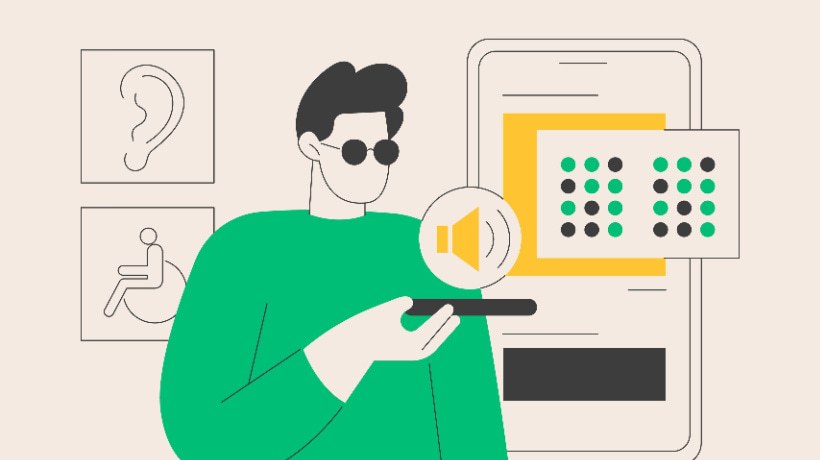
Making digital learning content accessible means designing it so all students, including those with visual, hearing, motor, or cognitive challenges, can engage fully and equally. It's not just about ticking boxes for compliance. It's about building inclusive experiences where every learner has a fair chance to succeed. This article explores simple, practical ways to make your online learning content more accessible and why it matters more than ever.
Tips To Make Digital Content Accessible
Creating accessible online learning content doesn't have to be complicated. By following a few simple guidelines, you can make sure that every student can easily understand, interact with, and benefit from your material.
1. Follow WCAG Guidelines: POUR
The Web Content Accessibility Guidelines (WCAG) are the global standard for digital accessibility. A helpful way to remember them is the POUR principle:
- Perceivable
Content can be seen or heard - Operable
Navigable by keyboard or assistive tech - Understandable
Easy to follow - Robust
Works across devices and tools
2. Avoid Long Blocks Of Text
Break your content into short paragraphs, use bullet points, and add headings. This makes it easier for all learners to scan and understand, especially those using screen readers or those who have attention difficulties.
3. Make Online Documents Or Forms Accessible
Whether it's a PDF, Word document, or Google Form, always structure content properly to make documents accessible. Use clear headings, readable fonts, alt text for images, and properly labeled form fields to support both people with visual impairments and screen reader users in general [1].
4. Provide Captions And Transcripts For Videos
Add captions and transcripts to all video content. This helps not only students with hearing impairments but also anyone who prefers to read, is in a noisy setting, or is learning in a second language.
5. Use Headings And Proper Formatting In Documents
Organize your documents with clear headings, subheadings, and consistent formatting. This helps screen readers navigate the content easily and improves overall readability for students who rely on assistive technology.
6. Use Sufficient Color Contrast
Ensure there is enough contrast between text and background colors so your content is readable for people with low vision or color blindness. There are free tools available to check contrast ratios and meet accessibility standards.
7. Use Inclusive Language
Choose words that are respectful and considerate of all backgrounds, abilities, and identities. Avoid slang, jargon, or phrases that might exclude or offend; this helps create a welcoming and supportive learning environment for everyone.
8. Ensure Assistive Technology Compatibility
Design your content so it works smoothly with assistive technologies like screen readers, text-to-speech tools, and voice navigation. This means using clean code, proper tags, and accessible file formats to support all types of learners.
9. Design Easy-To-Navigate Course Layouts And Use Alt Text For Images
Keep your layouts simple and predictable so students can quickly locate what they need. Add descriptive text to images so people with visual impairments and screen reader users can understand visual content.
10. Include Clear Error Messages
When students fill out forms or complete quizzes, clear error messages help guide them if something goes wrong. Explain the issue and how to fix it in plain language. This is especially helpful for individuals with cognitive impairments or anyone unfamiliar with the system.
Must Follow Universal Design For Learning
Universal Design for Learning (UDL) is an educational approach that helps meet the diverse needs of all students by offering flexibility in how content is presented, engaged with, and expressed. UDL ensures that no one is left out, no matter their learning style or ability.
1. Multiple Means Of Representation
Present information in different ways, like text, audio, visuals, or interactive media, so every learner can understand it in the format that works best for them.
2. Multiple Means Of Engagement
Give students different ways to connect with the material, such as discussion boards, videos, or hands-on activities. This keeps them motivated and involved.
3. Multiple Means Of Expression
Allow learners to show what they've learned in various ways, whether through writing, speaking, creating a video, or taking a quiz, so they can use their strengths to succeed.
Making digital content accessible in online learning environments isn't just about following rules; it's about creating inclusive experiences where every student feels supported and empowered to learn. By using simple strategies like clear formatting, captions, alt text, and Universal Design for Learning, you can make a big difference in how effectively your content reaches all learners. Accessibility benefits all learners. When we design with empathy and inclusion, we open the door to better education for everyone.
References:
[1] Super Cool Free Fonts To Add To Your Collection