

 ChatGPT
 Perplexity
 Claude
 Grok
Grok
Why Asking AI Questions Is A Core Skill In Modern L&D
To ask AI questions is no longer a simple task, but a core skill for modern L&D professionals. The move from traditional search engines to AI tools that answer questions directly has changed how people access, evaluate, and use knowledge at work. As a result, instead of looking through many sources, professionals now rely on AI to quickly gather insights.
This makes asking AI questions a strategic skill, not just a technical one. The answers you get depend a lot on how you ask the questions. Using clear and organized prompts helps AI provide relevant, detailed, and accurate answers. For Instructional Designers, this means focusing on how to frame questions rather than just thinking about the answers.
We can already see the benefits in L&D workflows. When teams use AI well, they create content faster, moving from an idea to a draft in much less time. They also make better decisions by using AI to compare different methods, summarize research, and explore options. In this new environment, those who ask better questions are more successful at designing learning experiences, testing ideas, and increasing their impact.
What Happens When You Ask AI A Question?
When you ask AI questions, you're not searching a database; you're using a system that predicts the best response based on patterns in data. These systems take your input, understand what you mean, and create responses that sound human-like. However, they don't "know" facts in the usual sense; they generate possibilities.
This is why answers can differ. If you ask vague AI questions, the system makes assumptions. This often results in answers that sound good but lack detail or accuracy. Sometimes, AI may give confident but wrong answers because it focuses on sounding coherent rather than being correct.
There is an important difference between asking a simple question and using a structured prompt. A basic question like "Can you explain onboarding?" yields broad, generic answers. In contrast, a structured prompt that adds context, audience, and format helps the AI provide more accurate and useful responses. For L&D professionals, this difference is crucial. The quality of AI answers depends on how you frame your question, not just the AI tool you use.
How To Ask AI Questions Effectively
To ask AI questions effectively, focus on how you structure your prompts. The difference between average and high-value AI questions and answers often comes down to structure. If you have ever wondered, "How do I ask AI a question in a way that delivers usable results?", a simple framework can make that process easier.
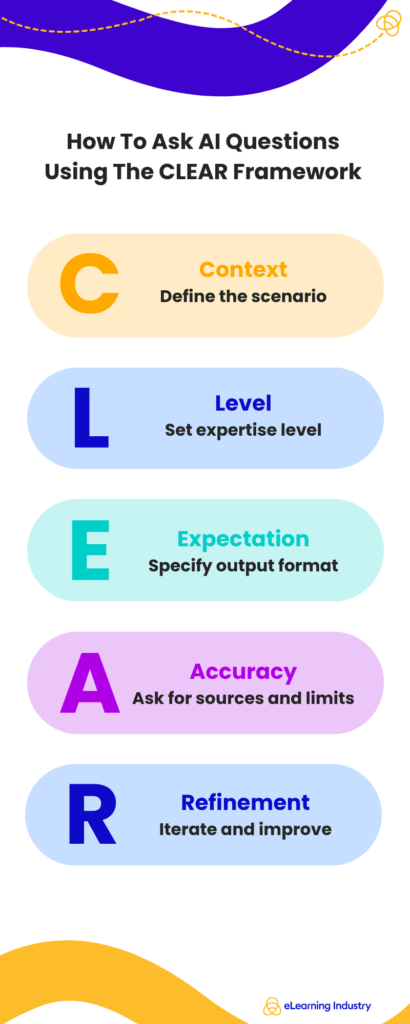
One such framework is the CLEAR framework. It is designed to help professionals get consistent, high-quality outputs when working with any AI to answer questions. Let's break it down.
C—Context: Define The Scenario
AI performs best when it understands the situation. Instead of asking broad or generic AI questions, provide background.
- What is the business goal?
- Who is the audience?
- What constraints exist?
Example:
Instead of: "Create training content."
Ask: "Create onboarding training for remote sales teams in a SaaS company with a focus on product adoption."
Adding context improves how AI answers questions by narrowing the scope and aligning the response with real-world needs.
L—Level: Specify Expertise Level
One of the most overlooked aspects of how to ask an AI assistant questions is defining the level of complexity.
- Beginner (new hires, basic understanding)
- Intermediate (working professionals)
- Advanced (leaders, specialists)
Example:
"Explain this as if I am a senior L&D leader designing an enterprise learning strategy."
This ensures the output matches the required knowledge level, making AI questions and answers more actionable.
E—Expectation: Define Output Format
AI can deliver information in multiple formats. If you do not specify, you risk receiving unstructured responses.
- List
- Framework
- Table
- Step-by-step guide
Example:
"Provide a 5-step framework in bullet points."
This step is critical in how to ask AI a question, especially when outputs are used in reports, learning materials, or stakeholder presentations.
A—Accuracy: Ask For Sources, Constraints, Or Assumptions
AI does not always clarify its reasoning. To improve reliability when using AI to answer questions, explicitly request validation.
- Ask for assumptions.
- Request limitations.
- Include source-based reasoning when needed.
Example:
"Include assumptions and note any limitations in your answer."
This approach strengthens trust in AI answers, particularly for strategic decisions in L&D.
R—Refinement: Iterate With Follow-Up Prompts
The first response is rarely the final one. Strong users of AI treat it as a conversation.
- Clarify unclear points.
- Ask for expansion or simplification.
- Request alternative perspectives.
Example:
"Refine this for a global audience" or "Make this more concise."
Refinement is what distinguishes basic usage from advanced question-answering AI practices.
Examples Of High-Quality AI Questions
When you ask AI questions, the quality of the answers depends on how clearly you phrase your prompts. Many professionals think that AI will automatically understand what they mean, but vague questions lead to generic answers. On the other hand, well-structured questions unlock more valuable insights. Ultimately, learning to refine your questions for AI is what makes the difference between basic use and producing high-impact results.
Weak Vs. Strong AI Prompts
A common mistake teams make when asking AI questions is being too vague.
Example #1
Weak: "Explain onboarding."
Strong: "Create a 30-day onboarding framework for remote sales employees in a SaaS company, including milestones and measurable outcomes."
The difference is clarity. Strong prompts include context, audience, and expected output. This allows AI to generate more relevant and actionable insights.
Example #2
Weak: "Give me training ideas."
Strong: "Suggest five microlearning modules to improve leadership communication skills for mid-level managers, including learning objectives."
The best AI questions are not necessarily longer, but more precise. When you consistently improve how you ask AI questions, you move from surface-level answers to structured, usable outputs.
Use Cases For L&D Professionals
For Instructional Designers and L&D leaders, knowing the right questions to ask AI can significantly improve efficiency and quality across workflows.
Designing Courses
Instead of asking, "Help me design a course," try: "Outline a blended learning program on compliance training for a global workforce, including digital and instructor-led components."
Creating Assessments
Rather than: "Create quiz questions," ask: "Generate 10 scenario-based assessment questions to evaluate decision-making in customer service roles."
Generating Scenarios
Weak prompts often miss realism. A stronger approach: "Create a workplace conflict scenario for leadership training, including character roles and decision points."
Research
Instead of: "Summarize this topic," ask: "Summarize key trends in AI-driven learning personalization, highlighting implications for enterprise L&D strategy."
These examples show that effective prompting is less about the tool and more about how you think. The more intentional you are when you ask a question, the more strategic and reliable your outputs become. Over time, developing this skill leads to better content, faster workflows, and stronger learning experiences.
Best AI Tools For Answering Questions
The best AI tools for answering questions come from a range of capabilities that help with different stages of thinking, research, and decision-making. For Instructional Designers and L&D professionals, selecting the right AI depends on the specific task: ideation, validation, or enterprise execution.
At a high level, there are three main categories to understand.
General AI Assistants
These tools are built for speed and versatility. They provide quick answers, help draft content, and allow you to explore ideas. They are useful for many AI-related questions and can assist with early instructional design tasks, such as outlining modules and brainstorming learning objectives.
Research-Focused AI Tools
These tools are designed for in-depth understanding and validation. They work best for complex questions where accuracy and sources are important. When you are focusing on compliance training, leadership development, or data-driven learning strategies, these tools improve AI responses by providing clear insights rather than just simple answers.
Enterprise AI Copilots
These tools fit into the systems and workflows of organizations. They enable secure and relevant interactions using internal data. For L&D teams, this means they can ask AI questions about internal policies, learning records, or performance data. This helps them make better decisions quickly.
What Makes The Best AI Question Answering System?
Not all tools perform equally. The best AI question answering systems share a few critical characteristics.
- Accuracy is foundational. Strong systems reduce hallucinations and provide reliable outputs, especially when answering complex or high-stakes questions.
- Context retention is what separates basic tools from advanced ones. This means that recalling prior inputs enables professionals to refine their approach when asking AI questions, leading to more meaningful, tailored results.
- Source transparency is essential for trust. The best tools show how answers are formed, enabling L&D professionals to validate information before using it in learning content or strategy.
- Customization allows users to shape how the AI responds. Whether defining tone, format, or audience level, customization ensures that the AI aligns with specific instructional goals.
Free Vs. Paid Tools To Ask AI Questions: What Professionals Should Know
To ask AI questions well, professionals need to know the differences between free AI tools and paid AI tools. Free platforms make it easy to ask questions, but the value you receive depends on your goals, context, and how complex your questions are.
Free AI Tools
Pros
- Speed and accessibility
- Quick answers
- Basic research
- Early-stage ideation
For example, if you are exploring course topics, drafting outlines, or testing ideas, using an AI can ask questions to accelerate your workflow without adding cost. In these cases, the ability to ask AI any question and get an instant response is often enough to move forward.
Cons
- Lack of depth
- Inconsistency
- No contextual awareness
Best for: Low-risk, exploratory tasks, such as brainstorming, content drafting, or generating examples.
Paid AI Tools
Pros
- Better context retention
- Improved output quality
- Stronger data privacy
- Integrations with enterprise systems such as LMS platforms.
Cons
- Financial costs
- Performance uncertainty
- Over-reliance and skill loss
- Privacy concerns
Best for: Complex learning experiences, in-depth analysis, or stakeholder-facing deliverables.
Common Mistakes When Asking AI Questions
Asking AI questions effectively is not just about typing a prompt, but about how clearly you think. Many professionals start asking AI questions without realizing that small mistakes can lead to weak or misleading outputs.
Vague Questions
When users write broad prompts like "explain onboarding" or "create training," the AI lacks sufficient direction. Strong questions AI can answer well are always specific, structured, and tied to a clear goal.
Ignoring Context
AI performs best when it understands the situation. If you have asked AI to generate learning content but do not mention the audience, industry, or format, the response will likely feel generic. Context is what turns a basic output into something usable for L&D strategy.
Treating AI As A Search Engine
Unlike traditional search, AI does not retrieve a list of sources, but generates responses. This means that asking AI questions requires more precision and intention than typing keywords into Google.
Not Validating Outputs
Even when AI provides confident answers, they are not always accurate. Relying blindly on questions AI generates or responds to can lead to flawed decisions. Reviewing, cross-checking, and refining outputs is essential, especially in professional environments.
How Asking Better AI Questions Improves Learning Design Outcomes
When you ask AI questions effectively, the impact on learning design becomes immediately measurable. For Instructional Designers and L&D professionals, the ability to structure AI questions is not just a productivity boost; it directly influences the quality, relevance, and scalability of learning experiences.
Faster Content Development
When you clearly define context, audience, and expected output, AI tools can generate structured drafts, learning objectives, and assessments in seconds. Instead of revising generic outputs, you start closer to a usable result, significantly reducing development cycles.
Deeper Personalization
By specifying learner profiles, skill levels, and business goals, you guide the system toward tailored responses. This enables AI to answer questions more aligned with real learner needs, supporting adaptive and role-based learning paths.
Improved Scalability
When you refine how to ask AI a question, you can reuse high-performing prompts across multiple programs, teams, or regions. This transforms question answering AI into a repeatable system rather than a one-off tool, allowing L&D teams to scale content without sacrificing quality.
Better Decision-Making
Leaders who ask AI questions clearly can extract insights, compare strategies, and evaluate learning interventions more effectively. Instead of vague outputs, they receive structured, actionable information that supports business alignment.
Conclusion
Asking questions to AI is a useful skill that can improve your thinking. For L&D professionals and Instructional Designers, how you ask a question affects the answers you get. Instead of viewing AI as a quick fix, see it as a partner for exploring ideas and solving problems. Try different prompts, refine them as needed, and compare the AI's answers with your own knowledge. The clearer and more specific your questions are, the better the answers you will receive. By mastering this skill, you can make better decisions, speed up content creation, and enhance your learning strategies.