

 ChatGPT
 Perplexity
 Claude
 Grok
Grok
What Is Digital Distraction?
Nowadays, anyone involved in designing, delivering, or managing technology-enabled learning has to consider digital distraction. Why? Digital tools have made learning easier to access, more flexible, and more collaborative. However, the same devices that connect learners to an LMS also let them check messages, emails, social media, news, videos, and many other things that compete for their attention.
This creates a real challenge for L&D teams, educators, and instructional designers. This challenge is called digital distraction. Digital distraction is losing focus on a task due to digital devices, apps, notifications, online content, or other tech activities. In learning, this happens when these distractions pull attention away from instruction, practice, reflection, collaboration, or assessment. So, the question is no longer if technology can help learning, as it clearly does. Now, learning professionals need to figure out when technology turns into a distraction and how to design learning environments that help people stay focused.
This definition of digital distraction includes more than just smartphones, though. For example, a learner might leave an LMS module to reply to a Teams message, open another browser tab during a webinar, check email while watching a training video, or start browsing unrelated content during an online course.
To address this, we need to look beyond just blaming phones or saying learners lack self-control. Digital distractions come from how technology, individual habits, Instructional Design, and the overall learning environment all interact. Let’s explore this matter further.
Why Does Digital Distraction Matter For Learning?
Digital distraction is important because learning is more than just seeing information. Learners need to focus on spotting key points, making connections to what they already know, practicing with new ideas, and remembering them later. But frequent interruptions can get in the way. Instead of focusing on one learning task, learners might keep switching between the course and other digital distractions.
This is especially true for online and workplace learning, where training often happens on the same devices people use for their daily work. For instance, a learner might finish an eLearning module while also checking Slack, reading emails, or replying to messages. Just finishing the module does not always mean they paid full attention or really understood the material.
Research supports this worry. One study of 1,532 university students during emergency remote teaching found that digital distraction was linked to lower perceived learning and satisfaction. Still, since this study focused on university students in a specific remote-learning context, we should be cautious about applying its results to all workplace learning.
Digital Distraction Statistics: What Does The Research Show?
Recent research on digital distraction shows that the problem is not caused by just one device or a single learner behavior.
A 2025 review examined 26 studies on digital distractions in education. It found that:
- About 52% of causes were related to technology, 38% to personal needs, and 10% to the learning environment.
- The review also showed that prevention strategies work at different levels, such as setting rules, using technology controls, and encouraging personal behavior changes.
Meanwhile, OECD data provide additional context on how common technology distraction is among students. In 2024, the OECD found that:
- Almost 1 in 3 students in its member countries got distracted by digital devices during class.
- It also found that 3 out of 4 students spent over an hour each weekday on social networks.
These statistics focus on education, but they highlight a key point for Learning and Development: distraction comes from a mix of technology, behavior, and environment, not just one factor.
What Causes Digital Distraction?
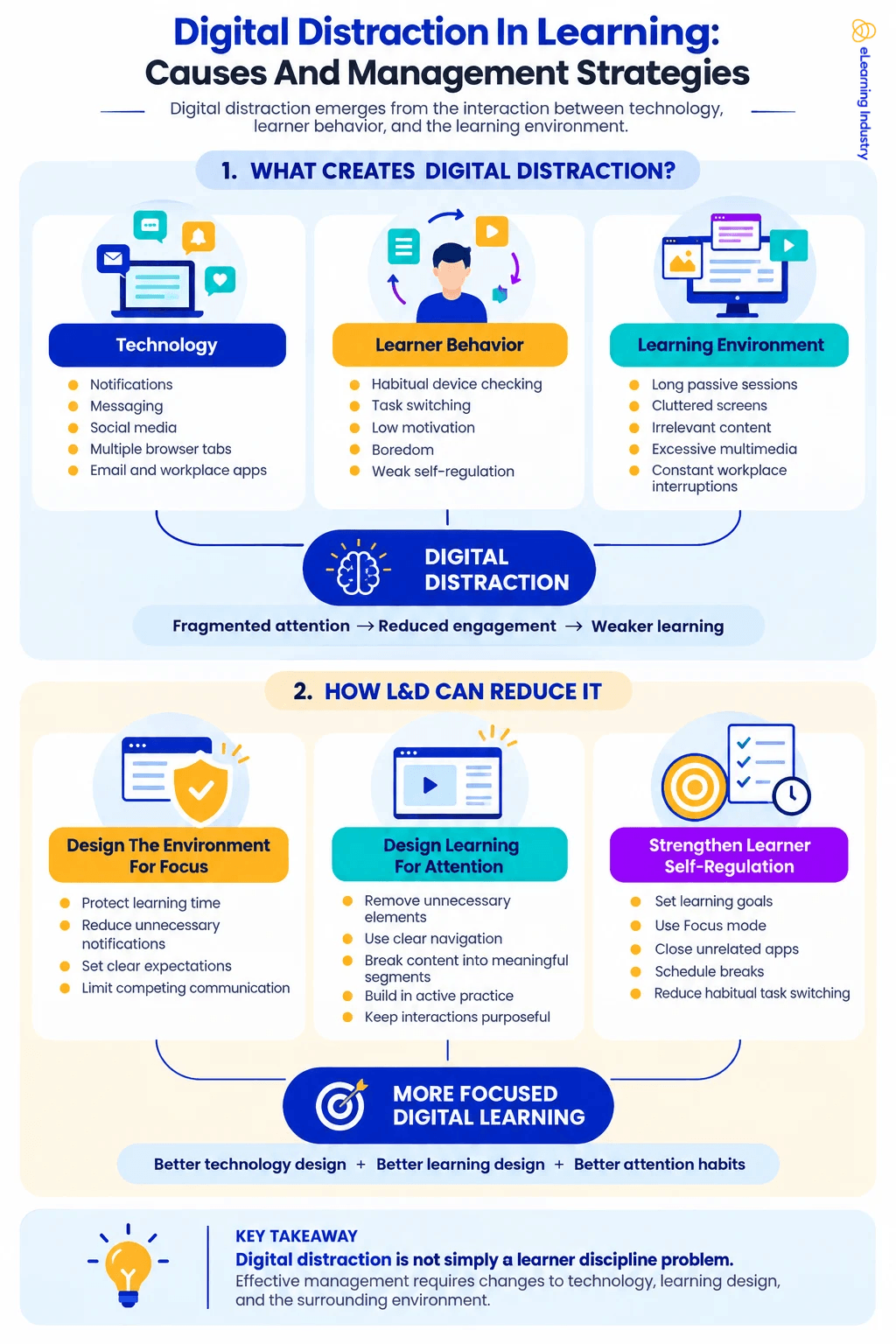
Digital distraction often has several overlapping causes, so simple solutions rarely work for everyone. Recent research helps by breaking these causes into three groups: technology, personal, and instructional-environment factors.
1. Technology-Related Distractions
Digital distraction often starts with technology designed to grab our attention. Notifications, messaging apps, social networks, email, video platforms, browser tabs, and collaboration tools can all interrupt learning.
Internet distractions are hard to avoid because online learning needs internet access. A learner might need a browser for a course, but can easily end up on unrelated sites within seconds.
Similarly, people learning at work might have an LMS, email, Teams, Slack, and other business apps open simultaneously. In this setting, technology distractions are part of the workspace itself.
2. Learner And Behavioral Factors
Habits, motivation, boredom, avoiding tasks, and self-control also play a role in digital distraction. Learners might reach for their phone or open another app even without a notification.
For example, someone who is used to checking messages frequently may continue to do so during training. If a learner does not find the material relevant, they might look for something else to do.
So, managing digital distraction takes more than just turning off notifications.
3. Learning-Environment Factors
The way learning is designed can also affect digital distraction. Long lectures, busy screens, extra multimedia, confusing layouts, off-topic content, and few chances to participate can all make it harder for learners to stay focused.
This is the area where learning and development teams can make the biggest difference.
Learning professionals cannot control every notification that learners get. But they can avoid adding extra distractions within the course. They can also design more meaningful, relevant, and engaging learning experiences, which helps keep learners involved.
Common Digital Distraction Examples In Learning
Digital distraction shows up in different ways depending on the learning setting. By spotting these patterns, L&D teams can figure out if learners are dealing with technology issues, learning design challenges, environmental problems, or a mix of these.
Common digital distraction examples include:
Learning situation |
Example of digital distraction |
| Virtual classroom | Checking Slack or Teams while the instructor speaks |
| Online course | Opening unrelated browser tabs |
| Training video | Repeatedly checking a smartphone |
| Webinar | Reading and answering emails |
| LMS module | Moving between course content and social media |
| Self-directed learning | Browsing unrelated websites |
| Workplace training | Responding to work notifications during learning |
| Mobile learning | Switching repeatedly between the course and other apps |
Not every use of different technologies is distracting. For example, if a learner opens a reference document needed for an activity, they are using technology to help them learn. But if they open a social feed that is not related, their attention shifts away from learning. The difference depends on the learning goal.
Is Technology A Distraction To Students And Learners?
Digital distraction occurs when technology delivers notifications, entertainment, messages, multitasking, or unrelated content that diverts attention from learning. Still, calling technology a distraction is overly simplistic and fails to capture its full impact on learning.
So, is technology a distraction? Sometimes it is, but not always by nature. Technology can help with simulations, practice activities, virtual classrooms, collaboration, personalized learning, accessibility, and quick access to information. This means the same device can be a helpful learning tool or a distraction, depending on how it is used.
This is why the question “Why is technology a distraction to students?” needs a more thoughtful answer. Technology distracts when it pulls attention away from the main learning goal.
For L&D professionals, the goal is not to remove technology from digital learning. Instead, it is to limit distractions and use technology where it truly helps learning.
Digital Distraction Management Strategies For L&D And Instructional Design
Managing digital distractions works best when you address the environment, the learning experience, and learner behavior at the same time. Recent research also shows that preventing distractions needs more than just one solution.
1. Design The Learning Environment For Focus
Organizations can help reduce digital distractions by setting clear boundaries for focused learning time.
For instance, L&D teams can ask learners to turn off unnecessary notifications during live sessions or scheduled learning times. Managers can support this by making sure employees have protected time for development, instead of expecting them to answer every message right away during training.
The goal is not to make the workplace completely free of distractions. Instead, it is to show that learning should get dedicated attention.
2. Reduce Distraction Within The Learning Experience
Instructional Design should also take digital distractions into account. Instructional Designers can help learners stay focused by:
- Removing unnecessary visual elements.
- Keeping navigation predictable.
- Breaking long content into meaningful sections.
- Using signaling to highlight important information.
- Including purposeful interaction and practice.
- Avoiding irrelevant animation or decorative multimedia.
- Connecting learning activities clearly to real tasks or outcomes.
Adding more technology does not always improve digital learning. Every item on the screen competes for the learner's attention in some way. So, any learning technology used should have clear instructional value.
3. Strengthen Learner Self-Regulation
It is not possible to remove all digital distractions through design alone, so learners also need ways to manage their own attention.
L&D teams can help by encouraging learners to set a clear goal before starting, managing notifications, planning regular breaks, closing apps they do not need, and noticing when they are switching tasks out of habit. This approach moves away from simple advice like “just focus.” Instead, learners get practical ways to shape their environment and habits.
In the end, the best results come from combining good technology design, thoughtful learning design, and strong attention habits.
How To Avoid Phone Distractions While Studying Or Learning
You can cut down on smartphone distractions while studying by making it harder to access other activities during your focused time. If you want to avoid phone distractions, you don’t need a complex productivity system. Just a few simple changes can help make distractions less tempting.
Here are some things you can try:
- Turn off notifications you don’t need. Only keep alerts for messages or calls that are truly important.
- Try using Focus or Do Not Disturb modes. These features help reduce interruptions without requiring you to turn off your phone completely.
- Put your phone somewhere you can’t easily reach it. This extra step makes it less likely you’ll check it out of habit.
- Set specific times to check your messages. Taking planned breaks works better for staying focused than constantly checking your phone.
- Close any apps or websites you don’t need for studying. This way, you’ll have fewer chances to get distracted by something else.
- Pick one clear goal for your study session. When you know exactly what you want to finish, it’s easier to stay focused.
These tips also help answer common questions like how to avoid getting distracted by your phone, how to ignore phone alerts, and how to stay off your phone while studying. However, it’s important for organizations to remember that avoiding phone distractions isn’t just up to the learner. If a course isn’t engaging, even the most disciplined students will have trouble staying focused.
Conclusion
Digital distraction is more than just a smartphone issue or a sign of learners' lack of discipline. It comes from how technology, learner habits, Instructional Design, and the learning environment all interact. This difference is important for L&D teams. Technology can be distracting, but it also helps make learning easier, more interactive, and more effective. The goal is not to get rid of digital tools, but to design learning spaces where these tools support learning rather than compete with it.
In reality, keeping learners focused is a shared job. Organizations should make time and space for learning, instructional designers should reduce distractions, and learners need practical ways to manage their digital habits.


