Develop your talent, reduce compliance risk, and train your ecosystem to achieve your goals. Improve business results with a learning solution that is assuring compliance, and training external audiences, through inspiring, continuous learning.
SAP SuccessFactors is used by large enterprises and global organizations that require a comprehensive, scalable, and cloud-based human capital management (HCM) platform to run complex HR operations and workforce planning across multiple regions.
SAP SuccessFactors is a cloud-based human capital management (HCM) suite designed to help organizations manage the full employee lifecycle, from recruitment and onboarding to learning, performance management, and workforce planning. Originally developed as an independent company and later acquired by SAP, SuccessFactors is now a core part of SAP’s enterprise software ecosystem and is widely used by medium to large organizations worldwide.
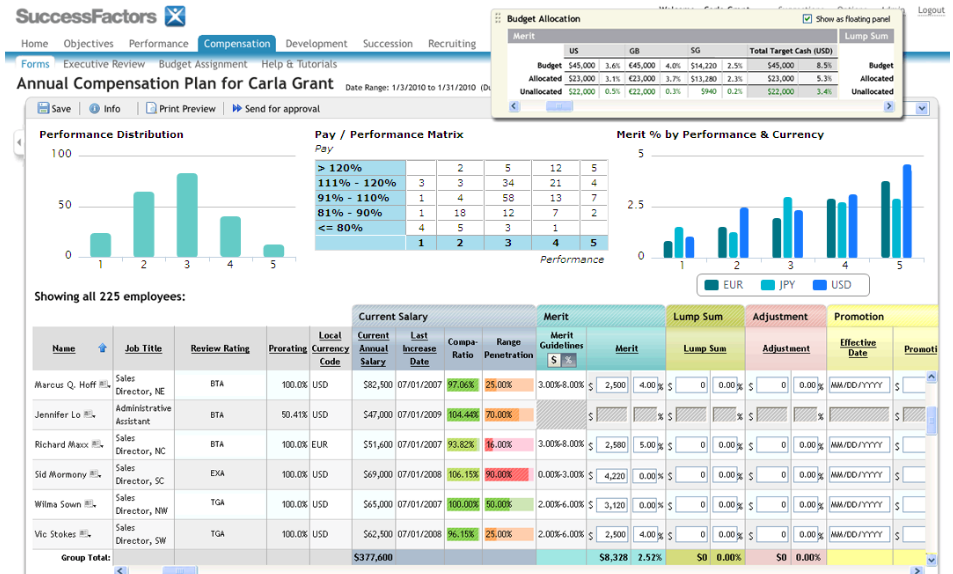
The platform combines core HR functionality with talent management, learning management, compensation planning, and analytics in a single, integrated system. SAP SuccessFactors enables organizations to centralize employee data, automate HR processes, support compliance requirements, and align workforce performance with business goals. Its learning and development capabilities support structured training programs, certifications, and compliance training, particularly in regulated industries. Built for scalability and global operations, SAP SuccessFactors supports multiple languages, regions, and regulatory environments, making it a common choice for multinational enterprises seeking a comprehensive, enterprise-grade HR and learning solution.
Overview of SAP SuccessFactors benefits
End-to-end human capital management – Manage the full employee lifecycle, from recruitment and onboarding to learning, performance, and succession planning, within a single cloud-based platform. Centralized employee data – Maintain a single source of truth for HR and workforce data, improving consistency, accuracy, and decision-making across the organization. Scalable for large and global organizations – Designed to support multinational enterprises with multilingual interfaces, global workflows, and region-specific compliance requirements. Integrated learning and development – Deliver employee training, compliance programs, and certifications through built-in learning management capabilities. Advanced workforce analytics – Gain actionable insights through dashboards and reports that help identify skills gaps, track performance, and support strategic workforce planning. Strong compliance and governance – Support regulatory and corporate compliance through structured processes, auditability, and standardized reporting. Seamless SAP ecosystem integration – Integrates natively with other SAP solutions, enabling streamlined data flows across HR, finance, and operations. Enterprise-grade security and reliability – Built on SAP’s secure cloud infrastructure with robust access controls and data protection standards. Improved employee experience – Provide self-service tools, personalized learning, and clear performance management processes that support employee engagement and development.
Features
Learn more about SAP SuccessFactors features that set it apart from the competition. Discover how its unique tools and capabilities enhance your processes.
Accounts
Add a new user
Archive usersDeactivate and store user accounts without deleting them.
Learn more about SAP SuccessFactors's pricing options, cost, and plans so you can make a well-informed, business-wise decision on the best software to use for organization.
SAP SuccessFactors Employee Central
$8/ month
Core HR, Payroll
Time Tracking
Benefits Admin
Document Management
Digital Workplace
Employee Central Service Center
Employee Central Payroll
SAP SuccessFactors Recruiting
$180/ year
Global Talent Sourcing
Applicant Management
Onboarding Portal
Performance Management
Compensation Management
Learning Management
Succession Planning
SAP SuccessFactors Workforce Analytics
$3,770/ year
Advanced Reporting and Analytics
Predictive Insights
Data Integration
Interactive Dashboards
Benchmarking
Metrics on Workforce Performance
Integrations
Learn more about SAP SuccessFactors's integration options.
ADP
API
G Suite
Gmail
Google Analytics
Google Calendar
Microsoft Dynamics CRM
Office 365
Okta
OneDrive
OneLogin
Oracle Sales Cloud CRM
Outlook Calendar
Paypal
Salesforce CRM
SAP CRM
ServiceNow
SharePoint
Slack
Stripe
WebEx
Zapier
Zendesk
Zoom
Have you used SAP SuccessFactors before?
Answer a few questions and help the community to make the best decisions
Is SAP SuccessFactors the right solution for you? Read verified SAP SuccessFactors reviews from people in industries like yours to make a confident choice.
Pros
Comprehensive, enterprise-grade functionality
Covers the full talent management and learning lifecycle, making it suitable for complex, large-scale HR and training environments.
Strong integration with SAP and enterprise systems
Works seamlessly within the SAP ecosystem and integrates well with other enterprise tools, which is a major advantage for SAP-centric organizations.
Stable and reliable platform
Generally perceived as stable and dependable, even when used by organizations with thousands of employees.
Effective for compliance and regulated training
Curriculum management, training assignments, due dates, and approval workflows are well suited for compliance-driven and regulated industries.
User-friendly experience for learners
While administration can be complex, the learner-facing interface is typically considered accessible and easy to use.
Cons
Complex and unintuitive administration
Administrators frequently report a steep learning curve, with many settings, dependencies, and approval chains that are hard to manage without deep system knowledge.
Outdated or legacy user interface elements
Parts of the platform feel dated, with legacy design elements that negatively affect usability and configuration efficiency.
Limited and inflexible reporting
Reporting and dashboards lack flexibility, with weak ad-hoc reporting and complex setup for meaningful analytics.
Customization requires technical skills
Advanced customization (reports, certificates, notifications) often requires HTML or technical expertise, increasing reliance on specialists or vendors.
High cost when advanced features are required
Additional modules, add-ons, and professional services can significantly increase the total cost of ownership.
Performance Overview
Overall Rating
59%
Usefulness
Usability
Customer Experience
Likelihood to Recommend
It is robust and integrated with a lot of functionalities
May 16, 2023
Overall Rating
68%
Usefulness
Usability
Customer Experience
Likelihood to Recommend
What do you like best?
That it is stable and integrated and pretty much does everything that is needed for a full talent management cycle .
What do you dislike?
I feel it is not self-explained or intuitive. Sometimes it becomes hard to figure our what would happen when a certain request is placed especially with long chain of approvals.
Thoroughly designed with all essential functionalities required for any global organization.
Jul 13, 2022
Overall Rating
74%
Usefulness
Usability
Customer Experience
Likelihood to Recommend
What do you like best?
I like the curriculum and training assignment functionality that meets most of the complex regulatory training needs.
What do you dislike?
Training Certificates templates set up and basic reporting/dashboard functionality the least as it lacks some basic requirements.
It is a vast improvement for our employees. It is very complex for administrators.
Jul 12, 2022
Overall Rating
66%
Usefulness
Usability
Customer Experience
Likelihood to Recommend
What do you like best?
I love the ease of use for the users and simple tile layout and design. I like that I can easily set due dates and reminders for training when publishing. I like that supervisors can easily track overdue training for their teams and approve training requests in a streamlined electronic process.
What do you dislike?
I have not received the advanced training and resources I need to be able to fully utilize all the features offered. The only manual I have does not correspond to our customized version of the program. Navigation for administering the system is complex and has to many variable settings. Customized features such as reports and certificates must be designed in html, which I don't do. I like all the bells and whistles but I will like them more when I learn how to use them.
It is a systemtic and functional LMS with a Russian roulette for content developers
Jun 10, 2022
Overall Rating
53%
Usefulness
Usability
Customer Experience
Likelihood to Recommend
What do you like best?
TO a certain extent, the experience for SAP is relatively seamless, it allows us to create great catalogs for users to explore, and it works well with other SAP programs.
What do you dislike?
Inconsistency in SCROM handling creates a lot of pressure for E-learning development. It is always like Russian roulette for scorm content whether it can be deployed successfully or not, then we need to worry about does it's recorded correctly. There is a lot of testing, trial and error period, and comprising in order to get used to their logic behind.
Comprehensive LMS and logical framework to use. User friendly
Jun 10, 2022
Overall Rating
83%
Usefulness
Usability
Customer Experience
Likelihood to Recommend
What do you like best?
User friendly and easy to train others (admins) how to use it. Edit entries was easy Upload capability of documents such as certifications
What do you dislike?
The interface was legacy from Plateau Some of the features were difficult to set up such as the customized email notifications. Needed to understand HTML
Antiquated, Out-of-Date, Overly Complicated, DO NOT BUY
Jul 12, 2021
Overall Rating
32%
Usefulness
Usability
Customer Experience
Likelihood to Recommend
What do you like best?
If I do need support, I can schedule time directly with a SAP support agent. They can usually explain the intricacies, and whys, better than our managed support provider. For my learners, they know no difference and it is not too difficult for them to access content.
What do you dislike?
The entire Administration portion. I have a strong LMS Admin background (15+ years). I have not seen an interface like this since the mid 2000's. It is cumbersome and not intuitive. I should have stayed with Litmos as I was familiar with it. Reporting is terrible. No ad hoc! I mostly blame our managed support provider as they oversold the product and its functionality. Most of the tools that we were looking to utilize to grow our program suddenly became costly add ons ($30K-50K). DO NOT BUY.
Simply terrible. Shame on SAP for selling it with a straight face.
Jun 16, 2021
Overall Rating
19%
Usefulness
Usability
Customer Experience
Likelihood to Recommend
What do you like best?
I was an administrator and heavy-user of the tool for 2 years, and during that time I don't think I have found one thing I liked without any asterix. Even features that are good idea like "quick guides" were executed in the way that made them unusable.
What do you dislike?
Where do I start? Terrbible and messy back-end that resembles Frankenstein monster as legacy elements are just hanging there. Rigid to absurd without possibility to correct any mistakes. Built in the way that every action can have a severe consquences on the whole system. Unimaginable errors (e.g. terrible experience with SCORM 2004) that never get addresses. Unreliable and unnecessarly complicated reporting. And all of that, not even mentioning look straight from the 90s.
Not easy to use and not reliable report are very complex to do and management of elearning is very b
Apr 13, 2020
Overall Rating
30%
Usefulness
Usability
Customer Experience
Likelihood to Recommend
What do you like best?
Multiple language use possibility : you can create a training session and have it display in multiple language Handy for European organisation
What do you dislike?
Report, not easy to use, you need to use it very often to remember everything you have to do to set your training Report for completion and statistic are not reliable and so complicated to generate Nothing is correctly integrated Research is a complicated to do It is not suit to manage online learning and El earning It is actually very old style and not up to date
Champion
Feb 3, 2018
Overall Rating
94%
Usefulness
Usability
Customer Experience
Likelihood to Recommend
What do you like best?
Period based Curricula
What do you dislike?
UI
Well integrated
Jan 28, 2018
Overall Rating
73%
Usefulness
Usability
Customer Experience
Likelihood to Recommend
You've viewed 10 out of 15
Alternatives
Not a match? Find software alternatives that better suit your needs and compare them to discover the one that's right for you.