Trending Learning Management Systems (LMS)
About the vendor
Located In Toronto, CA
Founded In 2011
Customers
  • Large Enterprises (>10,000)
  • Non Profits
  • Public Administrations
  • Small/Medium Businesses
Use Cases
  • Channel Training
  • Compliance Training
  • Continuing Education
  • Customer Training
  • Employee Onboarding
  • Employee Training
  • Workforce Development
Industries
  • Computer Software
  • Education Management
  • Financial Services
  • Food & Beverages
  • Health, Wellness and Fitness
  • Hospital & Health Care
  • Manufacturing
Deployment
  • Mobile Application
  • Software as a Service / Cloud
Platforms
  • Linux
  • Mac
  • Windows
Browsers
  • Apple Safari
  • Google Chrome
  • Internet Explorer
  • Mozilla Firefox
Training
  • Documentation
  • In Person
  • Live Online
  • Online Tutorials
  • Webinars
Support
  • Business Hours
  • Email
  • FAQ
  • Knowledge Base
  • Live Online
  • Phone
Supported Specifications
  • AICC
  • SCORM 1.2
  • SCORM 2004
Languages Supported
  • Arabic
  • German
  • English
  • Spanish
  • French
  • Italian
  • Japanese
  • Korean
  • Dutch
  • Portuguese
  • Russian
  • Chinese
LinkedIn Page
-
X
-
Change your privacy settings to see the content.
In order to watch this video you need to have advertising cookies enabled.
You can adjust your cookie preferences here.

What is SkyPrep LMS?

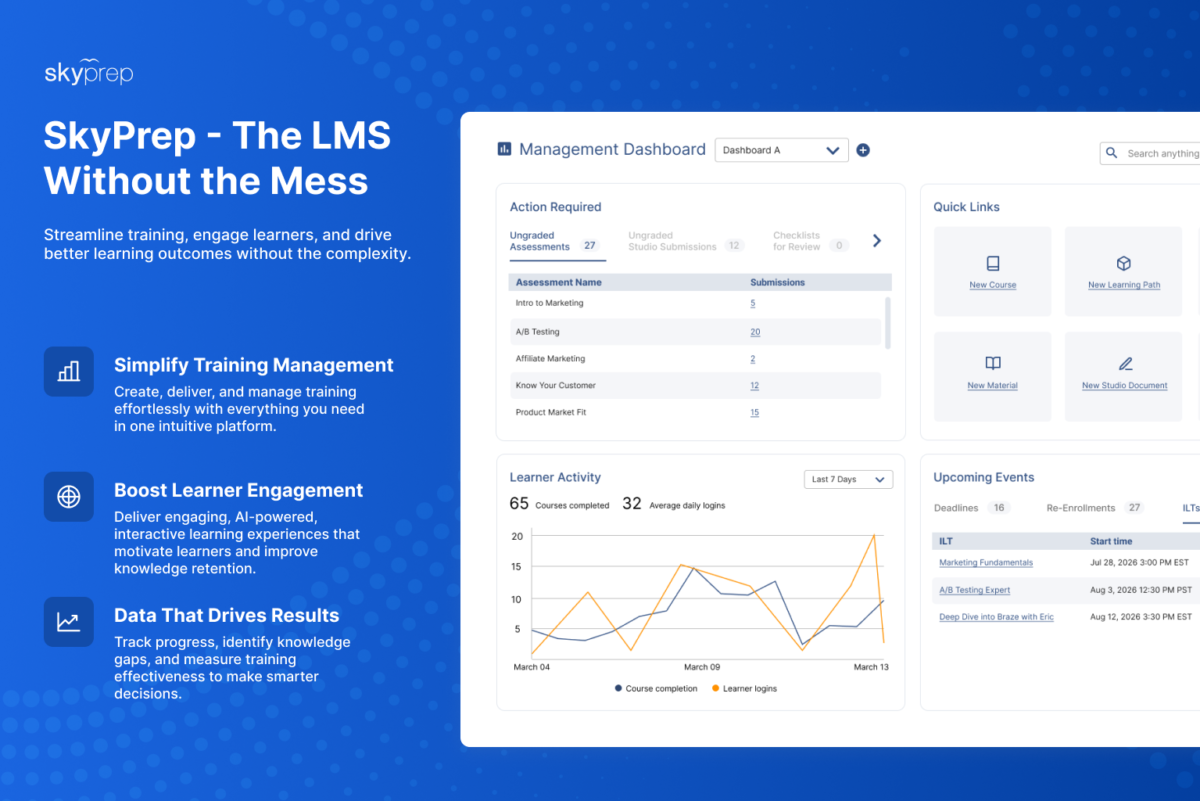
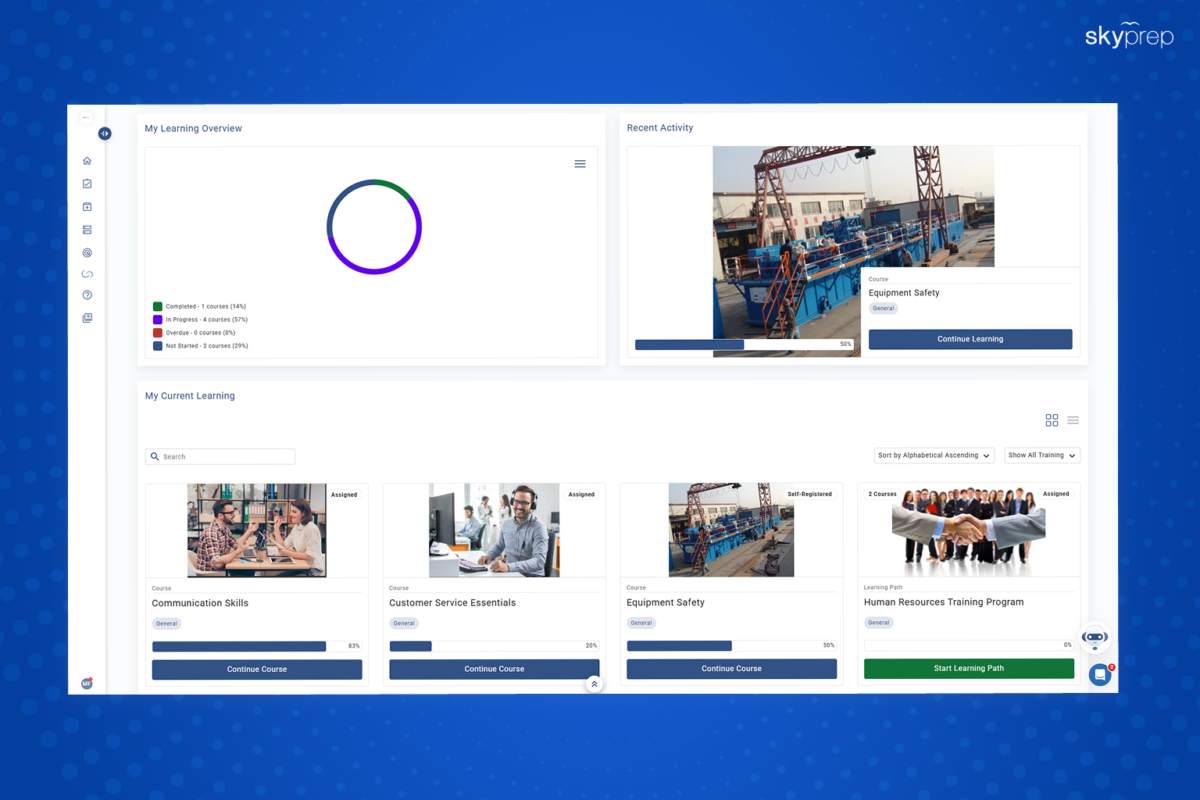
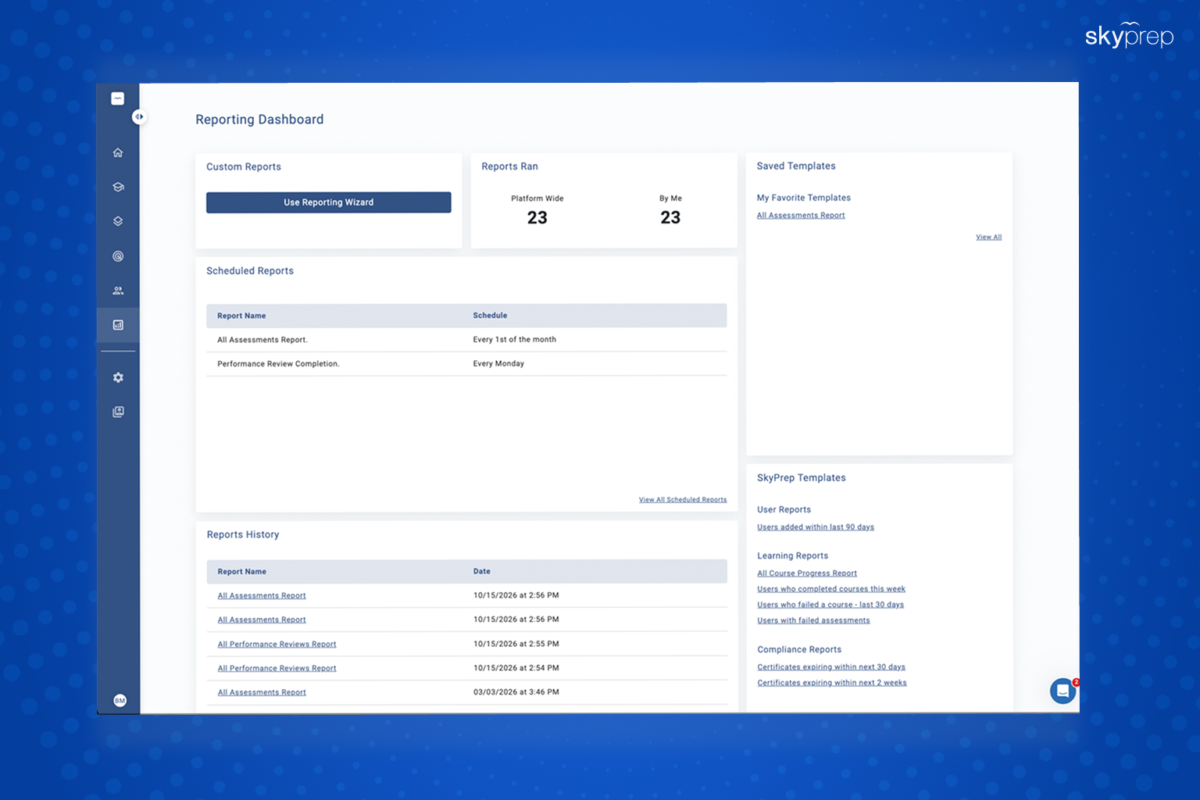
SkyPrep is the LMS without the Mess, supercharged by AI. Simplify how you create, deliver, and manage effective learning experiences with an intuitive platform built for organizations of all sizes. From employee onboarding and compliance training to customer and partner education, SkyPrep helps you create engaging learning experiences while saving time and improving results.

SkyPrep provides a complete suite of tools, including AI-powered course creation, built-in assessments, advanced reporting, and access to a library of ready-to-use training content.

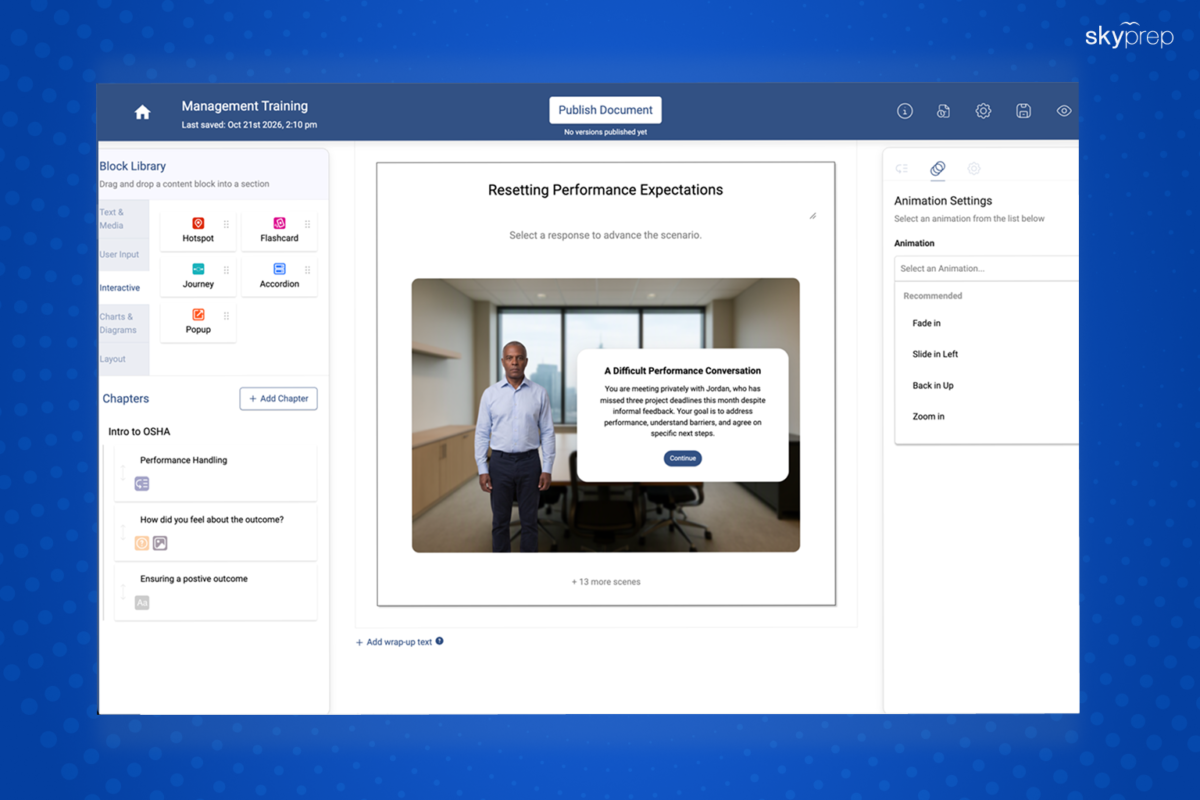
With SkyPrep Studio, organizations can easily create, customize, and publish courses using text, multimedia, and assessments, all from one centralized platform.

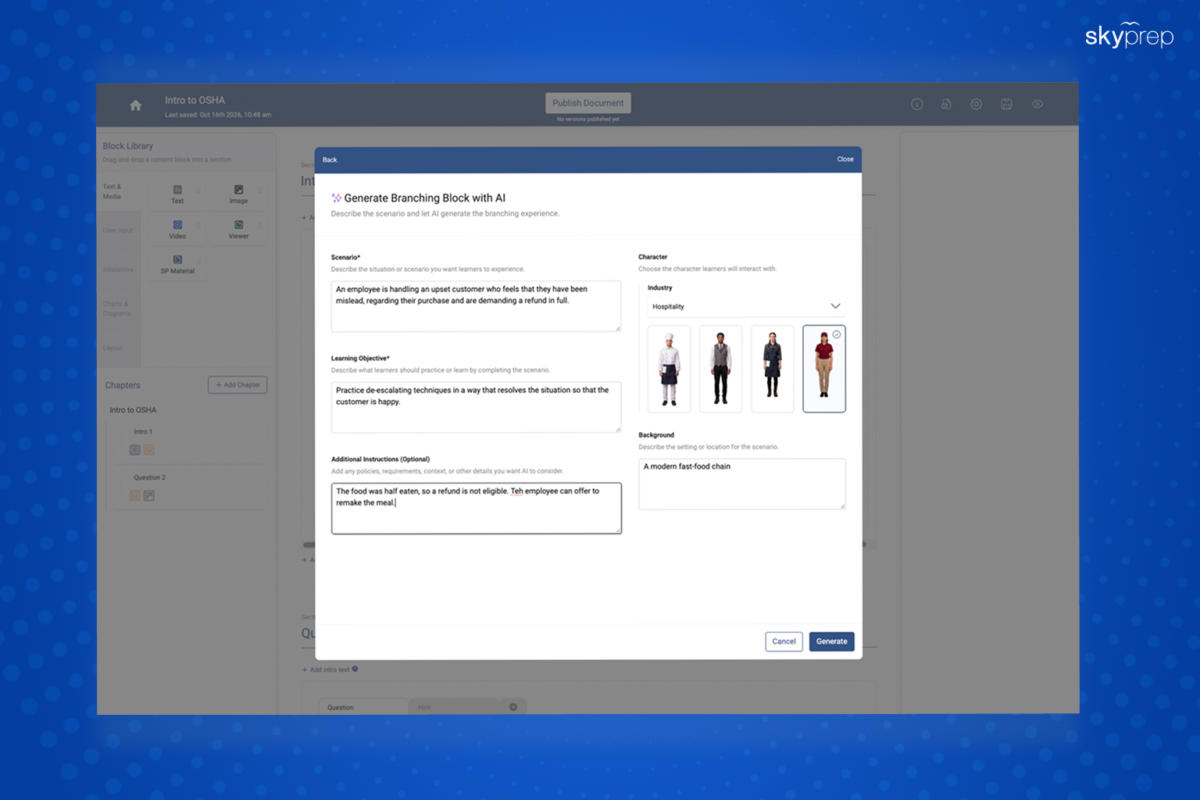
Generative AI accelerates course creation by transforming existing documents, policies, and training materials into structured, interactive learning content in minutes.

SkyPrep Perform extends learning beyond training by helping teams manage goals, performance reviews, feedback, and employee development in one seamless experience.

Discover how SkyPrep helps organizations build smarter, more engaging training programs with a flexible LMS designed for modern learning needs.
Overview of SkyPrep LMS benefits

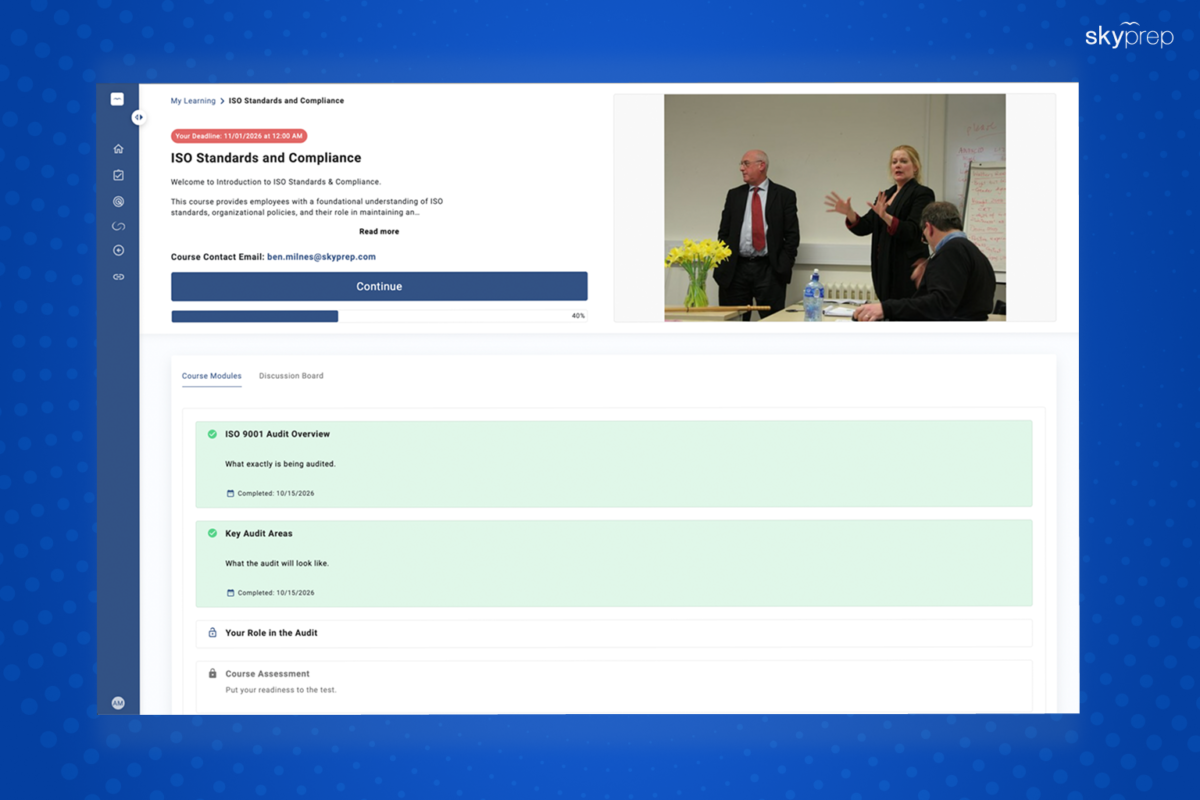
  1. Simplify Training Management – Manage course creation, assignments, learning paths, assessments, certifications, and reporting in one intuitive platform.

  2. Create Courses Faster with AI – Use generative AI to transform existing documents, manuals, and policies into comprehensive courses and assessments, reducing content creation time.

  3. Automate Administrative Tasks – Streamline training workflows with automated assignments, reminders, and certification management, reducing manual work.

  4. Deliver Engaging Learning Experiences – Build interactive courses with multimedia, knowledge checks, flash cards, branching scenarios, and other engaging content.

  5. Track Learner Progress and Performance – Monitor training activity, assessment results, course completion, and learner progress through centralized reporting.

  6. Support Employee Development – Connect learning with performance management through goal setting, reviews, feedback, skills gap analysis, and personalized development plans.

  7. Encourage Collaboration and Knowledge Sharing – Help learners exchange ideas, participate in discussions, ask questions, and share learning resources through SkyPrep Unity.

  8. Train Employees, Customers, and Partners – Support a variety of learning needs, including onboarding, compliance, product training, customer education, and partner enablement.

  9. Access Ready-Made Training Content – Expand your learning programs with ready-made course libraries and additional training resources.

  10. Get Personalized Customer Support – Receive personalized guidance and support to help implement, manage, and get the most out of your LMS.

Features

Learn more about SkyPrep LMS features that set it apart from the competition. Discover how its unique tools and capabilities enhance your processes.

Accounts

Add a new user Allows administrators to add new users directly to their LMS for streamlined user management.
Archive users Deactivate and store user accounts without deleting them.
Browse list of users View all registered users in the system.
Bulk User Actions Manage multiple user accounts at once.
Custom/Mandatory User profile fields Define required or optional fields for user profiles.
Upload users Import users via spreadsheet.

Activity grading

Course History View completed and ongoing courses for each user.
Gradebook Centralized view of all learner grades.
Gradebook audit trail Track all grade changes over time.
Gradebook comments Add comments to learner grades.
Manual Grading ("Marking") Manually review and grade submissions.
Multiple grading scales Support for different grading systems.

AI Features

Adaptive Learning
AI Powered Use AI-driven automation and insights.
Chatbot AI assistant for learner support.
Content development Generate or enhance educational content.
Content Translation Translate learning materials automatically.
Intelligent recommendations Suggest courses based on learner activity.
Natural Language Processing
Predictive analysis
Quiz generation Automatically creates AI-generated quizzes.
Text-to-speech Converts written content to audio.

Authentication

Active Directory/LDAP Integration Authenticate users via corporate directories.
Custom User login page Personalized login interface.
Manual Accounts
No login Allow content access without authentication.
SAML2/API Integration Single sign-on and external authentication.
Self-Registration Users create their own accounts.
Self-Registration w. Admin Confirmation User signup requires admin approval.

Categories

Assign Courses to categories Organize courses under specific categories.
Create new Categories Add new organizational groups for courses.
Manage Categories Edit, delete, or update categories.
Priced Categories (Bundle)

Certificate management

Certification life-cycle Track generation, renewal, and expiration.
Manage certification templates Customize certificate formats.
Predefined certification templates Use ready-made certificate designs.
Unique Certificate by Course
Unique Certification by Curriculum Different certificate per learning path.

Compliance management

Certificate expiration notifications Alerts when certificates are near expiry.
Certification Expiration Management Manage timelines and renewal rules.
Due Date notifications Notify learners of upcoming deadlines.
Soft/Hard Stop Due Dates Allow or block access after due dates.

Course Creation

Assignments Engine Create and manage learner assignments.
Built-In Authoring Tool Create content directly inside the platform.
Can reuse PPTs, PDFs, Videos Upload and repurpose existing material.
Changing Course default settings Modify core course configuration.
Consume online video content Embed or stream video lessons.
Content Library A repository of pre-made templates, existing content, multimedia sets, and learning outlines.
Course backup Options Backup and restore course data.
Drag & Drop Interactions Interactive content creation.
Hybrid Learning Courses
Learning Paths (Curriculums) Sequence courses into structured programs.
LRS
Scheduling LIVE events Plan webinars or virtual classes.
Survey Engine Create learner surveys.
Tests Engine Build quizzes and exams.
Upload courses Import courses into the platform.

Customization

Mobile Learning Support Optimize learning for mobile devices.
Personalized views Customize interface per user.

Enrollment

Attendance Tracking Track presence in sessions.
Automated Enrollment (based on User data) Enroll users automatically by rules.
Guest Access Settings Allow non‑registered users limited access.
Manual Enrollment Manually assign users to courses.
Progress Tracking Monitor learner progress in real time.
Self-enrollment Allow learners to join courses freely.
Self-enrollment (with a PIN #) Require a PIN for enrollment.
Survey enrollment (based on a response) Enroll based on survey answers.

Format

Course Discussions Forum-style communication.
Gamification Format Add game elements to courses.
Learner Upload Allow learners to upload content.
LIVE Chat Option
Social Format Social interaction‑focused layout.
Topics Format Organize course by topics.
Video Conferencing Integration Connect with tools like Zoom/Teams.
Weekly Format Course structured week by week.

Gamification

Badge customization Design custom achievement badges.
Badges Award digital achievements.
Customize Gamification mechanics Modify points, levels, and rewards.
Leaderboards Rank learners based on achievements.
Levels Define progression stages.
Points Award points for activity.
Rewards Offer incentives for achievements.

Interface options

Additional external pages
Block Management
Calendar Settings Configure system calendar.
Language settings Set default or custom system language.
Learning Accessibility Tools for users with disabilities.
Location Settings Configure regional settings.
Media embedding settings Control embedding permissions.
Multilanguage Support Provide support in multiple languages.
Ready-made Themes Prebuilt platform designs.

Learning types

Asynchronous Instructor-led Instructor-led but not in real time.
Asynchronous Self-paced Learners progress independently.
Blended Learning Mix online and face‑to‑face training.
Synchronous Virtual Classroom Live real-time classes.

Mobile learning

Offline (disconnected Mobile app)
Online (Internet connected) Access content with full connectivity.

Offline

Support for offline access to content

Reports

Automated Report Scheduling Send reports automatically.
Canned Reports Prebuilt report templates.
Dashboards and Graphic Reports Visual analytics dashboards.
Email delivery of Reports Send reports via email.
Exporting Reports in variety of formats Export data as PDF, Excel, etc.
Grading Report Settings Customize grade reporting.
Learning Analytics Tools Analyze learner behavior.
Training Record Maintenance Maintain full training logs.

Roles

Define roles Create custom permission roles.
Role Assignment Assign roles to users.
System Permissions per role Control access rights.
Teams and Team Hierarchies Organize users into teams.

Security

Anti-spam Protect forms and communication.
Anti-virus Scan uploaded files for threats.
IP Blocker Block specific IP ranges.
Restrict registration to specific domains Limit signups by email domain.
Strong Passwords Enforce secure password rules.

Shopping cart

Built-In Shopping Cart Sell courses directly.
Shopping Cart as Plug-In Add commerce via plugin.

System reports

Automatic email reports in predefined intervals Send periodic system reports.
Custom reports generator Create custom report layouts.
Email notification settings Control notification rules.
Live Logs Monitor system activity in real time.
Who uses SkyPrep LMS ?

Based on eLearning Industry reviews from the past 4 years

Company Size

Areas of Focus

Top Industries

Elearning
13%
Consumer Services
8%
Hospital & Health Care
6%
Computer & Network Security
4%
Information Technology and Services
4%
Other
65%
Pricing

Learn more about SkyPrep LMS's pricing options, cost, and plans so you can make a well-informed, business-wise decision on the best software to use for organization.

Lite

Contact us for pricing

The basics to launch your online courses quickly. 100+ active users Unlimited courses Custom branding SCORM packages Instructor-led training  Email support

Premium

Contact us for pricing

Get the most out of your LMS. Includes everything in Lite. 100+ active users Advanced Reporting API and SSO Gamification Workflow automation Phone support & CSM

Enterprise Learning Suite

Contact us for pricing

For companies requiring enterprise grade features. 100+ active users Multiple platforms Migration services Multi-year discounts Custom SMTP

Integrations

Learn more about SkyPrep LMS's integration options.

ADP

ADP

API

API

BambooHR

BambooHR

BigBlueButton

BigBlueButton

Dropbox

Dropbox

G Suite

G Suite

Gmail

Gmail

Google Calendar

Google Calendar

GoToMeeting

GoToMeeting

HubSpot

HubSpot

Office 365

Office 365

Okta

Okta

OneDrive

OneDrive

OneLogin

OneLogin

Paypal

Paypal

Salesforce CRM

Salesforce CRM

SAP CRM

SAP CRM

Shopify

Shopify

Slack

Slack

Stripe

Stripe

WebEx

WebEx

Zapier

Zapier

Zoom

Zoom

SkyPrep LMS logo
Have you used SkyPrep LMS before?
Answer a few questions and help the community to make the best decisions
Reviews

Is SkyPrep LMS the right solution for you? Read verified SkyPrep LMS reviews from people in industries like yours to make a confident choice.

Pros
  • Ease of Use & Navigation Reviewers frequently highlighted the platform's clean and accessible interface. They noted it is "intuitive and clean," making it easy to navigate for employees of all ages and skill levels without requiring extensive training to assign users or track progress.
  • Customer Support & Service The support team is described as friendly, responsive, and attentive. Success managers provide personalized help, including structured video calls to walk administrators through custom settings to ensure unique requirements are seamlessly met.
  • Value for Money / Pricing & ROI Multiple users highlighted the system's affordability relative to its capabilities. Reviewers called it "an excellent learning platform at a great price" and noted that "for the price, it offers great functionality" and straightforward configuration.
  • Implementation & Onboarding Setting up the platform requires minimal downtime. Administrators noted that implementation was "quick and straightforward, with minimal setup effort," avoiding the months of intensive integration work typically expected with other platforms.
  • Feature Set & Functionality The platform's diverse tools, including course authoring, compliance tracking, and specialized AI features, were highly rated. A reviewer specifically praised the "awesome" AI capabilities that allow them to simulate customer-facing scenarios to evaluate employee reactions.
Cons
  • Limited Features / Missing Tools Reviewers identified several minor functionality gaps, such as the total absence of a native "dark mode" to reduce screen fatigue, a lack of automated certificate generation upon course completion, and the inability to schedule course drops for future dates. Additionally, mobile users noted they cannot zoom in on materials on smaller screens.
  • Reporting & Analytics Issues Extracting specific or complex datasets can be difficult. Users mentioned facing limitations with standard templates, noting that "the customization options for reporting could be more flexible" and that providing finer-grained reporting previously required heavy workarounds.
  • Integration & Technical Challenges Some users experienced friction with virtual meeting tool plug-ins. A reviewer pointed out that the "ILT feature needs improvement, particularly with Microsoft Teams integration," because live connections frequently fail, forcing them to use Zoom instead.
  • Customization Limitations Deep administrative tweaks can feel restrictive without extra work. Reviewers noted that "some advanced customization... features feel limited without additional configuration," and finding structural files, like a Learning Path's master certificate, is not intuitive.
  • Complexity & Learning Curve While the platform itself is easy to use, parts of the initial training feel unoptimized. One administrator mentioned that the "implementation process could be more structured," noting that early training calls felt like generic Q&A sessions rather than guided system education.
Performance Overview
Overall Rating 88%
  • Usefulness
  • Usability
  • Customer Experience
  • Likelihood to Recommend

Skyprep is a reliable platform for compliance training

Jun 23, 2026

Overall Rating 88%
  • Usefulness
  • Usability
  • Customer Experience
  • Likelihood to Recommend
What do you like best? SkyPrep gives us a much clearer picture of who has completed mandatory training and who still needs to finish it. Automatic reminders and certificates have removed a lot of the chasing we used to do through email and spreadsheets.
What do you dislike? I'd like even more flexibility around notification rules. We have different teams with different requirements, so sometimes we'd like to get very specific with when reminders go out.
Reviewer photo

Jamie C.

Industry : Computer & Network Security | Company size : 51-200 | Level : Manager | Focus : Education | Experience using the software : More than 1 year as Administrator

Integrates nicely with all the tools we already use

Jun 12, 2026

Overall Rating 91%
  • Usefulness
  • Usability
  • Customer Experience
  • Likelihood to Recommend
What do you like best? The integrations were an important factor for us. Having our HR system connected to the LMS means we don't have to constantly add and remove employees manually. SSO has also made accessing training much easier for our staff.
What do you dislike? Initial integration setup required some help from our IT team. Day-to-day use after that has been pretty seamless.
Reviewer photo

Reviewer verified by LinkedIn

Industry : Consumer Services | Company size : 201-500 | Level : Manager | Focus : Education | Experience using the software : More than 1 year as Administrator

Reporting has improved a lot over the course of the past 3 years

May 24, 2026

Overall Rating 90%
  • Usefulness
  • Usability
  • Customer Experience
  • Likelihood to Recommend
What do you like best? I use the reporting tools regularly to track completions and overdue training. Being able to customize reports and schedule them to be sent automatically has saved me quite a bit of manual work each month.
What do you dislike? Advanced reports can take some time to configure when you're looking for something very specific. Once you have the report saved though, it's easy to reuse.
Reviewer photo

Audrey C.

Industry : Information Technology and Services | Company size : 51-200 | Level : Director | Focus : Education | Experience using the software : 6-12 months as User, Administrator

Their support teams have been consistently helpful

May 11, 2026

Overall Rating 90%
  • Usefulness
  • Usability
  • Customer Experience
  • Likelihood to Recommend
What do you like best? The support team deserves a mention. Whenever I've run into something I couldn't figure out, I've received a useful answer rather than just being sent a generic article. That was particularly helpful when we were first configuring the platform.
What do you dislike? There isn't anything major that I dislike. Some settings could be easier to find, which would probably reduce the number of times I need to contact support in the first place.
Reviewer photo

Joyce M.

Industry : Elearning | Company size : 201-500 | Level : Manager | Focus : Human Resources | Experience using the software : 6-12 months as Administrator

Our employees needed almost no training to use it.

Apr 13, 2026

Overall Rating 89%
  • Usefulness
  • Usability
  • Customer Experience
  • Likelihood to Recommend
What do you like best? The learner side is very straightforward. We have employees with very different levels of technical ability and we've had surprisingly few questions about how to access courses or complete training.
What do you dislike? I'd like a few more options for how courses and resources are displayed to learners. This is a minor issue for us though.
Reviewer photo

Sara R.

Industry : Mechanical or Industrial Engineering | Company size : 51-200 | Level : Director | Focus : Operations | Experience using the software : More than 1 year as Administrator, Member of the deployment/customization team

Great for managing training across different teams

Apr 12, 2026

Overall Rating 89%
  • Usefulness
  • Usability
  • Customer Experience
  • Likelihood to Recommend
What do you like best? We have several departments that require completely different training and SkyPrep makes this relatively easy to manage. We can organize users into groups, assign the appropriate courses and then monitor completion without maintaining separate systems.
What do you dislike? User management can become a little busy when you're dealing with a large number of groups and assignments. More bulk editing options would always be welcome.
Reviewer photo

Kristi G.

Industry : Human Resources | Company size : 201-500 | Level : Director | Focus : Human Resources | Experience using the software : More than 1 year as Administrator, Member of the procurement team

Customization is much better than our previous LMS

Apr 12, 2026

Overall Rating 91%
  • Usefulness
  • Usability
  • Customer Experience
  • Likelihood to Recommend
What do you like best? We were able to customize the platform with our logo, colors and domain so it feels like our own training portal rather than another piece of third-party software. I also like being able to customize what learners see on their dashboards.
What do you dislike? There are quite a few customization settings, so getting everything exactly how we wanted it took some trial and error.
Reviewer photo

Kristina H.

Industry : Accounting | Company size : 51-200 | Level : Director | Focus : Education | Experience using the software : 6-12 months as Administrator

Skyper really makes onboarding much more organized

Apr 12, 2026

Overall Rating 90%
  • Usefulness
  • Usability
  • Customer Experience
  • Likelihood to Recommend
What do you like best? We primarily use SkyPrep for onboarding and mandatory employee training. Learning paths allow us to put everything in the right order so new hires know exatly what they need to complete. Automated enrollment also means HR doesn't have to manually assign every course.
What do you dislike? Setting up all of our learning paths initially took longer than expected, although there isn't much work involved once they're running.
Reviewer photo

Julia K.

Industry : Financial Services | Company size : 201-500 | Level : Manager | Focus : Education | Experience using the software : More than 1 year as Administrator

Multi-portal functionality works well for customer training

Mar 22, 2026

Overall Rating 90%
  • Usefulness
  • Usability
  • Customer Experience
  • Likelihood to Recommend
What do you like best? We don't only train employees, we also have different groups of external learners. Being able to create separate branded environments while still managing everything centrally has been extremely useful for our team.
What do you dislike? Managing multiple portals naturally adds some complexity. You need to be organized with naming and permissions or things can get confusing fairly quickly.
Reviewer photo

Christy L.

Industry : Computer Networking | Company size : 201-500 | Level : Director | Focus : Education | Experience using the software : More than 1 year as Administrator, Member of the procurement team

One of the easier LMS platforms I've administered.

Feb 12, 2026

Overall Rating 90%
  • Usefulness
  • Usability
  • Customer Experience
  • Likelihood to Recommend
What do you like best? SkyPrep is pretty intuitive from an administrator's perspective. Uploading content, creating courses and assigning training doesn't require a lot of technical knowledge. I was comfortable managing most things myself after the initial setup.
What do you dislike? Some of the more advanced settings aren't immediately obvious. I've occasionally had to check the help center to figure out where something is located.
Reviewer photo

Abigail L.

Industry : Consumer Services | Company size : 201-500 | Level : Director | Focus : Education | Experience using the software : More than 1 year as Administrator

You've viewed 10 out of 48

Alternatives

Not a match? Find software alternatives that better suit your needs and compare them to discover the one that's right for you.

SkyPrep LMS

4.4/5

TalentLMS

4.8/5
Compare

Acorn

4.6/5
Compare

360Learning

4.7/5
Compare

GoSkills

4.4/5
Compare

Thought Industries

4.3/5
Compare

Synergy Learning LMS

Compare

Connecteam - Mobile Teams LMS

4.0/5
Compare
Resources

Explore a curated collection of resources that provide insights, guidance, and ideas to help you make informed decisions.