
About the vendor
Located In Toronto, CA
Founded In 2016
Customers
  • Large Enterprises (>10,000)
  • Small/Medium Businesses
Use Cases
  • Blended Learning
  • Compliance Training
  • Employee Training
Industries
  • Automotive
  • Industrial Automation
  • Manufacturing
  • Oil & Energy
  • Renewables & Environment
  • Utilities
Deployment
  • Self-Hosted System
  • Software as a Service / Cloud
Platforms
  • Mac
  • Windows
Browsers
  • Google Chrome
Training
  • Documentation
  • Live Online
Support
  • 24/7
  • Business Hours
  • Email
  • Knowledge Base
  • Phone
Supported Specifications
  • SCORM 1.2
  • SCORM 2004
  • xAPI/Tin Can API
Languages Supported
  • English
LinkedIn Page
@Linkedin
X
@X

What is Vision Portal?

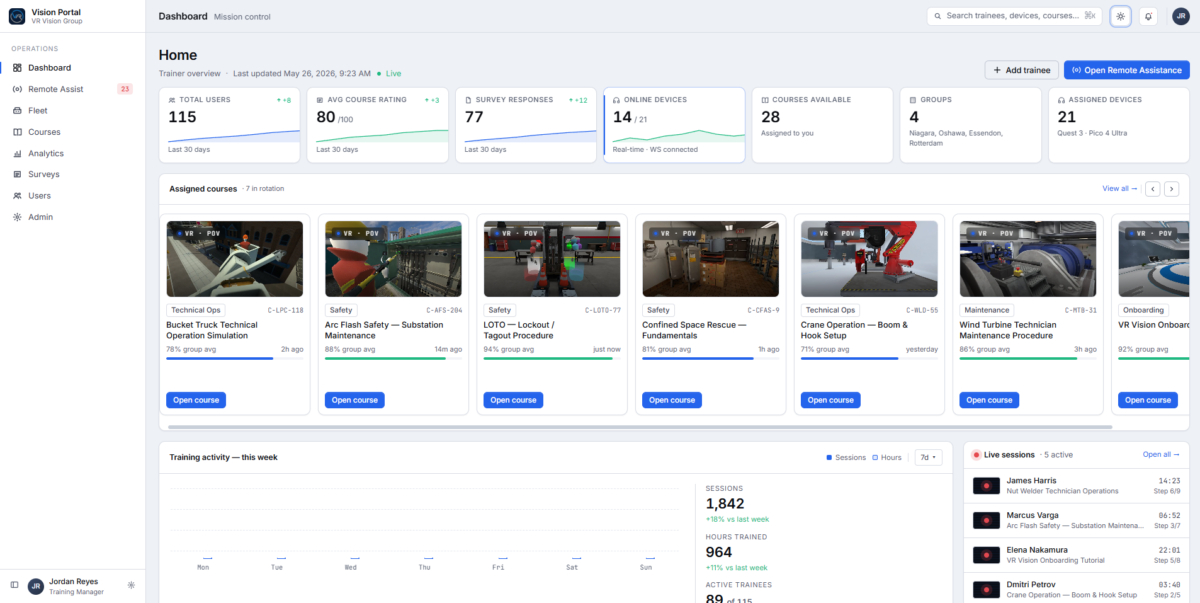
Vision Portal is VR Vision's browser-based platform for running enterprise VR training at scale. It gives L&D and operations teams real-time control over every VR training session, headset and learner across the organization from a single dashboard, with nothing to install.

Trainers can stream a learner's first-person headset view to their browser and guide them live with Remote Assist, including pausing, restarting or skipping steps. Admins deploy and manage VR courses across headsets at every site, group learners by team or location, and see each device's battery and connection status at a glance.

Built-in analytics track completion rates, time spent and performance across courses, cohorts and sites, while post-session surveys capture structured trainee feedback. Vision Portal supports Meta Quest 3S, PICO 4 Enterprise and PC VR headsets, including mixed fleets, and connects to your existing systems with SSO (Azure, Okta, Google, WorkOS). LMS integration via SCORM 1.2, SCORM 2004 and xAPI is available on request.

Overview of Vision Portal benefits

One place to run VR training at scale. See every headset, learner and session across all your sites on one screen, and push new courses to the whole fleet without touching a device.

Live support inside the headset. Remote Assist streams the trainee's view to the trainer's browser, so one trainer can coach learners in real time, step in when someone gets stuck, and keep sessions moving.

Proof that training is working. Track completions, time spent and performance by course, cohort and site, spot learners who drop off, and collect trainee feedback after every session to show ROI.

Built for regulated industries. Hosted on AWS in the region you choose, with on-premise and air-gapped options, data encrypted in transit and at rest, SSO, MFA and role-based permissions. Vision Portal stores session data only, with no personal data stored by default, and follows ISO 27001 practices.

Works with the hardware you choose. Run Meta Quest 3S, PICO 4 Enterprise and PC VR side by side, with device management through ArborXR. VR Vision is an authorized Meta and PICO partner.

Features

Learn more about Vision Portal features that set it apart from the competition. Discover how its unique tools and capabilities enhance your processes.

Administration

Access Controls/Permissions
Role-Based Permissions
Single Sign On

Communication Management

Alerts/Notifications
Collaboration Tools
Commenting / Notes
Contact Management
Employee Portal
Multi-Language
Student Portal

Content Development

508 Compliant
Activity Dashboard
Brand integration
Data Import/Export
Drag & Drop
Gamification
Interactivity

Content Management

Cataloging/Categorization
Content Library
Media Library
Search/Filter
Template Library

Integrations

API
Mobile App
Third Party Integrations
Pricing

Learn more about Vision Portal's pricing options, cost, and plans so you can make a well-informed, business-wise decision on the best software to use for organization.

Pricing Model
  • Subscription
License
  • Paid
Starting Price
  • N/A
Free Trial
  • No

Quote-based annual subscription, typically bundled with VR Vision's pre-built or custom VR training modules. Contact VR Vision for a quote; demo requests get a reply within 24 hours.

Vision Portal logo
Have you used Vision Portal before?
Answer a few questions and help the community to make the best decisions
Alternatives

Not a match? Find software alternatives that better suit your needs and compare them to discover the one that's right for you.

Vision Portal

Chameleon Creator

4.6/5
Compare

TalentLMS

4.7/5
Compare

Articulate 360

4.4/5
Compare

Compozer

5.0/5
Compare

Jericho Content Studio

Compare

iSpring Suite

4.7/5
Compare
FAQs

Learn more about Vision Portal.

An LMS manages courses and records completions. Vision Portal manages the VR side: the headsets, the live sessions and the in-headset data. Trainers can see what a learner sees in real time, guide them through Remote Assist, push courses to devices and track VR-specific analytics. It can sit alongside your existing LMS, with SCORM and xAPI integration available on request.

Vision Portal supports Meta Quest 3S, PICO 4 Enterprise and PC VR headsets, and you can mix Meta and PICO devices across sites. Device management runs through ArborXR, and VR Vision is an authorized Meta and PICO partner.

Yes. Vision Portal supports SSO through Microsoft Azure, Okta, Google and WorkOS. LMS integration using SCORM 1.2, SCORM 2004 or xAPI is available on request and works with enterprise platforms such as Cornerstone and SAP SuccessFactors. Learner details are read from the LMS to mark completions, not stored in Vision Portal.

Vision Portal is hosted on AWS in the region you choose, with on-premise and fully air-gapped deployment available for sites that can't connect to the cloud. Data is encrypted in transit and at rest, access is controlled with SSO, MFA and role-based permissions, and only session data is stored, with no personal data by default. VR Vision follows ISO 27001 practices.

Because Vision Portal is browser-based, there is nothing to install for trainers or admins. With licensed pre-built VR modules, most teams have a working pilot in the field 1 to 2 months after contract. With custom-built simulations, a working pilot typically takes 3 to 4 months.