


How To Start Coding: Coding Literacy As A Core Skill In L&D And Education
"How to start coding" is no longer just a search query for aspiring developers. Professionals in Learning and Development and education have also begun to take an interest in it, as digital ecosystems grow more complex. Thus, coding is becoming a core part of digital literacy.
Today, the lines between Instructional Design, learning technologies, and automation are becoming less distinct. Instructional Designers need to know how platforms operate, how data moves, and how to customize or automate learning experiences. This change has led more professionals to ask, "How do I learn coding?" and "Do I need to learn programming?"
The answer lies in reframing what learning how to code really means. It's not about becoming a software engineer. Instead, it's about understanding coding fundamentals, systems, and logic. Knowing the basics of coding allows L&D professionals to collaborate more effectively with technical teams, evaluate tools with confidence, and even create solutions themselves.
In this context, learning computer coding becomes a capability that supports better decision-making. Coding literacy enables professionals to think in terms of processes, automation, and scalability, which are skills that are increasingly essential in modern learning environments.
What "Learning How To Code" Actually Means
How to start coding often feels unclear because the terms are often mixed up. However, it's important to know the differences. Coding means writing instructions that a computer can follow. Programming is a broader term; it involves designing logic, solving problems, and organizing those instructions. Software engineering goes even further. It includes planning the system, ensuring it can grow, and working with different teams.
At its core, an introduction to coding should focus on understanding how computers interpret logic. As a quick definition: "Coding is the process of writing instructions for computers using structured languages like Python or JavaScript." This is the foundation of programming 101 and any effective intro to coding path.
When professionals ask how to start learning coding, they're usually referring to mastering coding fundamentals, such as variables, loops, conditionals, and functions. These are the basics of coding that power everything from simple scripts to enterprise systems. Similarly, computer coding basics include understanding syntax, debugging, and how code interacts with software environments.
For L&D and Instructional Design professionals, learning how to code isn't about becoming developers. It's about building fluency in logic and systems, which are skills that improve decision-making, tool adoption, and digital capability across learning ecosystems.
How To Start Coding From Zero Level: A Strategic Framework
Starting coding from zero can feel overwhelming, especially if you are not from a technical background. Many professionals in L&D ask questions like "how do I get into coding" or "how to start coding for beginners" because they see the value, but do not know where to begin.
The key is to view coding not as a single skill to master, but as a series of steps to take. Use a clear plan, like this one below, to guide you along the way. This approach helps you progress step by step, reduces confusion, and builds your confidence through small successes.
Step 1: Understand Your Use Case (Not Just The Skill)
Before you start learning syntax or tools, you need to understand why you are learning to code. This is the most overlooked step in learning how to code, especially for professionals in L&D, HR, or education. Coding becomes much easier when it is tied to real work scenarios. For example:
- Automating reporting tasks in spreadsheets or learning systems.
- Customizing LMS experiences for better learner engagement.
- Working with APIs to connect learning platforms and tools.
- Building data literacy to better interpret learning analytics.
These are practical use cases that make learning computer coding meaningful and relevant. This way, you are not learning for the sake of coding, but to solve real problems in your work environment.
Step 2: Choose The Right Entry Language
Once you understand your use case, the next step in learning computer programming is choosing the right starting language. Many beginners fail here because they try to learn too much at once or pick languages randomly. For most professionals, the choice can be simplified:
- Python: Best for automation, data analysis, and simple scripting.
- JavaScript: Useful for interactive learning tools and web-based platforms.
- HTML/CSS: Essential for structuring and styling learning content.
You do not need to learn all three at once. In fact, trying to do so slows down learning computer code and creates unnecessary frustration. Think of this step as selecting the right entry point into learning how to program.
Step 3: Learn The Coding Fundamentals First
At this stage, you focus on coding fundamentals. These are the building blocks that every programming language shares. Key concepts include:
- Variables (storing information)
- Loops (repeating actions)
- Conditionals (decision-making logic)
- Functions (reusable blocks of logic)
These form the foundation of basics to coding and are essential for anyone starting with basic coding for beginners. You do not need to rush. Understanding these fundamentals is more important than memorizing syntax. Once these concepts are clear, switching between languages becomes much easier.
Step 4: Practice With Context
One of the biggest mistakes in simple coding education is practicing without context. Writing random loops or functions without purpose does not help long-term understanding. Instead, practice should be tied to real or semi-real problems. For example:
- Writing simple scripts to automate repetitive tasks.
- Building small learning dashboards for tracking progress.
- Creating micro-tools that support daily workflow efficiency.
This is where coding for programming becomes meaningful. You are not just learning theory, but applying logic to solve problems. It also helps to practice directly in your computer environment. This hands-on approach to coding on a computer builds familiarity and reduces fear. The more you interact with real code, the more natural it becomes.
Step 5: Transition From Learning To Application
The final step is a mindset shift: moving from "learning about coding" to actually solving real problems with it. This is where most beginners either stop or grow significantly. Instead of focusing on tutorials, you begin asking:
- Can I automate this task?
- Can I improve this process?
- Can I simplify this workflow using code?
This is the point where "how to learn code" becomes "how to use code effectively". You stop being a passive learner and start becoming a problem solver. For professionals in L&D, this transition is especially powerful. It turns coding into a productivity skill rather than a technical specialty.
The Most Effective Ways To Learn Coding Today
For professionals exploring how to learn coding, the challenge is not access to resources, but choosing the right learning path. Today, there are three practical approaches that consistently work well: structured learning paths, self-directed learning, and AI-assisted coding. Each supports different goals depending on time, experience level, and how deeply you want to apply coding in your work.
Structured Learning Paths
If you are serious about learning code, structured learning paths are often the most reliable starting point. These include coding bootcamps and established online platforms.
Bootcamps are intensive programs that focus on hands-on skills. They are designed to move learners from zero knowledge to job-ready basics in a short time. For professionals in L&D or education, bootcamps can provide a fast introduction to coding logic, tools, and workflows without requiring long-term academic study.
Online platforms offer more flexibility. They allow learners to progress at their own pace, often starting with coding basics for beginners and moving into more advanced topics. This approach works well for those balancing learning with full-time roles. It also supports consistent learning how to code through structured lessons and practice exercises.
Self-Directed Learning
Self-directed learning is ideal for professionals who prefer control over their learning journey. Instead of following a fixed curriculum, you build your own path based on goals and real-world needs.
A documentation-first approach is especially effective. This means learning directly from official guides and applying knowledge immediately. It helps you understand how coding works in real systems rather than simplified exercises.
Project-based learning is another key method. Instead of just reading or watching tutorials, you build something, such as a simple automation script or a small learning tool. This approach strengthens understanding and makes learning coding more practical and relevant.
AI-Assisted Coding
Today, AI tools have become a central part of learning how to code. They do not replace learning but make it faster and more accessible. AI can help you:
- Explain code in simple terms.
- Generate examples for practice.
- Debug errors and suggest fixes.
For beginners asking how to learn code, AI acts like a real-time tutor. It reduces frustration and helps you understand concepts faster, especially when working alone. Used correctly, AI makes learning how to code more efficient and supports continuous skill development, even for non-technical professionals entering the field.
How Instructional Designers Can Start Coding Immediately
Instructional Designers don't need to become full-time developers to benefit from coding. Even a small understanding of coding basics for beginners can make day-to-day work faster, more flexible, and more efficient. The goal is not advanced software engineering, but practical application through a simple coding guide mindset.
Editing LMS Templates With HTML And CSS
Many LMSs allow light customization, and knowing how to adjust layout, spacing, or styling can significantly improve course design without waiting on technical teams. This is where learning basic programming becomes highly practical, as it helps Instructional Designers make small but meaningful improvements directly.
Creating Interactive Learning Elements
With basic coding knowledge, designers can build simple quizzes, clickable scenarios, or dynamic content that responds to learner input, which improves engagement. Even a basic understanding of code logic (like conditions and actions) helps bring these interactions to life.
Automating
Automation is another area where coding basics for beginners deliver immediate value. Repetitive tasks such as formatting reports, organizing learning data, or updating content lists can often be simplified with small scripts. This is not about complex systems, but about removing manual effort from routine workflows.
Integrating Tools Through APIs
Instructional Designers who understand how systems connect can better work with LMS platforms, analytics tools, or content libraries. Even at a beginner level, learning basic programming concepts helps you understand how data moves between systems.
How Long Does It Take To Learn Coding?
One of the most common questions people ask when they start is how long it takes to learn coding. The honest answer is that it depends on what "learning" means for you and how deeply you want to use coding in your work or career.
First 2–4 weeks
During that period, most beginners reach basic literacy. This is where you start to understand coding fundamentals like variables, loops, and simple logic. At this stage, you are not building complex systems, but you begin to read and slightly modify simple scripts.
After 2–3 months
This is when learners can actively apply basic coding for beginners to small projects. You might write simple automation scripts, analyze data, or build basic tools that support your work. This is where learning how to code becomes more structured and useful. You begin to connect coding with real tasks instead of isolated exercises.
Over 6+ months
Coding becomes part of your workflow. At this stage, you are no longer just learning to program, but you are using programming as a tool to solve problems, improve processes, or support decision-making in your role.
How To Start Coding: A Practical Beginner's Roadmap
If you are figuring out how to start coding, the most effective approach is to follow a simple, structured roadmap instead of trying to learn everything at once. Let's recap what we learned here:
- Define your use case. This means understanding why you want to learn coding in the first place.
- Pick one programming language. If you are just starting with how to start coding for beginners, Python is often recommended because it is simple and widely used. JavaScript is also useful for learning computer programming in web-based environments.
- Focus on coding fundamentals. This includes basics like variables, loops, and functions.
- Start building small, relevant projects. Simple coding tasks, like automating a spreadsheet or creating a basic tool, help reinforce learning.
- Use AI tools to accelerate learning how to code by explaining errors or generating examples.
- Apply what you learn in your workflow. This turns learning to program into a practical skill instead of just theory.
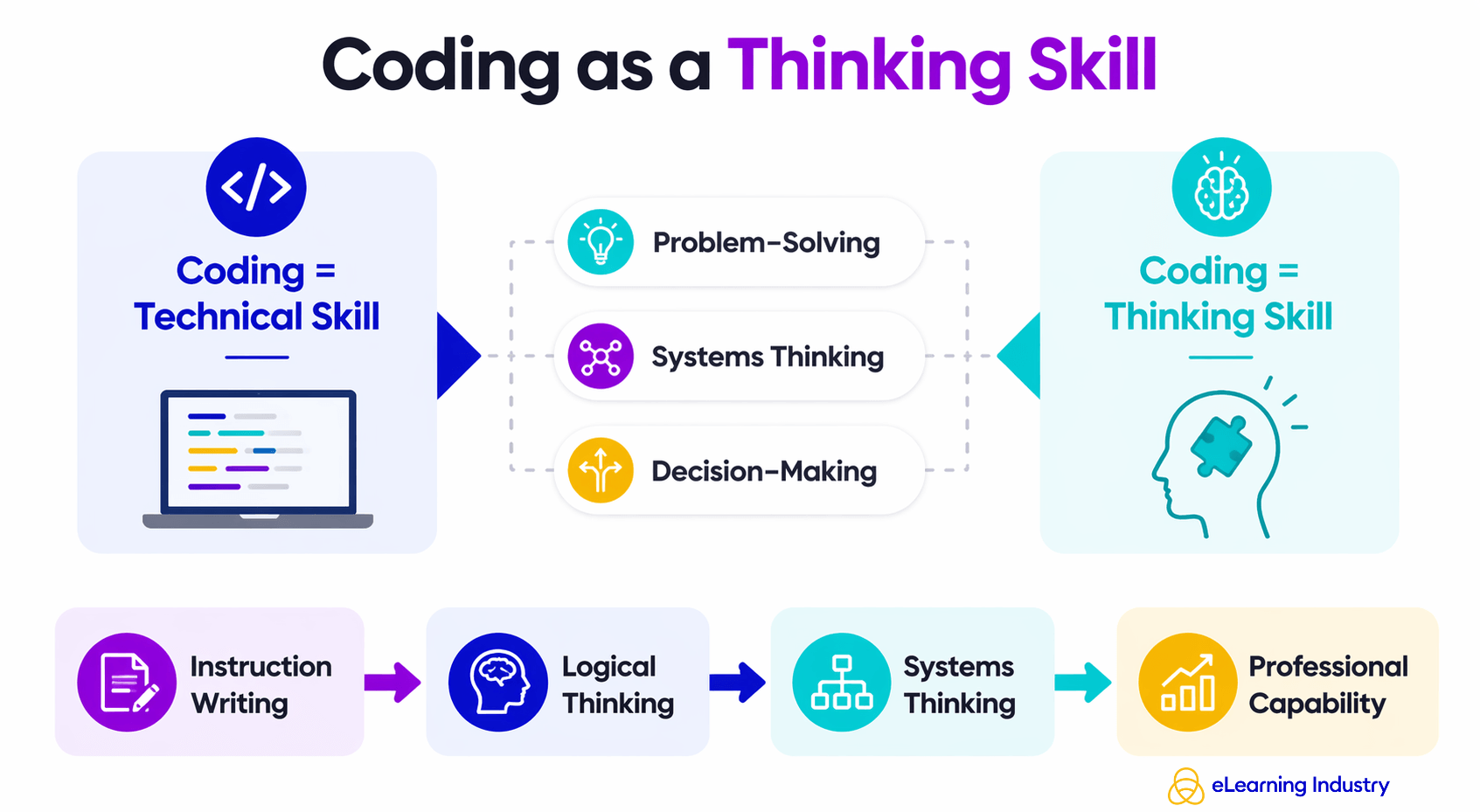
Coding is not just about writing instructions—it builds problem-solving, systems thinking, and decision-making capabilities that translate directly into professional impact.
Final Takeaway
Coding is not just a technical skill. It is a way of thinking. When you learn coding, you also improve problem-solving, because you learn how to break complex tasks into smaller steps. You build systems thinking by understanding how different parts of a process connect and interact. It also strengthens decision-making, since coding often requires choosing between different solutions based on logic and outcomes. Instead of asking how to start coding, a better question is how coding can expand your skills. This shift helps professionals see coding as a tool for thinking, not just writing instructions for computers.