
 ChatGPT
 Perplexity
 Claude
 Grok
The Library Side Of Platform Migration
For years, enterprise L&D teams have had to choose between two kinds of systems. One was the traditional LMS, built to assign training, track completion, and satisfy auditors. The other was a newer set of tools built around the learner experience. Most large organizations ended up running both, along with separate authoring and translation tools, and spent a lot of effort keeping them connected.
That is starting to change. Learning platforms are now being rebuilt around AI, with authoring, delivery, personalization, and administration in one system. Workday's launch of Workday Learning, powered by Sana, which recently became generally available for Workday HCM customers, is one of the more visible examples. Other vendors are moving in the same direction.
For L&D leaders, the platform decision gets most of the attention. There is a second question I expect many of them to face soon after they sign: What happens to the thousands of courses they already have?
Will Legacy Courses Benefit From An AI-Native Platform?
Only partly. A course built five years ago for a compliance-focused LMS was designed for that environment. It is usually one long module, built to be completed from start to finish and tracked as a single record. It may not be tagged to specific skills or roles, and its only assessment is a recall test at the end.
Move that course onto an AI-native platform and it will run. Learners can access it, and administrators can track it. It will still behave like a legacy course. Personalization depends on content that can be matched to roles and skills. AI tutors and recommendations work best with material that is accurate, current, and well structured. A long, untagged legacy course gives the platform very little to work with.
How Should L&D Teams Plan The Content Side Of The Rollout?
Most of the attention in a platform rollout goes to technical setup, organizational alignment, and change management. On the content side, planning starts with a close look at the existing library. In my experience, most enterprise libraries fall into four groups.
The first is content to retire. Every large library carries courses no one has opened in years, duplicates built by different teams, and material that no longer reflects current processes. Moving these to a new platform only adds clutter.
The second is content that can move as it is. Some courses are recent, accurate, and short enough to work well. These can migrate with little change.
The third is content to restructure. These courses are still accurate but built in a way that limits what the new platform can do with them. Legacy course conversion here means breaking a long course into shorter modules, tagging each to skills and roles, and adding practice activities so the platform can personalize and recommend it.
The fourth is content to rebuild. These are high-value programs, often onboarding, leadership, product, or critical safety and compliance training, where the gap between the old design and what learners now expect is large. These are worth redesigning properly for the new environment.
The order is important. Starting with a few high-visibility programs gives the business a clear view of what the new platform can do and builds support for the rest of the migration.
Doesn't AI Authoring Handle This Automatically?
AI authoring tools are now standard in these platforms, and they help. Turning source material into a first draft is much faster than it was, and updates take less time.
But deciding which courses to retire, how to restructure a program, which skills each module maps to, and what good practice looks like for a technical task are design decisions. The tool works from what it is given. A well-designed brief and a clear structure produce a strong course. A legacy course fed in as it produces a faster version of the same course.
What Does A More Automated L&D Model Change For The Team?
AI-native platforms point toward a more automated way of running L&D. As AI takes over more operational work, such as assigning training, sending reminders, generating reports, and producing first drafts, the L&D team's time can move toward higher-value work.
Much of that work centers on content: deciding which capabilities the business needs, designing programs that build them, and keeping the library current as roles and processes change. In an automated model, the quality and structure of the content becomes the main factor in how well the platform performs.
This is also where many teams will feel stretched. A platform rollout, a library restructure, and regular training demand all land on the same team at the same time. Planning for that capacity early is part of a successful deployment, alongside the technical and change management work.
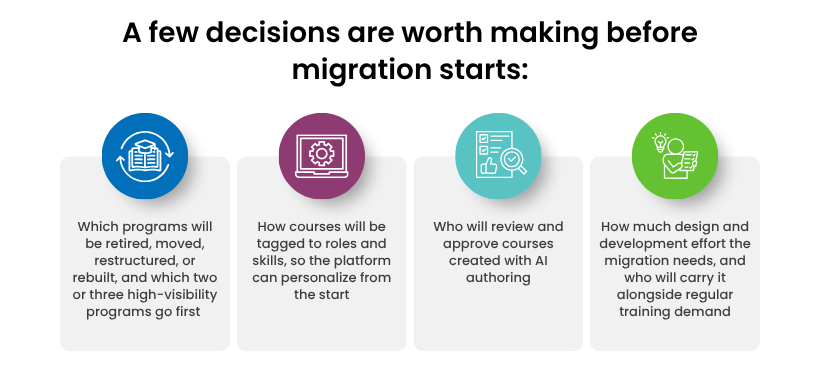
What Should L&D Leaders Do Before The Rollout Begins?
Sharing The Execution Load During A Rollout
At CommLab India, we have worked alongside enterprise L&D teams through several waves of learning technology, from the early LMS years to mobile and now AI. In earlier transitions, the client’s L&D team decided what to keep, retire, and prioritize, and set the standards for the new library. We took on much of the execution behind those decisions, supporting the library audit and restructuring and rebuilding courses for the new platform.
That arrangement let the internal team keep up with regular training demand during the rollout. AI-native platforms will bring a similar surge of migration work. L&D leaders who plan early for who will carry it can keep the rollout on schedule and get their most important programs onto the new platform first.