
Trending Learning Management Systems (LMS)
About the vendor
-
Customers
  • Large Enterprises (>10,000)
  • Non Profits
  • Public Administrations
  • Small/Medium Businesses
Use Cases
-
Industries
-
Deployment
  • Mobile Application
  • Software as a Service / Cloud
Platforms
  • Mac
  • Windows
Browsers
  • Apple Safari
  • Google Chrome
  • Internet Explorer
  • Mozilla Firefox
Training
  • Documentation
  • In Person
  • Live Online
Support
  • Live Online
Supported Specifications
  • AICC
Languages Supported
-
LinkedIn Page
-
X
-
Change your privacy settings to see the content.
In order to watch this video you need to have advertising cookies enabled.
You can adjust your cookie preferences here.
Features

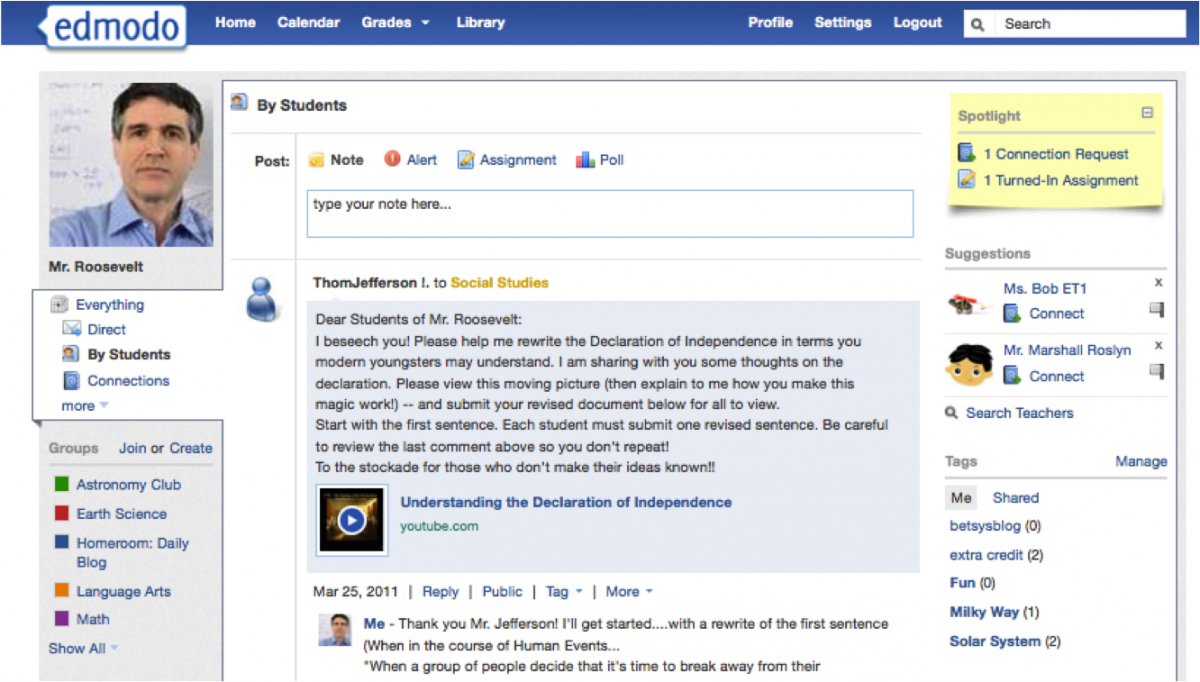
Learn more about Edmodo features that set it apart from the competition. Discover how its unique tools and capabilities enhance your processes.

Accounts

Add a new user
Archive users
Browse list of users
Bulk User Actions
Custom/Mandatory User profile fields
Upload users

Activity grading

Course History
Gradebook Centralized view of all learner grades.
Gradebook audit trail
Gradebook comments Add comments to learner grades.
Manual Grading ("Marking")
Multiple grading scales

AI Features

Adaptive Learning
AI Powered
Chatbot
Content development
Content Translation
Intelligent recommendations
Natural Language Processing
Predictive analysis
Quiz generation
Text-to-speech

Authentication

Active Directory/LDAP Integration
Custom User login page
Manual Accounts
No login
SAML2/API Integration
Self-Registration
Self-Registration w. Admin Confirmation

Categories

Assign Courses to categories
Create new Categories
Manage Categories
Priced Categories (Bundle)

Certificate management

Certification life-cycle
Manage certification templates
Predefined certification templates
Unique Certificate by Course
Unique Certification by Curriculum

Compliance management

Certificate expiration notifications
Certification Expiration Management Manage timelines and renewal rules.
Due Date notifications
Soft/Hard Stop Due Dates

Course Creation

Assignments Engine Create and manage learner assignments.
Built-In Authoring Tool
Can reuse PPTs, PDFs, Videos Upload and repurpose existing material.
Changing Course default settings
Consume online video content
Content Library
Course backup Options
Drag & Drop Interactions
Hybrid Learning Courses
Learning Paths (Curriculums)
LRS
Scheduling LIVE events Plan webinars or virtual classes.
Survey Engine
Tests Engine Build quizzes and exams.
Upload courses

Customization

Mobile Learning Support
Personalized views Customize interface per user.

Enrollment

Attendance Tracking Track presence in sessions.
Automated Enrollment (based on User data)
Guest Access Settings
Manual Enrollment
Progress Tracking
Self-enrollment
Self-enrollment (with a PIN #) Require a PIN for enrollment.
Survey enrollment (based on a response)

Format

Course Discussions Forum-style communication.
Gamification Format
Learner Upload Allow learners to upload content.
LIVE Chat Option Real-time messaging inside courses.
Social Format Social interaction‑focused layout.
Topics Format
Video Conferencing Integration
Weekly Format

Gamification

Badge customization
Badges Award digital achievements.
Customize Gamification mechanics
Leaderboards
Levels
Points
Rewards

Interface options

Additional external pages
Block Management
Calendar Settings Configure system calendar.
Language settings
Learning Accessibility
Location Settings
Media embedding settings
Multilanguage Support
Ready-made Themes

Learning types

Asynchronous Instructor-led
Asynchronous Self-paced
Blended Learning Mix online and face‑to‑face training.
Synchronous Virtual Classroom

Mobile learning

Offline (disconnected Mobile app)
Online (Internet connected)

Offline

Support for offline access to content

Reports

Automated Report Scheduling
Canned Reports
Dashboards and Graphic Reports Visual analytics dashboards.
Email delivery of Reports
Exporting Reports in variety of formats
Grading Report Settings
Learning Analytics Tools
Training Record Maintenance Maintain full training logs.

Roles

Define roles
Role Assignment
System Permissions per role
Teams and Team Hierarchies Organize users into teams.

Security

Anti-spam
Anti-virus
IP Blocker
Restrict registration to specific domains
Strong Passwords

Shopping cart

Built-In Shopping Cart
Shopping Cart as Plug-In

System reports

Automatic email reports in predefined intervals
Custom reports generator
Email notification settings
Live Logs
Pricing

Learn more about Edmodo's pricing options, cost, and plans so you can make a well-informed, business-wise decision on the best software to use for organization.

Pricing Model
  • Freemium
License
  • Paid
Starting Price
  • N/A
Free Trial
  • No

Edmodo is free except from premium package. Contact the company for details.

Integrations

Learn more about Edmodo's integration options.

-
Edmodo logo
Have you used Edmodo before?
Answer a few questions and help the community to make the best decisions
Reviews

Is Edmodo the right solution for you? Read verified Edmodo reviews from people in industries like yours to make a confident choice.

Performance Overview
Overall Rating 83%
  • Usefulness
  • Usability
  • Customer Experience
  • Likelihood to Recommend

Reliable classroom tool to get started quickly, but not enterprise-level ready

Apr 22, 2025

Overall Rating 84%
  • Usefulness
  • Usability
  • Customer Experience
  • Likelihood to Recommend
What do you like best? Edmodo stepped in for those schools looking for a quick solution. We launched teacher and student accounts in a matter of days, created classes, and started publishing assignments nearly instantly. This enabled us to access features such as file sharing, quizzes, and group discussions, without requiring heavy technical support or spending hours getting trained on their functionalities. Our research revealed that more than 90% of students and over 80% of teachers found the platform user-friendly.
What do you dislike? As our district grew and required features such as more advanced rostering, API integrations, or full single sign-on with our SIS, it became less comfortable on the platform. There are some integrations with other tools available, but fewer than those of some competitors. Additionally, interface and workflow customization are limited. Moreover, even though it functioned smoothly under stable networking conditions, a few students situated in distant regions with poor connectivity had issues
Reviewer photo

Sandy M.

Industry : Education - Higher | Company size : 201-500 | Level : Senior | Focus : Education | Experience using the software : More than 1 year as Administrator

Affordable and straightforward for smaller schools, but may outgrow as demands grow

Apr 2, 2025

Overall Rating 86%
  • Usefulness
  • Usability
  • Customer Experience
  • Likelihood to Recommend
What do you like best? For our smaller private school, cost-effectiveness was a huge factor, and Edmodo fit the bill. The fact that it had a free or low-cost plan enabled us to start without investing a lot of money. The interface is straightforward, onboarding seamless, and teacher uptake great: even the non-technical staff adopted it trouble-free. We were able to move a lot of our classroom work online quickly, thanks to the built-in assignment and quiz tools and the resource sharing capabilities.
What do you dislike? However, when we grew as a school, with more complex needs like tracking across departments, advanced analytics, complete mobile parity, handling lots of media, we felt constrained by the platform. Although we were keen to upgrade, not all our expectations were covered (on the free tier, there are very few advanced features). General connectivity was fine, but remote students with slow internet did experience delays or difficulties with larger submissions.
Reviewer photo

Claire P.

Industry : Education - Secondary | Company size : 51-200 | Level : Manager | Focus : Education | Experience using the software : More than 1 year as Administrator

Encourages student engagement and peer collaboration, though some limitations exist

Dec 11, 2024

Overall Rating 84%
  • Usefulness
  • Usability
  • Customer Experience
  • Likelihood to Recommend
What do you like best? One of the biggest strengths we discovered with Edmodo was its ability to encourage student collaboration and peer interaction. Because the interface resembles a virtual social feed that students are accustomed to, they felt more inclined to ask questions, comment on their peers’ posts, and engage in discussions. In blended learning environments, that kind of comfort and familiarity helped reduce student reluctance.
What do you dislike? The ease of use of the platform can also be a constraint if there is a need for more complex instructional design or differentiated learning. The toolset is fine for basic things, but if you want to roll out sophisticated adaptive learning pathways, elaborate analytics, or deeply tailored interactive content, you can soon run out of headroom. Some teachers reported that their less tech-savvy users required additional training to navigate the platform well, which did create initial uncertainty.
Reviewer photo

Michael F.

Industry : Education - Secondary | Company size : 201-500 | Level : Manager | Focus : Education | Experience using the software : More than 1 year as Administrator

Useful Content Choices And Smooth Google Linking But Tech Issues Slow Things Down

Oct 19, 2024

Overall Rating 84%
  • Usefulness
  • Usability
  • Customer Experience
  • Likelihood to Recommend
What do you like best? I enjoy the wide collection of learning materials in Edmodo because it helps teachers and students access helpful resources quickly. The mix of lessons, files, and ready-to-use content makes planning feel smoother and saves time during busy days. The connection with Google Suite adds even more value since it lets me pull in documents, slides, and forms with ease.
What do you dislike? My experience with Edmodo has been mostly positive, but there have been moments when technical problems have slowed things down. I have seen pages freeze or load slowly, and sometimes features take a while to respond. These small issues interrupt the flow of lessons and can make students lose focus.
Reviewer photo

Marcus C.

Industry : Consumer Services | Company size : 501-1,000 | Level : Manager | Focus : Human Resources | Experience using the software : 6-12 months as Administrator, User

Simple Platform For Daily Collaboration But Lacks Deep Analytics Tools

Oct 7, 2024

Overall Rating 83%
  • Usefulness
  • Usability
  • Customer Experience
  • Likelihood to Recommend
What do you like best? Edmodo is a user-friendly tool for managing class activities with a minimal learning curve. It’s one of the more approachable platforms for daily classroom use. For teachers, it’s easy to create groups, assign work, and share resources. For students, everything makes sense as they post assignments and participate in discussions.
What do you dislike? Edmodo is easy to set up and use, but it doesn’t offer the deep analytics or assessment tools many teachers expect from an LMS. Advanced grading options, detailed progress overviews, and content personalization are fairly limited. The interface could use a modern facelift, and some elements feel unnecessary.
Reviewer photo

Sophie M.

Industry : Elearning | Company size : 501-1,000 | Level : Senior | Focus : Operations | Experience using the software : More than 1 year as Administrator, User

Classroom Communication Tool Connects Everyone But Interface Feels Slightly Clunky

Oct 5, 2024

Overall Rating 83%
  • Usefulness
  • Usability
  • Customer Experience
  • Likelihood to Recommend
What do you like best? It helps put classroom communication in one place without overwhelming teachers or students. Assignments can be posted, updates shared, and discussions managed all in one place, so you don’t have the chaos of email. Students pick up on the interface quickly, and parents like being able to see their child’s assignments and announcements.
What do you dislike? The interface feels slightly clunky when compared to some modern learning management systems. There is a lack of customization; you can’t tailor templates, and the reporting and analysis tools are not very detailed at the student level. Edmodo can feel limited as class sizes or institutional demands increase.
Reviewer photo

Hannah B.

Industry : Consumer Services | Company size : 201-500 | Level : Director | Focus : Administrative | Experience using the software : 6-12 months as Administrator, User

Easy Classroom Setup With Smooth Early Learning But Grading Options Are Limited

Sep 15, 2024

Overall Rating 81%
  • Usefulness
  • Usability
  • Customer Experience
  • Likelihood to Recommend
What do you like best? I appreciate how easy Edmodo is to set up and start using, even for people who are new to digital classrooms. The layout feels natural enough that teachers and students can move through lessons without feeling lost. Uploading materials, sharing updates, and creating simple learning spaces all feel smooth.
What do you dislike? One issue I have faced with Edmodo is the limited flexibility in grading and assignments. I often want to adjust grading styles or set up unique structures for different groups, yet the options feel fairly fixed. This can slow down lesson planning because I need to work around the platform rather than shape it to fit my classes.
Reviewer photo

Julian F.

Industry : Capital Markets | Company size : 201-500 | Level : Senior | Focus : Finance | Experience using the software : 6-12 months as Administrator, User

Who Needs A Classroom When You Have Edmodo But Performance Lags Disrupt Focus

Sep 10, 2024

Overall Rating 84%
  • Usefulness
  • Usability
  • Customer Experience
  • Likelihood to Recommend
What do you like best? Edmodo feels very natural to move through and gives a gentle start for teachers and students who prefer a simple digital classroom. The setup process is quick, and daily tasks like posting materials or answering questions feel easy enough that classes stay active without extra stress. I find that even people who worry about online tools can settle in fast.
What do you dislike? There were moments when the platform slowed down or stopped responding, which interrupted lessons and disrupted students' concentration. Sometimes pages take longer to load or small features fail to react, and this creates delays at the worst times. These issues do not happen constantly, yet they appear often enough to create worry during important class activities.
Reviewer photo

Serena W.

Industry : Executive Office | Company size : 201-500 | Level : Director | Focus : Administrative | Experience using the software : More than 1 year as Administrator, User

Helpful Tools That Support Steady Class Contact But Reporting Tools Are Basic

Aug 22, 2024

Overall Rating 81%
  • Usefulness
  • Usability
  • Customer Experience
  • Likelihood to Recommend
What do you like best? Edmodo has helped my classes stay connected with its strong communication and group interaction features. Sending updates, sharing quick notes, and keeping conversations active feels smooth for both teachers and students. Group spaces make it easy to ensure everyone stays informed. I have used these tools to support class discussions and remind students about tasks.
What do you dislike? The reporting tools in Edmodo feel quite limited for deeper tracking. I often need to gather insights about class progress, assignment outcomes, or participation trends, yet the system gives only basic summaries. This means I have to pull information manually, which takes extra time. A more detailed set of reports would help teachers plan lessons with greater clarity and help students understand their progress better.
Reviewer photo

Elara V.

Industry : Entertainment | Company size : 201-500 | Level : Senior | Focus : Consulting | Experience using the software : More than 1 year as Administrator, User

A user-friendly classroom platform that supports teacher-student connection

Jun 7, 2024

Overall Rating 65%
  • Usefulness
  • Usability
  • Customer Experience
  • Likelihood to Recommend
What do you like best? Edmodo has a super intuitive interface that requires little to no training on the part of teachers or students. Because the groupings, homework assignments, quiz features, and progress tracking were accessible in one place, it eased administrative friction. Especially in our remote/hybrid setup, students could access materials from a shared work/resources library, as well as a built-in discussion feed, which motivated them to engage with one another.
What do you dislike? The fundamentals are certainly very solid, but Edmodo does not offer anything like the depth of customization and analytics we would wish to see, especially for a more stable institutional deployment. For instance, the grading and reporting module is a tad simplistic compared to more developed LMS platforms, and the extensibility for integrations is limited.
Reviewer photo

Kristi G.

Industry : Education - Secondary | Company size : 51-200 | Level : Manager | Focus : Information Technology | Experience using the software : 6-12 months as Administrator

You've viewed 10 out of 17

Alternatives

Not a match? Find software alternatives that better suit your needs and compare them to discover the one that's right for you.


Edmodo

4.2/5

iSpring LMS

4.7/5
Compare

TalentLMS

4.8/5
Compare

SkyPrep LMS

4.4/5
Compare

Acorn

4.6/5
Compare

Connecteam - Mobile Teams LMS

4.0/5
Compare

Absorb

4.8/5
Compare

360Learning

4.7/5
Compare