
 ChatGPT
 Perplexity
 Claude
 Grok
Grok
What Is A Timeline?
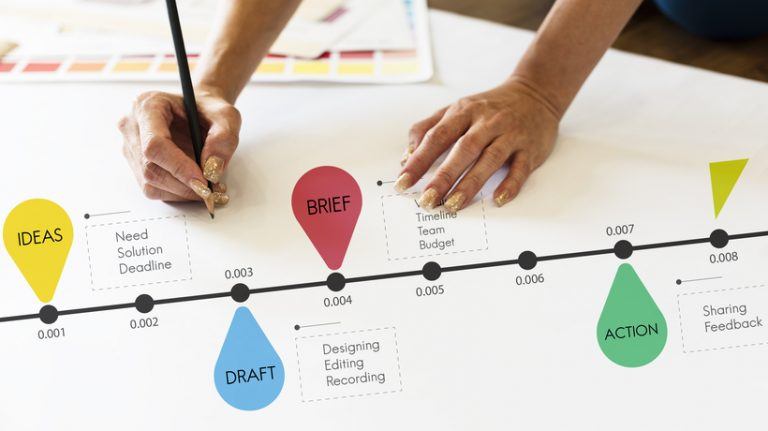
A timeline is a useful tool for organizing information in a clear and logical order. It helps when discussing a historical event, managing a project, or telling a story. Both teachers and students can use timeline templates or timeline generators to quickly create a custom timeline. This is ideal for those who may not have design skills but still want a professional look. With these easy-to-use templates, anyone can make polished timelines with little effort.
Timelines help track progress and allow people to see historical and current trends. In education, teachers can use timelines to help students visualize historical periods, see cause-and-effect relationships, or arrange important literary or scientific events in order. This makes timelines very useful in the classroom. Adding notes can enhance understanding and spark discussions. Timelines are also versatile; they can illustrate the water cycle, life cycle, or stages of photosynthesis. In art, they can illustrate the evolution of an artist's work over time, and in mathematics, they can demonstrate how mathematical theories have evolved.
Why Teachers Use Timeline Makers
Timeline makers help teachers turn information into a clear visual sequence that students can follow. Rather than presenting events, ideas, or processes as isolated facts, a timeline shows how they connect over time. In the classroom, this can make difficult topics easier to understand. Students can see the order of events, identify relationships between key milestones, and build a stronger sense of context. Many digital timeline tools also support images, videos, and other media, creating a more engaging learning experience.
Teachers use timeline makers across a wide range of subjects, from history and literature to science and project-based learning activities.
Visualizing Historical Events
History becomes easier to understand when students can see events arranged in sequence. A timeline provides a visual overview of what happened, when it happened, and how different events relate to one another. Students can compare periods, recognize overlapping developments, and identify how one event influenced another. This helps move learning beyond memorizing dates and encourages a more profound understanding of historical change.
Timelines also help students compare events happening in different places during the same period. This broader view can reveal connections between societies.
Supporting Project-Based Learning
Large projects can feel overwhelming without a clear structure. Timeline makers help students break work into manageable stages and monitor progress from start to finish. They can be used to plan research activities, record key milestones, and organize project tasks. This visual approach helps students stay on track. Teachers can use timelines to schedule checkpoints throughout the project. Regular milestones give students opportunities to review progress and improve.
Improving Student Engagement
Interactive timelines encourage students to take an active role in learning. Creating a timeline requires learners to research information, select important details, and organize them logically. Many digital tools also support multimedia content, allowing students to add images, videos, and audio clips that make lessons more engaging and memorable.
Organizing Complex Topics
Some subjects involve large amounts of information that can be difficult to process. Timeline makers help simplify these topics by presenting information in a structured format. Whether exploring scientific discoveries, literary developments, or historical events, students can see connections more clearly and understand how different ideas fit within a broader context. A timeline can also help students identify recurring themes and patterns. Seeing information arranged over time makes it easier to recognize trends.
Key Features To Look For In A Timeline Maker
The best timeline makers combine simplicity with flexibility. They should make it easy to create, edit, and share timelines while supporting different learning activities and project requirements. Features such as templates, collaboration tools, multimedia support, and export options can significantly improve the experience for both teachers and students.
The right tool should be flexible enough to support a variety of classroom activities. Whether creating a simple history timeline or a detailed research project, users should be able to adapt the layout to their needs.
Ease Of Use
A timeline maker should be straightforward to use, even for first-time users. Drag-and-drop editing, ready-made templates, and automatic formatting can reduce setup time and allow users to focus on content rather than design. A simple interface can also reduce frustration for new users. When tools are easy to navigate, students and teachers can spend more time focusing on content rather than learning how the software works.
Collaboration Features
Collaboration tools allow multiple users to contribute to the same timeline. Features such as shared editing, commenting, and permission controls support group work and make it easier to gather feedback. Students can contribute ideas, review each other's work, and make updates in group discussions without needing to manage multiple versions of the same timeline.
Multimedia Support
Adding images, videos, audio clips, and documents can make timelines more engaging and informative. Multimedia elements help provide context and support different learning styles and features. Multimedia elements can provide additional context that text alone may not capture. For example, historical photographs, video clips, or audio recordings can help bring key events and topics to life.
Templates And Customization
Templates provide a useful starting point and help users quickly create a professional-looking timeline. Customization options allow colors, layouts, and visual styles to be adapted to suit different projects.
Export And Sharing Options
A good timeline maker should make sharing simple. Export options such as PDF, image files, and presentation formats allow timelines to be used in lessons, reports, and classroom presentations.
How To Choose The Right Timeline Maker
Before you begin using a timeline maker, it's essential to understand how to select the right tool for your classroom. With so many options on the market, your ideal one will depend on your needs and budget. Before picking an online timeline maker, ask yourself:
- Does the tool offer timeline templates to match my class objectives?
- Can I create timelines individually and collaboratively, depending on my content needs?
- Are there timeline examples or project timelines that fit my lessons?
- Is it easy to use the online timeline creator from home or in a school lab?
Once you've answered the questions, you must also consider these factors before making your selection:
- Ease Of Use
A straightforward, user-friendly interface will keep your students focused on studying, as they can navigate the tool with ease and efficiency, thanks to its intuitive design. - Availability Of Templates
Pre-made timeline templates help generate ideas and save time in preparation. - Customization Options
Look for a timeline design that allows you to alter fonts, colors, and images to suit your class objectives or your students' creativity. - Collaboration Features
These are excellent for class-wide projects or managing group projects. - Interactive Elements
Students often find timelines more interesting and memorable when they include clickable events or animations.
You should also look for mobile friendliness, offline editing capabilities, and export options such as PDF or shareable links. Examine the availability of grading systems and teacher dashboards, particularly if you intend to use timelines as assessment tools. Don't forget to verify that the privacy and data protection policies comply with your school's regulations. This is important for students to register or submit work. Also, see if the application connects with popular educational platforms like Google Classroom and LMSs, such as Canvas or Moodle.
Timeline Makers Vs Traditional Timeline Assignments
| Factor | Digital Timeline | Traditional Timeline |
| Collaboration | Easy | Limited |
| Multimedia Content | Supported | Limited |
| Editing | Simple | Difficult |
| Sharing | Instant | Physical only |
| Engagement | Higher | Moderate |
Best Free Timeline Creation Tools
Timelines are inarguably powerful visual tools widely used for educational purposes. You can use them for emphasis, explaining, or presenting progress. Teachers often reap the benefits of integrating timelines into their lessons. Timelines enhance a lesson's interactivity and enable teachers to demonstrate how a concept has evolved. The next step is to examine some of the best free timeline creation tools listed below.
1. Office Timeline
Office Timeline is a free tool that helps you create professional-looking timelines. You can also use it to make milestones and Gantt charts. Here are its main features:
- MS PowerPoint Integration
Its built-in PowerPoint feature lets you craft and directly incorporate timelines into your PowerPoint slides. - File Import
Office Timeline allows you to import files from Excel or Project Management tools like Microsoft Project, provided you have a premium subscription. - Customization
It offers excellent space for customization and allows you to entirely modify your designs to localize them for any audience.
Pricing Plans
Office Timeline offers three plans: Lite, Plus (Pro), and Expert (Pro+), each with increasing feature access. You can contact the company to inquire about pricing options and opt for their 14-day free trial.
2. Sutori
Sutori stands out among free timeline creation tools that use pictures and videos to produce powerful storytelling. Let's examine its top features:
- Combines Text And Pictures
Particularly useful in presenting historical data or the succession of events describing a specific era. - Audio And Video Embedding
Sutori enables users to incorporate audio and video files into their timelines, providing a more engaging and interactive experience. - Multimedia-Rich Timeline Production Process
Teachers can help students relate to subjects like history and science by using text, images, audio, and videos. It's easy to share and combine Sutori timelines with Google Classroom.
Pricing Plans
Sutori does not provide detailed pricing information on its homepage. Although a free version or trial may be available, many features are locked behind a paid subscription. For customized pricing plans, it is best to contact the company directly.
Create the best Course for your School with the Right Vendor
3. MyHistro
One of the most innovative free timeline creation tools, MyHistro, can be used as a map creation platform. It is perfect for school projects that combine geography and history, like tracking the journeys of famous explorers or mapping out key battles in a war. Here are its core features:
- Storytelling Elements
You can include pictures, videos, and text, and specify their location on Google Maps, taking storytelling to the next level. - Easy Social Media Sharing
Using MyHistro, you are one click away from sharing all your meticulously put-together timelines with your social media network on platforms like Facebook and Twitter. - iPhone App Available
Busy iPhone users can also use MyHistro to create timelines on the go.
Pricing Plans
There are no subscription plans. You get to use all of MyHistro's features for free.
4. OurStory
OurStory is primarily designed for personal use. However, this is one of the most functional free timeline creation tools that can undoubtedly get the job done for teachers, if they do not require something too fancy. Some of its main features are:
- Interactivity And Social Media Sharing
Users can interact in the comments section or share their creations on social media. - Media-Rich Platform
Access text, images, and video to create interesting, descriptive, and engaging timelines. - Collaborative Timelines
Tag others and go beyond personal timelines to make collaborative stories.
Pricing Plans
You use it completely free of charge.
5. SmartDraw
SmartDraw is one of the most efficient free timeline creation tools for teachers to consider. Below are some of its top features:
- Ready-Made Templates
A great abundance of template variety to suit your students' needs. - Automatic Formatting
SmartDraw automatically realigns events every time you make changes to your timelines. All you have to do is provide the information. - Offline And Online Editions
If you're a Windows user, you can easily download the platform on your PC. However, there is also an online edition for computers and tablet devices. - Timeline Export To MS Office Platforms
You can integrate your timelines into MS Word or PowerPoint with just one click.
Pricing Plans
- Free Trial
With SmartDraw's 7-day free trial, you can experience its features without any cost. However, once the seven days are over, you will need to subscribe to one of the plans listed below. - Individual Plan
Available for $11.95 per month. - Team Plan
Available for $9.95 per month. - Enterprise Plan
It has custom pricing.
6. X's (Former Twitter) Custom Timelines
Both teachers and students commonly use social media and social learning. One effective free tool for creating timelines on X is the Custom Timeline feature, which allows users to curate specific groups of tweets into personalized feeds. This feature provides a focused perspective on topics, events, or user groups. TweetDeck is a social media dashboard application that facilitates the creation and management of these timelines. Some of its key features include:
- Customizable Ordering With Hashtags
Do you use X as a tool in your lessons? X's Custom Timelines allow you to craft a timeline of all tweets on a particular subject and showcase your students' changes in comprehension over time. - Timeline Sharing And Website Embedding
X's Custom Timelines enables students to share their timelines on X or embed them on their website.
Pricing Plans
X's Custom Timelines is an entirely free timeline creation tool. Members of X Premium (formerly Twitter Blue) can also create custom timelines.
Note
X users have the ability to build or subscribe to carefully curated timelines, which offer a more customized platform experience. For example, during a school debate, historical anniversaries, or significant events such as elections or science conferences, teachers can incorporate live tweet streams into their classroom blogs or dashboards to showcase ongoing discussions. Additionally, teachers can create columns in TweetDeck to monitor specific hashtags (such as #WW2week and #BiologyDay), filter current content, and maintain a safe, monitored feed.
7. Timeline JS
Timeline JS is an open-source timeline maker with numerous features, regarded as one of the most interactive free tools for creating timelines. Here are some of its noteworthy features:
- Ready-Made Templates
You don't have to be an expert, as Timeline JS has you covered with some pre-made templates. However, more advanced users can customize the timelines to create more impressive ones. - Media Sources
Users can incorporate media from various sources, including Twitter, Flickr, YouTube, Vimeo, Vine, Dailymotion, Google Maps, Wikipedia, SoundCloud, and Document Cloud, among others. - Support For 40 Languages
Teachers can eliminate all space barriers using this tool for multi-lingual projects.
Pricing Plans
There is no subscription plan. Timeline JS offers all of its features for free.
8. Free Timeline
Free Timeline is a free tool for creating timelines and offers many features that enhance user experience.
- Easy-To-Use Interface
Drag-and-drop features make timeline creation a breeze. - Use On Various Devices
Free Timeline can be efficiently utilized from any desktop or tablet device. - Import Feature
Excel and Google Sheets CSV files can be directly imported into Free Timeline.
Pricing Plans
As the name of the platform suggests, it's completely free.
9. Preceden
Preceden offers exciting features that distinguish it as one of the best free timeline creation tools available online. We explore these features below:
- Zooming And Panning
Zooming in allows you to concentrate on areas of the timeline where multiple events are accumulated and need emphasis. You can highlight the significance of the event to make it stand out on the timeline. - Sharing And Embedding
Unique timeline URLs allow you to share them on social media or embed them on a website.
Pricing Plans
- Free Version
With Preceden's free plan, you can add 10 events per timeline, making it a great choice for students and teachers. - Basic Plan
It costs $10 per month. - Pro Plan
It offers advanced features and costs $16 per month.
10. TimeToast
TimeToast is a highly effective free tool for creating timelines that accomplishes the task well. It includes essential timelining features, making it perfect for lessons that require basic designs. Here are two standout features:
- Pictures And Text
Inclusion of pictures and text is quite straightforward. There are no advanced features available here. - Social Sharing
Since it offers embedding, social sharing (Facebook, X), and publish and share features, students can easily share their creations on Oncebook, X, and Pinterest and embed them on any website.
Pricing Plans
This platform has a free Public Plan, a Basic Plan for $5 per month, and a Pro Plan for $7.50 per month.
Conclusion
Timelines are essential for teachers, as they make content easier to follow and more memorable. The 10 free timeline creation tools outlined in this article can help you create both basic and advanced timelines, depending on the needs of your lessons. When used creatively, these free timeline tools can significantly enhance understanding of a subject without incurring additional expenses. To learn how to effectively utilize these free timeline makers in eLearning and create engaging courses, check out the article "10 Creative Ways To Use Free Timeline Makers in eLearning."