



Build Realistic Branching Scenarios With AI
Choosing the correct answer in a quiz is usually straightforward. Deciding what to say when a customer is furious, an employee becomes defensive during feedback, or a coworker ignores a safety rule is a different challenge.
These situations require judgment, timing, and an understanding of how one decision can change what happens next. Scenario-based learning gives employees a safe place to practice these kinds of difficult workplace decisions before they need to make them in real-world situations.
In this article, I'll walk you through designing focused branching scenarios faster with iSpring Suite AI.
Why Choices And Consequences Improve Learning
Decision-based training places people in a realistic situation, asks them to make a decision, and changes the next part of the experience based on that choice.
For example, imagine that a support agent receives this message: "This is the third time I've contacted you about the same issue. I'm done."
A regular quiz might ask learners to identify the best response. A branching scenario lets them choose what to say and then shows the customer's probable reaction.
- If the agent acknowledges the frustration and asks for more information, the customer may explain what happened.
- If the agent immediately quotes the refund policy, the customer may feel dismissed and request a supervisor.
- Offering a discount could calm the customer temporarily while leaving the original problem unresolved.
Each option represents a behavior that employees might genuinely consider. The learner is evaluating several plausible responses and seeing how tone, timing, and priorities affect the result.
This connection between choice and consequence is the central value of scenario-based learning. Trainees can make mistakes, examine the outcome, and try a stronger approach without real workplace risks.
Decide If You Really Need A Scenario
Branching scenarios take more planning than a conventional presentation or quiz, so they shouldn't be the default format for every topic.
Before you begin, ask: Does the learner need to make a decision or simply remember information?
A short lesson, checklist, demonstration, or standard quiz is usually enough when employees need to locate a policy, recall a rule, follow a fixed process, or learn which button to click.
Scenarios become useful when employees need to:
- Handle difficult conversations
- Make judgment calls under pressure
- Choose between several realistic options
- Respond to risk before it escalates
- Practice skills that depend on context or tone
- See how an early decision affects a later outcome
This helps employees build the judgment and confidence needed for customer service, sales, compliance, safety, leadership, healthcare communication, cybersecurity, and onboarding for complex roles.
Start With The Decision, Not The Topic
A topic alone doesn't give a scenario enough direction, but a specific decision does. Compare these two ideas:
- Customer service
- What should an agent say first when a customer is angry and the refund policy is unclear?
The second version immediately suggests a character, a source of tension, several possible responses, and consequences for each choice.
Before writing dialogue, define what learners should do differently after completing the course. For example, learners may need to handle feedback, suspicious requests, or sales conversations more effectively. The chosen behavior should guide every choice, consequence, and feedback screen.
Next, place learners close to the moment of action. A long introduction usually weakens the tension. Give learners only the context they need. For example:
The prospect says, "Your competitor is cheaper, and I'm not sure your solution is worth the difference." What do you say next?
The situation is clear, the pressure is immediate, and the learner has a meaningful decision to make.
Write Plausible Choices
A scenario becomes ineffective when one answer sounds flawless and the others are obviously careless or absurd. Consider these options:
- Say the right thing.
- Ignore the customer.
- Be rude.
Learners can identify the intended answer without understanding the skill. More realistic choices might be:
- Apologize and ask the customer to explain what happened.
- Explain the policy before requesting more information.
- Offer a discount to calm the customer quickly.
Every option has an understandable logic. One prioritizes listening, another focuses too quickly on procedure, and the third addresses the emotion without resolving the issue.
Consequences should then demonstrate what the decision changed. Show the customer becoming more cooperative, an employee shutting down, a safety concern going undocumented, or a prospect agreeing to a meeting while remaining unconvinced.
Keep The First Version Manageable
It's easy to overbuild branching scenarios. Three decision points with three completely separate choices can produce dozens of screens, especially when every branch leads to a unique ending.
For an initial scenario, I recommend:
- One realistic workplace problem
- Two or three decision points
- Two or three choices per decision
- Three or four possible endings
- Five to ten minutes of learning time
Different choices can also reconnect to the same path. For example, two weak responses might create the same underlying problem and lead to one coaching screen. This keeps production manageable without making the decisions feel meaningless.
Before opening an authoring tool, map the scenario in a simple table or chart. Record the situation, learner role, decision point, available choices, consequence of each choice, feedback, and the final outcome.
Build The Scenario In iSpring Suite
Once the logic is mapped, you can build the experience with branching scenario software.
iSpring Suite AI works directly in PowerPoint, so you can build on a familiar PowerPoint workflow and add branching, role-play simulations, quizzes, characters, narration, and other interactive elements without moving the project into a completely separate production environment.
There are two main ways to create decision points.
1. Use Role-Plays For Conversations
Creating role-plays with iSpring Suite AI is great for dialogue-heavy situations such as:
- Handling an angry customer
- Responding to a sales objection
- Discussing a sensitive issue with a patient

The learner chooses what to say, and each response can lead to a different reaction, scene, feedback message, or outcome.
2. Use QuizMaker For Scored Branches
QuizMaker offers more control over scoring, feedback, remediation, and assessment paths. A response can send the learner to another question, a coaching screen, an information slide, or the end of the quiz.
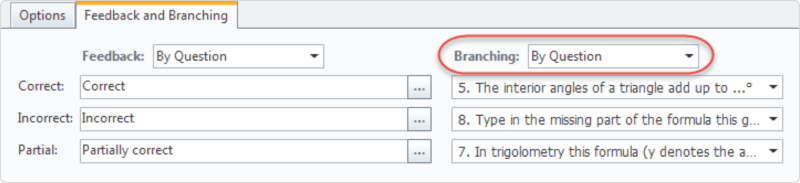
This format works well when you need to assess learner decisions and track the results in an LMS. Multiple-choice and multiple-response questions let each option lead to a different path, feedback screen, or score.
You can also combine the two approaches. A course might begin with a conversational role-play, pause for reflection and instruction, and then use a scored branching quiz to check whether the learner can apply the same principle in a new situation.
Use AI To Accelerate Content Creation
iSpring Suite AI can help you:
- Draft character dialogue
- Rewrite stiff or unnatural responses
- Suggest plausible incorrect choices
- Generate feedback for different outcomes
- Develop alternate branches
- Create quiz questions
- Produce images for specific scenes
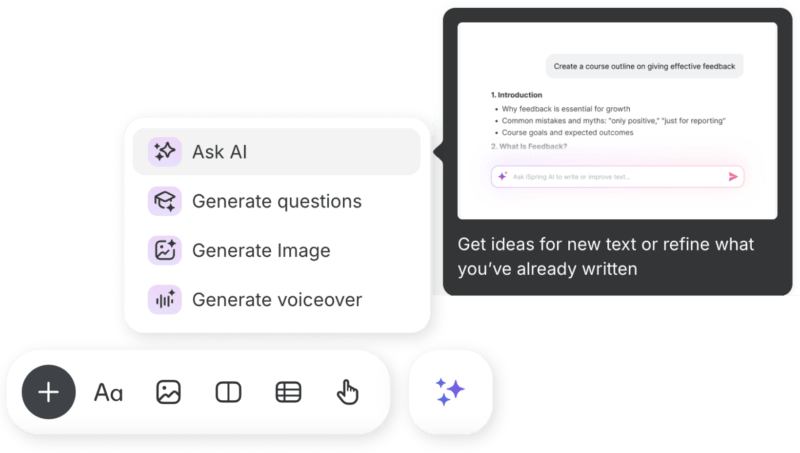
For example, you could ask AI to write three customer responses to the same statement: one calm, one skeptical, and one frustrated. You can then refine the language with a Subject Matter Expert so it reflects your customers, policies, and communication style.
Remember: an SME still needs to confirm that the options and consequences are realistic.
Add Visual Context
Visuals help learners understand the setting quickly. A suitable workplace background, character, or facial expression can establish who is involved and how the conversation is changing before the learner reads a long explanation.
Content Library in iSpring Suite AI includes:
- Course templates
- Characters
- Locations
- Icons
- Interface elements that can be used to create consistent scenes
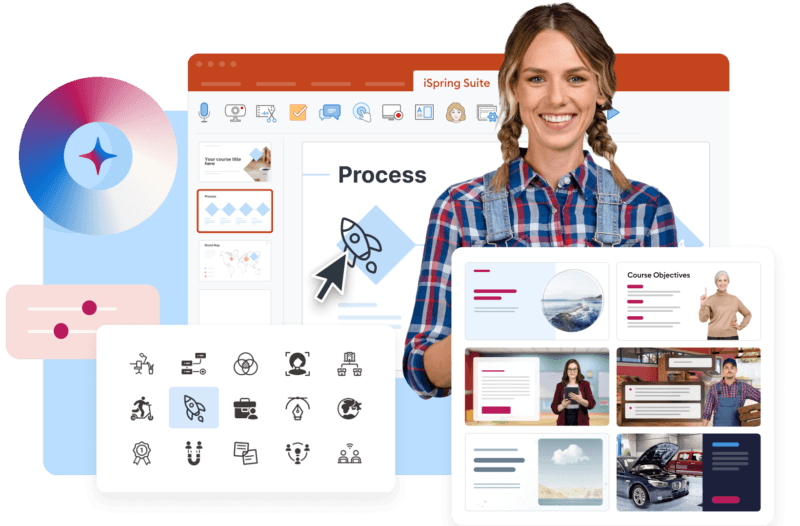
Character Builder also helps developers adjust appearance, clothing, and expressions for more specific audiences and situations.
For other visuals, you can use iSpring AI to generate unique images in seconds, based on a written prompt.
Test Every Path Before Publishing
Branching logic needs more testing than a linear course. Preview the scenario as a learner and click through every available path.
Check that:
- Every choice opens the intended screen
- Consequences and feedback appear at the right moment
- Scoring works as expected
- Learners can recover from weak decisions where appropriate
- Endings match the choices that led to them
- Navigation remains clear throughout the scenario
- The course works on the devices employees will use
When the course is published to an LMS, completion data, attempts, scores, and quiz results can reveal which decisions cause the most difficulty. These insights can help you improve the scenario, clarify a confusing choice, or identify where employees need additional coaching.
Turn Decisions Into Safe Practice
The best branching scenarios focus on a few key decisions and give employees a clear view of what their choices can change. Start with one recognizable problem. Write options that employees might genuinely choose. Show consequences clearly and keep the first version compact enough to develop and test properly with eLearning authoring tools.