

 ChatGPT
 Perplexity
 Claude
 Grok
Grok
How To Manage Client Expectations: Setting Expectations For eLearning Project Success
A successful eLearning project takes more than good Instructional Design. Setting expectations early helps your clients and team have a better experience, builds trust, avoids misunderstandings, and keeps your project moving forward.
So, it's safe to say that a great eLearning project starts with a clear understanding between the client and the Learning and Development (L&D) team, not just a storyboard or authoring tool. Even creative projects can run into problems if expectations are not clear. However, by managing client expectations early, you can avoid surprises and keep your project's quality and purpose on track. This guide will show you practical ways to set clear boundaries and deliver results that meet both business and learner needs.
Why Managing Client Expectations Matters In L&D And eLearning Projects
Managing client expectations helps keep eLearning projects on track, encourages teamwork, and sets realistic goals. By clearly outlining project goals, learning needs, deadlines, responsibilities, and deliverables, everyone stays on the same page.
The outcome? Fewer revisions, fewer delays, and less frustration. Most importantly, clear expectations allow L&D teams to focus on good instructional design and deliver results that meet project goals while staying true to learning principles.
10 Strategies For Managing Customer Expectations
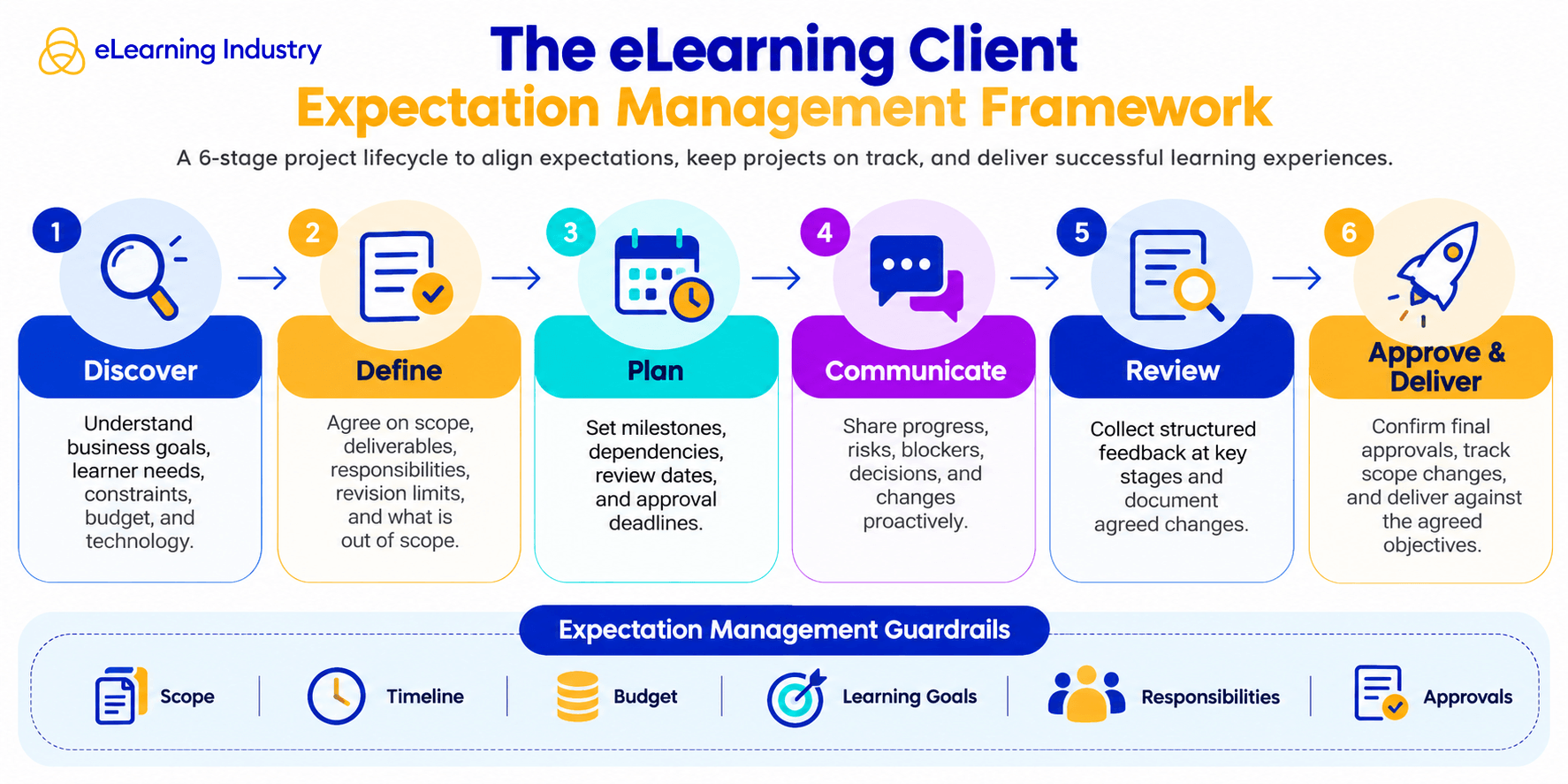
Building strong client relationships takes more than luck. You need to put in steady effort, have honest conversations, set clear boundaries, and communicate consistently. Use these ten strategies to set shared expectations, avoid confusion, and work smoothly together from beginning to end.
1. Be Honest From The First Conversation
Being transparent is important, so talk openly about what can actually be done with the available budget, resources, time, and technology. If you see possible challenges, explain why and suggest other options. Avoid making promises you can't keep. Honest conversations help build trust right from the start.
2. Define Project Scope And Deliverables Upfront
A clear project scope gives everyone a solid reference. List the number of courses, modules, assessments, interactions, and revision rounds included in the project. Make sure to explain the project limits and note anything that would cost extra.
3. Set Clear Milestones And Timelines
Divide the project into clear, manageable stages like content review, storyboards, design approval, development, and final approval. Set realistic dates for each milestone and point out any dependencies. This way, clients can plan their input and avoid last-minute delays.
4. Practice Active Listening To Understand Underlying Goals
Often, clients are not sure what they really need. Try to anticipate their needs and be proactive. For example, they might want more animations to make a course engaging or want to simplify an assessment. The best way to find out is to get them talking. Ask good questions and focus on their specific needs. When you understand their main goal, you can offer helpful suggestions and show your expertise.
5. Communicate Proactively, Not Just Regularly
Regular updates are useful, but being proactive is even better. Let your client know about possible risks, blockers, or changes before they ask. Share updates quickly to prevent problems. For example, if a deadline might change, explain why right away and suggest other options. Acting fast helps avoid delays and keeps your client's trust.
6. Under-Promise And Over-Deliver
It can be tempting to promise fast turnarounds or extra features to please clients, but making promises you can't keep will hurt trust. Instead, give realistic estimates for time and results. Set expectations you know you can meet, and look for ways to add value within the agreed scope. Finishing early, delivering great work, or adding a few extras can be a nice surprise for your client without putting too much pressure on your team.
7. Push Back On Requests That Undermine Instructional Design
Not every client request helps meet the learning goal. Too much text, extra interactions, or too many design elements can distract from the main purpose. Instead of saying yes to everything, explain your suggestions with clear reasons. Politely saying "No" to less effective ideas and offering better options helps manage expectations and leads to better results.
8. Use Shared Dashboards Or Portals For Transparency
Be open about progress. Use a shared dashboard so everyone can track updates in real time. Keep all files, tasks, deadlines, approvals, feedback, and action items in one place. Centralizing information reduces scattered emails and gives clients a clear view of the project. It also helps your team stay on the same page as the project moves forward.
9. Document Agreements And Decisions In Writing
Write down important decisions instead of relying on memory. Send email summaries that list approved changes, updated requirements, feedback, and agreed deadlines. Share meeting notes to recap decisions and next steps. Clear instructions help everyone understand the plan and prevent mistakes, especially when many people are involved.
10. Collect And Act On Client Feedback Simultaneously
Don't wait until the end to ask for feedback. Get input at the end of each key stage to see what's working and what needs to change. Most importantly, act on feedback quickly. Keep two-way communication open and use feedback early to stay on track during development.
How To Prevent Scope Creep With Clear Boundaries?
Scope creep often begins with small requests. These might seem harmless, but over time, they can move the project away from its original plan. To prevent this, clearly state what is not included in the project and set limits on revisions. Here's how to define your project boundaries:
- Before you begin, make a clear list of the actions to be taken, how many changes are allowed, when each part will be finished, and who is responsible for each task.
- Review each new request to ensure it aligns with the project's main goals.
- Let everyone know in advance how extra requests will affect the project's time and cost.
- Set a limit on the number of free revisions allowed at each stage.
- Offer practical alternatives, keep a record of any approved changes, and update the project timeline as needed.
Balance Client Requests With Sound Instructional Design
Sometimes what clients want doesn't align with good instructional design. The goal is to find a balance that meets business needs but still supports effective learning. You can do this by offering clear reasons, evidence, and practical alternatives.
- Listen closely so you can understand what the client really wants.
- Try to distinguish between personal preferences and actual performance or compliance needs.
- Ask questions to find out what the client really needs.
- Help clients understand cognitive load by explaining why packing in too much information makes learning harder.
- Support your design choices with data, examples, or evidence.
- Try using creative scenarios and stories instead of dense text to make things more engaging.
- Suggest rolling things out in phases to meet contract needs now, while leaving room for further design improvements later.
- Offer a few clear options instead of leaving every decision wide open.
Tools And Systems That Make Expectation Management Easier
To manage client expectations well, focus on clear communication, open systems, and setting clear boundaries. Using the right tools and frameworks helps avoid confusion, keeps everyone on the same page, and reduces stress.
Management Area |
Tools And Systems |
Purpose |
Intake And Agreement |
Typeform
Airtable Google Forms |
Collect structured project needs |
Project Tracking |
Asana
Trello |
Provides real-time visibility into project stages |
Shared Project Dashboards |
Notion
ClickUp |
Serves as a single source of truth for project status |
Communication |
Slack
Microsoft Teams |
Keeps conversations organized and accessible |
Feedback And Review |
Miro
Articulate Review Microsoft Forms |
Collects and manages structured feedback |
Documentation |
Google Docs
Notion Microsoft SharePoint |
Records decisions, revisions, and project details |
Approval Management |
DocuSign
HoneyBook |
Tracks approvals and formalizes agreements |
Build Long-Term Client Relationships In eLearning
Long-term eLearning partnerships develop when you do more than just deliver single projects and start acting as a strategic partner.
- Begin by ensuring your courses align with your client's primary business goals. Show your value through impact reports, completion rates, and learner feedback.
- Keep your clients involved at every stage and update them regularly on your progress.
- Stay in touch between projects by sharing industry news, platform updates, or helpful suggestions.
- Listen carefully to feedback and make changes when necessary.
- By taking this ongoing approach, you show that you care about more than just creating courses. It proves you are committed to their learning goals and to building a lasting partnership.