


 ChatGPT
 Perplexity
 Claude
 Grok
Grok
Make AI A Real Drafting Partner
Most Instructional Designers are already using AI. Far fewer are getting output they can actually put in a course. The gap is rarely the model. It is the prompt. Treat a Large Language Model like a search box and you get bland, generic content that a Subject Matter Expert (SME) will quietly rewrite. Treat it like a junior designer who needs a clear brief, and it becomes a genuinely useful drafting partner.
Prompt engineering has quietly become a core Instructional Design skill, sitting right next to needs analysis and assessment writing. This is not about clever one-liners or "magic" phrases. It is about giving the model the same context you would give a new hire: who the learner is, what they need to be able to do, what raw material you have, and exactly what shape the output should take. What follows is a reusable playbook, patterns you can adapt today for storyboarding, assessments, rewriting, and localization, with the quality guardrails that keep AI-assisted work defensible.
Start With A Reusable Scaffold, Not A Fresh Sentence Each Time
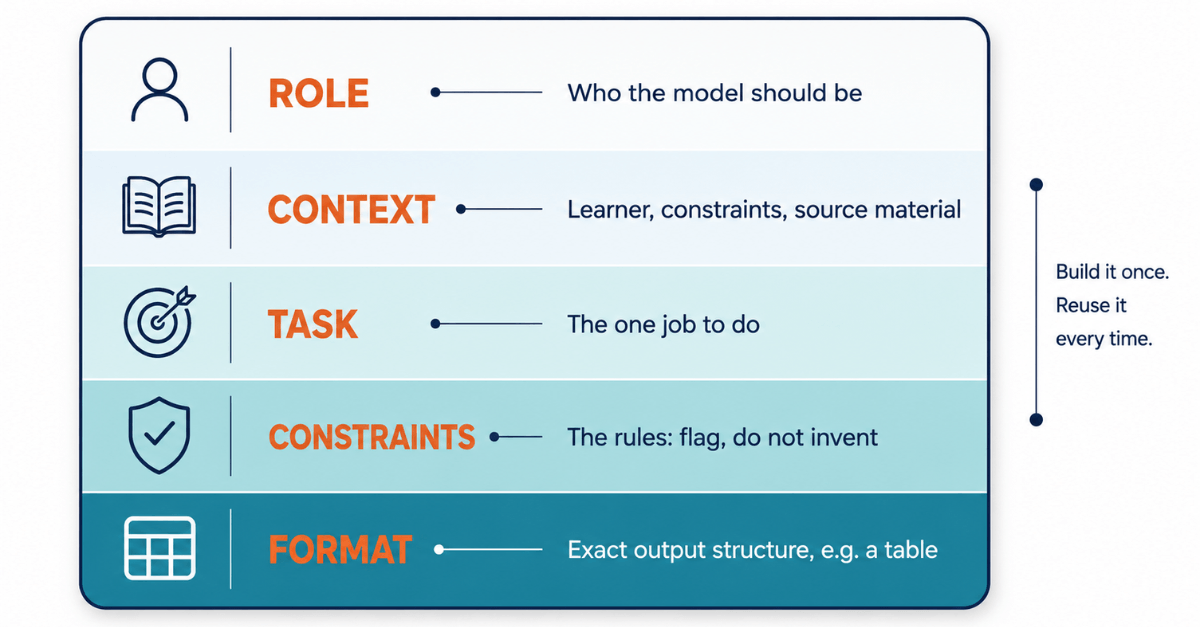
The single biggest improvement most designers can make is to stop writing prompts from scratch. Build one scaffold and reuse it. A reliable prompt has five parts:
- Role
Tell the model who to be. "Act as an Instructional Designer specializing in compliance training for a distributed workforce." - Context
Give it the learner, the constraints, and the source material. Audience role, prior knowledge, module length, and the actual SME content pasted in. - Task
State the one job. Draft a storyboard, write five assessment items, rewrite for a lower reading level. - Constraints
Set the rules. Word limits, tone, reading level, what to avoid, and what to flag rather than invent. - Format
Specify the exact output structure. A table with named columns beats "give me a storyboard" every time.
Once you have this scaffold saved, every pattern below is just a variation on it. The examples are written to be copied, pasted, and edited with your own brackets filled in.
Pattern 1: Storyboarding From Raw SME Content
Turning a dense policy document or a set of SME notes into a screen-by-screen storyboard is slow, mechanical work. It is also exactly what a well-briefed model does well, provided you force it to map every screen back to an objective:
Act as an Instructional Designer building a storyboard for a [15-minute] eLearning module on [topic] for [audience: role, prior knowledge, context].
-
- Learning objectives: [paste 3 to 5 objectives].
- Source content: [paste SME notes or the policy extract].
Produce a storyboard as a table with these columns: Screen number, On-screen text (max 60 words), Visual or media direction, Narration script, Interaction type, and the objective each screen maps to.
-
- Rules: one idea per screen, conversational second person, and no screen without a stated objective. If any screen has no supporting source content, flag it as "SME to confirm" rather than inventing detail.
The last rule matters most. Without it, the model will happily fill gaps with plausible-sounding content that has no basis in your source. Asking it to flag those gaps turns a risk into a task list for your SME review.
Pattern 2: Assessments That Test More Than Recall
Ask a model for "quiz questions" and you will get recall items with one obviously correct answer and three obviously wrong ones. That is the default, and it is weak assessment. The fix is to specify the cognitive level, demand realistic distractors, and require a rationale for each.
Write [4] scenario-based multiple-choice questions assessing this objective: [objective, with its Bloom level, for example "Apply"].
-
- Audience: [role]. Setting: [realistic workplace situation].
- For each item, provide: a short workplace scenario stem, one correct answer, and three plausible distractors based on common misconceptions rather thanobvious errors. Add a one-line rationale explaining why each distractor is wrong.
- Avoid: "all of the above", absolute words like always or never, grammatical clues that give away the answer, and anything that only tests memory.
Map each item back to the objective.
The distractor rationale is the part designers undervalue. It doubles as a feedback copy and, more importantly, it exposes lazy items. If the model cannot explain why a wrong answer is tempting, the question is not doing its job and you will see that immediately.
Pattern 3: Rewriting For Clarity, Level, And Tone
Rewriting is where AI saves the most time and where unguarded prompts do the most damage. A vague "make this simpler" instruction strips out required terminology or, worse, quietly changes the meaning. Constrain it.
Rewrite the passage below for [audience] at a [Grade 8] reading level.
-
- Keep all technical accuracy and these required terms exactly: .
- Make it active voice, second person, with short sentences, chunked into scannable segments with subheadings.
Do not add any facts that are not in the original. After the rewrite, list any terms you simplified so I can confirm the meaning still holds.
Two constraints do the heavy lifting here. Locking the must-keep terms protects compliance and technical precision, and asking for a list of simplifications gives you a fast list to check against the source. You are not proofreading the whole passage, only the handful of words the model chose to change.
Pattern 4: Localization, Not Just Translation
Translation swaps words. Localization adapts meaning. For global L&D teams this distinction is the difference between content that lands and content that confuses or offends. The prompt should push the model past literal translation and, crucially, tell it when to stop and defer to a human.
Localize this module content from [source locale] for learners in [target locale and language].
-
- Go beyond literal translation: adapt examples, names, currency, units, workplace norms, and idioms to the target market.
- Flag anything that is culturally sensitive, legally different such as a compliance threshold, or has no clear equivalent, and leave it for a human reviewer instead of guessing.
- Keep the same learning objectives and reading level.
Return a two-column table, source segment beside localized segment, plus a separate "needs human review" list.
No model should be the final word on whether a scenario is culturally appropriate or whether a regulatory figure transfers across borders. The instruction to flag rather than guess is what makes AI-assisted localization safe. It gives a native reviewer a focused shortlist instead of a wall of translated text to recheck line by line.
Quality Guardrails You Cannot Skip
Speed is only an advantage if the output is trustworthy. These guardrails are what separate professional AI-assisted design from copy-paste risk.
Treat the model as a drafting partner, never a source of truth. Every factual claim, statistic, regulation, or citation it produces must be verified against an authoritative source or signed off by your SME. Language models generate fluent text, and fluent text is not the same as accurate text. They are known to invent citations that look real, so a reference list from a model is a starting point for checking, not evidence. Run an explicit alignment and inclusivity pass. After a draft is produced, a short self-check prompt catches a surprising amount:
Review the draft you just produced and list any failures against these criteria, without fixing them: every element maps to a stated objective, the reading level matches the target, there are no unsupported factual claims, the language is inclusive and accessible, and there are no unstated cultural assumptions.
Asking the model to flag rather than fix keeps you in control of the edits and stops it from confidently "correcting" something that was fine.
Protect your data. Never paste confidential, proprietary, or personally identifiable content into consumer AI tools that may use it for training. If you are working with real employee data or unreleased material, use enterprise tools with clear data controls, and check your organization's policy first. This is often the single biggest blocker to AI adoption in regulated industries, and it is entirely avoidable.
Keep a prompt library. The scaffold and four patterns above are only worth building once. Save your best versions, with the bracketed variables intact, in a shared space your team can reach. A living library turns individual experiments into a repeatable capability, and it means the quality of your AI-assisted output stops depending on who happened to write the prompt.
The skill Is Editorial, Not Technical
Prompt engineering can sound like a developer's job. For Instructional Designers it is closer to writing a good creative brief. The people who get the most from these tools are not the ones who know the most tricks. They are the ones who are clearest about the learner, the objective, and the standard the output has to meet. AI will draft faster than you can. Deciding what "good" looks like, and holding the work to it, is still the designer's job, and it is becoming the more valuable half of the role.
Start with one pattern this week. Take a module you are already building, run the storyboarding or assessment prompt against real source content, and measure it against what you would have written yourself. Refine the prompt, save the winner, and add it to your library. That is how a scattered set of AI experiments becomes a dependable part of your design practice.
Image Credits:
- The images in the body of this article were created/supplied by the author.